Most of the internet or computer users use Microsoft Office word for document purpose (Those who use Microsoft Operating Systems). This blog will show you how to use different text fonts other than English text.
For example: How to use Hindi , Punjabi, Bengali, Tamil, Malayalam fonts in MS word.
Follow these steps to install your desired fonts:
Download the fonts that you wish to use in MS word. Foe ex: Hindi, Marathi, Bengali, Punjabi, Tamil, Malayalam etc. It should have .tff extension. Ex: hindi_font.tff
Save this font anywhere in your system and then copy it to fonts directory. You can reach to Fonts directory in 2 ways
Open C:/Windows/Fonts (will work in Any Windows O.S. like XP, Vista, Win7 etc)
Got to Control panel there you will see Fonts Directory in Windows XP and Control Panel\Appearance and Personalization\Fonts for Windows Vista users
Open that Fonts Directory and just paste the fonts. You are Done!
Now open MS word and you will see that font name or font style in your font field.
I have tested it on Windows XP and Windows Vista only. If you find any issues in installing fonts into your system or facing problem in using it. Please let us know we may solve your issues.
You can download few common fonts that may be useful for you from the attached links shown below:
These are the few questions asked in HR interview (some of them already known to us)!! The answers are really stunning and inspiring. Thinking out of box!
A must read… Question 1: You are driving along in your car on a wild, stormy night, it's raining heavily, when suddenly you pass by a bus stop, and you see three people waiting for a bus:
An old lady who looks as if she is about to die.
An old friend who once saved your life.
The perfect partner you have been dreaming about.
Which one would you choose to offer a ride to, knowing very well that there could only be one passenger in your car?
Answer:
This is a moral/ethical dilemma that was once actually used as part of a job application.
* You could pick up the old lady, because she is going to die, and thus you should save her first;
* or you could take the old friend because he once saved your life, and this would be the perfect chance to pay him back.
* However, you may never be able to find your perfect mate again.
The candidate who was hired (out of 200 applicants) had no trouble coming up with his answer. Guess what was his answer?
He simply answered:
"I would give the car keys to my Old friend and let him take the lady to the hospital. I would stay behind and wait for the bus with the partner of my dreams."
Sometimes, we gain more if we are able to give up our stubborn thought limitations. Never forget to "Think Outside the Box."
Question 2: What will you do if I run away with your sister?" Answer: The candidate who was selected answered " I will not get a better match for my sister than you sir"
Question 3: Interviewer (to a student girl candidate) – What is one morning you woke up & found that you were pregnant. Girl – I will be very excited and take an off, to celebrate with my husband.
Normally an unmarried girl will be shocked to hear this, but she managed it well. Why I should think it in the wrong way, she said later when asked
Question 4: Interviewer: He ordered a cup of coffee for the candidate.
Coffee arrived kept before the candidate, then he asked what is before you? Answer:Candidate: Instantly replied "Tea"
He got selected.
You know how and why did he say "TEA" when he knows very well that coffee was kept before.
(Answer: The question was "What is before you (U – alphabet)
Reply was "TEA" ( T – alphabet)
Alphabet "T" was before Alphabet "U"
Question 5: Where Lord Rama would have celebrated his "First Diwali"? Answer: People will start thinking of Ayodya, Mitila [Janaki's place], Lanka etc…
But the logic is, Diwali was a celebrated as a mark of Lord Krishna Killing Narakasura.
In Dusavataar, Krishnavathaar comes after Raamavathaar.
So, Lord Rama would not have celebrated the Diwali At all!
Question 6: The interviewer asked to the candidate "This is your last question of the interview.
Please tell me the exact position of the center of this table where u have kept your files." Answer
Candidate confidently put one of his finger at some point at the table and told that this was the central point at the table.
Interviewer asked how did u get to know that this being the central point of this table,
then he answers quickly that sir u r not likely to ask any more question, as it was the last question that u promised to ask…..
And hence, he was selected as because of his quick-wittedness. ……..
Question 7: A man and his son are in a car crash. The father is killed and the child is taken to hospital gravely injured. When he gets there, the surgeon says, 'I can't operate on this boy – for he is my son!!!' How can this possibly be? Answer: The surgeon cannot operate on her own son; she is his mother.
Question 8: There are six eggs in the basket. Six people each take one of the eggs. How can it be that one egg is left in the basket? Answer: The last person took the basket with the last egg still inside.
Question 9: How could a baby fall out of a twenty-story building onto the ground and live? Answer: The baby fell out of a ground floor window.
Question 10: Acting on an anonymous phone call, the police raid a house to arrest a suspected murderer. They don't know what he looks like but they know his name is John and that he is inside the house. The police bust in on a doctor, an engineer, a lawyer and a fireman all playing poker. Without hesitation or communication of any kind, they immediately arrest the fireman. How do they know they've got their man? Answer: The fireman is the only man in the room. The rest of the poker players are women.
Never forget to "Think Outside the Box."
Got this in internet, thought its good to share with you readers.
Image Source: teluguone.com
Sharepoint 2010 have a very good featuree of Modal dialog, Modal dialogs in sharepoint 2010 use the client library SP.UI.ModalDialog and showModalDialog
There come the requirement when you want to find the weather the modal dialog is opened or not and you want to modify certain style in modal dialog from the parent page, this can be achieved by using javascript adding it to master page, where you can identify the window location and can create the javascript or style tag that can be add it to modal dialog while rendering.
46 thoughts on “4 simple steps to use fonts other than English in MS word”
HI..
I downloaded e kalapai software and tamil.ttf format and i copied it on C:windows/Fonts folder and i cant find font directory in control panel( I'm using Windows XP) if once I activated E kalapai tamil fonts appear in web pages but it nao appearing in ms.word
pls help me in this regard…
Harish.
Hi Harish,
Recheck gaain if you can see that tamil font in fonts folder or not. (C:\Windows\fonts\)
If you can see it there, then open MS word first I am using MS word 2007 and then look by that name or name may be misleading.
If you can't find that font name check tamil language font (i mean it will be written in tamil itself), if so use that.
I'm a win 7 user, I need to view a web page that asks to install "kruti dev" font (hindi), I downloaded n installed it but still that page doesn't show the original content, tried various methods but still helpless, would you please help..
After pasting, you will get option to keep it as it is or match with the destination/source etc. Change the font accordingly
Or simply paste it even hindi font goes, then select all text and change the current font to your hindi font through font option shown at ribbon toolbar
I got the devnagari fonts in my fonts folder. but in MS word when i type AKHI its giving me ???… actually it should be in AKHI in marathi font. i have all Marathi fonts in my FONTS folder.. i think, this is something to do with the keys?
Hi Sanjeevani,
As far as I know, you need to do some setting in your system apart form putting fonts in correct folder.
1. Did you do all system settings?
2. Did you install any Marathi fonts? as devnagri is not for marathi letter
Please go through my previous comments, you may find useful and may solve your issues. If not then let me know in detail like what you tried and what you got, what you expected etc. We will be happy to help you.
I tried the system settings you have mentioned like going to right most bottom corner change it to Marathi. It's showing Marathi now. Then i installed 4 marathi fonts with .ttf extension like Mangal, Utsah, aparajita, kiran, Akshar. For all fonts i am getting teh same results, If i press key P, it shows me ?. It should have been ?. so for every key, the corresponding Marathi letter is different. …. so how can i come to know what keys i need to press to get the desired Marathi word?
Kiran does work to some extent… thanks… but still, it does not give the correct translation of the keysike YENAR is ynar… apparantly i am not able to cntrl+V marathi word here.. in my earlier message i could copy-paste.. today i cant… ay, this was of much help and better as compared to earlier solution.. . thanks for our prompt and helpful replies… pls see if you can completely solve my problem.. đź�‰
i am using display properties to convert hindi to engish using display tag in jsp i am generating pdf but headter data in hindi is not displaying can any one hepl me plaes
Hi ?Madhaw, can you send the screenshot of the problem which you are facing?
Because, I am not able to simulate the same error with the suggested settings given in this article.
Steps what I did:
I wrote something in google translator in english,
converted it into hindi
Copied from there and pasted in MS Word 2010
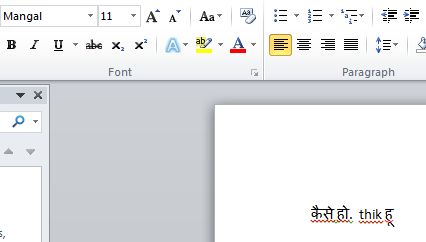
While pasting I didn’t set it to mangal font, it was in arial font settings. But after pasting the hindi text from google translator, It automatically set the font to mangal in my ms Word.
Please, share your issues in detail step by step for better diagnosis. Here is the screenshot of my example.


HI..
I downloaded e kalapai software and tamil.ttf format and i copied it on C:windows/Fonts folder and i cant find font directory in control panel( I'm using Windows XP) if once I activated E kalapai tamil fonts appear in web pages but it nao appearing in ms.word
pls help me in this regard…
Harish.
Hi Harish,
Recheck gaain if you can see that tamil font in fonts folder or not. (C:\Windows\fonts\)
If you can see it there, then open MS word first I am using MS word 2007 and then look by that name or name may be misleading.
If you can't find that font name check tamil language font (i mean it will be written in tamil itself), if so use that.
Let me know if it helps you
Thanks Vibhor. Will keep sharing such things on regular basis.
hi sir,
that was really great …. thank u so much……….i really appriciate your work.
Hi Sanjay,
Answer to your question has been posted as a separate blog.
Here is the link: http://aliencoders.com/content/solved-problem-viewing-hindi-font-websites
I'm a win 7 user, I need to view a web page that asks to install "kruti dev" font (hindi), I downloaded n installed it but still that page doesn't show the original content, tried various methods but still helpless, would you please help..
Gr8 way….very simple way…thanks
Hi Anonymous,
You need to do any of these things:
Hope this would help
Regards,
Sanjeev
im windows xp user
through i followed ur steps , hindi texts go boxes when pasted to word
hi all please help to how to use mangal font in my computer using through ms office.
Hi Jai,
Did you try the given steps? What problem exactly you are facing while doing so?
If you can explain mroe, may be we can help you.
how to use hindi font(mangal) in ms word..
Thank you so much.. Helped me a lot…
I got the devnagari fonts in my fonts folder. but in MS word when i type AKHI its giving me ???… actually it should be in AKHI in marathi font. i have all Marathi fonts in my FONTS folder.. i think, this is something to do with the keys?
Hi Sanjeevani,
As far as I know, you need to do some setting in your system apart form putting fonts in correct folder.
1. Did you do all system settings?
2. Did you install any Marathi fonts? as devnagri is not for marathi letter
Please go through my previous comments, you may find useful and may solve your issues. If not then let me know in detail like what you tried and what you got, what you expected etc. We will be happy to help you.
Regards,
Sanjeev
I tried the system settings you have mentioned like going to right most bottom corner change it to Marathi. It's showing Marathi now. Then i installed 4 marathi fonts with .ttf extension like Mangal, Utsah, aparajita, kiran, Akshar. For all fonts i am getting teh same results, If i press key P, it shows me ?. It should have been ?. so for every key, the corresponding Marathi letter is different. …. so how can i come to know what keys i need to press to get the desired Marathi word?
try to download this font and install it in font directory.
then open MS word and type kiran as font.
Hope this would work, because it worked at my system. I typed paha and it showed ??? correctly.
Kiran does work to some extent… thanks… but still, it does not give the correct translation of the keysike YENAR is ynar… apparantly i am not able to cntrl+V marathi word here.. in my earlier message i could copy-paste.. today i cant… ay, this was of much help and better as compared to earlier solution.. . thanks for our prompt and helpful replies… pls see if you can completely solve my problem.. đź�‰
thnaxxxxxxxxx
i am using display properties to convert hindi to engish using display tag in jsp i am generating pdf but headter data in hindi is not displaying can any one hepl me plaes
How to use mangal font in word in windows 8?
hindi text copy from google translator and past in MS WORD 2007 (XP) but in encrypted font
please help us so that we can type in translator and past save hindi as it is
THANKS RESOLVED PROBLEM
Thanks Madhaw for the confirmation. Keep learning and sharing
Hi ?Madhaw, can you send the screenshot of the problem which you are facing?
Because, I am not able to simulate the same error with the suggested settings given in this article.
Steps what I did:
Please, share your issues in detail step by step for better diagnosis. Here is the screenshot of my example.
Visitor Rating: 5 Stars
I think the admin of this website is ?n fact working hard for his w?b site, fo? the reason that he?e every material i? quality base? materi?l.
This information is priceless. Where can I find out more?
I waas suggestsd this blog by mmy cousin. I am not sure
whethsr this post is written by him as no one else know such detailed about myy problem.
You are incredible! Thanks!
Visitor Rating: 5 Stars
Visitor Rating: 5 Stars
Visitor Rating: 5 Stars
Visitor Rating: 4 Stars
Visitor Rating: 5 Stars
Visitor Rating: 5 Stars
Visitor Rating: 1 Stars
Visitor Rating: 5 Stars
Visitor Rating: 5 Stars
Visitor Rating: 5 Stars