You don’t need to remember every password! Why I need a good password management tool In the digital age, managing numerous complex passwords securely is […]
Category: software
Comparing Python PDF Generation Options
At at least one point in your programming career, you’ll be asked to generate a PDF. Maybe receipts are legally required to be in PDF […]

Why it’s Important to Get Help From an IT Consulting Company to Recover Data
What does data recovery mean and why should you require an IT firm? A reliable company builds over time through a well-organized data system, updated […]

How to check the readability of MS Word and Outlook using Flesch Reading Ease tool
There is the general SEO rule for readability of your article is that when writing for a general audience; you should aim for an 8th […]

WhatsApp Audio call feature is enabled for all Android users
In early March,2015 WhatsApp rolled out its newly added feature of audio call to only handful of Android users with some time-framed window to invite […]

Who has read your message-new feature in WhatsApp
I really like and use frequently WhatsApp. All features are nice except video compression quality, Right? Well, this new feature in WhatsApp looks good but it […]
Which Adobe Product is good for image,logo,magazine -simple comparison
Many of us are aware of Image manipulation application like Adobe Photshop, GIMP etc. Now adobe has lots of useful products for each category. We have Adobe Photoshop, Adobe Illustrator, Adobe InDesign basically for Image,logo related stuffs.
Which one of these is good for what purpose. Here is the basic Difference chart which depicts the most common strengths and weakness of these three Adobe products.
- Adobe Photoshop is always good for Image manipulation
- Adobe Illustrator is very famous for logo designing
- Adobe InDesign is famous for magazine production
Upgrade to Firefox 6 – released on 16th August 2011
Little Introduction about Firefox with history
 Firefox 6 got released on 16th Aug 2011. I think it’s too early to release a newer version even when Firefox 4 and 5 are not in major use. But I feel the browser competition; especially with Google chrome’s frequent releases forced Mozilla to do so.
I am hard core user of Firefox browser and use lots of useful plug-ins for my day today activities over internet. According to W3schools around 42% internet users use Firefox and around 23% people use Internet Explorer. Another Major browser into the account is Google Chrome which is being used by almost 27% (increasing rapidly). Browser statistics from various agents clearly depicts that Mozilla is a one sided winner in this browser’s race now. Although Google Chrome is going to be a tough rival too! But who cares.
- When Mozilla launched Firefox v1.0 in November 2004 then there was hardly 2% of internet users were using it.
- Version 2.0 got released on October 2006. They did major enhancements and was being used by Linux users by default, apart from safari.
- It leads the browser war after releasing v3.0 in June 2008 and it was the most stable version of Firefox till now. I am still using Firefox v3.6.3 in one of my computer. It’s never gave trouble to me though.
Later they found few major security bug, crash issues and lack of look and feel layout. They did few minor fixes and released version 4.0 on March 2011. Although very few people were using it. May be they didn’t want to switch from 3 to 4 . Anyways it was big failure from Mozilla side and they launched version 5.0 just after 3 months with all updated bug fixes and it was just similar to IE9 and Google Chrome.
But Firefox v6.0 took even lesser time to come into existence. Less than 2 months…. What happened to you Mozilla? Don’t be insane. You are still user’s favorite. You don’t need to do lots of fancy experiments like IE or Chrome and you don’t have to release every new version just after few months. Stop it Now dude!. Version 6 looks cool and I wish it will be into existence for a year at least.
I personally appreciate Mozilla’s work for bringing up totally fast, elegant, more secured browser for us. Releases will go on , whenever system ,users or situation demands any changes. On 16th August Firefox v6.0 released and v7.0b1 has been started for newer release. It is usually with every software around the market. So welcome abode Firefox v6.0
Now chrome and IE users may switch to Firefox after using this version. There are many features of this version which really impressed me:
- It opens faster
- Takes less space than previous Firefox, so less CPU memory consumption
- Look and feel is similar to IE + Chrome combination which makes it better than those two browsers.
- Browsing tab comes above the address bar
- Bookmarking is now more easy and customized
- Quick Find can be enabled just by clicking / then type whatever the word you are looking for. It will spot at the first word simultaneously. (Ctrl+F open Find and / open quick find mode)
- Alert message is no longer dull, it’s just equivalent to jquery alert effect. I liked it personally
- Text Area box can be resized. If you need to write longer passage just resize it using mouse over the corner of text box.
- It highlights the domain name. (again matters for technical people. It’s not so useful for common users) So in a URL like httphttp://www.aliencoders.org/category/wordpress-category/techno-buzz/internet-related, http://www.aliencoders.org would be emphasized.
- Simplified reload /stop button (in Firefox 3.6.3 it was before address bar.)
- Home button is introduced like Google Chrome just after the address bar.
- Auto switch tab:If you are going to open a website which is already opened, it will redirect you to existing tab. This is really cool feature to have.
- Smooth Scrolling: Earlier it was creating problem if you would open more than 10 tabs but now its new feature lets you scroll through tabs easily to see them all and access the one you want quickly.
- New option tab have been added ”stay sync” which helps you to browse your bookmarked websites, stored password, visited websites from one system to another.
- Auto-fill Form : If you are going to write same value for any form field that you have already filled in some other form, will be suggested and will be auto filled for you
- No more Firefox crash when adobe flash, Microsoft silverlight or Apple’s quick gets crashed.
- Now you can view 3D games, videos usinf Firefox Brwoser!!! WebGL brings 3D graphics to Firefox.
- Supports more than 100 International languages.
Download links:
windows win32 en-US
Note: The beta version of Firefox 7 i.e. v7.0b1 released on 18th August. It will include some major visual appearance changes. Will be fully supporting HTML tags, 3D video rendering etc….

Reset any password in windows through windows key enterprise
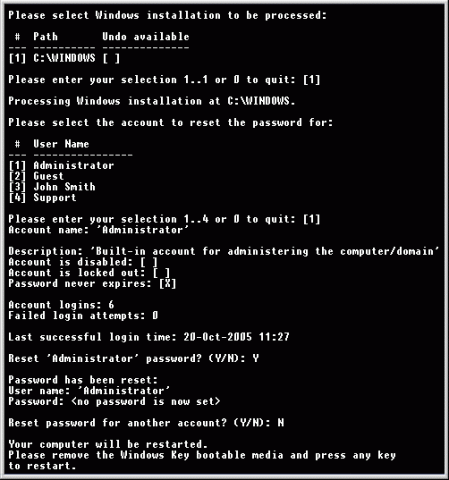 Have you ever imagined, what will happen, if you would forget or compromised your login password in Windows O.S.?
There may be a situation when your friends or relatives may play prank with you and will change administrator password. What you will do then?
In short, if you are using Windows Operating Systems and want to get rid of forgotten/lost password or want to reset almost all the existing password at one go. Then “Windows Key Enterprise Edition is for you only.”
Here are the listed features of this particular software:
Just burn it into CD and you are done!
Features
- 100% recovery rate
- All passwords are reset instantly
- Windows 7 New!, Vista, Vista SP1 supported
- All Windows Workstations supported
- All Windows Servers supported, including Server 2008 (Windows Key Professional and Enterprise editions only) New!
- Resets passwords with a bootable CD-ROM
- Resets passwords with a bootable USB drive (Windows Key Professional and Enterprise editions only)
- Burns password reset CD
- Resets local Administrator passwords
- Resets Domain Administrator passwords (Windows Key Enterprise edition only)
- Resets local policy settings
- Resets secure boot options: startup password or startup key disk
- Displays account properties
- Supports all Service Packs
- Supports RAID/SCSI/SATA drives Updated!
Its latest version is: 10.3.2585 whose archived size is: 5.12 MB (8.2 MB approx in iso format). It’s a shareware software. So you need to pay to use its full version. You can try demo though.
Other versions are Windows Key Professional and Windows Key only which has limited features.
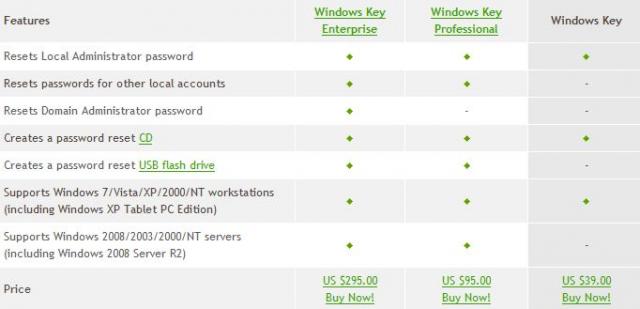
Image Source: http://www.lostpassword.com
Download its Torrent file form here
5 essential Multimedia players for windows users
 Whatever be your profession, it doesn’t matter how busy you are in your life. You will listen songs, watch movies for sure and computer plays an important role for such entertainment stuffs always.
You must be using any one of your favorite Multimedia player to play songs, watch movies, video tutorials, etc. So which player is your favorite one? Mine is all time favorite KMplayer.
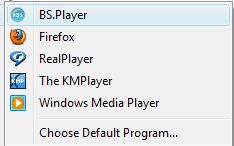
5 Multimedia players that I have are (Ranks may differ person to person):
1. KMPlayer
-
 First things its free and plays almost any video formats at its best. Takes very less space and runs audios/videos hassle free.
 - Keyboard shortcuts make it very easy and comfortable to use. Its very user friendly too.
- The KMPlayer is a versatile media player which can cover various types of container format such as VCD, DVD, AVI, MKV, Ogg Theora, OGM, 3GP, MPEG-1/2/4, WMV, RealMedia, and QuickTime among others.
- It handles a wide range of subtitles and allows you to capture audio, video, and screenshots in many ways.
- Click here to download. For more details about it, read our previous article on it.
2.  VLC Multimedia Player
- It is also open source and latest VLC player also plays almost everything. But its not so user friendly like KMPlayer. After using it for few days, you may be habituated for it too.
- VLC comes with nearly every codec built in, so no need to update for codecs.
- It plays damaged files too! Which means Missing or broken pieces won’t stop VLC to play undamaged part of it.
- Its available for all Operating Systems which makes it most popular all over the computer users.
- You can download VLC Player from here.
3.  Real Player
- a. If you use internet to watch videos, downloads audio/video files from youtube, apniisp etc then You might need Real Player too!
- b. Very few players supports .rmvb. It plays .flv, .mpeg, .avi and other various formats too
- c. Real player is also available in all O.S. flavors and its available for free and for premius use too (paid one)
- d. You can download videos, share through FB, youtube, twitter and can burn too!
- e. For more details and to download this player Visit here
4.  Windows Media Player
- a. Most computer users would have windows Operating system by default and it contains WMP already. So people get used of it. WMP 11 is really cool and has really all features that other media players have.
- b. A tree-style file directory makes it easy to find the music you want quickly, and a simple search box gets you where you want to go immediately.
- c. A five-star rating system lets you rate your music, then organize it by rating, so it's easy to group your favorite songs
- d. Download it for free from here
5.  BS Player/Winamp/Jukebox
- I have used winamp, jukebox and BS Player too. BS Player is the newest one and winamp is all time favorite for listening audio songs.
- Winamp is available for android too. Its skin, and playing features can attract anyone to have it in their system.
- Download Winamp from here
- BSPLayer is very light, so don’t take much CPU space, downloads and saves subtitles automatically. Plays high resolution video smoothly. HD Laptop users should have it .
- Download BSPlayer from here.