Top 5 Browsers of year 2010/2011(predicted)

Browser imageIn internet world, we can’t get any info without web browsers. Isn’t it? Whatever we are looking for over internet, browsers will only display it. Right now you are reading this blog through some browser for sure. You might have used few different browsers and have rated according to your taste (requirements, comfort, efficient, add-ons support etc) . In 2009, Internet Explore was at the top. Mozilla Firefox at second position and Google chrome was at third position.
But in 2010, situation got changed. According to my observation/opinion (after doing some search on google and doing some analysis using Google analytics), browsers rank would be:

  1. Mozilla FirefoxFirefox

    • Well it’s my one of the favorite browsers too! I like its simplicity, customizing options, navigation speed, tabbed browsing (now common to every browser), integrated search engine etc.
    • It has more than 10 thousand active add-ons  which you can customize and enhance your web browsing experience.
    • It supports HTML 5 audio and video too!
    • It’s there by default in Linux Distros.
    • Its features are more useful and powerful but designed in very simple way, which I like in it.
    • Its much much faster now in comparison to version 3. Try to have Firefox v3.6+ and feel the difference
    • Firefox 3.5+ has integrated private browsing too that you can easily enter and leave the private mode, browsing seamlessly in complete stealth mode. I have tried it few times.
    • Lots of documents are there to support its features, where you can get in detail about its features and add-ons
    • Firefox is a FREE to download and most of the  add–ons are also free.
  2. Google Chrome Google chrome

    • If Google has developed something then how we can deny its greatness, name is enough to describe it. It uses complex features but have made it simple (but not so simpler like Firefox, as I felt).
    • It has also lots of updated features that you may need and tools are there.
    • Private more is also there, similar to Firefox. So security is there of course!
    • I liked its drag and drop feature (anywhere you wish)
    • I liked its another  unique tab feature that simplifies your browsing is “related tabs”. When a new tab opened, the new tab is placed next to the originating or parent tab, rather than at the end of your list of tabs. (This is not there in Firefox yet)
    • It uses “sandboxing”, which makes every tab to run independently in the browser. This is great because if a certain application crashes, it will stay isolated to that tab only, it will not affect any other tabs. Different processes run separately in their own tab. This technique helps  computer to stop  one tab from taking control of all others. Once you close a tab, that process is completely terminated.
    • It uses online task manager feature too, which comes handy for internet geeks.
    • Its also very fast and I have both browsers in my system along with other 3 browsers.
  3. Internet Explorer Internet Explorer

    • Although IE 9 is there in market, but still I like IE 7. IE 8 was a big flop, it seems. As most of the computer market has been captured by Microsoft’s Operating System which has Internet Explorer by default. That’s why, it is mostly used for browsing.
    • Its startup time is bit faster but navigation time is little slower than Firefox and Chrome
    • Now newer version is having add-ons, tabbed feature is also there and integrated search window is present too.
    • Internet Explorer 7+ has enhanced security features. It provides security for the entire family and offers extensive parental controls to protect children against web predators and inappropriate content.
  4. Opera opera

    • Another browser that enticed me towards it.  Best thing is you can configure Opera to fit your needs and your style. Arrange panels, toolbars and buttons and choose from several unique skins and various widgets.
    • Its everywhere, talk about any O.S. and mobile phone; it will be there J . Its one of the only browsers that has interactive voice commands. You can navigate the web by talking to the browser, and Opera will even read text to you.
    • Visual tabs, mouse gesture, opera turbo (double your speed in lower connection), Speed dial are some really amazing features in Opera.
    • Its free and more than 150 million are using it. I didn’t like its downloading features as it starts downloading my torrent files too L (not a big issue though)
  5. Safari Safari

    • Earlier when we use to hear this word, we thought that oh its only for Mac users but now not anymore, anyone can use it. Its look and feel is too cool. After all its apple’s product J
    • I like its colored progress bar on the toolbar that shows how fast a page is loading and how close it is to being complete.
    • You may feel tough at first site but its very user friendly like our top rated browsers
    • Its very fast and popular. Still I need to explorer its various features
    • Its secured too!

Other popular browsers are: -> Avant (UI effect is really cool and its user friendly too), ->Maxthon(It uses Internet Explorer engine internally and features lots of add-ons too. Very popular in China as it’s a Chinese product J ) and ->Flock (social networking website, so its popular because of Facebook, twitter and youtube integration)


SPEED UP UR ACROBAT READER (ALMOST LIKE NOTEPAD)

. Steps to follow:
1. Go to the installation folder of acrobat reader (C:\program files\adobe\acrobat7.0\reader\.. whatever)

2. Move all the files and folders from the "plug_ins" directory to the "Optional" directory. (I repeat.. cut and paste the files NOT copy & paste).

Also make sure that acrobat reader is not open else it will lock the files and not allow you to move the files). Now your acrobat reader will load very fast and almost as good as notepad.. enjoy it…….

Review of top anti-virus software for PCs

Anti-virus, these days has turned out to be one of the inevitable requirements for the personal computer. With the novel ideas of hacking erupting every now and then, there is a need for a perfect information security system that has all your confidential information safeguarded. Reviews of the latest top brands of anti virus systems are as follows.

Kaspersky Anti-Virus 2011

An anti virus system that has all the required features of any good anti virus software, though advanced is simple in installation and usage. It is designed in such a way that it protects, prevents and removes all the malware that causes harm to the PC and robs you of your secret information.

The protection that the software provides is from all the traditional computer virus types in addition to having the capacity of detecting new threats. There is also an online download and installation facility that keeps you at ease. Its usage of iChecker and iSwift scanning technology helps in keeping your resources safe. The other features include a virtual keyboard, desktop security gadget which offers better access to your system security and gamer mode.

Norton Anti-Virus 2011

This brand of anti virus has always been on the forefront ever since anti virus software saw its light of day. It supports a number of browsers like Chrome and Opera, email clients like Outlook and IM clients like Yahoo and MSN messenger. This is also known for its simple-to-use characteristic and easy installation. It provides information security to the hilt so that the ones who know how to create viruses and spread it can never ever cause harm.

The most important feature of this software is the bootable recovery tool that helps in the fixing of a crashed PC. The advantage of Norton Anti-virus 2011 is that there is a Norton Safe Web for Facebook. This scans the videos posted by your friends for virus

Bit Defender Anti-Virus Pro 2011

The best aspect of this easily accessible anti virus software is its flexibility. It can work when controlled manually or automatically. The feature of the Bit Defender Anti-Virus Pro 2011 that is worth a mention is the inclusion of the Search Advisor that provides protection while surfing on the net using any browser.

Apart from providing all the features that a reputable anti virus software provides, it does all the optimization with the maximum speed. Therefore, it provides a complete information security from different types of virus. A specialty mode is also offered for the laptop which can automatically run even when the laptop is left unplugged.

ESET NOD 32 Anti- Virus 4

The latest version from the house of ESET NOD 32 Anti-Virus has a number of features that were missing in the previous version. From keeping your PC safe from Trojans, spyware and viruses this high speed anti-virus version knows how to prevent computer viruses at all times.

It is provided with a smart scanner that detects even the hidden threats that can harm your system. Along with the email scanner it also has the necessary system tools that help in the cleaning of the infected system effectively with the help of Integrated SysInspector and SysRescue.

This article was submitted by one of our guest author: Sweta Menon

The best multimedia player: KMPlayer (freeware)

The KMPlayer is a versatile media player which can cover various types of container format such as VCD, DVD, AVI, MKV, Ogg Theora, OGM, 3GP, MPEG-1/2/4, WMV, RealMedia, and QuickTime among others. It handles a wide range of subtitles and allows you to capture audio, video, and screenshots in many ways.

Hide and Prevent Access to drives using diskpart utility

dispart utilityAlthough there are many ways to hide your drive and to prevent access to your drives. Either by setting regedit value for NoDrives and  NoViewOnDrive  or by using some system settings.

But I found one built-in tool “DISKPART”.

1. Go to Start > run > type "diskpart". A DOS window will appear with following description. DISKPART>

2. Then type "list volume" The result will look like: 

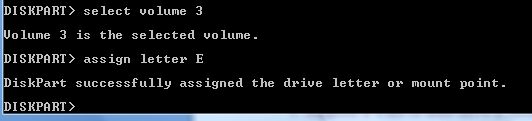
3. Suppose u want to hide drive E then type "select volume 3" Then a message will appear in same windows { Volume 3 is the selected volume}

4. Now type "remove letter E" Now a message will come { Diskpart Removed the Drive letter }
Sometime it requires the reboot the computer  or logoff and login will work. Diskpart will remove the letter. Now try to open that date even using at address bar. It will not open. Windows XP is not having capability to identify the unknown volume. Reassingning drive letters using dispartYour Data is safe now from all unauthorized users. Don’t worry it will not tamper any of your data.

To access the content of hidden Drive repeat the process mentioned above. But in 4th step replace “remove" to "assign" i.e. type "assign letter E" . Note: It will not work for drive which is having system files, boot files etc like C drive in most cases. And it works in Vista , XP too. Didn’t test in win 7 but I think it will work there also.

Ultrasurf: to bypass blocked sites

Blocked site made frustrationIn most of the colleges or IT industries, you will observe that many sites will be blocked or even you will not be able to hat through online messenger. People use to open orkut, facebook, youtube but they will not be able to open it due to proxy enabled firewall in hat organization. I also got annoyed with such things and one day go to know, how to surpass all these barriers.

Why to use or test any proxy site to open such sites when there is a small application for it which does its job at its best. Yes! ultrasurf is there to solve your problem. (You can smile :)). More than 70% organizations usually ban  Social networking sites. Few companies allow with some term and conditions. Sometimes its good to not having access to such sites, else it may harm work culture and productivity. But it may be used for refreshment and kind of updates about friends, families, about other companies, sites etc.

For example: I wish to see updated news of few companies or sensex through twitter, then how i will be able to see it if they will block twitter at office?Why social sites are banned?

  • Its daily traffic is over 8000 GB and daily hits would be near around 800 million
  • Its free to use
  • Latest version is 9.97
  • Its so light, size is 500 Kb approx.
  • You just need to download it and double click on it whenever you wish to use automatic enabled proxy server to bypass your organization's proxies.
  • It requires IE only and works on almost any O.S. version of windows (like XP,Vista, win 7)

Add-on for Firefox

Firefox users need to download the firefox add-on besides the above software: Download Firefox add-on(.zip) (md5: 6ce151b1b0ef8430031a8e9a69f38806)

Installation:

Unzip it, drag the wjbutton_en.xpi file to firefox window. Click the "Install" button in the pop-up window to install it. The UltraSurf icon will show at the right-bottom of the firefox window. Close all firefox windows and re-open firefox. A grey-out UltraSurf icon means UltraSurf is disabled. A bright colorful icon means UltraSurf is enabled. Click it to enable/disable it. To change the settings or uninstall it, go to "tools/add-ons" of firefox. Start UltraSurf program and enable the firefox add-on, your internet activities thru Firefox will be under UltraSurf's protection.

Automatic upgrade

When UltraSurf software releases a new version, you will see a pop-up window telling you to download the latest version when you open the UltraSurf home page. I hope you will like it. Comment is needed! Happy Alien Blogging You tube access deniedUltrasurf v9.97

Ava Find: An alternate to windows search

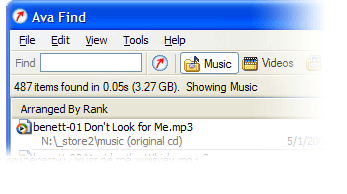
Ava FindHi friends, Have you ever noticed that searching any file on a clattered system is how tough through windows search mechanism? I feel irritated sometimes when windows search is on and on and after few minutes , saying that no match found. I have left even thinking that Windows is having such feature and i started using Ava Find 1.5. Its in my favorite application list now. Its fast searching features really amazed me. Some of its features are listed below:

  • Search without delay. (very very fast if its cached)
  • Searches accurately and will show you all the details you might want.
  • Scout Bot finds newly downloaded files automatically. You don’t even have to enter a search or have to refresh it again.
  • Browse Music/Videos/Programs etc folder at single click or you can select select all also.
  • Find documents you just saved: Suppose you forgot, where you have saved it. Not an issue at all if you have Ava Find. 🙂
  • Suppose you don’t the exact file name or folder name, no worries Ava Find does Advanced Name Search i.e. Match file names using * and ? wildcards.
  • Same right-click menu options are there for each file as it is in Windows Explorer.
  • Folders are shown with their sizes next to them. So, you need not to wait for windows properties to show their size.

Fair enough to use it freely or buy it. Ifs its Ava Find Pro then you can do network drive search also and if its free then you might not be able to do all right click stuffs too. You can use free version but after 30 days, it will disable few of the features that you may have in Pro. Its latest version is still 1.5 only Its of less than one MB in size. It costs 40 US Dollar approx. (can use trial version too.) You can download it from here Don’t forget to comment if you like this application.

Tool to get information about site: whois and whosip (for windows)

Hi friends, you might be using some whosip informationonline site to know the details about any ip address or website like ip-adress.com or whois.domaintools.com In Linux or Unix based O.S there is a utility call whois , if you are familiar with whois and wish to do the same operation in windows then you might find whois and whosip tools useful.

How to get work done on Windows:
Step 1: Download whois or whosip (or both ,depending upon your interest). These software will be in zip format.

Step 2:

  1. Make a folder anywhere in your PC, like C:/whois/
  2. go to that folder i.e. whois (here in example)
  3. extract any one of these or both (again on your interest)

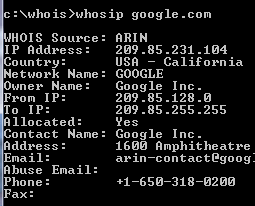
Step 3: open run command type cmd then go to c:/whois location and type whois domainname hostname(optional) or whosip domainname hostname (for summary) or whosip -r domainname (for detailed information)

Here domain name can be either website name or its IP address. Ex: whois google.com whosip google.com whosip -r google.com Note: the information that you will see through whois and whosip may differ What I observed from the output is whois <domain name> will give you the information about domain name whereas whosip <domain name> would give you the information about registrar where that domain name got registered etc. So, if you wish to know something about hostname use whois or if you wish to know where that domain name got registered and all then use whosip.


An alternative to winrar : 7-zip

compression softwareIn our day today life, we use at least one of the rar application  for sure. It may be used to compress your codes, files, movies, songs whatever it is.
Winrar seems bit popular in this area but it now freeware or open source application. And I get annoyed when I double click on any .rar files it open winrar application and says buy it or use trial version. Then I was trying to find better compression application than winrar and guess I got success in that.

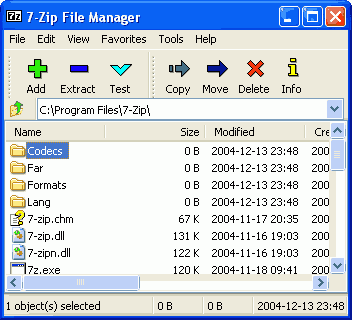
7-zip is the alternative to winrar or any compression application. It supports nearly all feasible format for your system. Its an open source software, so you can download it freely from  here (32 bit) and from here for 64 bit pc

  • It is of 1 MB size and supports near around 70 languages.
  • Its latest version is 9.13 in beta relaease and 4.65 under stable release
  • It supports under any windows platform like XP/Vista/ME/2000, hopefully it would work on 7 also
  • 7-Zip compresses to zip format 2-10% better than most of other zip compatible programs.
  • 7-Zip compresses to 7z format 30-70% better than to zip format

Compression ratio depends upon what you are  going to compress. Like if you are going to compress any .exe file then it will not compress much because its already compressed. Use it and revert back your feedback here.

Pidgin: Universal Chat software v2.6.6

Pidgin: Universal Chat SoftwareEvery time when you wish to chat with your friends and foes, you have to open separate chat software for that like msn, skype, yahoo, gtalk and so on. Why not to use only one software for all these stuffs.
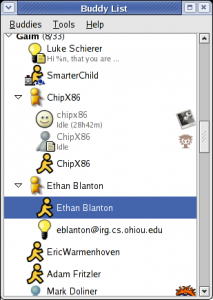
Then I saw one site called meebo.com (its really a cool one, web based chat site). It allows you to login with your yahoo or gmail or skype etc ids. But if you are looking for a software that will provide you such facilities , then pidgin is there.

Pidgin (formerly named Gaim) is a multi-platform instant messaging client, based on a library named libpurple.

Libpurple has support for many commonly used instant messaging protocols, allowing the user to log into various different services from one application.  libpurple is intended to be the core of an IM program. When using libpurple, you'll basically be writing a UI for this core chunk of code. Pidgin is a GTK+ frontend to libpurple, and Adium (like pidgin but for Mac OS X) is a Cocoa frontend. Whatever be your chat program, whatever language you use, if you are going to connect with network, user dialogue box, user authentication in fancy manner; you have to use libpurple. It is being used by pidgin, meebo, EQO(for mobile users), Adium etc.


It’s an open source software and written in C and its plugins are written in C#, Python, Perl etc. Its file Size is 14.10 MB and latest Version is 2.6.6 Pidgin supports following chat networks:  AIM, ICQ, Google Talk, Jabber/XMPP, MSN Messenger, Yahoo!, Bonjour, Gadu-Gadu, IRC, Novell GroupWise Messenger, QQ, Lotus Sametime, SILC, SIMPLE, MXit, MySpaceIM, and Zephyr. It can support many more with plugins.

It  Supports many international and lots of regional languages too like Kannada, Gujarati  ,  Telugu, Punjabi, Marathi and Hindi (of course).  It supports almost all popular languages over the world. Whatever be your OS you can use it (Windows and Linux is common).

It became very popular  after 2007 and today millions of people use it worldwide. It supports all famous chat networks like

Shows all chat list

  • Bonjour
  • Gadu-Gadu
  • Google Talk
  • Groupwise
  • ICQ
  • IRC
  • MSN
  • MXit
  • MySpaceIM
  • QQ
  • SILC
  • SIMPLE
  • Sametime
  • XMPP
  • Yahoo!
  • AIM
  • Zephyr
  • Now Facebook chat also being supported through XMPP network.

But I found only one demerit in it, that is why I use it rarely. If you are logged in with your yahoo account , next time if you will login with your gmail account, it will show you your yahoo and gmail friend list together (imagine in case of yahoo, gmail, msn, aol: how long list you will be having). One more thing is that, if you are using it alone then its ok. If your friends also gets logged in through the same software then he/she will be able to see your whole friend list also (Isn’t it bad?). I hope in next version they will do something to this issue.