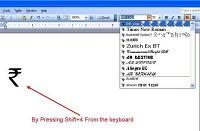
Windows Custom font[/caption]
Most of the internet or computer users use Microsoft Office word for document purpose (Those who use Microsoft Operating Systems). This blog will show you how to use different text fonts other than English text.
For example: How to use Hindi , Punjabi, Bengali, Tamil, Malayalam fonts in MS word.
Follow these steps to install your desired fonts:
- Download the fonts that you wish to use in MS word. Foe ex: Hindi, Marathi, Bengali, Punjabi, Tamil, Malayalam etc. It should have .tff extension. Ex: hindi_font.tff
- Save this font anywhere in your system and then copy it to fonts directory. You can reach to Fonts directory in 2 ways
- Open C:/Windows/Fonts (will work in Any Windows O.S. like XP, Vista, Win7 etc)
- Got to Control panel there you will see Fonts Directory in Windows XP and Control Panel\Appearance and Personalization\Fonts for Windows Vista users
- Open that Fonts Directory and just paste the fonts. You are Done!
- Now open MS word and you will see that font name or font style in your font field.
I have tested it on Windows XP and Windows Vista only. If you find any issues in installing fonts into your system or facing problem in using it. Please let us know we may solve your issues.
You can download few common fonts that may be useful for you from the attached links shown below:
- Bangla Font. Search as adarshbangla in MS Word
- Hindi Font. Search as Kruti Dev 010 in MS Word
- Marathi Font. Search as kiran in MS Word
- Tamil Font. Search as Bamini Plain in MS Word
- Punjabi Font. Search as Gurbaniakhar in MS Word
- Malayalam Font. Search as Jwala in MS Word
- mangal font. Search as mangal (devnagari)