Simple steps to verify email id existence

Email id exists or notOur team always face email existence problem when they try to:

  • Verify the  registered account holder’s email id or
  • While sending mail to anonymous user who posted comment with some fake email id or
  • To check, if that email address is still valid (ex: 2 years back emailed was valid but not now)

Well it’s not possible to know 100% whether given e-mail address exists in real or not but it will be handy in majority of the cases. You can do it manually also if you are in Linux box using host or nslookup and telnet command. I would prefer host command for this purpose.

How it works:

  • Check if domain name exists or not using ping command
  • If domain name exists then check if it has any mail handlers i.e. mx records in DNS. Use host or nslookup command for it
  • If mx record exists for that domain name use that mail handler using telnet command
  • Use telnet and smtp command to verify user email id. If you get 250/Ok for user email id. You may assume that it exists.

Here many things came into the picture while testing various mail ids from various mail handlers. I will discuss it under “possible ways of failures”

Steps to check the email existence manually

1.       Get the mail id to verify (we can get domain-name from this format to use it in our next step userid@domain-name . For ex:admin@aliencoders.org)

2.       Either use nslookup command or host command to get mail server address (Lists of mx records from DNS)

a.       Using nslookup:
nslookup –type=mx domain-name

b.      Using host :
host –t mx domain-name

3.       Get the least digital value’s mx record to use it in telnet

a.       telnet mxrecord port-no i.e. telnet mail.aliencoders.org 25

b.      Once connected use SMTP commands to know if email id exists or not. It will return 250 as a return code with OK or Accepted. Depending upon mail server configuration and Linux flavors too.

Let’s see it practically with all combination of commands, inputs and outputs 😀

Output from nslookup (it will show many more things which I have not shown here)

$ nslookup -type=mx gmail.com
Non-authoritative answer:
gmail.com       mail exchanger = 20 alt2.gmail-smtp-in.l.google.com.
gmail.com       mail exchanger = 30 alt3.gmail-smtp-in.l.google.com.
gmail.com       mail exchanger = 40 alt4.gmail-smtp-in.l.google.com.
gmail.com       mail exchanger = 5 gmail-smtp-in-v4v6.l.google.com.
gmail.com       mail exchanger = 10 alt1.gmail-smtp-in.l.google.com.

Output from host command ( I prefer this over nslookup )

$ host -t mx gmail.com
gmail.com mail is handled by 30 alt3.gmail-smtp-in.l.google.com.
gmail.com mail is handled by 40 alt4.gmail-smtp-in.l.google.com.
gmail.com mail is handled by 5 gmail-smtp-in-v4v6.l.google.com.
gmail.com mail is handled by 10 alt1.gmail-smtp-in.l.google.com.
gmail.com mail is handled by 20 alt2.gmail-smtp-in.l.google.com.

Get the value which has lowest ranked digit. In this case it is 5 so take gmail-smtp-in-v4v6.l.google.com for our purpose
Either use host or nslookup for the first stage.

Telnet outputs:

Step 1

telnet gmail-smtp-in-v4v6.l.google.com 25
Trying 173.194.77.27…
Connected to gmail-smtp-in-v4v6.l.google.com.
Escape character is '^]'.
220 mx.google.com ESMTP hk4si16050652obc.168

Step 2 (type helo, if it didn’t work try helo hi, if it didn’t work too try ehlo then )

helo
250 mx.google.com at your service

Step 3 (type any valid email id. Invalid email id will say ok but after rcpt to it will throw an error and don’t skip this step)

mail from: <sanjeev@aliencoders.org>
250 2.1.0 OK hk4si16050652obc.168

Step 4 (You need to provide email which needs to be verified.  Ok means it may exists. Not 1005 guaranteed on existence but we can infer that this email id may work)

rcpt to: <jassics@gmail.com>
250 2.1.5 OK hk4si16050652obc.168

Telnet outputs on failure (Various reasons are there)

1.       Network is unreachable. (sometimes it is reachable form one host but not from others)

telnet gmail-smtp-in-v4v6.l.google.com 25
Trying 74.125.127.26…

telnet: connect to address 74.125.127.26: Connection timed out
Trying 2001:4860:8005::1b…

telnet: connect to address 2001:4860:8005::1b: Network is unreachable

telnet: Unable to connect to remote host: Network is unreachable

2.       Error at mail from:<mail-id> :

  • Don’t forget to use <> while typing email id. jassics@gmail.com is wrong. jassics@gmail.com is correct
  • Never use space before or  after mail id
  • Don’t use single quote or double quote while typing email id

3.       If email id exists but it doesn’t show up 250/ok then below reasons may justify this:

  • Server response delayed
  • Email address black listed
  • Email does not exist  (even if it existed 2 years back )

Steps to check email existence using Perl

  1. Get Mail::CheckUser module from CPAN
  2. Install it either manually or using cpan command
  3. Write simple script using this module and check the output

Good thing with this script is:

  • You don’t need to use any command like host, nslookup telnet and don’t need to remember all those SMTP commands.
  • Just pass the email id rest thing it will do.
  • Internally it checks:
  • It checks the syntax of an email address.   
  • It checks if there any MX records or A records for the domain part of the email address.
  • It tries to connect to an email server directly via SMTP to check if mailbox is valid. It can detect bad mailboxes in many cases.

Here is the fully working Perl script

Why still this trick doesn’t assure 100% proof that email id exists or not?

There can be many reasons for not trusting on this script or the above said manual steps. Best way is to send an email to the given email id. If it bounced back, means it doesn’t exist or can’t be delivered. (I chat with a person in gtalk but can’t send an email to that person. Strange isn’t it).

  • There may be server delay
  • Email id may be black listed
  • It may say it exists if it has to bypass proxies
  • Final output will depend upon server settings which may be using  an algorithm to stop spammer like stuffs
  • For instance SMTP defines the VRFY command for this purpose but gmail doesn’t support it.
  • Never send bulk emails, your mail id will be flagged as a spammers by many hosting companies
  • You may not get proper result because network is unreachable or down by that time

Note: This was just for educational purpose and found helpful for web masters or admins. Don’t use it as spam stuffs, you IP address and your mail id will be blacklisted. Like admin@aliencoders.org has been blacklisted from various mail servers.

How to transfer the domain name easily

How to tranfer domain nameHow to transfer the domain from one hosting provider or registrar to other

It’s always important to host your website to a reliable web hosting service provider. But sometimes due to lack of knowledge or much experience on these things we register our domain and signup for the hosting plans. Although all renowned hosting providers are doing great job but I preferably choose either blueshost.com or godaddy.com

I had few issues with godaddy.com, that’s why I postponed the plan to host my domain there and finally chose bluehost.com as I was using it from last 2 years without any hassle and Customer Support Service is awesome. I liked online chatting also 😉

These simple steps to transfer your domain from one hosting service provider to another or from one registrar to another will work for any such situation for any service provider. (Few things may change though)

Let’s start step by step to transfer domain from one registrar or one hosting provider to another
Step 1
Make sure you have access to your present account and the domain name that you wish to transfer is unlocked. If not then either go to your admin panel (cpanel usually) and under domain section you will see domain manager icon/link. Click on that and then you will see unlock domain option.

If you are not able to figure out how to unlock the domain name and how to see/change EPP(Auth) code which you would be the basic step to transfer your domain name successfully. Contact the current registrar or the hosting provider to unlock the domain and to provide EPP or authorization code.

Step 2
I assume you are done with Step 1 and your domain is unlocked and you have EPP code with you. Now make sure your whois database information is upto date and turn off the privacy domain if it’s turn on else leave it.
This step is required because your new registrar will send the mail to the email id that appears in whois database for that domain name.

Step 3
Now either you will register the domain and host too with the same client or registrar may be different from the hosting provider. But I would suggest try to host your domain from whom you registered. For example: Blue Host Inc is a hosting provider and you can register the domain name from this company too. Its registrar is FastDomain Inc. So, choose hosting provider carefully and do the needful.

This step is required to make transferring easier. Once you register and have account with a new hosting provider and your account is verified there. If you are new to that hosting provider it may take 48 hours to get verified or it may take just few hours (for me it took 6 hours approx.)

Step 4
It is highly recommended that pointing the name servers to your new hosting provider before initiating a registration transfer because transfers can take 3-10 days to complete. During this time the name servers cannot be modified. If you point the name servers to it before starting a transfer, your domain will be pointed to it (bulehost DNS in my case) during the duration of the transfer and your site will show what is on Bluehost's servers.

Go to old account (I mean the existing account i.e. old one) and point the name server to point to your newly registered web hosting DNS. In my case it was bluehost, so
I updated Bluehost nameservers as:

  • ns1.bluehost.com (Primary Server Hostname)
  • ns2.bluehost.com (Secondary Server Hostname)
Once you have made this change, allow 24-48 hours for the changes to update across DNS resolvers worldwide, and your domain will be pointed to Bluehost’s name servers.

Step 5
Now you can login to your newly registered account’s dashboard. (For me it was bluehost cPanel) and click on the domain manager under the domain section.
Then Select the domain that you wish to transfer. (One can have as many domains linked with one account as possible). Then you will fugure out that there will be a link/icon to “Tranfer this domain to your account” (for me it showed aliencoders.org)

Read the information carefully and provide the EPP code that you got from your older account and click on continue.

Step 6
Now you will get email on the same email id that you have updated in your old account which will contain the verification code without which you will not be able to proceed.
So, if you don’t have access to the provided email address, contact the current registrar to update the WHOIS contact information. It will take hardly few minutes if everything is fine). I got within 10 minutes.
 
Step 7
I assume you got the confirmation code that I stated at step 6 and now use that code as the second verification code required by new registrar and click on continue button.
And update nameservers if required, and other option like renewal scheme, contact information, privacy option. Then agree to all terms and click on Add transfer/start transfer process.

Now your old registrar will contact you and will mail you to confirm the transfer. It would take 2-3 days to get mail from old registrar, so be patient. Then respond accordingly.
Note: These are a few points to keep in mind while transferring the domain name registration.

  • The transfer process takes 3-10 days once initiated. Ensure the domain name will not expire in this time frame to avoid potential problems with the transfer. If recently renewed, make sure it is at least 30 days after the renewal date to ensure you do not lose the additional time added with the current registrar.
  • When transferring a domain to bluehost, ICANN requires an additional year is added to the domain's current expiration date. The cost for this is $11.95 per domain. If your account has an available "Free Domain" credit, it will automatically be applied during the checkout process.
  • ICANN policy does not allow a domain name to be transferred from a registrar within 60 days of the date or registration or renewal.
  • If you would like to start hosting the domain with bluehost within 24-48 hours rather than waiting to complete registry transfer, contact the current registrar before starting the transfer and modify the DNS to ns1.bluehost.com and ns2.bluehost.com. Once the transfer is initiated, no change to the DNS can be made until the transfer is either canceled or has completed.  (I did so and it worked perfectly for me)
Source: Blue Host Inc (Last four points mainly) and this article is based on bluehost process because I transferred here only.
 
 Image source:
http://domainnames.nikenya.com

How to hide a file behind a jpeg file

hide folder optionSometimes it may happen that you have to share your computer with your family member. As it happens with me. I have a younger brother and I like to tease him so what I do is whenever he install any new games into my computer I hide the entire folder with the shortcut. When he tries to find it out he got nothing. So let’s work on it. Now I am going to share this tricks with you guys
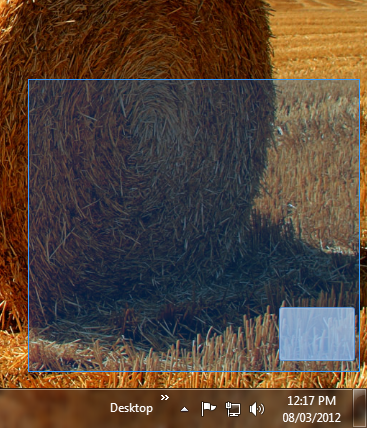
By this trick, first we create a hidden folder and after that we will hide our important files behind the .jpeg image file. This second trick is very helpful for those people who want to hide some files from their friends; even I did the same thing during my college days. Usually I hide my entire assignment file behind a jpeg image (every time I use an image of donkey).

How to hide a folder?

  1. Right click on the empty area and create a new folder.
  2. Rename the folder. while rename hold the Alt key and press 0160 from your number keypad.(make sure that your number lock is on)
  3. Now press a space bar, Usually it is required to give a name to a folder as you can’t keep it blank, but when you press Alt+ 0160 it will take a ASCII (American Standard Code for Information Interchange) value for the space as new name for the folder. It may possible that it read a pixel value of a blank space from the screen as a new name of a folder.
  4. When you will done with step 3 you will find that your folder got hidden now but still folder icon it visible. Refer the image above shown 🙂
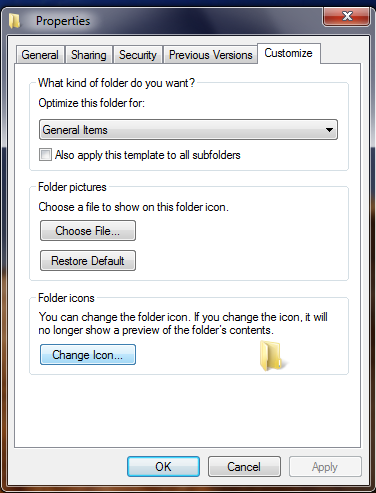
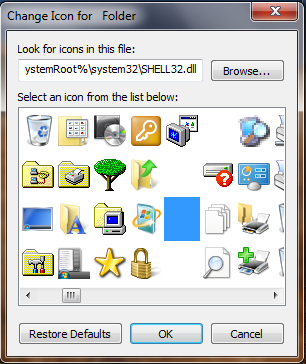
  5. Now right click on the folder go to properties then select customize tab and click on change folder icon. In the change icon wizard you find several icon among them there are some empty spaces, so select that empty space as an icon and click on apply.

    folder propertiesicon option
     

  6. We are done with all the steps. But you have to remember the place on the desktop where you have created a folder. Now place your folder in the corner of the screen. When u selects the area you will find the folder like this.
    hidden folder

How to hide a folder behind a jpg file?

  1. Create a folder in a drive for easy access, e.g. C: (because we have to use this path on a command prompt so mask this path as simple as you can).
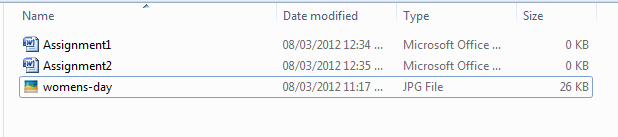
  2. Put all the files you want to hide in there, as well as a JPEG image that you would like to hide the files in.

item list option

  1. Select all of the files you want to hide, and create a ZIP or RAR file with them using a program like WinRAR, WinZip, 7Zip, etc.(after archiving delete the file).

item lists

  1. Now you have your entire file in the archive folder.
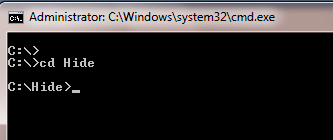
  2. Go to start then go to run and type cmd and press enter.
  3. Now go to that location where you have your archive folder with the help of cd command.

cmd option

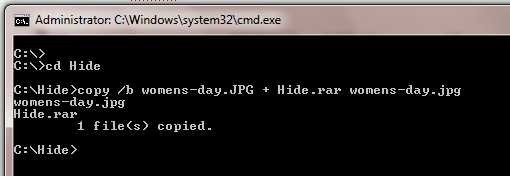
  1. Type the following: copy /b womens-day.JPG + Hide.rar  womens-day.jpg (note : if you have a different image and archive name the you should replace the highlighted words with your specification ).
  2. Once you done with the step 7 you should receive a message 1 file copied on your command prompt. 
    cmd image


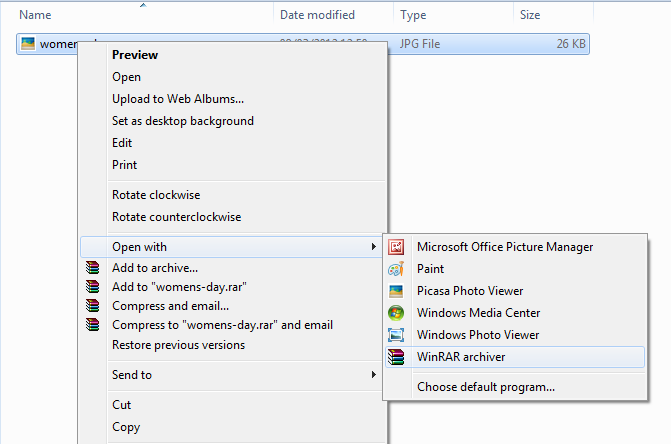
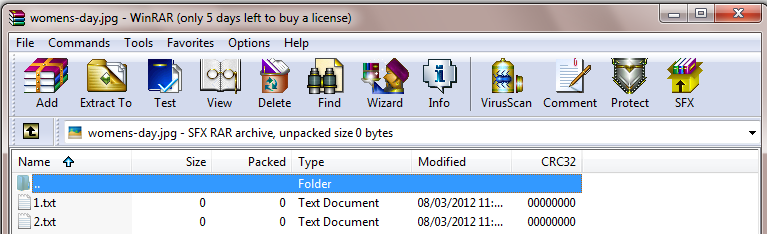
  1. When you double-click on the file jpg image will get open and when u want to open your hidden file simply right click on the file and open a file into WinRAR (into that application which u have selected earlier for archiving ).

    open with options

winrar options


Great demise to IT World: Steve Jobs is no more

Steve Jobs is deadHave you ever been thrown out from your home or office or class? There is a person who was thrown out from his own company, once who was the CEO and founder of that company? If it would happen with us we would lose the control and would give up.

But this person started another company and that also reached at zenith within no time. And previous company was losing its charm. He was called back as CEO and again that company because the starrer in IT field whether it’s O.S. or animation or mobile phones or tablets.

Yes , you guessed it right (I know I am exaggerating: P), he is none other than Steve Jobs who just died today (5th October, 2011 morning IST)  at the age of 56 and caused a great loss to the world specially to our IT domain. He was the main person behind Mac, iPhone, iPod, iPad and many more things.

Those who don’t know who was Steve Jobs (what seriously you don’t know!  That’s bad), Steve Jobs  was an American computer entrepreneur ,inventor, mentor, graphics evangelist. He is the person behind all innovative work behind Apple (non-edible). He was one of the founding member and CEO of Apple Inc. He was the CEO of Pixar Animation studios until its acquisition by Walt Disney Company. But, after that he became the member of the board of the directors of Disney in 2006. He was known for his movie Toy Story too!. He was the executive producer of that movie.

Steven Paul Jobs (Yes it’s him only, Steve Jobs) was born on 24th February 1955 and died on 5th October, 2011. He founded Apple with his some team mates in 1970s and served as CEO of that company till 1986 when he resigned from that company due to some disputes with the board of the directors members. But in his absence the company’s stock went down to 68 percent, pushing Apple to the stage of bankruptcy.

Later he found NeXT computers which was used by Tim burners lee and became the first server of www. Later in 1996 Apple bought NeXT and again he became the CEO of Apple, what an entry Steve; Well Done!!!

In 1986 only he acquired the computer graphics division of Lucas Film ltd and names as Pixar Animation Studios.  Wall-e, Toy story series, Finding the Nemo, The incredible, Cars series, Ratatouille are few hit movies under Pixar banner.

Jobs is listed as either primary inventor or co-inventor in 338 US patents or patent applications related to a range of technologies from actual computer and portable devices to user interfaces ,speakers, keyboards, power adapters etc. Thanks Steve for showing us mouse, graphics user Interface multimedia etc , otherwise we would be dangling with command interface till date . 😉

I must say products under Apple’s banner (or rather say under your supervision) are too good to applaud. Be its iPhone, iPod or iPad you became the trendsetter time to time. I saw all movies under your Pixar banner. Thanks to you for finding Pixar, else I would never see animated movies with much interest. Wall-e was damn technical Steve and Toy Story was out of my imagination (I am not comparing, I can’t at all) 😀

Honors listed in Wikipedia:

  • He was awarded the National Medal of Technology by President Ronald Reagan in 1984 with Steve Wozniak (among the first people to ever receive the honor), and a Jefferson Award for Public Service in the category "Greatest Public Service by an Individual 35 Years or Under" (a.k.a. the Samuel S. Beard Award) in 1987. 
  • On November 27, 2007, Jobs was named the most powerful person in business by Fortune Magazine.
  • On December 5, 2007, California Governor Arnold Schwarzenegger and First Lady Maria Shriver inducted Jobs into the California Hall of Fame, located at The California Museum for History, Women and the Arts.
  • In August 2009, Jobs was selected as the most admired entrepreneur among teenagers in a survey by Junior Achievement.
  • On November 5, 2009, Jobs was named the CEO of the decade by Fortune Magazine.
  •  In September 2011, Jobs was ranked No.17 on Forbes: The World's Most Powerful People.
  • In December 2010, the Financial Times named Jobs its person of the year for 2010, ending its essay by stating, "In his autobiography, John Sculley, the former PepsiCo executive who once ran Apple, said this of the ambitions of the man he had pushed out: 'Apple was supposed to become a wonderful consumer products company. This was a lunatic plan. High-tech could not be designed and sold as a consumer product.' How wrong can you be".


His Contribution to Apple Inc.  from wired.com

He and his friend  launched Apple in 1976. Their first project, the Apple I, was just an assembled circuit board. Anyone who bought it had to add the case and keyboard. But it was enough for Jobs to convince Mike Markkula, a semi-retired Intel engineer and product marketing manager, that personal computing was the future. Markkula invested $250,000 in the fledgling enterprise.

The Apple I begat the Apple II in 1977. It was the first successful mass-market computer, and easy to use, too. That would become a hallmark of Apple under Jobs.

The Apple II had a huge impact on the tech business, but cheaper alternatives, like the Commodore 64 and the VIC-20, quickly eroded Apple’s market share. IBM’s open PC platform eventually won out over Apple’s closed approach, and the die was cast. The PC dominated the market.

Still, Apple was by any measure a success. By the time Jobs was 25 in 1980, he was worth more than $100 million. Not that it mattered to him.

“It wasn’t that important because I never did it for the money,” he once said.

Apple once again shook up the industry with the Macintosh, announced in 1984 with a now-iconic Super Bowl ad challenging IBM. The Mac was a revolutionary step forward for personal computing — the first mass market computer to use a mouse-driven, user-friendly graphical interface. It was influenced by-critics would argue lifted from — technology Jobs saw a few years earlier at the Xerox Palo Alto Research Center. It irreversibly changed how we interact with computers.


But then Jobs fell from grace. One year after the Mac’s introduction, Jobs was fired in a power struggle with CEO John Sculley. Jobs was devastated. He felt he’d let those who came before him – pioneers like David Packard and Bob Noyce – down, and he wanted to apologize.

“It was a very public failure, and I even thought about running away from the Valley,” he admitted in a 2005 speech.

Apple’s incredible string of hits started with the iMac and continued with iTunes and the iPod in 2001, the iPhone in 2007 and 2010’s iPad. There were some misses along the way – Mobile Me and Apple TV –made Apple one of the biggest companies in the world.

The Tata Grande Blogger Meet at Chennai on 9th october 2011

Bloggers MeetNeed not to explain anything, if I mention Indiblogger meeting in my blog post 🙂

Yes There is going to be grand bloggers' meeting in Chennai on 9th October 2011. I am one of the attendees and first time i am going to attend such meeting. So, I am really excited to meet like minded bloggers 🙂

Those who wish to register to attend this blogger meeting please click here and register

Location : Chennai on Sunday 9th October 2011 from 1:30 pm. to 5:30 p.m.

What's the plan (Agenda)?

  Item Time By
1. Car pooling *
(Optional, see below for more info)
12 PM Bloggers & Tata Motors
2. Registration & Photo Sessions 1 PM Bloggers
3. Photos, Just The Beginning 1:30 PM IndiTeam
4. 49 Seconds of Fame 2:00 PM Bloggers
5. Introducing The Tata Grande Dicor 3:15 PM Tata Motors
6. Mingling / High Tea 3:30 PM Bloggers
7. Live & Let Comment 4:10 PM Bloggers
8. IndiBlogger Forum: Redux 4:30 PM Bloggers
9. Head home and keep blogging! 5:30 PM Bloggers, Auto drivers, etc.

* Car pooling

Twenty bloggers are invited to walk into one of the showrooms listed below at 12 PM (sharp!). You can share the wheel with other bloggers in a Tata Grande Dicor all the way to the venue (Please bring a valid driver's license!). Take pictures of Chennai along the drive, tweet the pictures using the #TataGrande hashtag, and you could win prizes at the meet!

The twenty will be chosen on a first-come, first serve basis – please RSVP by calling Gomathi at +919659611333.

Concorde Motors (10 Bloggers)
No. 42, Velachery Road
Guindy
Chennai- 600 032
Tel no : 044 – 22354014 / 16

General Manager: Mr. Ram Kumar

VST Motors Limited (10 Bloggers)
144, Anna Salai
Mount Road
Chennai 600 002
Tel No: 044 – 28602485 / 86 / 87

General Manager: Mr S Ravishankar

The Venue

Hyatt Regency Chennai
365, Anna Salai
Teynampet, Chennai

The basic optimizations that everyone forgets -SEO

The basic optimizations that everyone forgets
SEO tipsThe design looks good and promising and you are about to make it live. But wait, the job does not end here.
Do you like to own a website that people cannot even find easily while surfing in Google?
You definitely not like the idea of owning a website that comes with barrage of problems. You can not even think of it right. But, it happens.

Even after taking so many precautions, you eventually find that you have missed out on some vital points that create big issue with your website’s online visibility. Here, we are going to share some basic seo techniques that you should not give a miss no matter what.

Meta tag: Just keeping the name of your website in the title is not going to help you make your website appear in some related search queries. You need to add some keywords in the title and Meta description sections of your website if you are to see your website getting a descent amount of traffic to targeted keywords. Do not stuff keywords in title and Meta description section as it will be treated as spam and your website might get penalized for that. Just try to keep it simple and natural.

Set Canonical: Google still treats www and non www version of a website as different URLs and that means, if URLs of your website are not getting redirected from non www to www version, it is creating internal duplicate content. This will certainly not augur well for the visibility of your website. To fix this issue, all non www URLs of the website need to be redirected to with www version via 301 permanent redirection.

Cross Browser Compatibility: This is another vital issue. You do not like to see your website opening like hell in IE because of poor cross browser compatibility issue. Now, before your make your website live, you need to check that the website is rendering perfectly in all major browsers. A poor browsing experience can ruin all your chances of making it big in the virtual world, so give it your best shot if you do not want to face an embarrassing situation at the end.

Validation: You need to make sure that your website conforms to the rules set by W3. Besides that your website does not have any error within it. Some common errors are missing alt tags, forget to close tags etc. Before making your website live, you should check them all otherwise, it will be a huge downer for both the users and search engines.

Analytics: Do not forget to add analytic codes in your website. Without them you will not be able to get indepth analysis of your website. Just create a Google Analytics account and there you go.

Prefetch and Prerender: You do not like to wait, no one does. So, it is your moral duty to preload some pages of your website so that visitors would not have to wait. Just specify the URL that you want to preload with both these two tags and there you go.

Alt tag: Do not forget to add alt tag against all the images of your website. Since Google or other search engines cannot read images, you should always use alt tags against all the images of your website. This will increase the chances of your website appearing in google image search.

Page Load: Make sure that your website is not taking long time to get loaded. If your website takes more than 5 seconds to get loaded, it will cost you dearly. You might lose your visitors and a steady decline is what you are likely to see in the Google analytics report. To fix this thing, you need to follow certain rules religiously. You should not use large images no matter what. Do not use inline CSS or JS files as they contribute significantly to your website’s loading time. Create separate files and put all the codes therein. It will help you reduce page loading time to a great extent.

Read and Reread: Make sure that you have read all the content precisely. Typos are quite common these days and therefore, you should go through all the content of your website to minimize the chances of typos.

Sitemap: You need to have two versions of sitemap – HTML and XML. XML sitemap is for search engine submission purpose whereas HTML sitemap is for users who could otherwise unable to reach to some URLs of your website.

Robots.txt: Robots.txt is a simple txt file that needs to be placed at the root folder. It gives search engines the direction which pages you want them to crawl and which you want them exclude from their index. Just use the Disallow and Allow tags judiciously and there you are done.

If you have checked all of the above mentioned points, I can dare say that your website is in good shape and it is the time to make it live.

Author Bio
James Arnold is a passionate blogger. He has been writing articles on different promotional codes at coupon blogs where you can find discount for laithwaites wineand zagat wine promo code. He is a regular writer for a coupon website that has amazing offer on zagat wine coupon, laithwaites wine promo code and other promotional code.

Image source: yourseotips.com

Public relations (PR) Progress With Social Media

Public RelationsPublic relations (PR) play an important role in promoting image of an organization. PR department is the connection between the public and organization which utilizes various media. With the changing times, the way PR is handled is also changed. All old-cum-traditional PR practices are to be revised or replaced with the new social media methods.

The change is imminent. If organizations are not geared up for change, it is very likely that they lose substantially and it will be high time for them to built new systems or leverage systems at a later stage. We shall find how PR can be leveraged to achieve the maximum benefit from the changed life styles of the people being influenced by various modes of social media.

Change from Stone Age to Space Age

Traditional public announcements of press releases are replaced with online news releases. Television ads are replaced by YouTube videos. Pamphlets and brochures are replaced by emails and social networking sites. There is no more physical printing on paper.

Your hands are dirt free when every potential customer is informed and updated through online medium. You can reach your friends, customers, employees, competitors and competitors’ customers through social media platforms.

Changed PR’s work style

Present generation of PR executives are engaged with social media right from the morning to the evening. On a typical working day, a PR executive starts his job by leaving comments on Facebook, Twitter and discussion forums. He accepts or rejects friends’ requests and sends new requests to add as friends on social networking sites.

He may publish a blog with the latest happenings on his company and post the link on Twitter and Facebook. Next, he will check for the available nice stuff on social bookmarking sites like Digg, Stumbleupon, etc. He will be busy in sending emails to friends and employees.

By the evening, he will be busy in doing research on the next blog post that should be delivered. He leaves comments and adds friends from other bloggers.

Information and its proliferation

In all the PR activities, preparation of content takes first priority. The content should be search engine optimized. The content should present the right information in right time and should reach the right people. It should erect interest in the audience and make them discuss about the things presented. Various means of content can be utilized.

It can be through blogs, images, videos, presentations, PDF files and Podcast. Before releasing any content, the content should be presented with appropriate title and description. Keywords should be analyzed and link building strategy should be chalked out. The content should be promoted through various social media platforms.

On our discount coupon site that offers carbonite and sittercity discount coupons, the main promotion of the blog’s content is done through social media platforms and hence most of the traffic is also from social media sites.

Blog platform – the PR desk

It is imperative to have a dedicated blog site with the organization’s paid domain name. Blogging gets coverage from search engines, social bookmarking sites, social news sites and social networks.

Focus on public

Traditional PR practice confines to offline promotion. Latest and current PR practice caters to both online and offline community. A single promotional activity through traditional means takes months of planning and demands lot of budgetary allocation.

In the changed scenario, it is possible to promote on a daily basis or even on hourly basis. You have direct access to millions of online subscribers who read blogs, who makes friends through Facebook, who watch videos on YouTube than on television, who check social bookmarking sites before purchasing an item, etc. PR’s focus has shifted from ‘attracting media for coverage’ to ‘attracting public through social media platforms’.

Multiple opportunities

Social media opportunities are in galore from all angles. This is the time to seize opportunities from every possible interaction with others you come across. PR should be active enough to respond queries. It is a two way process unlike traditional ‘one to many’ publicity campaigns. You should participate in discussions and should be open to listen and take advice.

Importance of building relationships

PR can reach public through Facebook and Twitters. It is essential to build relations on one to one and one to many basis. It is difficult to build relations or bond without building a rapport with them that come across you. You should introduce yourself, you should talk about common interests, you should answer questions and these steps will create confidence and will lead to relationships. These relationships will pay you back in PR promotions.

Promoting promotions

The content can be promoted through social networking sites (Facebook and Twitter), social bookmarking sites (Del.iciu.us), videos (YouTube) and photos (flickr).

Monitor your growth

You can monitor how your blogs are being marketed through various means. You can monitor how they are shared through Facebook and Twitter. You can monitor discussion on forums and you can subscribe to RSS feeds to monitor all the activities with a single tool.

You will be able to gauge the success by tracking the visitors that you have attracted to your website or promotion platform. You will be able to gauge the number of new leads created. For gauging these statistics, you can deploy tool like, Google Analytics.

Has your PR desk changed or yet to change? Let me know if you are better off?

Jane also writes for YouLoveCoupons, discount coupon site that features carbonite and sittercity discount coupon deals, among the others. Here are a couple of cool discount deals for you: carbonite coupon codes, sittercity referral code.

Top 10 websites to share links

Share linksWriting quality contents will not give fruitful result unless and until it is published and spread over the web properly. And it can be done in many ways. By sending emails to all subscribers, spreading links to your friends, telling them in person or by sharing links at common place where majority of people visit at anytime. 

Although there are lots of websites to share your contents but I figured out few popular websites which are very effective for sharing your articles.

  1. Facebook
    No doubt, facebook is the most popular social networking website at present. Currently, Facebook has more than 500 Million users worldwide and increasing. It gets more than 5 billion hits per day!
    So, sharing your contents in facebook will surely draw more traffic.

    You may plan certain strategy to share your links to target most benefited users from your link.i.e.  You can share your blogs on social cause to your wall, to any social cause related groups and pages.

    You can have your own page and group to promote your website. I have page for Aliencoders  https://www.facebook.com/aliencoders  and group for Aliencoders is https://www.facebook.com/groups/aliencoders/ And I share my links to different pages and groups which I have joined like bloggers, glad to be programmer, Linx, Perl etc.

  2. Twitter
    Twitter being the top 10 influential website and the top most website for micro blogging and sharing the links. It has more than 100 million users and getting 3 billion hits per day.
    So, you must consider yourself in sharing links to twitters without any delay.

    Follow the people who are having same taste and request them to follow you.  This way you can increase your website traffic

  3. Stubmleupon
    You might be sharing your blog links here, if not then start sharing. It has again under top 100 website and it has more than 11 million users. Users share almost 25 average links per day! So contribute more links. You can share almost all kind of blogs there.
  4. Reddit (Best one for quick response for your link apart from facbook and twitter. You must consider it for sharing your links)
  5. Delicious
  6. Digg (Once your submission gets mass hits then you don’t have to worry about traffic it wil draw even more and more continuosly)
  7. Yahoo’s meme
  8. Tumblr
  9. Indiblogger (Want real bloggers to read and vote for you join here too.)
  10. Bloggers (For those write posts using google account)

 Apart from listed 1o most popular websites to get traffic I would suggest   Dzone to all developers.

It’s not necessary that you should share in all listed websites everything. Share at least at 5 listed websites according to your post’s theme. Like if it’s based on India and you wish to target Indian blogger/users mainly, post it in indiblogger specially.
If you have written any code you want exposure for expert comments, share it on dzone.
Facebook and twitter are for everything , everyone 😀 

No more fake accounts on Google+ : issues verfication badge

How many times have you faced fake profile through social networking sites? Sometimes they pretend so real that we start talkiGoogle+ verified accountng with them and start sharing some of our personal things too! Even images, mobile number everything seems original but finally the person will be fake.

It may be common because Social networking sites can’t verify each and every account details. Think about fake profile of any celebrity.

  • How much havoc it may create if it would be misused by the wrong person?
  • What If Anna’s fake profile will roll out at the present scenario?
  • What if Manmohan Singh joins Google+ and start stating something offensive? What will be the reaction of people!

There should be some way to identify those accounts specially that represents mass icons. Like Sachin Tendulkar, Amitabh Bachchan, Barack Obama, Angelina Jolie, President, Prime Minister, Noble Prize winner and list goes on.
 Now Google+ is coming with the idea of verification badge to almost all users, brands, and celebrities. But as it will be a baby step at the beginning and all personalities, celebrities will be identified, verified then will be provided a badge which will be a proof that the particular account is real not fake. Badge will be something like small icon at the corner of image, like twitter (May be this concept comes from twitter!) Google has maintained his word  that it would not tolerate fake profiles and had even deactivated the profiles of many users without notification because the profiles were found not real (may be fake).

Hareesh Tibrewala, joint chief executive, Social Wavelength said:

“It is an extremely important aspect for any social networking platform, as it is difficult to know the authenticity of a user. In case of celebrities, we have seen how fake accounts can create challenges. Nobel prize-winning economist Amartya Sen’s identity was impersonated by an imposter on a popular social networking site. Brands, too, have a tough time. This makes sense for common users as well. If Google manages to take this excercise on a larger scale, it would be a differentiator in the market. It has been struggling to increase the number of users on Google+”

At the starting stage, it will cover only those profiles that are having huge fan base and the names which seem of any celebrity’s identity. But later it may be implemented for all users. What short of method they are going to use is not known? But it will be surely a good sign for all users that we wouldn’t need to be worried before following any famous identity or adding any verified stranger.

And it will be good for Google+ point of view too, because after realizing current scenario I can say, nobody wants to migrate from Facebook to Google+. Although many of us are having accounts but very few of them are really active there or have left Facebook fully for Google+ use. It’s very tough to be active at more than one social networking site at a time. I wish Google+ will draw attention of users this time by implementing this idea.

P.S. Google+, it’s still tough to attract all 75million+ facebook users!

Upgrade to Firefox 6 – released on 16th August 2011

Little Introduction about Firefox with history

Firefox 6 released on 16th AugustFirefox 6 got released on 16th Aug 2011. I think it’s too early to release a newer version even when Firefox 4 and 5 are not in major use. But I feel the browser competition; especially with Google chrome’s frequent releases forced Mozilla to do so.

I am hard core user of Firefox browser and use lots of useful plug-ins for my day today activities over internet. According to W3schools around 42% internet users use Firefox and around 23% people use Internet Explorer. Another Major browser into the account is Google Chrome which is being used by almost 27% (increasing rapidly).  Browser statistics from various agents clearly depicts that Mozilla is a one sided winner in this browser’s race now.  Although Google Chrome is going to be a tough rival too! But who cares.

  • When Mozilla launched Firefox v1.0 in November 2004 then there was hardly 2% of internet users were using it.
  • Version 2.0 got released on October 2006. They did major enhancements and was being used by Linux users by default, apart from safari.
  • It leads the browser war after releasing v3.0 in June 2008 and it was the most stable version of Firefox till now. I am still using Firefox v3.6.3 in one of my computer. It’s never gave trouble to me though.

Later they found few major security bug, crash issues and lack of look and feel layout. They did few minor fixes and released version 4.0 on March 2011. Although very few people were using it. May be they didn’t want to switch from 3 to 4 . Anyways it was big failure from Mozilla side and they launched version 5.0 just after 3 months with all updated bug fixes and it was just similar to IE9 and Google Chrome.

But Firefox v6.0 took even lesser time to come into existence. Less than 2 months…. What happened to you Mozilla? Don’t be insane. You are still user’s favorite. You don’t need to do lots of fancy experiments like IE or Chrome and you don’t have to release every new version just after few months. Stop it Now dude!. Version 6 looks cool and I wish it will be into existence for a year at least.

 I personally appreciate Mozilla’s work for bringing up totally fast, elegant, more secured browser for us. Releases will go on , whenever system ,users or situation demands any changes. On 16th August Firefox v6.0 released and v7.0b1 has been started for newer release. It is usually with every software around the market. So welcome abode Firefox v6.0

Now chrome and IE users may switch to Firefox after using this version. There are  many features of this version which really impressed me:

  • It opens faster
  • Takes less space than previous Firefox, so less CPU memory consumption
  • Look and feel is similar to IE + Chrome combination which makes it better than those two browsers.
  • Browsing tab comes above the address bar
  • Bookmarking is now more easy and customized
  • Quick Find can be enabled just by clicking / then type whatever the word you are looking for. It will spot at the first word simultaneously. (Ctrl+F open Find and / open quick find mode)
  • Alert message is no longer dull, it’s just equivalent to jquery alert effect. I liked it personally
  • Text Area box can be resized. If you need to write longer passage just resize it using mouse over the corner of text box.
  • It highlights the domain name. (again matters for  technical people. It’s not so useful for common users) So in a URL like httphttp://www.aliencoders.org/category/wordpress-category/techno-buzz/internet-related,     http://www.aliencoders.org would be emphasized.
  • Simplified reload /stop button (in Firefox 3.6.3 it was before address bar.)
  • Home button is introduced like Google Chrome just after the address bar.
  • Auto switch tab:If you are going to open a website which is already opened, it will redirect you to existing tab. This is really cool feature to have.
  • Smooth Scrolling: Earlier it was creating problem if you would open more than 10 tabs but now its new feature lets you scroll through tabs easily to see them all and access the one you want quickly.
  • New option tab have been added ”stay sync”  which helps you to browse your bookmarked websites, stored password, visited websites from one system to another.
  • Auto-fill Form : If you are going to write same value for any form field that you have already filled in some other form, will be suggested and will be auto filled for you
  • No more Firefox crash when adobe flash, Microsoft silverlight or Apple’s quick gets crashed.
  • Now you can view 3D games, videos usinf Firefox Brwoser!!! WebGL brings 3D graphics to Firefox.
  • Supports more than 100 International languages.


Download links:
 windows win32 en-US

 mac en-US

Linux-i686 en-US

Linux –x86_64 en-Us

Note: The beta version of Firefox 7 i.e. v7.0b1 released on 18th August. It  will include some major visual appearance changes. Will be fully supporting HTML tags, 3D video rendering etc….