Create Google+ profile without invitation

Google+ Everybody is asking me do you have Google+ account. Are you active there. Can you send me invitation?
I just wondered why invitation? You can create Google+ account without invitation too!

Strange but true. All what you need to do is, you should have Gmail  id of course and you should be logged in into any of the good apps like Gmail, orkut, youtube, blogger, analytics etc.

Then just click on this link and create your profile. https://plus.google.com/u/0/me

Update your profile, link picasa if you wish upload few videos and you are done!. Just wait for 1 or 2 days then You will get mail from Google+ which will be an indication that your Google+ account is active and you can rock and roll there 😛

Enjoy Google+ without invitation 🙂 It's still working but  it may not work in future, If they will find it as a security bug.

Team- Aliencoders

Beware of search engine ads: Social engineering in action

Cyber crime in actionBefore proceeding further some common question to all readers.

  • Which search engine do you use? Google, yahoo, Bing, Lycos etc?
  •  How many of you know about virus, worms, malware, spam, social engineering, session hi jacking etc.?
  • How many times you clicked the link which led you to a known page but the web address is somewhat different?
  • Have you ever been the victim of such things, like clicking on image or any link may lead spam installation by default into your system? Or one fake message will be spread to all you friends from your account? (I am sure more than 70% would lie in this category).

It shows that Social Engineering, an oldest but very sophisticated weapon is still active amongst us because of our callousness, lack of proper knowledge about internet activities and all. Recently there was news that Bing search ads are leading visitors to install malwares in their computers. Although Bing  Search engine is not so popular and not having even 20% Google’s traffic but still it attracted cybercriminals to spread worms through it.


How it works?

  • Whenever you search for anything say Fierfox, Flash, Torrent, Google chrome,  any images, songs, mp3 free download (these are most common terms, :D).
  • It will list millions of links and you will see few ads at the top of it, at the right side of the search result.
  • If you click on them (not authenticated or say criminal’s provided link), it will lead you to look alike page and It will allow you to install that particular software also but it may attach its own infected programs with it which will silently get installed without your knowledge.

How we can avoid it?

  • Don’t try to click on ads unless and until you think it is necessary and relevant for your specified work.
  • Check the redirecting links before clicking. When you will hover on that good ad link, at the bottom of the browser, you will be able to see the link. If you find anything suspicious then don’t click on such links.
  • If you have clicked by mistake then before installing or providing any crucial information, please check the web address. If that is the address which you were looking for then it’s ok else just close that website. Ex: You may see Facebook like page and it will allow you to login at Facebook also but its web address will not be https://www.facebook.com
  • Instead of that it may http://www.facbook.com or http://www.fcebook.com or anything except the original one.
  • Don’t trust your anti-virus blindly and be little cautious before doing any activities that may lead attcks to your system.

Ed Bott is an award-winning technology writer who reported this issue to Microsoft. And after 5 hours of reporting, Microsoft banned that particular hosting server and fixed the issue mostly.
A Microsoft spokesperson told him :
Microsoft has identified the malicious ad and took the appropriate action to remove it. The advertiser also can no longer post ads on Bing. In addition, the site’s URL is no longer available via adCenter. We remain vigilant in protecting consumers, advertisers and our network from fake online insertion orders and continue to directly work with our agency media partners to verify and confirm any suspicious orders.

P.S. :Most common way to spread spam is through most famous social networking sites. So Facebook, twitter, Google+ users,  please be more conscious before clicking on any links and before installing any executable files.

Image source: http://www.reverbnation.com/

Minimal Reasons to prefer Gmail over other Mailing systems

I love GmailEverybody is already well acquainted with the mailing system’s usages. In brief it’s a platform through which you can send, receive your messages with/without attachments. Attachment may include audio, video, books, exe files too! (Beware of social engineering!).

There are hell lot of mail providers are there like yahoo mail, rediff mail, hotmail, Gmail , gmx, in.com and now facebook too!  You can read the features of mail providers from here.

But I personally prefer Gmail over other mailing services due to various reasons:

  1.  Provides space more than 7GB and its continuously increasing bit by bit every second. If you need more space (very rare), you may buy by paying $4.99 for 20GB space. Here are the features of space offer.
  2.  Layout is very simple and easy to use. (May be I am little biased over here!)
  3. You can send attachment up to 25 MB (I know there are many mail providers who may offer more than this. GMX offers up to 50 MB!). But I am ok with it. If you need to send a file of size larger than 20 MB just split it using winrar or winzip application and just mail part by part.
  4. Access too many accounts just from one login id (Isn’t it fascinating and wonderful). You can have access to web analytics, web master tool, Google adsense,  blogspot, orkut, youtube and now Google+
  5.  I liked its various lab features. Few of them are worthy to mention.

    • Undo sent mail within 30 seconds Priority Inbox
    • Showing no of unread mails over tab icon
    •  Move icon column. Now I don’t need to see at the right side of the mail that if anything is attached with it or not. It shows the attachment icon in the left side. Easy for me to identify if anything is attached with mail or not. (Simple but effective)
    • Title Tweaks. I can easily see how many new mails have arrived under tab. It is very useful when you have opened many tabs in a single browser. Instead of Inbox (7) it will show me (7) Inbox.
    •  Sending in the background. Now I can read or do anything with my mail systems while sending mail in parallel.
  6. To read more about these features, please read our post on Gmail Features That You may like

  7. Google’s chat functionality is also cool. Audio chat, video chat, group audio chat and now group video chat too (They call it hangout under Google+ banner).
  8. Now you can take backup of your Gmail contacts, buzzes, Picasa albums and probably mails too.
  9. It have various other features too like Google calendar, Event organizer, Google docs, Buzz which makes it more useful in comparison to other mail providers. (Almost everything you can do at one place with a simple click.)
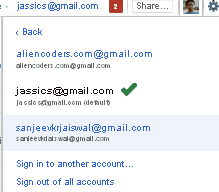
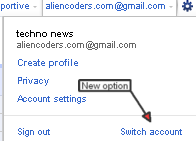
  10. You can login to more than one account with switch account functionality.
  11. Account Activity facility makes you aware that who accessed your account at what time and from where. If anything unusual would happen in accessing your account Gmail will notify you.
  12. Google tackles with spams in a very smart way. Its mail filtering technology really amazing. It saves our time and electricity too! (Why electricity? Relate it with Global Warming)
  13. Waiting for Google voice and sms functionalities in India. Its available in US already.

Note: This is my personal view about Gmail. If anyone has similar or different views, please revert here with your comments 😀


Features of different Mail Providers

Different Mail ProvidersThere are many mail providers  over the web but I would state the features of 5 highly popular or useful mail providers. (It’s totally my views, so it may differ person to person).

Gmail, Yahoo, rediff, mail.com, in.com ,lycos, facebook.com, gmx.com, hotmail, aol, gawab, mail.ru, 126.com are a few to include in that list.

1.       Gmail

gmail iconI have already explained why I like Gmail most. There is not much to write here again about this lovely mail provider. You can read our previous post based on Gmail.
In short let me tell you that

·         it’s  easy to operate

·         it’s really very fast

·         7 Gb+ space

·         Attachment up to 25 MB

·         So many lab features

·         Can login to multiple account at one time

·         Access a lot of services just by having one mail id. Like blogspot, analytics, webmaster, adsense, google+

·         Audio and video chat with soothing enhancements

·         Easy to access through mobile devices too

2.       Yahoo

Yahoo iconAfter Gmail, I can say Yahoo mail is ubiquitous over the web, mobile devices, iPad etc with unlimited storage facility, chatting etc.

·         It has almost unlimited storage capacity

·         Attachment limit is 25 MB

·         Keyboard shortcuts are there and are having similar to desktop like interface too

·         No labeled message as far as I have experienced

·         No IMAP access to its mail, so no support for desktop email programs

·         Yahoo! Mail offers free email accounts with yahoo.com, ymail.com and rocketmail.com domains.

·         It can be found in mobile devices too!

3.       Hotmail

hotmailWindows Live Hotmail is again a free email service with unlimited storage and can be considered the most secured mail provider over the internet.

·         Easy to use

·         Very simple layout as compared to Gmail

·         Maximum file size allowed is only 10MB

·         It doesn’t offer IMAP Access

·         You can set hotmail to accept mail from the people who are in your address book.

·         Live messenger is very famous. So nothing more to discuss about it.

·         A vacation auto-responder answers emails in your absence (Almost all mail providers have this feature)

4.       GMX

gmx icon·         It’s a reliable email service filtered well of worms, viruses etc and provides unlimited online storage.

·         It offers a rich web interface which may make you to feel better and more interactive.

·         POP and IMAP access are allowed in GMX

·         No chat and no support for handheld devices

·         50 MB attached file size limit

5.       Mail.com

mail.com iconIt’s good for forwarding mail with various domain names and attachment limit for any file is 50 MB. But it lacks security features and trust of other webmail services.

·         You can choose your mail id from 200 listed domain names. ex: sanjeev@writeme.com or jassi@techie.com (sounds interesting )

·         It offers a calendar and notepad too but can’t beat Gmail’s features.

·         50 MB file attachment size limit.

·         Spam and virus protection is little weak (which may be of major concern while choosing this mail provider)

·         It’s online calendar, solid address book feature may attract intern users

There are other major mail providers also but I think these are at the top with respect to storage, popularity, user friendly aspects.
Rediff has changed its look, now it’s easy to navigate date wise, easy to delete, easy to attach file etc but still I am not sure if it has attracted as many users as those 5 mail providers have.

Here is the comparison of list of web mail providers: http://en.wikipedia.or/wiki/Comparison_of_webmail_providers

5 ways to socialize effectively through Google+

Google+Life is enriched by actively participating in the society. As you know, there are innumerable ways to maintain contacts, communicate and share information through social networking sites. Of late blows the whistle, Google+, being cooked by imaginative Google engineers who are testing and letting tasted by select few user invites, has already spread fumes out. Google+ can help you socialize in a better way.
If you are not sure about the how to’s of Google plus, this tutorial on Google+ will be of help.

Better contact management

The first step to socialize is maintaining contacts. You can easily maintain groups in different circles. Friend contacts can be placed under friends circle, family members can be placed under family circle and co-workers can be placed under employee circles and fans can be placed under fans circles.

You can name a circle as you want. Interactions will be made on a circle basis. What you post in one circle will not reflect in other circle. You can add your friend both in employee circle and friend circle in which case he gets information from both circles. Using circles you can bring friends from other networks like Facebook and Twitter also.

Sharing information

Sharing of information is vital to be social. Sparks is an interesting feature through which you can gather information on various topics of interest. In fact, the Google+ search engine will gather interesting links on its own just by opting the topics of your choice. You can share music, photos, videos and links with a single circle or all circles.

Google is planning to promote music in a big way including sharing, offering live music performance and group listening parties. If you post some interesting or useful piece of item which may be text or image or video, members from your circles can comment on it. By actively approving the comments or replying the comments, you can make it a live platform.

You can even write blogs on your own and start uploading them! Here lies the great opportunity to promote yourself or your products and services, although Google+ does not support business officially as of now.

Face to Face (F2F) Chat

Don’t you love talking with your loved ones, as if you are right in front of them? With ‘Hangouts’ you can gather yourself for video face to face chat. Multiple people can participate in this anytime and anywhere. With video chat, you can share and explain things in a better way, better understand the feelings of other people by closely watching them. If you are bored and no one is readily available, you can watch YouTube videos too while on hangout.

Instant Messaging

If you want to be in touch with your friends through simple text messages, you can do so through ‘Huddle’. You will be able to send short messages to individual or circle.

Of course, you and the one who receives need to use Android application to achieve this. When you invite a new person to the conference, he will be able to access the context from the time of his joining only.

Social gaming

Social gaming is going to be a big boon in the coming days. Google+ is on the way to create an altogether new platform to enthuse both young and old.

Have you tasted Google+? What is your experience?

About our guest author:
Dr. Jane H Sheeba is Research Scientist in Centre for Nonlinear Dynamics at Bharathidasan University.
She runs a self help blog Find All Answers. She is part of the team at Coupon Triumph, a site that features Bistro MD and Diet to go discount coupons among the others. Here are 2 coupons for you: bistro md coupons, diettogo discount 15%.


How to send executable files through mail

exe files attachedHave you ever noticed that you cannot send any executable file format through mail?
Whatever mail agent would be, say Gmail or Yahoo or Rediff. No one allows you to send files which have executable format like .chm, .exe, .js, .vbs etc

But there are two most common ways to send such files through your mail id. I would show it using Gmail Account.

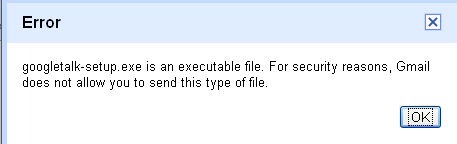
Problem:  While attaching above mentioned formats, I got error stating that it’s an executable file. For Security reason Gmail doesn’t allow you to send this type of file.

Solution:  There are two methods to bypass this security issue.

Method 1

Steps Included

  • Error in gmail file attachmentRename the file’s extension  to most common extension which will not cause any security issues.  “txt” or “doc” or “pdf” would be the most useful extension to send executable files.
    For ex: If file name is testing.exe Change it to testing.txt
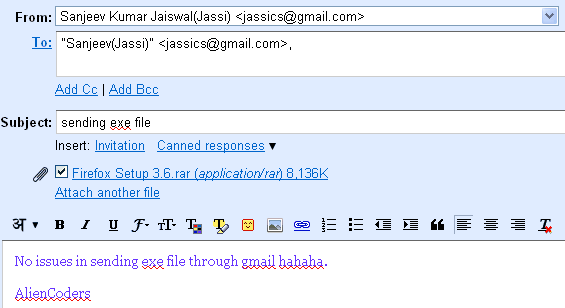
  • Now attach this converted file to your mail id and send. (Gmail would not show any error with such files)
  • Tell the recipient that after downloading that attached file change it to proper file extension. In this case, change it from testing.txt to testing.exe
  • Done! (It shows that Gmail only checks the file extension not the contents inside it. Even it is not checking for signature/pattern to determine whether it is proper file or not. )exe file download-gmail

Method 2

Problem: Method 1 would work if you have to single file or separate files in the same mail but by attaching one by one separately. What if you have lots of files of same or different extensions which you want to sent as a whole. Rather say you want to send a folder containing various executable files. 

Solution: We can send it through any compressing tool which has the feature to set password to your file or folder. Winrar being the best example for this scenario. Download it from the here


Steps Included:

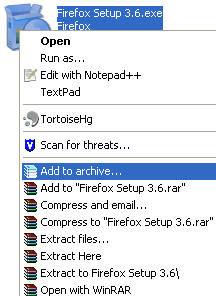
  • winrar optionsRight click on the file or folder that you want to send and click on add to archive option
  • Set the passwordset password in winrar

    • Click on Advanced tab 
    • Now click on set Password button (see at the right center )
    • Type the password and reconfirm it again.
    • Click Ok
    • Again click Ok to get out of making rar file.
  • Now you will see one new file with .rar extensions. Ex: If you have file called abc.chm or a folder called setup which is have lots of executables files inside. Then after doing above steps, you would get abc.chm.rar or folder-name.rar.
  • Attach that file in your Gmail account and send to the specific user.(Maximum file size allowed by Gmail per mail is 25 MB)
  • Done! It shows that It checks the files and contents inside it but cannot scan the files which is password protected. So it simply allows it!password protected file

If you know any other way to send such files, please do comment. I tested it on Gmail but I think it would work in almost all mail clients.


5 minimal reasons to write blog

blog powerNow a day almost every internet user is having one’s personal website or blogging website. Even if you are not having one, sooner or later you will be having your own blogging website for sure.

What minimal things are there which will force you to write blog?
According to me, it should be:

  1. write blogTo show your presence over internet

Blogging is one of the best ways to be famous amongst netizens.  Which means you will be popular amongst your locality, company, school/college, country or all over the world.

  • Who doesn’t want to be famous (of course for good reasons only)?
  • Who doesn’t want fans, fame, respect, followers?

Just being a blogger can give you all these. So start writing blog!

 2. To get in touch with like minded people

blog networkIf you are from biology background or say economics or like me a networking freak guy, Web developer etc. You may want to be in touch with people of same profession and of same taste. Internet is the fastest way to grow your own community rather than joining any club near your home! Even your neighbor will meet you most of the time over internet. More networks mean more knowledge you can gain and more efficiently you can put your point over the internet crowd.

Remember, Internet is the fastest way of communication than TV or newspaper!

3. blog addictedShow off your knowledge and get rewarded online

Who doesn’t like to hear praising words like:

  • You saved my day
  • You are genius
  • You are guru in your field
  • I am lucky to have you as my mentor and so on

 Show off (Share in general sense) whatever you know related to your domain. Let’s say being a JavaScript programmer, you can post tutorials, can post your experiments etc. More you will share, more you will learn in two ways:   

  • Just to write a single blog on small topic, you would do a lot research before publishing it which ultimately is going to help you to hone your skills.
  • More you will share more expert comments you will get and other people would share too. i.e. like share one learn multi stuffs principle

                          You may be popular like Linus or Richard Stallman or name any one of your favorite role models.  

 4. Earn  some  bucks from it

write blog for moneyMany part time and full time blogger are even earning more than $2000 per month just from blogging. You can be the example too!. You should write quality blog, should gain user’s trust and keep updating latest stuffs from your domain regularly. That’s it!
Putting Google ad sense, local advertisements, affiliation program, joining few CPC programs can give you what you want from your blog (Of course I meant money only)

If by writing what you like, you can earn money then what’s the harm in it. Let the money come in 😛

 5. Will enhance your skills significantly

As already I discussed about it in my 3rd point that writing quality blog can give not only name & fame but money too! Find your best part that you can show to the whole world by writing blogs. It’s not necessary that it should be technical only and only technical people can have blog.
Any one can handle and manage blogging based website. Check BlogSpot, wordpress etc for better understandings.
You can have blogs on food items, dressing style, music reviews, book reviews, city updates etc.

So, when you are going to publish your own blog?


Make gmail more social : use Rapportive

Rapportive optionsMany of us use gmail account for mailing purposes. If you will open any mail to read, you will notice that in the right side bar of mail; Google ads showing which is of no use for us (almost).
1. Will not it be nice, if we could get something useful instead of those advertisements? 
2. How about getting social updates from different linked sites from the mail sender?

Rapportive gmail screenshot Rapportive is a  CRM (Customer Relationship Management but i would say Content resource Management though), a  Firefox plug-in for Gmail which will do the same as I said above. It will update sender’s social updates from Facebook, Linkedin, Gmail contacts, blogger profile, twitter, picasa etc. It’s one of the best CRM in the market which can be used as google mail plug-in.

You can install it from here  (Detailed instruction will be there with screenshots).
It get s the information based on sender’s mail ID and also allows user notes at the bottom of the page for personal use.

It’s not only that, even you can comment on his/her updates. Like you can comment on sender’s facebook status, recent pics added, can like or even can retweet or reply to his/her tweets. I liked it very much and its really worthy to use.

Something about Rapportive:
It’s a small company founded in January 2010 by Rahul  Vohra, Martin Kleppmann and Sam Stokes. Check this out: http://rapportive.com/about .
 Rapportive’s fund now have crossed $1 million and this plug-in was suggested by lifehacker.com, techcrunch etc.

What they say: You can immediately see what people look like, where they're based, and what they do. You can establish rapport by mentioning shared interests. You can grow your network by connecting on LinkedIn, Twitter, Facebook and more. And you can record thoughts for later by leaving notes. Imagine relationship management built into your email. For free.

Security Concerns:
People may think that it can read our contents form various accounts, can get our all personal mails etc. But just ask this question again to yourself. Whenever you are linking one account with other, are not they sharing your details?
What matters is trust and second thing is, it requires Google’s authorization to show you the details. Its works in the same way as other third party authorization tool works. So no harm in using it!

Any Alternatives? Yes

  1. Gist
  2. Whosent.it

Top 20 funny things programmers say

Jokes- Aliencoders20. That's weird….
19. It's never done that before.
18. It worked yesterday.
17. How is that possible?
16. It must be a hardware problem.
15. What did you type in wrong to get it to crash?
14. There is something funky in your data. OR It's a data problem, not a program problem.
13. I haven't touched that module in weeks!
12. You must have the wrong version.


11. It's just some unlucky coincidence.
10. I can't test everything!
9. THIS can't be the source of THAT.
8. It works, but it hasn't been tested.
7. Somebody must have changed my code.
6. Did you check for a virus on your system?
5. Even though it doesn't work, how does it feel?
4. You can't use that version on your system.
3. Why do you want to do it that way?
2. Where were you when the program blew up?
And the Number One Thing Programmers Say When Their Programs Don't Work:
1. "It works on my machine.."  😉


Source: Internet. (emailed by a friend.)