 What is Hibernate and how it works – a minimal introduction
During my post graduations we had to make a project based on the requirement, at that time I heard about a word hibernate. But at that time I was not so much curious about it. I only know that it is a kind of framework. My friends was used it in their project also but I was not aware about it so I use my own Java coding for all stuff.
But when I joined an organization I came to know that here also we are using hibernate but now the situation was very difficult because I did not know A, B, C… of it. But my senior level was very cooperative and they help me a lot to overcome from the situation. So now I want to share my knowledge with you people so that in future you will not face this problem. So let’s start with the basic question what, when, why and how?
What is Hibernate?
Hibernate is a free, open source Java package that makes it easy to work with relational databases. It provides a query service for Java. Hibernate lets you develop independent classes following common Java idiom – including association, inheritance, polymorphism, composition and the Java collections framework. Hibernate is basically used with J2EE (Java web application).
It is a very popular open source technology which fits well both with Java and .NET technologies. The Hibernate 3.0 core is 68,549 lines of Java code. Hibernate maps the Java classes to the database tables. It also provides the data query and retrieval facilities that significantly reduce the development time. Hibernate can be used in Java Swing applications, Java Servlet-based applications, or J2EE applications using EJB session beans. Hibernate is free software that is distributed under the GNU Lesser General Public License.
Source: wikipedia
When Hibernate?
Hibernate was started in 2001 by Gavin King as an alternative to using EJB2-style entity beans. Its mission was to simply offer better capabilities than EJB2(Enterprise Java beans) by simplifying the complexities and allowing for missing features. Early in 2003, the Hibernate development team began Hibernate2 releases which offered many significant improvements over the first release.
JBoss, Inc. (now part of Red Hat) later hired the lead Hibernate developers and worked with them in supporting Hibernate. On 9th Feb 2012 they have released a stable version of hibernate as Hibernate 4.1 final. It is developed in Java language so it uses JVM as a platform for the execution.
Why Hibernate?
It is the  most important question that why we need hibernate into our application? So let’s discuss it in very simpler way. We know that when we develop any application, at that time for storing our data we required a database.
For example we are making a web base application for the Post-Office and here we have to keep track of all the information related to post, money order, courier etc. For the information storage point of view we use a MySQL as a backend database and we have code all things into a Java class like how to add data into database or how to perform operation on that data base. Now when we are going to deliver the product (i.e. our application) suddenly client requirement got changed and now they want ms access as their database because it is freely available and it can be easy to understand.
Can you imagine the situation now? You have a limited amount of time and you have to change your each and every class which is dealing with the database and the worst thing is that now you have to change all 50 files because it is a live application (this number can be 5000 also depend upon the scenario) . To handle this kind of situation hibernate came into picture. Hibernate provide an API (Application programming Interface) with all build in functions like insert (), delete (), update () etc. It also provides persistence architecture for a code (each class is independent). Here we follow a standard hibernate architecture in which we use xml for all the configuration settings.
How It Works?
Hibernate does not get in your way nor does it force you to change the way your objects behave. They do not need to implement any interfaces in order to become persist. All you need to do is create an XML "mapping document" telling Hibernate the classes you want to be able to store in a database, and how they relate to the tables and columns in that database, and then you can ask it to fetch data as objects, or store objects as data for you. At runtime, Hibernate reads the mapping document and dynamically builds Java classes to manage the translation between the database and Java program.
Now there is one question related to hibernate which was asked to me during my campus interview but at that time I was not able to answer it. Let’s find the answer
What is dirty checking?
Hibernate automatically detects object state changes in order to synchronize the updated state with the database, this is called dirty checking. An important note here is, Hibernate will compare objects by value, except for Collections, which are compared by identity. For this reason you should return exactly the same collection instance as Hibernate passed to the setter method to prevent unnecessary database updates.
Now I will discuss an example for a simple Java application, if you have basic knowledge in Java and JDBC (Java Database Connectivity), then you will understand it comfortably.
Suppose you have to make an application which will maintain records of the entire employee present in your office. So we will do it in the following way
Simple Design pattern to follow

How to hide a file behind a jpeg file
 Sometimes it may happen that you have to share your computer with your family member. As it happens with me. I have a younger brother and I like to tease him so what I do is whenever he install any new games into my computer I hide the entire folder with the shortcut. When he tries to find it out he got nothing. So let’s work on it. Now I am going to share this tricks with you guys
By this trick, first we create a hidden folder and after that we will hide our important files behind the .jpeg image file. This second trick is very helpful for those people who want to hide some files from their friends; even I did the same thing during my college days. Usually I hide my entire assignment file behind a jpeg image (every time I use an image of donkey).
How to hide a folder?
- Right click on the empty area and create a new folder.
- Rename the folder. while rename hold the Alt key and press 0160 from your number keypad.(make sure that your number lock is on)
- Now press a space bar, Usually it is required to give a name to a folder as you can’t keep it blank, but when you press Alt+ 0160 it will take a ASCII (American Standard Code for Information Interchange) value for the space as new name for the folder. It may possible that it read a pixel value of a blank space from the screen as a new name of a folder.
- When you will done with step 3 you will find that your folder got hidden now but still folder icon it visible. Refer the image above shown 🙂
-
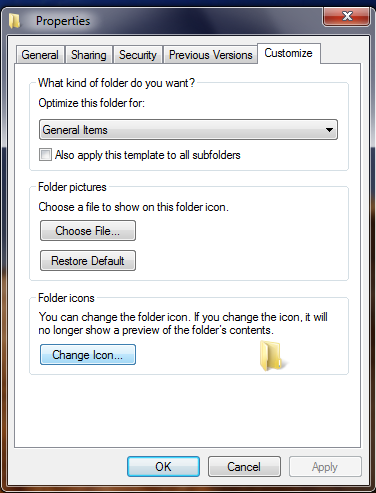
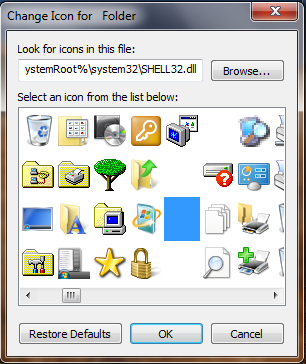
Now right click on the folder go to properties then select customize tab and click on change folder icon. In the change icon wizard you find several icon among them there are some empty spaces, so select that empty space as an icon and click on apply.
-
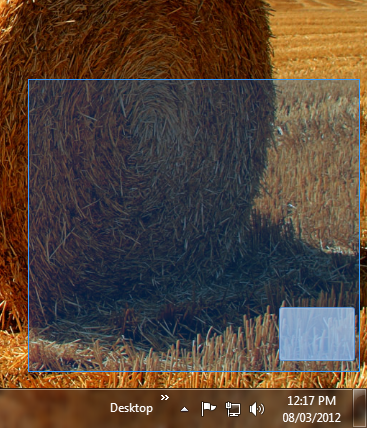
We are done with all the steps. But you have to remember the place on the desktop where you have created a folder. Now place your folder in the corner of the screen. When u selects the area you will find the folder like this.
How to hide a folder behind a jpg file?
- Create a folder in a drive for easy access, e.g. C: (because we have to use this path on a command prompt so mask this path as simple as you can).
- Put all the files you want to hide in there, as well as a JPEG image that you would like to hide the files in.
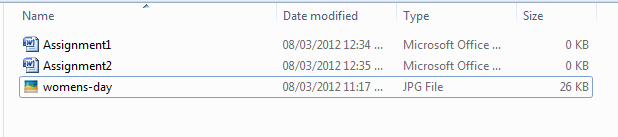
- Select all of the files you want to hide, and create a ZIP or RAR file with them using a program like WinRAR, WinZip, 7Zip, etc.(after archiving delete the file).

- Now you have your entire file in the archive folder.
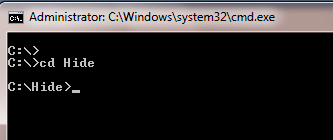
- Go to start then go to run and type cmd and press enter.
- Now go to that location where you have your archive folder with the help of cd command.
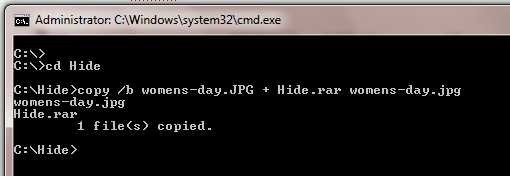
- Type the following: copy /b womens-day.JPG + Hide.rar womens-day.jpg (note : if you have a different image and archive name the you should replace the highlighted words with your specification ).
-
Once you done with the step 7 you should receive a message 1 file copied on your command prompt.
-
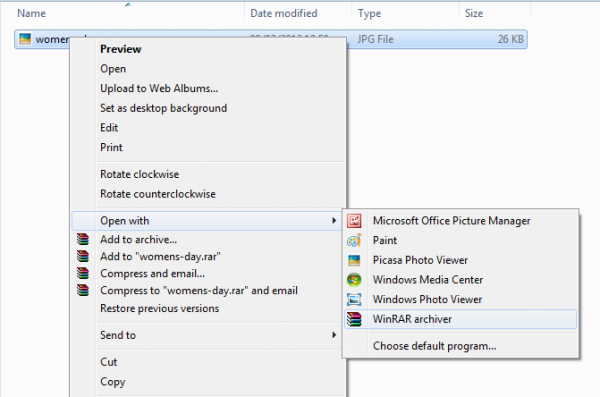
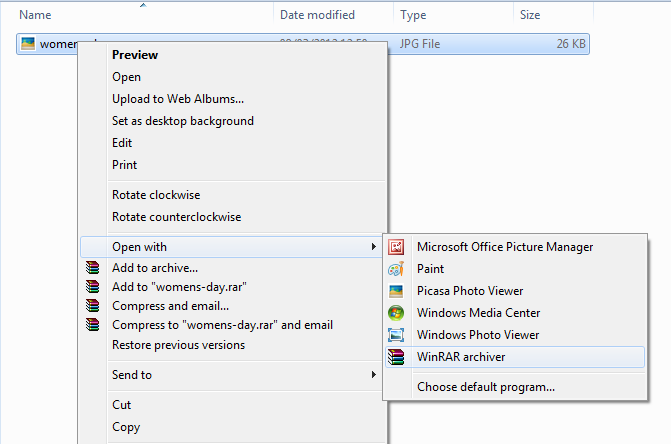
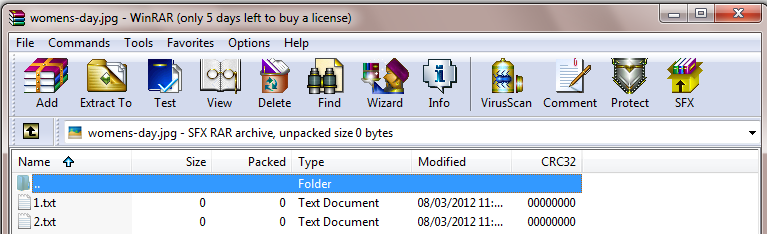
When you double-click on the file jpg image will get open and when u want to open your hidden file simply right click on the file and open a file into WinRAR (into that application which u have selected earlier for archiving ).
Java development kit
 When we discuss about Java, the words which got clicked into my mind are JDK, JRE and JVM. For a common man these are only words which starts from letter J but for a technical person, these are the building blocks of Java.
Frankly speaking when I was new to Java ,I was very confused with these there words. It seems like the same. But after some time when I got familiar with it I got to know that it’s a magical thing. So let’s take a ride of JDK with JVM and JRE.
JDK (Java Development Kit)
JDK or the Java Development Kit is a set of a Java compiler, a Java interpreter, developer tools, Java API libraries, documentation which can be used by Java developers to develop Java-based applications.
Compiler converts java code into byte code. Java application launcher opens a JRE, loads the class, and invokes its main method.
You need JDK, if at all you want to write your own programs, and to compile them. For running java programs, JRE is sufficient.
JRE is targeted for execution of Java files.
JRE = JVM + Java Packages Classes(like util, math, lang, awt,swing etc)+runtime libraries.
JDK is mainly targeted for java development. You can create a Java file (with the help of Java packages), compile a Java file and run a java file
You can also say that JDK is a super set of JVM and JRE.

JRE (Java Runtime Environment)
Java Runtime Environment contains JVM, class libraries, and other supporting files. It does not contain any development tools such as compiler, debugger, etc. Actually JVM runs the program, and it uses the class libraries, and other supporting files provided in JRE.
If you want to run any java program, you need to have JRE installed in the system or we can also say like this JRE is a minimum set that includes a Java interpreter, Java API libraries, Java browser plug-in, which make up the minimum environment to execute Java-based applications.
The Java Virtual Machine provides a platform-independent way of executing code; programmers can concentrate on writing software, without having to be concerned with how or where it will run.
If you just want to run applets (ex: Online Yahoo games or puzzles), JRE needs to be installed on the machine.
JVM (Java Virtual Machine)
The JVM or Java Virtual Machine is the core of the Java platform and is a part of both the JDK and JRE that translates Java byte codes and executes them as native code on the client machine.
As we all aware when we compile a Java file, output is not an 'exe' but it's a '.class' file. '.class' file consists of Java byte codes which are understandable by JVM. Java Virtual Machine interprets the byte code into the machine code depending upon the underlying operating system and hardware combination. It is responsible for all the things like garbage collection, array bounds checking, etc… JVM is platform dependent.
The JVM is called "virtual" because it provides a machine interface that does not depend on the underlying operating system and machine hardware architecture. This independence from hardware and operating system is a cornerstone of the write-once run-anywhere value of Java programs.
There are different JVM implementations are there. These may differ in things like performance, reliability, speed, etc. These implementations will differ in those areas where Java specification doesn’t mention how to implement the features, like how the garbage collection process works is JVM dependent, Java spec doesn’t define any specific way to do this.

so that's all from my side hope now you are clear with the difference
Java as a platform independent language
Did u know why Java is very much popular? It’s because Java has a platform Independent feature. So let’s discuss why Java is platform independent.
Actually the fact is Java platform independent then but JVM (Java Virtual Machine) is platform dependent.
There are two tools which use for compiling and running Java programs
javac -It is a compiler which converts Java source code to byte code that is a .class file. This byte code is standard for all platforms, machines or operating systems.
Java Versions
I remember when I was attending Java training in my organization our trainer told us the Sun Microsystems (now Oracle) launched a new version of Java Java SE 7 and its code name is Dolphin .At that time I was very surprise because I was working in Java from last 3 year and I did not know this thing that every version of Java has its own significance and its own code name too.
After that I was curious to all the "code name" so I founded it out. Here I am sharing this information with you guys . It will be a good learning experience.
I have summarized below important new features added in each major Java release till now. I target to highlight important features added in respective releases. Apart from below list of features, every release has enhancements too.
Java Version SE 7
code named Dolphin and released on July 28, 2011.
New features in Java SE 7
- Strings in switch Statement
- Type Inference for Generic Instance Creation
- Multiple Exception Handling
- Support for Dynamic Languages
- Try with Resources
- Java IO Package
- Binary Literals, underscore in literals
- Diamond Syntax
- Automatic null Handling
Java Version SE 6
Code named Mustang and released on December 11, 2006.
New features in Java SE 6
- Scripting Language Support
- JDBC 4.0 API
- Java Compiler API
- Pluggable Annotations
- Native PKI, Java GSS, Kerberos and LDAP support.
- Integrated Web Services.
- Lot more enhancements.
J2SE Version 5.0
Code named Tiger and released on September 30, 2004.
New features in J2SE 5.0
- Generics
- Enhanced for Loop
- Autoboxing/Unboxing
- Typesafe Enums
- Varargs
- Static Import
- Metadata (Annotations)
- Instrumentation
J2SE Version 1.4
Code named Merlin and released on February 6, 2002 (first release under JCP).
New features in J2SE 1.4
- XML Processing
- Java Print Service
- Logging API
- Java Web Start
- JDBC 3.0 API
- Assertions
- Preferences API
- Chained Exception
- IPv6 Support
- Regular Expressions
- Image I/O API
J2SE Version 1.3
Code named Kestrel and released on May 8, 2000.
New features in J2SE 1.3
- Java Sound
- Jar Indexing
- A huge list of enhancements in almost all the Java area.
J2SE Version 1.2
Code named Playground and released on December 8, 1998.
New features in J2SE 1.2
- Collections framework.
- Java String memory map for constants.
- Just In Time (JIT) compiler.
- Jar Signer for signing Java ARchive (JAR) files.
- Policy Tool for granting access to system resources.
- Java Foundation Classes (JFC) which consists of Swing 1.0, Drag and Drop, and Java 2D class libraries.
- Java Plug-in
- Scrollable result sets, BLOB, CLOB, batch update, user-defined types in JDBC.
- Audio support in Applets.
JDK Version 1.1
Released on February 19, 1997
New features in JDK 1.1
- JDBC (Java Database Connectivity)
- Inner Classes
- Java Beans
- RMI (Remote Method Invocation)
- Reflection (introspection only)
JDK Version 1.0
Code named Oak and released on January 23, 1996.
Some facts about java
Hello All ,
This is my second post about java. Everything has its own and very popular history. So when I think about java the very first question arrived in my mind is how and why java ? Because we have c with us for the core programming and we have c++ for the entire object oriented concept. After going through a long discussion and from the internet I founded some facts which are sufficient for my queries.
So Let' start with my first question
How we got java?
Java was created by a team led by James Gosling for Sun Microsystems, James Gosling, Mike Sheridan, and Patrick Naughton initiated the Java language project in June 1991. Java was originally designed for interactive television, but it was too advanced for the digital cable television industry at the time.
The language was initially called Oak after an oak tree that stood outside Gosling's office; it went by the name Green later, and was later renamed Java, from Java coffee, said to be consumed in large quantities by the language's creators. However, when Java 1.0 was released to the public in 1996, its main focus had shifted to use on the Internet.java language derives much of its syntax from c and c++ but has a simpler object model and fewer low-level facilities.
Java is a fully functional, platform independent, programming language it has powerful set of machine independent libraries, including windowing (GUI) libraries.Java applications are typically compiled to byte code (class file) that can run on any Java Virtual Machine (JVM) regardless of computer architecture.
The most interested thing about java is "write once, run anywhere" (WORA), meaning the code that runs on one platform does not need to be recompiled to run on another.
Why java ?
One characteristic of Java is portability, which means that computer programs written in the Java language must run similarly on any hardware/operating-system platform. This is achieved by compiling the Java language code to an intermediate representation called Java byte code, instead of directly to platform-specific machine code.
Java byte code instructions are analogous to machine code, but are intended to be interpreted by a virtual machine (VM) written specifically for the host hardware. End-users commonly use a Java Runtime Environment (JRE) installed on their own machine for standalone Java applications.
Java is very powerful language but it has its own pros and cons too. so lets discuss some strong and weak points of java.
Pros
- Free.
- The syntax is familiar to the programmers that know any other C based language.
- Java (the platform) has a very large and standard class library, some parts of which are very well written.
- Java provides a platform for behavioral transfer from one address space to another. This is particularly evident in the dynamic class loading mechanisms of RMI (Remote Method Invocation).
- Automatic Memory Management implemented by Garbage Collection
- Explicit Interfaces
- Improving performance
- Good portability (certainly better than that of nearly any compiled alternative)
- Simplified syntax (compared to C++)
- Language design not committee driven
- Lots of available code and third-party libraries
- If you love OOP, the only way to write functions is to make them class methods.
- Many standard interfaces defined in the standard library, which would have been vendor/OS specific otherwise, helps a lot in achieving portability and ease integration/selection of 3rd party libraries. E.g. JDBC, JMS, JCE, JAI, serial I/O, JAXP, JNDI, etc. Some have correspondence in other languages (e.g. ODBC) but not all.
Cons
- Performance: Java can be perceived as significantly slower and more memory-consuming than natively compiled languages such as C or C++.
- Look and feel: The default look and feel of GUI applications written in Java using the Swing toolkit is very different from native applications. It is possible to specify a different look and feel through the pluggable look and feel system of Swing.
- Single-paradigm language: Java is predominantly a single-paradigm language. However, with the addition of static imports in Java 5.0 the procedural paradigm is better accommodated than in earlier versions of Java.
So , this is all about java from my side. This are some very basic things about java . I hope it will give all of u a good start with java.
Source: wikipedia and my own work 🙂
Java video
Hi All,
As we know java is a most popular and an open source programming language.There are many features of java like
Top 8 Java Personality
I found it very insteresting and useful, so thought to share with our aliencoders users and viewers.
1. Father of the Java programming language
 James Gosling, generally credited as the inventor of the Java programming language in 1994. He created the original design of Java and implemented its original compiler and virtual machine. For this achievement he was elected to the United States National Academy of Engineering.
On April 2, 2010, he left Sun Microsystems which had recently been acquired by the Oracle Corporation. Regarding why he left, Gosling wrote on his blog that “Just about anything I could say that would be accurate and honest would do more harm than good.”
2. Hibernate Founder
 Gavin King, is the founder of the Hibernate project, a popular object/relational persistence solution for Java, and the creator of Seam, an application framework for Java EE 5. Furthermore, he contributed heavily to the design of EJB 3.0 and JPA.
The Cairns Post launched its new website in February 2008, featuring King's blog to offer readers the opportunity to provide comments and feedback to his columns. The blog has consistently received the site's largest volume of response from readers. (Wiki)
3. Spring Founder (Creator of Spring & Best Selling Author of J2EE without EJB)
 Rod Johnson, is the founder of the Spring Framework, an open source application framework for Java, Creator of Spring, CEO at SpringSource. Furthermore, Rod’s best-selling Expert One-on-One J2EE Design and Development (2002) was one of the most influential books ever published on J2EE
Rod is an authority on enterprise Java architecture, a thought leader on open source development and business models, and a popular speaker at conferences around the world.
Rod has over 15 years technology, management and business experience. He holds a BA with Honors in Computer Science, Mathematics and Musicology as well as a PhD from the University of Sydney.
4. Struts Founder
 Craig Mcclanahan, creator of Struts, a popular open source MVC framework for building Java-based web applications, which is arguably that every Java developer know how to code Struts. With the huge success of Struts in early day, it’s widely implemented in every single of the old Java web application project.
He was part of the expert group that defined the servlet 2.2, 2.3 and JSP 1.1, 1.2 specifications. He is also the architect of Tomcat's servlet container Catalina.
5. JBoss Founder
 Marc Fleury, who founded JBoss in 2001, an open-source Java application server, arguably the de facto standard for deploying Java-based Web applications. Later he sold the JBoss to RedHat, and joined RedHat to continue support on the JBoss development.
After selling his company to Red Hat, Fleury became Senior Vice President and General Manager of the JBoss Division.
On 9 February 2007, he decided to leave Red Hat to pursue other personal interests, such as teaching, research in biology, music and his family
In 2008 Fleury started a new open source project called OpenRemote, to build Home Automation Systems.
In 2010 Fleury started producing electronic music with the label Acid All Stars.
6. Java Collections Framework
 Joshua Bloch, led the design and implementation of numerous Java platform features, including JDK 5.0 language enhancements and the award-winning Java Collections Framework.
In June 2004 he left Sun and became Chief Java Architect at Google. Furthermore, he won the prestigious Jolt Award from Software Development Magazine for his book, “Effective Java”, which is arguably a must read Java’s book.
He is the alma mater of Coolumbia University and Carnegie Mellong University
7. Test Driven Development & JUnit Founder
 Kent Beck, creator of the Extreme Programming and Test Driven Development software development methodologies. Furthermore, he and Erich Gamma created JUnit, a simple testing framework, which turn into the de facto standard for testing Java-based Web applications.
The combination of JUnit and Test Driven Development makes a big changed on the way of coding Java, which causes many Java developers are not willing to follow it.
Kent lives in Medford, Oregon and works at Facebook now
8. Tomcat & Ant Founder
 James Duncan Davidson, while he was software engineer at Sun Microsystems (1997–2001), created Tomcat Java-based web server, still widely use in most of the Java web projects, and also Ant build tool, which uses XML to describe the build process and its dependencies, which is still the de facto standard for building Java-based Web applications.
Source: mkyong.com and few other websites
Note: Data can be outdated later. We may not update time to time. It will be static one. For more information you can go for