Uncategorized

IT Security Threats for 2011 by McAfee

2011 will be much like 2010 when it comes to IT security threats, only more so.

“We are seeing an escalating threat landscape in 2011,” says Dmitri Alperovitch, threat research vice president at McAfee Labs, which Tuesday issued its annual threat predictions for the coming year.

In an interview with Information Security Media Group, Alperovitch explains the challenges these threat present and how individuals and organizations can address them. The threats McAfee Labs identifies for 2011 are:

5 essential Multimedia players for windows users

Whatever be your profession, it doesn’t matter how busy you are in your life. You will listen songs, watch movies for sure and computer plays an important role for such entertainment stuffs always.
You must be using any one of your favorite Multimedia player to play songs, watch movies, video tutorials, etc. So which player is your favorite one?  Mine is all time favorite KMplayer.
5 Multimedia players that I have are  (Ranks may differ person to person):
1. KMPlayer  

  1. First things its free and plays almost any video formats at its best. Takes very less space and runs audios/videos hassle free.
  2. Keyboard shortcuts make it very easy and comfortable to use. Its very user friendly too.
  3. The KMPlayer is a versatile media player which can cover various types of container format such as VCD, DVD, AVI, MKV, Ogg Theora, OGM, 3GP, MPEG-1/2/4, WMV, RealMedia, and QuickTime among others.
  4. It handles a wide range of subtitles and allows you to capture audio, video, and screenshots in many ways.
  5. Click here to download.   For more details about it, read our previous article on it.

2.   vlc logo VLC Multimedia Player

  1. It is also open source and latest VLC player also plays almost everything. But its not so user friendly like KMPlayer. After using it for few days, you may be habituated for it too.
  2. VLC comes with nearly every codec built in, so no need to update for codecs.
  3. It plays damaged files too! Which means Missing or broken pieces won’t stop VLC to play undamaged part of it.
  4. Its available for all Operating Systems which makes it most popular all over the computer users.
  5. You can download VLC Player from here.

3.  real player logo Real Player

  • a. If you use internet to watch videos, downloads audio/video files from youtube, apniisp etc then You might need Real Player too!
  • b. Very few players supports .rmvb.  It plays .flv, .mpeg, .avi and other various formats too
  • c. Real player is also available in all O.S. flavors and its available for free and for premius use too (paid one)
  • d. You can download videos, share through FB, youtube, twitter and can burn too!
  • e. For more details and to download this player Visit here

4.  wmp logo Windows Media Player

  • a. Most computer users would have windows Operating system by default and it contains WMP already. So people get used of it. WMP 11 is really cool and has really all features that other media players have.
  • b. A tree-style file directory makes it easy to find the music you want quickly, and a simple search box gets you where you want to go immediately.
  • c. A five-star rating system lets you rate your music, then organize it by rating, so it's easy to group your favorite songs
  • d. Download it for free from here

5.  bsplayer logo BS Player/Winamp/Jukebox

  1. I have used winamp, jukebox and BS Player too. BS Player is the newest one and winamp is all time favorite for listening audio songs.
  2. Winamp is available for android too. Its skin, and playing features can attract anyone to have it in their system.
  3. Download Winamp from here
  4. BSPLayer is very light, so don’t take much CPU space, downloads and saves subtitles automatically. Plays high resolution video smoothly. HD Laptop users should have it .
  5. Download BSPlayer from here.
Uncategorized

Top 10 Programming language of year 2010

It is always important for the IT people to know that:

1.       Which language is rising exponentially?

2.       Which language is in high demand?

3.        By having knowledge of which language we can grab more job opportunity?

4.       Which one is the highest paying language in your country?

And many more Just like ever year Tiobe has done complete survey and displayed the result for top 10 programming languages of 2010 and have compared from previous year.  Just have a look over it.

Internet Explorer is found vulnerable again

A vulnerability has been identified in Microsoft Internet Explorer, which could be exploited by remote attackers to take complete control of a vulnerable system. This issue is caused by a use-after-free error within the “mshtml.dll” library when processing a web page referencing a CSS (Cascading Style Sheets) file that includes various “@import” rules, which could allow remote attackers to execute arbitrary code via a specially crafted web page.

Top 5 Browsers of year 2010/2011(predicted)

Browser imageIn internet world, we can’t get any info without web browsers. Isn’t it? Whatever we are looking for over internet, browsers will only display it. Right now you are reading this blog through some browser for sure. You might have used few different browsers and have rated according to your taste (requirements, comfort, efficient, add-ons support etc) . In 2009, Internet Explore was at the top. Mozilla Firefox at second position and Google chrome was at third position.
But in 2010, situation got changed. According to my observation/opinion (after doing some search on google and doing some analysis using Google analytics), browsers rank would be:

  1. Mozilla FirefoxFirefox

    • Well it’s my one of the favorite browsers too! I like its simplicity, customizing options, navigation speed, tabbed browsing (now common to every browser), integrated search engine etc.
    • It has more than 10 thousand active add-ons  which you can customize and enhance your web browsing experience.
    • It supports HTML 5 audio and video too!
    • It’s there by default in Linux Distros.
    • Its features are more useful and powerful but designed in very simple way, which I like in it.
    • Its much much faster now in comparison to version 3. Try to have Firefox v3.6+ and feel the difference
    • Firefox 3.5+ has integrated private browsing too that you can easily enter and leave the private mode, browsing seamlessly in complete stealth mode. I have tried it few times.
    • Lots of documents are there to support its features, where you can get in detail about its features and add-ons
    • Firefox is a FREE to download and most of the  add–ons are also free.
  2. Google Chrome Google chrome

    • If Google has developed something then how we can deny its greatness, name is enough to describe it. It uses complex features but have made it simple (but not so simpler like Firefox, as I felt).
    • It has also lots of updated features that you may need and tools are there.
    • Private more is also there, similar to Firefox. So security is there of course!
    • I liked its drag and drop feature (anywhere you wish)
    • I liked its another  unique tab feature that simplifies your browsing is “related tabs”. When a new tab opened, the new tab is placed next to the originating or parent tab, rather than at the end of your list of tabs. (This is not there in Firefox yet)
    • It uses “sandboxing”, which makes every tab to run independently in the browser. This is great because if a certain application crashes, it will stay isolated to that tab only, it will not affect any other tabs. Different processes run separately in their own tab. This technique helps  computer to stop  one tab from taking control of all others. Once you close a tab, that process is completely terminated.
    • It uses online task manager feature too, which comes handy for internet geeks.
    • Its also very fast and I have both browsers in my system along with other 3 browsers.
  3. Internet Explorer Internet Explorer

    • Although IE 9 is there in market, but still I like IE 7. IE 8 was a big flop, it seems. As most of the computer market has been captured by Microsoft’s Operating System which has Internet Explorer by default. That’s why, it is mostly used for browsing.
    • Its startup time is bit faster but navigation time is little slower than Firefox and Chrome
    • Now newer version is having add-ons, tabbed feature is also there and integrated search window is present too.
    • Internet Explorer 7+ has enhanced security features. It provides security for the entire family and offers extensive parental controls to protect children against web predators and inappropriate content.
  4. Opera opera

    • Another browser that enticed me towards it.  Best thing is you can configure Opera to fit your needs and your style. Arrange panels, toolbars and buttons and choose from several unique skins and various widgets.
    • Its everywhere, talk about any O.S. and mobile phone; it will be there J . Its one of the only browsers that has interactive voice commands. You can navigate the web by talking to the browser, and Opera will even read text to you.
    • Visual tabs, mouse gesture, opera turbo (double your speed in lower connection), Speed dial are some really amazing features in Opera.
    • Its free and more than 150 million are using it. I didn’t like its downloading features as it starts downloading my torrent files too L (not a big issue though)
  5. Safari Safari

    • Earlier when we use to hear this word, we thought that oh its only for Mac users but now not anymore, anyone can use it. Its look and feel is too cool. After all its apple’s product J
    • I like its colored progress bar on the toolbar that shows how fast a page is loading and how close it is to being complete.
    • You may feel tough at first site but its very user friendly like our top rated browsers
    • Its very fast and popular. Still I need to explorer its various features
    • Its secured too!

Other popular browsers are: -> Avant (UI effect is really cool and its user friendly too), ->Maxthon(It uses Internet Explorer engine internally and features lots of add-ons too. Very popular in China as it’s a Chinese product J ) and ->Flock (social networking website, so its popular because of Facebook, twitter and youtube integration)

Uncategorized

Enable disable USB port using registry editor

When I was in college, many times I needed to disable system's USB port so that nobody other than me can use that port. So what I was doing is simply editing registry editor for USB port everytime. When I had to use it, I was enabling it else I would be keeping it inactive and would rather say to my friends that "buddy! USB port has some problem in my system :(" 

I know you might have seen such a common topic here there always but whats the harm in keeping such stuffs in our site too! So I shared it here (may be little bit late, but i am sure it will still help many people from our blog :))
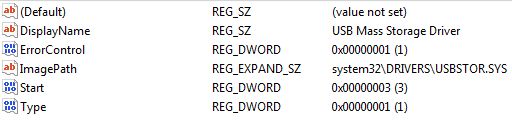
Now the trick lies here in registry editor USBSTOR keyword which is under HKEY_LOCAL_MACHINE\SYSTEM\CurrentControlSet\Services To disable the access to USB port, in Vista/Windows XP and 2000, follow the steps below  (I have not tested it on Win 7. Please someone verify it and let us know)

1. Click Start, and then click Run.
2. In the Open box, type regedit, and then click OK.
3. Locate, and then click the following registry key: HKEY_LOCAL_MACHINE\SYSTEM\CurrentControlSet\Services\USBSTOR
4. In the right pane, double-click Start.
5. In the Value data box, type 4 (REG_DWORD), click Hexadecimal (if it is not already selected), and then click OK. 6. Quit Registry Editor.

To re-enable a disabled port, follow these steps below:
1. Click Start, and then click Run.
2. In the Open box, type regedit, and then click OK.
3. Locate, and then click the following registry key: HKEY_LOCAL_MACHINE\SYSTEM\CurrentControlSet\Services\USBSTOR
4. In the right pane, double-click Start.
5. In the Value data box, type 3, click Hexadecimal (if it is not already selected), and then click OK.
6. Quit Registry Editor. Or else If you are lazy person like me 🙂 then just save two different .reg files one for enabling and other for disabling purpose.

Steps To make one click working for enbaleUSB:
1. Open Your favorite editor or simply notepad
2. Type these lines there: REGEDIT4 [HKEY_LOCAL_MACHINE\SYSTEM\CurrentControlSet\Services\USBSTOR] "Start"="3"
3. Save it as enableUSB.reg (You could save it as anything but for our comfortness I wrote like that. extension should be .reg anyhow)

In the same way to disable USB port follow these steps:
1. Open Your favorite editor or simply notepad
2. Type these lines there: REGEDIT4 [HKEY_LOCAL_MACHINE\SYSTEM\CurrentControlSet\Services\USBSTOR] "Start"="4"
3.Save it as disableUSB.reg

Brief introduction on Computer Virus

Virus imageWhat is a Virus?
A virus is a self replicating code that produces its own code by attaching copies of itself into other executable codes and operates without the knowledge or desire of a computer user. Virus was discovered in early 1980s. Viruses require human activity such as booting a computer, executing an autorun on a CD, or opening an email attachment.

In day today life most of computers get attacked or infected with the viruses or worms. 4% attacks are due to viruses and worms are reported,  rest are due to human error (53%) and so on. But that 53% also includes viruses and worms which get attached to our system due to human error. So, whatever be the matter , every computer user should at least know the basics of viruses and worms and how one can try to avoid such stuffs from the system.

There are three basic ways viruses propagate through the computer world: Master boot record: This is the original method of attack.. It works by attacking the master boot record of floppy disks or the hard drive. This was effective in the days when everyone passed around floppy disks.

  • Document Virus: A slightly newer form of virus that relies on the user to execute the file.. Extensions, such as .com and .exe, are typically used. Some form of social engineering is normally used to get the user to execute the program. Techniques include renaming the program or trying to mask the .exe extension and make it appear as a graphic or .bmp.
  • Macro Virus: The most modern type of virus began appearing in the 1990s. Macro viruses exploit scripting services installed on your computer. Most of you probably remember the I Love You virus, a prime example of a macro infector.

Viruses must place their payload somewhere so that  they can overwrite a portion of the infected file. Most virus writers want to avoid detection for as long as possible One way the virus writer can accomplish this is to place the virus code either at the beginning or end of the infected file. 

Prependers infect programs by placing their viral code at the beginning of the infected file. Appenders infect files by placing their code at the end of the infected file.. This leaves the file intact while the malicious code is added to the beginning or end of the file or append at both sides.

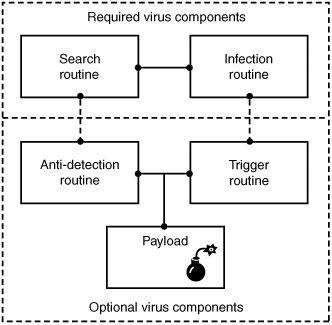
Component/Working of a Virus: Working of VirusViruses that can spread without human intervention are known as worms. ->The search routine is responsible for locating new files, disk space, or RAM to infect -> Infection Routine is responsible for copying the virus and attaching it to a suitable host. ->Trigger Routine: is to launch the pay-load at a given date and time. The trigger can be set to perform a given action at a given time.

Characteristics of Virus

  • Virus resides in the memory and replicates itself.
  • It does not reside in the memory after completing its task
  • It may transform itself into other programs to hide its identity

Reason for the creation of Viruses:

  • It may be created for research purpose
  • May be to play pranks with friend and foes what we usually do J
  • Someone may intentionally wish to harm others computer i.e. vandalism
  • To gain over some companies content for financial or threat purpose i.e extortion
  • To have an eye over the people say in a computer lab or on any product distribution i.e Spyware.
  • For spreading threats and terrors at the people through internet by thefting others identity and misusing that and many more may be the reason.

Symptoms that computer get an attack

  • System will work in unmannered way
  • Process may take more time that its expected.
  • floppy drive or disk drive suddenly get opened
  • Hang up at the starting time.
  • Computer name gets changed.
  • Drive names get changed
  • Firefox or other browsers not working properly
  • Getting sudden restart or freezes fast on warning
  • Other gets vulgar messages what you have not sent to them and so on.

Basic Difference between Virus  and worm:

  • A worm is a special kind of virus that can replicate itself and use memory, but don’t attach itself to other programs what a virus does.
  • A worm spread through the infected network automatically but virus does not.

Types of Viruses:

What they infect

  • Boot virus: infects disk boot sectors and records.
  • File Virus: infects executables files in OS file system.
  • Macro Virus: infects documents, data sheets etc like word, excel
  • Network Virus: spread through email using command and protocols of computer network.
  • Source Code Virus: override host codes by adding Trojan code in it

How they infect

  • Parasitic Virus: attach itself to executable files and replicates itself
  • Memory resident Virus: resides and do changes in main memory
  • Stealth Virus: which can hide itself from anti-virus programs
  • Polymorphic Virus: A virus that mutates and changes accordingly.
  • Cavity Virus: overwrites a host file with constant null but with the same size and functionality
  • Famous Viruses and Worms: I love you which is a win-32 email based worm
  • Melissa Virus: it’s a Microsoft word macro virus
  • JS.spth: It’s a JavaScript internet worm which spreads through e-mail, p2p networks etc.
  • Klez virus: its an email attachment that automatically runs when viewed with MS word and uses its own SMTP engine to spread mail
  • Slammer/Sapphire worm: it was the fastest worm in history which doubles itself within 9 seconds. others are top rated viruses in 2008 detnat,  netsky,  mytob , bagle, mywife, virut, Zafi, mydoom, Lovegate and bagz.

Always remember Prevention is better than cure so don’t accept strange files, don’t do double click on everything, try to check file’s extension and learn little bit batch file commands.

Install good antivirus(Nod32, AVG, McAfee, Bitdefender , Kaspersky etc.) and regulary scan your whole sytem, always try to check processes and all.

For more information check Wikipedia, howstuffsworks.com , Ec-council CEH guide and don’t forget to google to get latest news and stuffs related to this topic. This was just an introduction!

The best multimedia player: KMPlayer (freeware)

The KMPlayer is a versatile media player which can cover various types of container format such as VCD, DVD, AVI, MKV, Ogg Theora, OGM, 3GP, MPEG-1/2/4, WMV, RealMedia, and QuickTime among others. It handles a wide range of subtitles and allows you to capture audio, video, and screenshots in many ways.

Minimal thing that one should know about CSS 3 -Part I

CSS Logo-aliencodersMinimal Introduction About CSS 😉 CSS means Cascaded Style Sheet which is a style sheet language used to describe the layout (look and feel) of a document in Markup Language. CSS is designed primarily to enable the separation of document content (written in HTML or a similar markup language) from document presentation, including elements such as the layout, colors, and fonts.

This separation can improve content accessibility, provide more flexibility and control in the specification of presentation characteristics, enable multiple pages to share common formatting, and reduce complexity and repetition in the structural content (such as by allowing for tableless web design).

CSS can also allow the same markup page to be presented in different styles for different rendering methods, such as on-screen, in print, by voice (when read out by a speech-based browser or screen reader) and on Braille-based, tactile devices. While the author of a document typically links that document to a CSS style sheet, readers can use a different style sheet, perhaps one on their own computer, to override the one the author has specified.

CSS specifies a priority scheme to determine which style rules apply if more than one rule matches against a particular element. In this so-called cascade, priorities or weights are calculated and assigned to rules, so that the results are predictable. The CSS specifications are maintained by the World Wide Web Consortium (W3C).

Internet media type (MIME type) text/css is registered for use with CSS by RFC 2318 (March 1998). Its has gone through different version till date. Its lates version is CSS 3 which  has been under development since December 15, 2005. The minimal topic that one should know to use CSS 3 are written in structured way here and from the next post, we will try to explain all topics one by one.

1. External, Internal, Inline

2. Syntax h1{color:#FFFFFF;} or selector {property:value}

3. ID vs Class

4. Styling

  • Text styling

i. Color ii. Letter-spacing iii. Word-spacing iv. Text-align (left, center, justify, right) v. Text-indent vi. Text-transform (uppercase, lowercase, capitalize) vii. Text-decoration (none, overline, line-through, underline, blink) viii. Line-height

  • Font

i. Font-family ii. Font-style (normal, italic, oblique) iii. Font-size iv. Font-weight v. Font-variant (normal, small-caps)

  • List

i. List-style 1. List-style-image 2. List-style-type (circle, square, alpha, roman, latin, decimal-leading-zero) 3. List-style-position (inside, outside)

  • Table
  • Links

i. a:link ii. a:visited iii. a:hover iv. a:active

  • Background (color, image, position, attachment (scroll, fixed),repeat)

i. Background-color:#colorcode ii. Background-image: url(‘path of image’) iii. Background-position:left top/left center/left bottom/x pos y pos iv. Background-attachment:scroll/fixed/inherit v. Background-repeat: repeat/repeat-x/repeat-y/none 5. Box Properties

  • Model
  • Border
  • Margin
  • Padding
  • Outline

6. Dimension

  • Height
  • Width
  • Max-height
  • Min-width

7. Visibility and display

  • Visibility:hidden collapse(useful for table. Works in IE if !doctype is defined)
  • Display: block or inline or none

8. Positioning

  • Fixed (fixed position is positioned relative to the browser window)
  • Relative (relative positioned element is positioned relative to its normal position.)
  • Absolute (An absolute position element is positioned relative to the first parent element that has a position other than static. If no such element is found, the containing block is <html>)
  • Static (default)
  • Z-index

9. Float and clear

  • Float (left, right, none, inherit)
  • Clear (left, right, both, none, inherit)

10. Pseudo class

  • :focus (ex: input:focus { color:green;})
  • :first-child (ex: p:first-child{color:blue;})

11. Pseudo elements

  • :after
  • :before
  • :first-letter
  • :first-line

12. Opactiy (css3)

  • Opacity: 0-1 (FF)
  • filter:alpha(opacity=x). (for IE x=0-100)

Follow this link for CSS examples
CSS

  1. External, Internal, Inline
  2. Syntax h1{color:#FFFFFF;} or selector {property:value}
  3. ID vs Class
  4. Styling

    • Text styling

i. Color

ii. Letter-spacing

iii. Word-spacing

iv. Text-align (left, center, justify, right)

v. Text-indent

vi. Text-transform (uppercase, lowercase, capitalize)

vii. Text-decoration (none, overline, line-through, underline, blink)

viii. Line-height

    • Font

i. Font-family

ii. Font-style (normal, italic, oblique)

iii. Font-size

iv. Font-weight

v. Font-variant (normal, small-caps)

    • List

i. List-style

1. List-style-image

2. List-style-type (circle, square, alpha, roman, latin, decimal-leading-zero)

3. List-style-position (inside, outside)

    • Table
    • Links

i. a:link

ii. a:visited

iii. a:hover

iv. a:active

    • Background (color, image, position, attachment (scroll, fixed),repeat)

i. Background-color:#colorcode

ii. Background-image: url(‘path of image’)

iii. Background-position:left top/left center/left bottom/x pos y pos

iv. Background-attachment:scroll/fixed/inherit

v. Background-repeat: repeat/repeat-x/repeat-y/none

  1. Box Properties

    • Model
    • Border
    • Margin
    • Padding
    • Outline
  2. Dimension

    • Height
    • Width
    • Max-height
    • Min-width
  3. Visibility and display

    • Visibility:hidden collapse(useful for table. Works in IE if !doctype is defined)
    • Display: block or inline or none
  4. Positioning

    • Fixed (fixed position is positioned relative to the browser window)
    • Relative (relative positioned element is positioned relative to its normal position.)
    • Absolute (An absolute position element is positioned relative to the first parent element that has a position other than static. If no such element is found, the containing block is <html>)
    • Static (default)
    • Z-index
  5. Float and clear

    • Float (left, right, none, inherit)
    • Clear (left, right, both, none, inherit)
  6. Pseudo class

    • :focus (ex: input:focus { color:green;})
    • :first-child (ex: p:first-child{color:blue;})
  7. Pseudo elements

    • :after
    • :before
    • :first-letter
    • :first-line
  8. Opactiy (css3)

    • Opacity: 0-1 (FF)
    • filter:alpha(opacity=x). (for IE x=0-100)

Follow this link for CSS examples


Lock folder without any software

Sooner or later, you may require an application to lock down your important folder. So, why not to lock and unlock folder without any application. Just follow few simple steps and your work will be done.folder-lock-logoSooner or later, you may require an application to lock down your important folder. So, why not to lock and unlock folder without any application.  Just follow few simple steps and your work will be done.

Method 1:

Step 1: open your favorite editor and type: ren foldername foldername.{21EC2020-3AEA-1069-A2DD-08002B30309D}

Step 2: Save it as lock.bat or whatever name you wish to give but .bat extension should be there.

Step 3: Open text editor again and type: ren  foldername.{21EC2020-3AEA-1069-A2DD-08002B30309D} foldername

Step 4: Save it as key.bat or whatever name you wish to give but .bat extension should be there. Now double click on lock.bat to lock “foldername” and double click on key.bat to unlock “foldername”. For ex: say my foldername is jassi then just replace the word foldername to jassi. At one time you can use lock and key batch file for locking one folder only.

Method 2:

As we saw in method 1, that only one folder will work at one time and if someone knows about key.bat, he/she can unlock that folder. So better to have .exe or .com .bat file which can lock or unlock  any folder at your wish with initialized password that only you would know.

Step 1:

Open your favorite editor and type:

cls @ECHO off title Folder Locker color A echo Which folder you want to lock or unlock? set/p "folder=>" if EXIST "%folder%.{21EC2020-3AEA-1069-A2DD-08002B30309D}" goto UNLOCK if NOT EXIST %folder% goto MDfolder :CONFIRM echo Are you sure u want to Lock the folder(Y/N) set/p "cho=>" if %cho%==Y goto LOCK if %cho%==y goto LOCK if %cho%==n goto END if %cho%==N goto END echo Invalid choice. sleep 1 cls goto CONFIRM :LOCK ren %folder% "%folder%.{21EC2020-3AEA-1069-A2DD-08002B30309D}" attrib +h +s "%folder%.{21EC2020-3AEA-1069-A2DD-08002B30309D}" cls color C echo Folder locked sleep 2 goto End :UNLOCK echo Enter password to Unlock folder set/p "password=>" if NOT %password%==jassi  goto FAIL attrib -h -s "%folder%.{21EC2020-3AEA-1069-A2DD-08002B30309D}" ren "%folder%.{21EC2020-3AEA-1069-A2DD-08002B30309D}" %folder% echo Folder Unlocked successfully sleep 2 goto End :FAIL cls color 4A echo Invalid password goto UNLOCK :MDfolder cls echo %folder% was not there so md %folder% echo %folder% created successfully sleep 2 :End

Step 2:

Save it as locker.bat or any name but be sure that extension is .bat and yeah before saving it change password according to your ease. Right now its jassi . Find that keyword and change as you wish. Now double click on locker.bat, one command prompt will come and will ask for folder to lock and unlock. If folder is not there it will create too. It will not unlock unless and until you give correct password.
Being .bat extension people may edit it so at that time you may wish to change it in .com or .exe extension. You can do that by downloading  Bat_To_Exe_Converter.exe which is free ofcourse.


Note: Main important thing to note here {21EC2020-3AEA-1069-A2DD-08002B30309D} , its  nothing just the address of control panel. So We renamed our folder as control panel destination, which means if you click on that locked folder now. It will open control panel. Hope you will enjoy it!!!