Everything about cd command in UNIX

analysis of cd command.Hi Alien Coders….its not an alien thing to write about cd. Yeah cd(change directory) not CD(Compact Disc) 😛 . Either you are working on Windows or Unix flavors O.S, the most easiest and usual command is cd, correct?

cd means change directory (as everyone knows) and its more powerful in Unix rather than Windows i guess. Window is having only cd path_of_the_diretory or cd .. but in Unix or specifically in Linux cd command is having lots of options. Lets explore one by one:

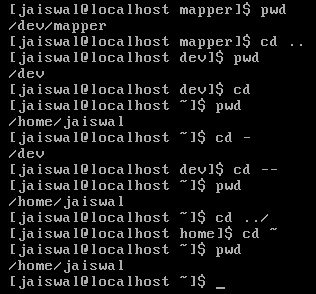
1. cd path_of_directory This command is used to enter into the directory whichever is specified either absolute or relative Ex: # cd /home/jaiswal/songs/audio/bollywood (absolute path) # cd  songs/audio/bollywood   (relative path when u r already at /home/jaiswal)

2. cd .. This command is used to move one step up form the current directory. If you are at /home/jaiswal/songs/audio/bollywood (keep it as a base of the examples) and want to move one directory up use cd .. Ex: # cd ..  (now current directory will be /home/jaiswal/songs/audio) # cd ../../../movies  (moved up three directories and entered into movies directory now i.e. /home/jaiswal/movies)

3. cd – This command comes very handy when you are working with files and one is at other directory and one is at another directory. For example: suppose one file is at /opt/bin/perl/codes and other is at /opt/bin/perl/modules/jaiswal/modules Now go to one directory using cd. Like cd /opt/bin/perl/codes then again type cd /opt/bin/perl/modules/jaiswal/modules and now use cd – You will be returned back to previous one which you used with cd. now use cd – as many time as you wish to switch over those two directories.

Ex:

# cd /opt/bin/perl/codes
# cd /opt/bin/perl/modules/jaiswal/modules
# cd - /opt/bin/perl/codes
# cd - /opt/bin/perl/modules/jaiswal/modules
Yes , you are right cd – is doing two work at a time.

1. Bringing back to previous used cd directory path and 2. also print the current directory path just like pwd

4. cd — or cd ~ or cd Yes all three commands will let you drive to user's home directory most probably /home/user_name like /home/jaiswal ex: #  cd — or cd ~ or cd (don't write all three commands all together just i wrote. use any one if at one time buddy.) Windows have no such option as far as i have tried (if it is there let me know ) # pwd /home/jaiswal # I hope you will like it although even you know all these commands, you will find rarely any article on this which will explain like this. What say?

Tool to get information about site: whois and whosip (for windows)

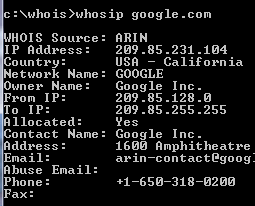
Hi friends, you might be using some whosip informationonline site to know the details about any ip address or website like ip-adress.com or whois.domaintools.com In Linux or Unix based O.S there is a utility call whois , if you are familiar with whois and wish to do the same operation in windows then you might find whois and whosip tools useful.

How to get work done on Windows:
Step 1: Download whois or whosip (or both ,depending upon your interest). These software will be in zip format.

Step 2:

  1. Make a folder anywhere in your PC, like C:/whois/
  2. go to that folder i.e. whois (here in example)
  3. extract any one of these or both (again on your interest)

Step 3: open run command type cmd then go to c:/whois location and type whois domainname hostname(optional) or whosip domainname hostname (for summary) or whosip -r domainname (for detailed information)

Here domain name can be either website name or its IP address. Ex: whois google.com whosip google.com whosip -r google.com Note: the information that you will see through whois and whosip may differ What I observed from the output is whois <domain name> will give you the information about domain name whereas whosip <domain name> would give you the information about registrar where that domain name got registered etc. So, if you wish to know something about hostname use whois or if you wish to know where that domain name got registered and all then use whosip.


An alternative to winrar : 7-zip

compression softwareIn our day today life, we use at least one of the rar application  for sure. It may be used to compress your codes, files, movies, songs whatever it is.
Winrar seems bit popular in this area but it now freeware or open source application. And I get annoyed when I double click on any .rar files it open winrar application and says buy it or use trial version. Then I was trying to find better compression application than winrar and guess I got success in that.

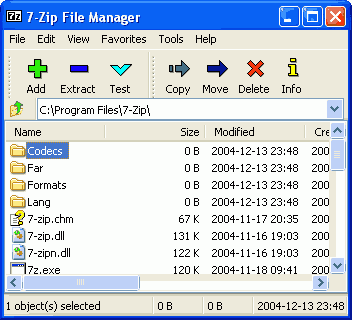
7-zip is the alternative to winrar or any compression application. It supports nearly all feasible format for your system. Its an open source software, so you can download it freely from  here (32 bit) and from here for 64 bit pc

  • It is of 1 MB size and supports near around 70 languages.
  • Its latest version is 9.13 in beta relaease and 4.65 under stable release
  • It supports under any windows platform like XP/Vista/ME/2000, hopefully it would work on 7 also
  • 7-Zip compresses to zip format 2-10% better than most of other zip compatible programs.
  • 7-Zip compresses to 7z format 30-70% better than to zip format

Compression ratio depends upon what you are  going to compress. Like if you are going to compress any .exe file then it will not compress much because its already compressed. Use it and revert back your feedback here.

Pidgin: Universal Chat software v2.6.6

Pidgin: Universal Chat SoftwareEvery time when you wish to chat with your friends and foes, you have to open separate chat software for that like msn, skype, yahoo, gtalk and so on. Why not to use only one software for all these stuffs.

Then I saw one site called meebo.com (its really a cool one, web based chat site). It allows you to login with your yahoo or gmail or skype etc ids. But if you are looking for a software that will provide you such facilities , then pidgin is there.

Pidgin (formerly named Gaim) is a multi-platform instant messaging client, based on a library named libpurple.

Libpurple has support for many commonly used instant messaging protocols, allowing the user to log into various different services from one application.  libpurple is intended to be the core of an IM program. When using libpurple, you'll basically be writing a UI for this core chunk of code. Pidgin is a GTK+ frontend to libpurple, and Adium (like pidgin but for Mac OS X) is a Cocoa frontend. Whatever be your chat program, whatever language you use, if you are going to connect with network, user dialogue box, user authentication in fancy manner; you have to use libpurple. It is being used by pidgin, meebo, EQO(for mobile users), Adium etc.


It’s an open source software and written in C and its plugins are written in C#, Python, Perl etc. Its file Size is 14.10 MB and latest Version is 2.6.6 Pidgin supports following chat networks:  AIM, ICQ, Google Talk, Jabber/XMPP, MSN Messenger, Yahoo!, Bonjour, Gadu-Gadu, IRC, Novell GroupWise Messenger, QQ, Lotus Sametime, SILC, SIMPLE, MXit, MySpaceIM, and Zephyr. It can support many more with plugins.

It  Supports many international and lots of regional languages too like Kannada, Gujarati  ,  Telugu, Punjabi, Marathi and Hindi (of course).  It supports almost all popular languages over the world. Whatever be your OS you can use it (Windows and Linux is common).

It became very popular  after 2007 and today millions of people use it worldwide. It supports all famous chat networks like

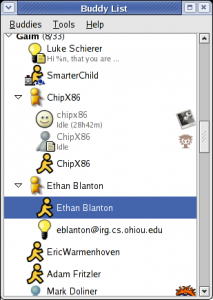
Shows all chat list

  • Bonjour
  • Gadu-Gadu
  • Google Talk
  • Groupwise
  • ICQ
  • IRC
  • MSN
  • MXit
  • MySpaceIM
  • QQ
  • SILC
  • SIMPLE
  • Sametime
  • XMPP
  • Yahoo!
  • AIM
  • Zephyr
  • Now Facebook chat also being supported through XMPP network.

But I found only one demerit in it, that is why I use it rarely. If you are logged in with your yahoo account , next time if you will login with your gmail account, it will show you your yahoo and gmail friend list together (imagine in case of yahoo, gmail, msn, aol: how long list you will be having). One more thing is that, if you are using it alone then its ok. If your friends also gets logged in through the same software then he/she will be able to see your whole friend list also (Isn’t it bad?). I hope in next version they will do something to this issue.

Uncategorized

ESET’s nod32 and smart security 4

ESET v4 (latest one)Hi friends I am using this anti-virus from last 3 years and believe me i never got anything in mind to change this software and to use other. What i like most in ESET’s Nod32 is:

  • It doesn’t slowdown your system
  • It updates recent virus signature database automatically
  • Very user friendly and its just like a German shepherd, it will never allow any unwanted stuffs to get in.
  • It is written in assembly language, so its but obvious that it will have fast execution than other software.

ESET is having its two products mainly. They are ESET Nod32 and ESET Smart Security and it comes for home edition, business edition and enterprise edition. you can download softwares related to eset from its own site. click here

Features of NOD32 4.0.467 :

  •  ThreatSense technology — a single optimized Anti-Threat engine for analyzing code to identify malicious behavior, such as viruses, spyware, adware, phishing and more
  •  Unprecedented heuristic analysis capable of discovering new malware threats as they emerge • Powerful virtual PC emulation technology enables unpacking and decryption of all types of archives and run-time packing • Able to clean active malware running in memory
  •  Protects at multiple infiltration points, including HTTP, POP3, SMTP and all local and removable media
  • Removes infections from files that are locked for writing (e.g., loaded DLL file) • Prevents infected files from being opened and executed, and warns on creation of infected files
  •  Automatic execution on system startup • Supports multiple Terminal Server environments
  •  Supports scanning of mapped network disks and many more .

It will be hardly 34 MB and its latest version is 4.0.467 Final It has home edition, business edition, mobile edition as an option; whatever you need you can get the download link form here. You can give it a trial i am sure you will be loving it. One thing i will suggest that use USB disk security system with it then you will never have any kind of virus problem in your system.

Bit Torrent: an introduction about torrents

Bit Torrent BitTorrent logois the name of a peer-to-peer (P2P) file distribution protocol, and is the name of a free software implementation of that protocol.

A Protocol is a formal description of message formats and the rules that two computers must follow in order to exchange those messages. P2P is a jargon for Peer-to-Peer file sharing. File sharing is not a new phenomenon. The first of the file sharing clients appeared in early 1999 and reached mainstream popularity within a few months. Peer-to-Peer file sharing is now a seven year old phenomenon, and by many subscribers would be considered a fundamental Internet service.

Some terms associated with file sharing: Peer:A peer is one instance of a BitTorrent client running on a computer on the Internet to which other clients connect and transfer data. Usually a peer does not have the complete file, but only parts of it. However, in the colloquial definition, “peer” can be used to refer to any participant in the swarm (in this case, it’s synonymous with “client”).

Seeder : A seeder is a peer that has a complete copy of the torrent and still offers it for upload. The more seeders there are, the better the chances are for completion of the file.

Leech : A leech is usually a peer who has a negative effect on the swarm by having a very poor share ratio – in other words, downloading much more than they upload. Most leeches are users on asymmetric internet connections and do not leave their BitTorrent client open to seed the file after their download has completed. However, some leeches intentionally avoid uploading by using modified clients or excessively limiting their upload speed. The term leech, however, can be used simply to describe a peer or any client that does not have 100% of the data. U can say like us student who serrves the pc for our download purpose just after the download we cut-off the connection. So we are are all leachers!

Torrent : A torrent can mean either a .torrent metadata file or all files described by it, depending on context. The torrent file contains metadata about all the files it makes downloadable, including their names and sizes and checksums of all pieces in the torrent. It also contains the address of a tracker that coordinates communication between the peers in the swarm.

Tracker : A tracker is a server that keeps track of which seeds and peers are in the swarm. Clients report information to the tracker periodically and in exchange receive information about other clients to which they can connect. The tracker is not directly involved in the data transfer and does not have a copy of the file.

File sharing characteristics : Peer-to-Peer usage follows the typical 80/20 rule, in that 80% of files downloaded (by volume of total traffic)represent only 20% of the files available (by number of unique files available). In fact, research shows the breakdown is closer to 90/10. The language used for bit comet command is C++ while bit torrent works on Python.

Limitations and security : BitTorrent does not offer its users anonymity. It is possible to obtain the IP addresses of all current, and possibly previous, participants in a swarm from the tracker. This may expose users with insecure systems to attacks.

Another drawback is that BitTorrent file sharers, compared to users of client/server technology, often have little incentive to become seeders after they finish downloading. The result of this is that torrent swarms gradually die out, meaning a lower possibility of obtaining older torrents. Some BitTorrent websites have attempted to address this by recording each user’s download and upload ratio for all or just the user to see, as well as the provision of access to older torrent files to people with better ratios. Also, users who have low upload ratios may see slower download speeds until they upload more. This prevents users from leeching, since after a while they become unable to download much faster than 1-10 kB/s on a high-speed connection. Some trackers exempt dial-up users from this policy, because they cannot upload faster than 1-5 kB/s.

BitTorrent is best suited to continuously connected broadband environments, since dial-up users find it less efficient due to frequent disconnects and slow download rates.

Some facts to be known about torrents:

Q: What are the five best torrent search engine?

A: As of October 2, 2006, the 5 Best Bit Torrent search engine sites are listed below. This list is selected from hundreds of reader votes, and voted on each week by a small panel of torrent download users. The criteria used to evaluate these torrent sites: breadth and depth of database, database currency, ease of use and searching, speed of access,general integrity of files, information provided on the torrent P2P community, price of membership, and readers’ comments.

1.The Pirate Bay (the piratebay.org)
2.Torrentz.com (its a torrent search engine)
3.Isohunt (this one is also cool)
4. Demonoid (i use it frequently)
5. Desitorrents.com (for indian movies)

Q. What Are the good BitTorrent software packages?

A: 1. uTorrent (has all the functions a torrent downloader, yet it very small memory foorprint)
2. Azureus (A utorrentJava lanBitLord logoguage client; was the best until uTorrent software came along)
3. ABC
4.Bitlord (Nice-looking GUI appearance )
5.BitComet (Good, but losing popularity to uTorrent and Azureus)
6.The Original BitTorrent Client (Authored by Bram Cohen himself; no fancy GUI here, but it downloads quickly)

Q: How are torrents special? How is the torrent community different from Kazaa or Limewire?
A: Like the other file-sharing networks (Kazaa, Limewire, Gnutella, eDonkey, and Shareaza) BitTorrent’s primary purpose is to distribute large media files to private users. Unlike most P2P networks, however, BitTorrent stands out for 5 major reasons:

1. BitTorrent networking is NOT a publish-subscribe model like Kazaa; instead, BitTorrent is true Peer-Peer networking where the users do the actual file serving.

2. Torrents enforce quality control by filtering out corrupted and dummy files, ensuring that downloads contain only what they claim to contain.

3. Torrents actively encourage users to share (“seed”) their complete files, while punishing users who “leech”.

4. BitTorrent can achieve download speeds over 1500 kilobits per second.

5. BitTorrent code is open-source, advertising-free, and adware/spyware-free. This means that no single person profits from BitTorrent’s success.

An important thing to note is that download speeds are controlled by Torrent tracking servers, who monitor all swarm users. If you share, tracker servers will reward you by increasing your alotted swarm bandwidth (sometimes up to 1500 kilobits per second).
Similarly, if you leech and limit your upload sharing, tracking servers will choke your download speeds, sometimes to as slow as 1 kilobit per second. Indeed, the “Pay It Forward” philosophy is digitally enforced! Leeches are not welcome in a BitTorrent swarm.
Beware of spam mail

What steps can I take to minimize spam email? What is spam email? Why is spam email an issue? Spam email is generally annoying, and can slow down computer networks and the delivery of legitimate email, and increase your download Spam mailcosts.

Why is spam email an issue?

Have you ever observed that you are getting few mails based on your search criteria. Even Google does so. In my Gmail inbox i find suggested mail based on my search on Google. Sometime you will get message like "Congrats! you won the lottery and so and so…", play this video, its amazing or some power point slides (either from your friend or from strangers).

Do you check these stuffs through any anti-virus before opening it?

I guess more than 75% users will say no. What if on click on such things will crash your system or will leak your personal information. Have you even thought about it? if not then start thinking….. This is what we call spam and through Social engineering it is very easy to get information about you and about your system.

You might have read or heard about web security that is being provided by any banks. They use "https" protocol to make it safe and a lot of security features are there. You might have read these few  lines somewhere which is written below: We are committed to developing online and electronic products to help taxpayers meet their obligations and make the experience easier, cheaper and more personalized. We place significant effort and resources into ensuring the security and privacy of tax information and the integrity of our systems. However, it is equally important that you know about, and can minimize the risk of, certain information technology issues that could:

  • cause you significant inconvenience or costs
  • impact on your ability to deal with us electronically or online
  • result in the loss or damage of your electronic information, or
  • lead to your electronic records or tax details being misused.

If you manage your tax affairs using a computer system, or use the Internet or e-commerce systems to deal with the tax office, then you should be aware of spam email.

What is spam email?

Spam email is the electronic equivalent of junk mail. It is email that is not requested and usually not wanted. It is typically used to promote a particular product or service. The amount of spam being sent has increased significantly over the past few years. Some authorities claim that spam may account for up to 80% of all email in the world.

Spam email is generally annoying, and can slow down computer networks and the delivery of legitimate email, and increase your download costs.

Most significantly, spam email may be used to distribute computer viruses, spy ware or Trojans that could affect your computer or allow others to access your personal information. Related publications available are:

What steps can I take to minimize spam email?

  • Delete all spam mail. Do not ask to be removed from a mailing list or follow hyperlinks to unsubscribe from further email. This just indicates your email address is active and you'll most likely receive even more unsolicited email.
  • Never purchase anything from a company that sends you spam email. This only supports the activity.
  • If you need to provide details to a particular website, review their privacy policies. Make sure you know what they will do with your email address and personal details. Do not provide your email address to any organisation you do not trust.
  • Set up a spam filter if your email program has this functionality. This can reduce spam by marking, blocking or deleting spam email.
  • Spam from Australian companies or individuals can be reported to the Australian Communications Authority (ACA) which administers the Spam Act 2003.

Spam emails produce as much greenhouse gas emissions each year as 3.1million cars, according to new research. A study for computer protection company McAfee showed that globally, spam uses 33 billion kilowatt hours (KWh) a year – enough energy to power 2.4million homes.

The research also found that the UK was the joint fourth biggest emitter of CO2 from spam in the world, creating 50,000 tonnes of carbon dioxide a year.
Greenhouse gases: Spam uses 33 billion kilowatt hours a year – enough energy to power 2.4million homes, claims the research. The Carbon Footprint of Spam study by researchers ICF said that nearly four-fifths of the energy use associated with the emails was in end-users deleting spam and searching for legitimate emails.

The report also claimed that spam filtering currently saved enough energy to reduce emissions equivalent to taking 13 million cars off the road.

More…

Jeff Green, senior vice president of product development and McAfee Avert Labs, said: 'As the world faces the growing problem of climate change, this study highlights that spam has an immense financial, personal and environmental impact on businesses and individuals.

'Stopping spam at its source, as well as investing in state-of-the-art spam filtering technology, will save time and money and will pay dividends to the planet by reducing carbon emissions as well.'

Note: I liked this article and read it somewhere a month ago, so thought to share with you people.


Links that may save your time on internet

Hi friends, whenever and whatever be the case, we usually do a lot of search for specific topic like downloading songs, movies, books etc., online tutorials related to programming, or any other area like Maths, Bio and so on . Now I tried to put few important links here so that you can save you time whilst searching such stuffs. I hope it would be very helpful to you internet guys.

  1. Songs/Movies (Audio/Video)

CMS: a complete package for web designing

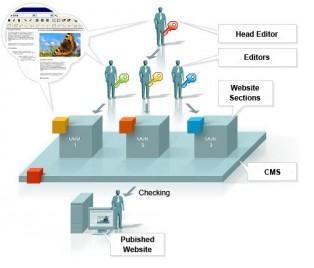
If one needs for personal website and as i work on PHP stuffs so i will prefer JOOMLA, if site is bigger and one needs more functionality tworking of a CMShen one should go for Drupal. If the site is for blog purpose then one can use wordpress. I have used wordpress for blog and SMF for forum in our website i.e non-other than aliencoders.org



 Although here are hell lots of popular websites working on CMS concept but still many people who use internet or who are from technical field don’t know that much about CMS of if someone says Website production works on MVC(Model View Control). So first question is what is CMS? then may be people think who all gonna use it, whats needed to use it blah blah lets try to elaborate step by step.

1. What is CMS? A content management system (CMS) is the software that almost every website and intranet use whatever be the use either personal, commercial, educational sites etc. What CMS uses is templates for graphics layout, plug-ins/modules etc for displaying contents according to the described purpose.A content management system (CMS) supports the creation, management, distribution, publishing, and discovery of corporate information.

  • It covers the complete life cycle of the pages on your site, from providing simple tools to create the content, through to publishing, and finally to archiving.
  • It also provides the ability to manage the structure of the site, the appearance of the published pages, and the navigation provided to the users.
  • We are focusing on the most common use of a CMS: to manage web content. so, these systems are also called Web Content Management Systems (WCMS).

2. What are its goals actually ? There are so many goals but i am writing here only basic goals what every CMS is made up of.

  • to increase flexibility
  • Reduce redundancy in information
  • improve publishing process
  • easy to maintain
  • easy to use
  • only basic knowledge of web site designing and CMS specific language will suffice the needs
  • If anything new to be implemented, it should be done with ease.

There may be many goals but i observed that these can be the basic needs.

3. Why CMS is required?

Content Management System makes life much easier in many ways:

  • any newbies can even make a good looking site without the help of web designer.
  • Changes can be made any time as they are needed without any difficulties.
  • All the technical details are simply handled by the CMS, allowing anyone to manage and update the site, only one should know how to use that CMS
  • Many users can keep the site up to date, instead of being restricted to just one person. The CMS will track who is doing what, avoiding potential confusion, like blogging .
  • You can issue particular permission to particular section to a particular person/member of that site
  • The CMS ensures that all the pages are consistent in design, and will build all the menus and other navigation for you.
  • There are less bugs and security is of main concern.

4. What are famous CMS in use

Logo for wordpress
Logo for wordpress
Logo for joomla cms
Logo for joomla cms
Drupal Logo
Drupal Logo

See what is famous is not always good for you , may be it wll not fulfill your needs so its upon the person that what all facilities he/she wants in his/her websites. How big the site will be, how much money one can spend,  What all sorts of knowledge is required for that CMS and what the user knows.

CMS is written in many languages like PHP, JAVA, Python, Perl, Ruby etc. What should be one’s preference is main important , say if company is working on STRUTS then you have to use that but if  its upon on our choice then i would prefer any popular open source CMS which has many developers and very active communities.

If one needs for personal website and as i work on PHP stuffs so i will prefer JOOMLA, if site is bigger and one needs more functionality then one should go for Drupal.

If the site is for blog purpose then one can use wordpress.

I had used wordpress for blog and SMF for forum in our website i.e non-other than aliencoders.org But now I am using Drupal from last 1 year and will stick to it.

Here is the list of CMS

Minimal application that user should install after Windows Installation

Well this article is very useful for those users who don’t use computer and internet frequently or those who are not a frequent users or computWindows userer expert.

Although its very basic thing to know that what a computer users should install in their system(windows users), whatever they wish they can install but what matters is what are the  essential software amongst them.

I am listing few of them rest they can install according to their needs. After installing  one of the various versions of WINDOWS  (like XP/VISTA/ME etc) one should install