Hide and Prevent Access to drives using diskpart utility

dispart utilityAlthough there are many ways to hide your drive and to prevent access to your drives. Either by setting regedit value for NoDrives and  NoViewOnDrive  or by using some system settings.

But I found one built-in tool “DISKPART”.

1. Go to Start > run > type "diskpart". A DOS window will appear with following description. DISKPART>

2. Then type "list volume" The result will look like: 

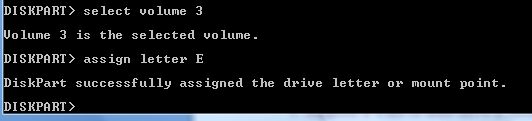
3. Suppose u want to hide drive E then type "select volume 3" Then a message will appear in same windows { Volume 3 is the selected volume}

4. Now type "remove letter E" Now a message will come { Diskpart Removed the Drive letter }
Sometime it requires the reboot the computer  or logoff and login will work. Diskpart will remove the letter. Now try to open that date even using at address bar. It will not open. Windows XP is not having capability to identify the unknown volume. Reassingning drive letters using dispartYour Data is safe now from all unauthorized users. Don’t worry it will not tamper any of your data.

To access the content of hidden Drive repeat the process mentioned above. But in 4th step replace “remove" to "assign" i.e. type "assign letter E" . Note: It will not work for drive which is having system files, boot files etc like C drive in most cases. And it works in Vista , XP too. Didn’t test in win 7 but I think it will work there also.

ID vs Class in CSS

CSS allowClass vs ID in CSSs us to define our own custom selectors also, which is known as ID and class selectors. IDs and classes are applied to (X)HTML elements as simple attributes that provide much tighter control over our design. Most of the time, we get confused IDs with classes, either failing to utilize the real purpose of each or simply using one instead of the other.

Let’s treat ID as identification, which is unique to you an is not shared with anyone else. A class is different, in that there can be many people in a class, be it at school, in society, or wherever. This translates to CSS where an ID can only be used once per page, whereas classescan be used an unlimited number of times.

Another Example could be Bar Code (class) and Serial Number (ID).

There are two kinds of selectors mainly in CSS: One is base selector like h1,h2, body, table or any existing HTML tags.
Such as the following rule which sets all paragraphs to red (font-color): p {color: #F00;}

CSS allows us to define our own custom selectors also, which is known as ID and class selectors. IDs and classes are applied to (X)HTML elements as simple attributes that provide much tighter control over  our design. Most  of the  time, we get  confused IDs with classes, either failing to utilize the real purpose of each or simply using one instead of the other.

Let’s  treat ID as identification. Which s unique to you an is not shared with anyone else. A class is different, in that there can be many people in a class, be it at school, in society, or wherever. This translates to CSS where an ID can only be used once per page, whereas classescan be used an unlimited number of times. Another Example could be Bar Code (class) and Serial Number (ID).

IDs An ID can only be used once per page, and is a unique identifier to an element.
Typically, an ID is used for any unique page element such as the header, main navigation, footer, or other key part of the user interface. Applying an ID The most common way to apply an ID is to reference it in the (X)HTML using the id="name" attribute immediately after the opening tag within an element. In this case, our two IDs are named highlight and default, respectively, and are applied to two paragraphs:

<p id="pred">This paragraph has red text.</p>
<p id="default">This paragraph has dark gray text.</p>

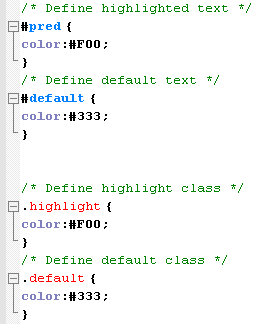
The corresponding CSS uses the hash (#) character to denote the rule is a unique ID. The hash is combined with the ID name to start the rule, followed by the property declarations:

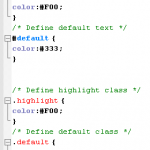
/* Define highlighted text */
#pred {color:#F00;}
/* Define default text */
#default {color:#333;}

Combining IDs with Selectors Existing or new IDs can be combined with selectors in the style sheet to add further control. In the following example, the base CSS defines all h2 headings as dark gray and 16 pixels in size: /* Basic heading style */ [code language="css"] h2 { color:#333; font-size:16px; } [/code] That is fine for most uses of <h2>, but let’s say the main <h2> on your page (the title of an article) needs to be emphasized with a different color. This calls for a new rule where the selector is defined in the form element#name:

/* Adjust the color of h2 when used as a title */
h2#title { color:#F00; }

Here the new rule will override the default <h2> color (color: #333;) with red (color: #F00;) whenever an <h2> is identified with in the (X)HTML. The new rule does not redefine font-size, so that will be carried over and unchanged. Simply add the unique identifier to the page:

<h2 id="title">Title Of My Article</h2>

Remember that title is a unique identifier, so it cannot be used again within that template. Any other instances of <h2> on the page will be rendered with the default styling.

When to Use an ID
Only one element on each page can be styled by each unique ID, and therefore IDs should be reserved for unique, single-use elements such as a header or sidebar, or the main navigation or page footer. This makes scanning your markup easier, as all ID attributes will denote unique content areas or special regions of the page, while also providing greater flexibility for more complex CSS application

When to Avoid an ID
IDs must be avoided when there is more than one requirement for the CSS rule. Do not use an ID for anything you are likely to multiply in the future, such as multiple images, link styles, or paragraphs where more than one will need to be styled a particular way.

Class
A class can be used an infinite number of times per page, making it a very flexible method of applying CSS. A class defines an element as belonging to a group, or as a reusable object or style. Classes solve problems in the short term, but can provide less flexibility for more complicated CSS designs.

Applying Classes The most common way to apply a class is to reference it in the (X)HTML using a class="name"attribute of an element. As with our ID example, the two classes are named highlight (for red text) and default (for dark gray text):

<p class="highlight">This paragraph has red text.</p>
<p class="default">This paragraph has dark gray text.</p>
<p class="default">This paragraph also has dark gray text.</p>

Note that as the identifiers are classes, they can be used more than once, hence in the example two paragraphs have been identified as default, so will be styled the same way. That would not be acceptable if using IDs. The corresponding CSS uses a full stop (.) character to denote the rule is a reusable class. The full stop is combined with the class name to start the rule, followed by the property declarations:

 /* Define highlight class */
.highlight {color:#F00;}
/* Define default class */
.default {color:#333;}

Combining IDs with Multiple Classes
Classes are especially useful when you wish to have control over a number of elements. Consider the following drinks list, the source code for which is available in the drinks.html file:

<ul id="drinks"> <li class="alcohol">Beer</li> <li class="alcohol">Spirits</li> <li class="mixer">Cola</li> <li class="mixer">Lemonade</li> <li class="hot">Tea</li> <li class="hot">Coffee</li> </ul>

Note first that the unordered list (<ul>) is given a unique ID. Thus, id="drinks" will not be used again on the page at any time, allowing that particular list to be styled uniquely. Note also that Beer and Spirits are within list elements defined with class="alcohol", Cola and Lemonade are within list elements defined with, and finally Tea and Coffee are defined in list elements with. This allows each drinks group to be treated individually. The CSS declares that the default text for that list will be red, so any list items without a class attribute will default to red text:

/* Drinks list styling */
ul#drinks {color:#F00;}

Next, the classes for each drink type are defined with unique shades of gray for font color:

/* Define alcohol color */
.alcohol {color:#333;}
/* Define mixer color */
.mixer {color:#999;}
/* Define hot drinks color */
.hot {color:#CCC;}

The result sees the list of items move through shades of gray (defined by the classes). Any further drinks added to the list can be assigned to a particular drinks group, such as <li>Wine</li>. Thus a logical color key is established using simple CSS classes.

Note: Before adding a class to an element, be sure that the element needs it. Too often web designers overuse classes when the (X)HTML is already providing more than enough hooks for the CSS. Make sure that the element cannot be targeted using a descendant selector or other method before opting for a class. This will help keep your code lean and make future redesigning much easier.

Overriding Base Styling with Classes Here is an example of base CSS rule that is being  used to turn all paragraphs red declaring all instances of paragraphs red and  add a class rule to the CSS that will bleach out any element it is identified with by turning text light gray:

/* Default styling for paragraphs */ p {color:#F00;font-size:12px;} /* Use this style to turn anything light gray */ .bleached {color:#CCC;}

All paragraphs will still be red by default, but this can still be overridden when necessary by identifying an element with the bleached class, as in this (X)HTML: <p>This paragraph has red text.</p> <p class="bleached">This paragraph has light gray text.</p> The second paragraph will now be light gray, as the color declaration in bleached overrides the red. Note that the paragraph is still rendered 12 pixels high, as bleached does not redefine font-size. Add a font-size declaration in bleached, and that value will override the original size for all paragraphs identified with.

Linking a Class Directly to an Element In this example, the CSS is constructed with the class attached directly to the element in the form element.classname, and like before, it is referenced using the class="classname" format within the (X)HTML.

/* Use this style to turn anything light gray */
.bleached {color:#CCC;}
/* Override the color of bleached when it identifies a paragraph */
p.bleached {color:#000;}

This method would be used when the standard declaration for the bleached class needs to be overruled. For example, any element given a class of bleached will remain light gray (color:#CCC;), but any instances of paragraph elements with a class of bleached will be rendered black (color: #000;). This method is useful when numerous instances of a class are littering your (X)HTML, and it would be too difficult to remove them all manually. Instead, simply target that class when it identifies the element you need to change using the form element.classname.

When to Use a Class
As described previously, classes are a very flexible method for applying your CSS rules, and can be used again and again within a page. Use classes to control elements that belong to a group, for temporary items, and also to enhance the behavior of an ID.

When Not to Use a Class
It is not recommended that classes be used for main structural elements within a page, such as headers and main navigation, although they will work. Doing so would decrease the flexibility of your design and make further customization difficult without overhaul or extra markup. Also, be sure a class is needed, and make sure the element cannot be targeted by defining a rule for the existing (X)HTML before getting class-happy. Remember that a class is used for exceptions to normal styling, and not to define the standard.

Elements can have BOTH
There is nothing stopping you from having both an ID and a Class on a single element. In fact, it is often a very good idea. Take for example the default markup for a WordPress comment list item: <li id="comment-27299" class="comment"> It has a class applied to it that you may want for styling all comments on the page, but it also has a unique ID value (dynamically generated by WordPress, nicely enough). This ID value is useful for direct linking. Now I can link directly do a particular comment on a particular page easily.

CSS doesn’t care
Regarding CSS, there is nothing you can do with an ID that you can’t do with a Class and vice- versa. I remember when I was first learning CSS and I was having a problem, sometimes I would try and troubleshoot by switching around these values. Nope. CSS doesn’t care.

Javascript cares
JavaScript people are already probably more in tune with the differences between classes and ID’s. JavaScript depends on there being only one page element with any particular, or else the commonly used getElementById function wouldn’t be dependable. For those familiar with jQuery, you know how easy it is to add and remove classes to page elements. It is a native and built in function of jQuery. Notice how no such function exists for ID’s. It is not the responsibility of JavaScript to manipulate these values, it would cause more problems than it would be worth.

If you don’t need them, don’t use them (try to avoid using if possible)

Smileys for all chat messenger at one place

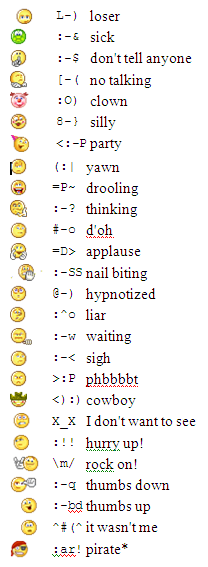
Chatting is funNow a days, chatting over net is very very common. And use of smiley makes more sense than words sometimes. Specially when you are in sad mood, angry mood or in romantic mood 😛

There are many keyboard shortcuts to send smiley or emoticons and in almost all chat messengers it will be more or less same. Most popular chats are Yahoo, GoogleTalk (Gtalk), Skype, FB emoticons too (FaceBook is at world rank 2)

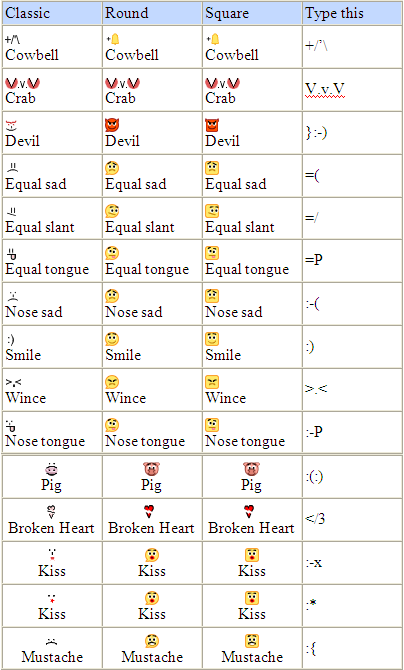
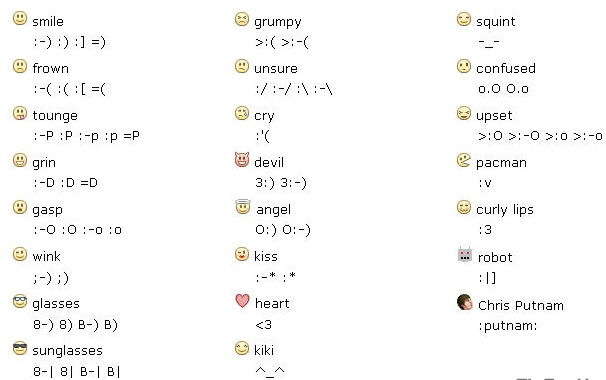
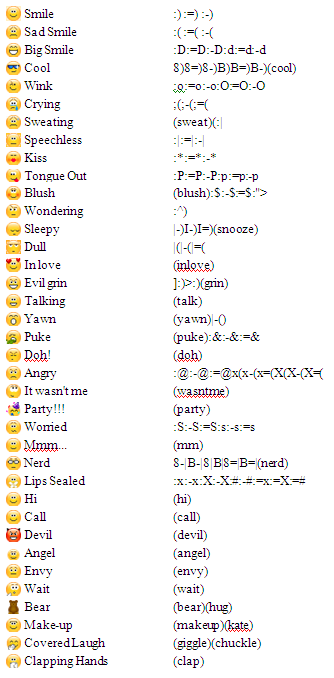
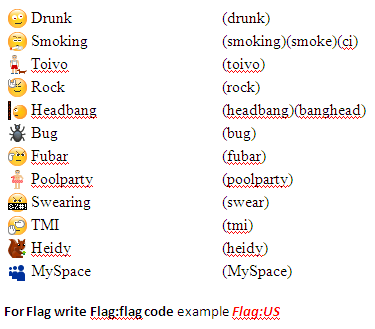
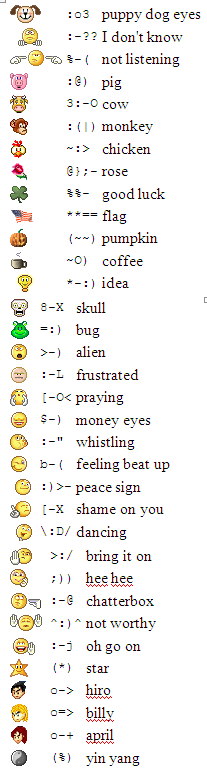
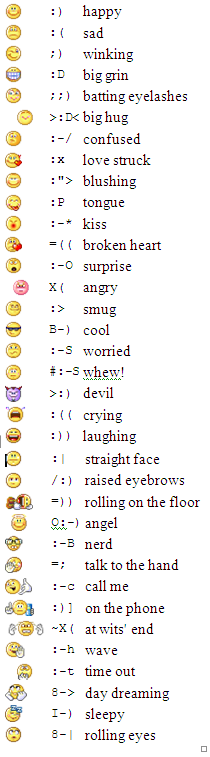
I will post images for all possible emoticons of most popular chat services that i collected from various sites. few are common to all messengers and few are hidden one like yahoo smiley for flag, rose etc. Gtalk is having three different tastes for emoticons: Classic, Round, Square:

Gtalk Emoticons-IGtalk Emoticon-IIFacebook EmoticonsSkype EmoticonsSkype Emoticons-IISkype Emoticons III Yahoo EmoticonsYahoo Emoticons-IIYahoo Emoticons-III

Enjoy All the Emoticons at one place. Happy Alien blogging !

Safety tips for mobile users

be safe while talking on mobile Hi friends, according to present scenario every people who are above 14 are having mobile (except those who can't afford it). Its good thing to have to be in touch with friends and families but it may turn into devil if you misuse it either knowingly or unknowingly. So, its the right time to know that what we should do and what we should not do with mobile.

  • Only give your mobile number out to people you know and trust. (Specially for girls)
  • Don't do any transaction through smart phone if password or any personal information is getting to be stored in your mobile.
  • Don't talk rubbish or don't harass anyone on phone, it comes under Cyber Crime. (while break up couples usually do so. So beware guys!)
  • Avoid, unless absolutely needed, connecting to an unsecured wireless network through your mobile (whici is having wi-fi facility)
  • Do not use your mobile phone to communicate with strangers. Only text and call people or businesses you know in real life.
  • Never reply to text messages from people you don’t know. (One or two messages you can do to know his/her identity, if possible)
  • Make sure you know how to block others from calling your phone. Using caller id ,you can block all incoming calls or block individual names and numbers.
  • Make a record of your Electronic Serial Number (ESN) and/or your International Mobile Equipment Identity (IMEI) number. You can find out your IMEI number by pressing *#06# on your mobile phone's keypad, it will display a 15 digit number – that is your IMEI number.
  • If your phone is lost or stolen, report it to your local police station and your network operator immediately.
  • Think about how a text message might be read before you send it. (Married couples may face many issues because of such messages. No need to explain i guess)
  • You should never give anyone else's number out without their permission.
  • You should never take pictures or videos of anyone with your phone if you do not have their permission.
  • Do not allow others to take pictures or videos of you without your permission. Remember – these pictures and videos can be posted to the Internet.
  • Be careful if you meet someone in real life who you only "know" through text messaging. Even though text messaging is often the "next step" after online chatting, that does not mean that it is safer.

We follow most of the steps but knowingly or unknowingly we do such mistakes which leads towards Cyber crime. So, play safe, be safe and make the nation Cyber crime free nation. Source: http://www.staysafeonline.org

Be friendly but use your brain while talking on Social networking sites

lets be frdHi friends, If you are using internet then you must be having accounts on Facebook or Orkut or Myspace etc. (may be in all :)) My question is: Why you joined social networking sites?

1. Just for fun,

2. To remain in touch with my friends and relatives,

3. To make new friends specially beautiful girls :D,

4. To remain updated about others

Let me guess in most cases it would case no. 2 or 3 (correct me if I am wrong). As far as you are safe at this site its ok even if you are addicted to it. But if you are sharing your social or personal information then be aware before talking even.
Bit Defender did survey on it and found more than 90% internet users share sensitive data within 2 hours of continuous talks over chat messenger or over Social sites.  According to Internet World Stats, people are spending increasingly more time online, with global Internet usage up by more than 390% between 2000 and 2009. Over this period of time, the popularity of social networks amplified as well.

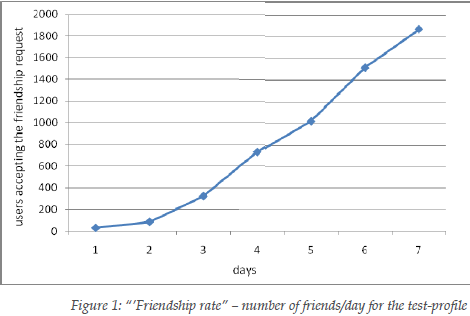
They did survey by making a fake profile and sending friend request to more than 2000 users (male and female included age varying from 20-65 of 27 years mean age). After a week, the friendship request form proved very successful: out of the 2,000 requests sent by the test-profile, 1,872 were accepted.

A first analysis of the gathered datasets revealed that usually, on a social network, the first impression counts a lot: a very nice looking young woman will always attract a lot of friends. 94% of the 2,000-user experimental sample accepted to become friends with the test-profile.
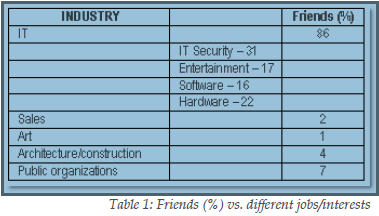
Surprisingly 86% of them were from IT field (isn’t it hilarious), and more interesting ,31 % of them were from IT Security field. An industry that has been stressing the risks of using social networking sites for many years. (This really surprised me) Most of them added because of display picture which was of a lovely girl.

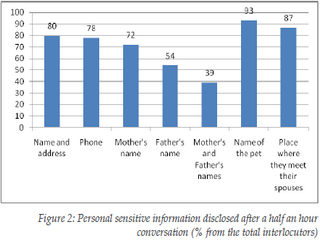
The worst thing with social networking site is, after having half an hour conversation with stranger they reveal many personal information like their parent’s names, address, spouse, children names (all these information can be use to crack passwords and in most of the cases it works).

They allow them to see their albums which may be copied for wrong purpose. In addition to that, after a 2 hour conversation, 73% revealed what appears to be confidential information from their work place, such as future strategies, plans, and unreleased technologies/software. The results of this study suggest not only that social network users accept unknown persons in their group just based on a nice profile photo, but also that they are willing to reveal personal, sensitive information after a short online conversation.

This means that social networks serve both as a meeting ground where people can present themselves and communicate, but also as a starting point for a virtual “friendship”, which brings people to divulge too much information because of the illusion of anonymity.
So, from the next time if someone sends you friend request or trying to talk to you over chat messenger, have patience do all investigations related to unknown profile (at least take help from Google) , if you feel O.K. then go on else reject it blindly. Never be too emotional over social sites and don’t reveal such things so easily. It may help them in social engineering and they may harm your system, your bank accounts, your reputation even you. See the images below for detailed analysis: frdship rateppl from diff jobpersonal info revealed Source: BitDefender

3 Easiest methods to make gmail your default Email Client

Love for GmailSometimes you don't need a bulky program just for sending an email like MS outlook, isn't it? And gmail lover would rather prefer sending any mail through their gmail account right? Sometimes you just need to send a website link, or just a screen-shot of  current web page  it really doesn't make much sense to start Outlook for these tiny things.

If you see any emailto: field, that will prompt you to open MS outlook by default which is annoying sometimes. (I really don't like). So if you click on that emailto: admin@aliencoders.org (say an example), it would rather shoot gmail instead of MS outlook. You can do this in three different easiest ways:

  1. Tweaking Firefox settings:

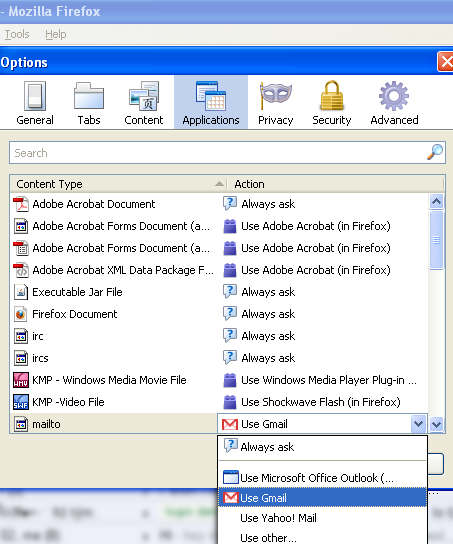
    • Click on  tools-> option
    • Click on Application tab
    • You will see content type and action column. Search for mailto content type and choose gmail from drop-down option against mailto column (you can choose yahoo mail or any other email client too)
    • I would prefer this method over any other methods, because there is no need to install any extra application.
    • It will work only if firefox is opened for sending mail
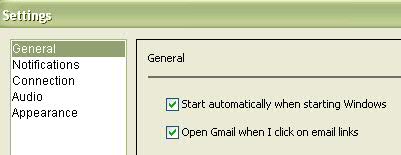
  2. Using Google-talk settings:

    • Double click on the Google Talk icon in the system tray(you need not to be logged in)
    • Click on the Settings link and go to general tab option
    • Now check the “Open Gmail when I click on email links” box in the Settings window.
    • Click “OK” and You are done hurray!
    • Many people use gtalk, so this is also fine and i would give it second preference
       
  3. Using Gmail notifier:

    • You need to have Gmail notifier installed in your system
    • Right click on its system tray icon
    • Select the Options menu and tick the box next to “Use Gmail for internet mailto: links”.
    • Select your favorite browser in the drop down menu and you are done now.
    • You may get error saying  “Cannot connect to your mailbox. and it always have an unnecessary pop-up to prompt whenever you try to connect gmail at startup.


    Personally i avoid installing unnecessary application, if that work will get accomplished by other easier way, isn't it. i would use Gmail notifier when i will not have any option (which will never happen unless and until Firefox or gtalk is there :P)

Firefox and Google Talk settings images:Gmail option in Firefox  Gtalk settings for gmail I hope you will surely like this. need your comments! Happy Alien browsing 🙂

Firefox tweak to bypass blocked sites

Firefox tweaks Hi folks!, Why to use any proxy server or any application when we can achieve the same thing just by tweaking firefox a little bit? Most of the people have account in facebook. People use to open it in an organization frequently. Second things that users wish to do is chat over yahoo or skype or gtalk or aol or jabber etc. Make Firefox to work for facebook:

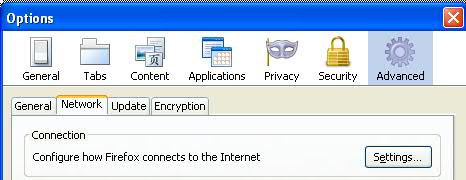
  • Click on Tools->options
  • Click on advanced tab (you will see general, tabs, content….advanced at last)
  • Click on Network (second option after general)
  • Under connection click on setting button (a pop-up box will come out)
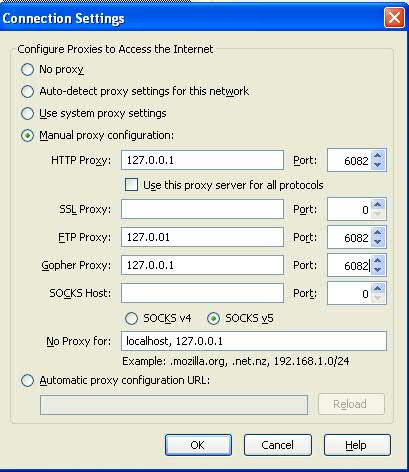
  • Check Manual proxy configuration radio button

    • Leave SSL and SOCKS host blank at  IP address and port no: 0
    • For the rest HTTP, FTP Gopher leave as it is being set by your organization

    You are done! Click on Ok and come out of all those options. Try to open facebook or meebo or chat based site (except orkut). If its saying access denied, try that link with https i.e. https://www.meebo.com or https://www.facebook.com Now it will open (working for me).

  • For chat option you can use https://www.meebo.com, https://www.imo.im(its having skype option too) or http://java2script.org (click on below shown chat icons)

Note:

  • You will not be able to open orkut anyhow.
  • If you gmail chat is disabled, then after setting your firefox option as above said, you will be able to chat through gmail.
  • You can't open youtube too

Check the images below: (click to view larger size) firefox proxy settingsProxy connection settings Let me how its works for you all? Happy Alien browsing !

Types of Network Hardware

computer network The label network hardware is generally given to any piece of equipment with the task of moving data. Common categories of network hardware include:
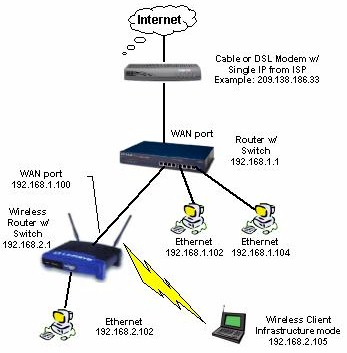


• Routers routers and switches

•Switches 

• Network Interface Cards

Routers A router is a network device with interfaces in multiple networks whose task is to copy packets from one network to another. Routers operate at Layer 3 of the OSI Model, the Network Layer. A router will utilize one or more routing protocols to create a routing table. The router will then use the information in its routing table to make intelligent decisions about what packets to copy to which interface. This process is known as routing.

Routers are available with many interface types, such as Ethernet and DSL. Wireless routers support wireless interfaces, such as 802.11 (Wi-Fi). Not all routers clearly fall into the category of network hardware. Routing software makes it possible to build a fully functional router out of a normal computer

Switches A switch is a network device with multiple ports in one network whose task is to copy frames from one port to another. Switches operate at Layer 2 of the OSI Model, the Data-Link Layer. A switch stores the MAC Address of every device which is connected to it. The switch will then evaluate every frame that passes through it. The switch will examine the destination MAC Address in each frame.

Based upon the destination MAC Address, the switch will then decide which port to copy the frame to. If the switch does not recognize the MAC Address, it will not know which port to copy the frame to. When that happens, the switch will broadcast the frame to all of its ports.

Before switches became available, devices called hubs were used. Hubs were less intelligent netword devices that always copied all frames to all ports. By only copying frames to the destination ports, switches utilize network bandwidth much more effectively than hubs did. Another piece of network hardware related to the switch is the Bridge. A Bridge is effectively a two-port switch. Because few users need a two-port switch, they are no longer manufactured. NIC

Network Interface Cards A network interface card is an expansion card which installs into a computer and enables that computer to physically connect to a local area network. The most common form of network interface card in current use is the Ethernet card. Other types of network interface cards include wireless network interface cards and Token Ring network interface cards. Other terms for network interface card include network adapter, network card and NIC. Network interface cards are becoming rare, as most motherboards now include built-in network interfaces.

Ultrasurf: to bypass blocked sites

Blocked site made frustrationIn most of the colleges or IT industries, you will observe that many sites will be blocked or even you will not be able to hat through online messenger. People use to open orkut, facebook, youtube but they will not be able to open it due to proxy enabled firewall in hat organization. I also got annoyed with such things and one day go to know, how to surpass all these barriers.

Why to use or test any proxy site to open such sites when there is a small application for it which does its job at its best. Yes! ultrasurf is there to solve your problem. (You can smile :)). More than 70% organizations usually ban  Social networking sites. Few companies allow with some term and conditions. Sometimes its good to not having access to such sites, else it may harm work culture and productivity. But it may be used for refreshment and kind of updates about friends, families, about other companies, sites etc.

For example: I wish to see updated news of few companies or sensex through twitter, then how i will be able to see it if they will block twitter at office?Why social sites are banned?

  • Its daily traffic is over 8000 GB and daily hits would be near around 800 million
  • Its free to use
  • Latest version is 9.97
  • Its so light, size is 500 Kb approx.
  • You just need to download it and double click on it whenever you wish to use automatic enabled proxy server to bypass your organization's proxies.
  • It requires IE only and works on almost any O.S. version of windows (like XP,Vista, win 7)

Add-on for Firefox

Firefox users need to download the firefox add-on besides the above software: Download Firefox add-on(.zip) (md5: 6ce151b1b0ef8430031a8e9a69f38806)

Installation:

Unzip it, drag the wjbutton_en.xpi file to firefox window. Click the "Install" button in the pop-up window to install it. The UltraSurf icon will show at the right-bottom of the firefox window. Close all firefox windows and re-open firefox. A grey-out UltraSurf icon means UltraSurf is disabled. A bright colorful icon means UltraSurf is enabled. Click it to enable/disable it. To change the settings or uninstall it, go to "tools/add-ons" of firefox. Start UltraSurf program and enable the firefox add-on, your internet activities thru Firefox will be under UltraSurf's protection.

Automatic upgrade

When UltraSurf software releases a new version, you will see a pop-up window telling you to download the latest version when you open the UltraSurf home page. I hope you will like it. Comment is needed! Happy Alien Blogging You tube access deniedUltrasurf v9.97

Ava Find: An alternate to windows search

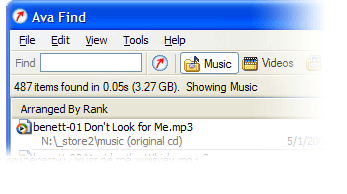
Ava FindHi friends, Have you ever noticed that searching any file on a clattered system is how tough through windows search mechanism? I feel irritated sometimes when windows search is on and on and after few minutes , saying that no match found. I have left even thinking that Windows is having such feature and i started using Ava Find 1.5. Its in my favorite application list now. Its fast searching features really amazed me. Some of its features are listed below:

  • Search without delay. (very very fast if its cached)
  • Searches accurately and will show you all the details you might want.
  • Scout Bot finds newly downloaded files automatically. You don’t even have to enter a search or have to refresh it again.
  • Browse Music/Videos/Programs etc folder at single click or you can select select all also.
  • Find documents you just saved: Suppose you forgot, where you have saved it. Not an issue at all if you have Ava Find. 🙂
  • Suppose you don’t the exact file name or folder name, no worries Ava Find does Advanced Name Search i.e. Match file names using * and ? wildcards.
  • Same right-click menu options are there for each file as it is in Windows Explorer.
  • Folders are shown with their sizes next to them. So, you need not to wait for windows properties to show their size.

Fair enough to use it freely or buy it. Ifs its Ava Find Pro then you can do network drive search also and if its free then you might not be able to do all right click stuffs too. You can use free version but after 30 days, it will disable few of the features that you may have in Pro. Its latest version is still 1.5 only Its of less than one MB in size. It costs 40 US Dollar approx. (can use trial version too.) You can download it from here Don’t forget to comment if you like this application.