
The emergence of social media, increasingly accessible through smartphones and tablets, has made information from all across the world accessible at a touch. The emerging […]
Category: TechNews
HTC Windows Phone 8 Powered 8S In-depth Review
HTC's Windows Phone 8 Powered '8S' – In-depth Review
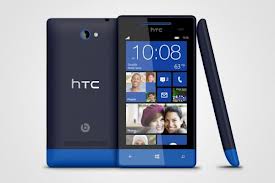 There have been many Windows Phones making their debut ever since the new operating system debuted with version 8. And the HTC Windows Phone 8S looks like it can leave the competition biting the dust. Just in terms of price, the HTC phone is way cheaper than the Nokia Lumia, its closest competitor. If you’re looking for a good mid-range Windows 8 Phone, this might be the one for you.
There have been many Windows Phones making their debut ever since the new operating system debuted with version 8. And the HTC Windows Phone 8S looks like it can leave the competition biting the dust. Just in terms of price, the HTC phone is way cheaper than the Nokia Lumia, its closest competitor. If you’re looking for a good mid-range Windows 8 Phone, this might be the one for you.The phone comes with a
- 1 GHz dual-core processor,
- 4 GB internal storage- with support for 32 GB microSD cards and 512 MB of RAM.
- The battery is a tad disappointing, a mere 1,700 mAh but do remember that the same number runs some pretty high-tech phones, so you’re not too badly off.
It is an attractive looking phone as well with Super LCD Gorilla Glass covering its 4” 480X800 resolution screen. You’ll enjoy the happy-making color scheme of the phone, something of an icon with the Windows phones. But while the other phones come in lovely, bright single shades, the HTC sports two colors.
The main portion of the phone is one solid shade while the strip at the bottom of the phone is a different shade. This two-tone scheme is distinct to the HTC and it great to look at, no matter what angle.
The main portion of the phone is one solid shade while the strip at the bottom of the phone is a different shade. This two-tone scheme is distinct to the HTC and it great to look at, no matter what angle.
It is a slim phone, perhaps the sleekest you might have set eyes on, at 120.5 X 63 X 10.3mm and the impression of thinness is further supported by curved edges. It is not a lightweight phone, weighing in at 113 grams, but some heft is good, endorsing the feeling that you have a good product on your hands and not a cheap version. While the finish is plastic, not glass or metal, the rubbery touch makes it easy to hold and doesn’t look tacky either.
Browsing the internet is simple, if a bit slow, on the HTC 8S. It comes with HSDPA and Wi-Fi. Scrolling through websites is a pleasure and words and images are crisp and clear. Connectivity is in the form of Bluetooth and GPS and the 3G speeds are pretty decent. The Wi-Fi tends to slow a bit, which can be annoying.
The 5 megapixel camera supports 720p video and there is no front facing camera, so video calls and the like, are out of the question. It comes with some options. You can create cool effects like negative or sepia and work with ISO, contrast, exposure, saturation and white balance.
The Bing Maps isn’t impressive but does a good job, being accurate and well laid out. In terms of apps, there’s not much to write home about here, except perhaps OneNote, the note taking app.
The HTC 8S is a good looking phone with a unique design to set it apart. Considering that it’s a mid-range phone, it is smooth and efficient and its inclusion of a microSD card slot places it above other, more expensive phones. On the downside, there’s a low battery life, slow internet experience and not much by way of apps and media. But it delivers on social networking and texting. If you’re keen on a Windows 8 phone that doesn’t cost the earth, you could think about the HTC 8S.
This is a guest post is brought to you by Samantha Kirk, a writer for Verizon Fios Deals . Samantha provides up to date content and information for FIOS bundles, TV, internet, digital voice and other deals.
Gmail increased file attachment limit-[How to use]
 I think majority of us use Gmail for mailing purpose at present followed by Hotmail , Yahoo and so on. In my previous post I had mentioned the Features of different mail providers and Minimal Reasons to choose Gmail for personal mailing system.
There are lots of reasons to choose mail providers, and the attachment size is definitely one of the top reasons to be considered. Recently, Google started to allow file attachment till 10 GB! Of course, there is something that you had to know before using large files as attachment. I will try to provide an overview on how this large file size email attachment works in Gmail.
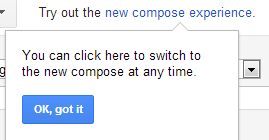
- First open your Gmail account and click on compose button which is at left top corner (Obviously you know it!). After that you will see one text with the link written as “try out new compose experience.” Don’t worry, if you can’t see this text with your Gmail Account. They are experimenting now with some accounts, so very soon it will be available for your account too! Here is the screenshot for that.
- Click on the link provided, then you will be redirected again to compose your mail in new format which allows large size file attachment. First time you will see an introduction screen. Once you click “Got It”, you will be allowed to compose a new mail.
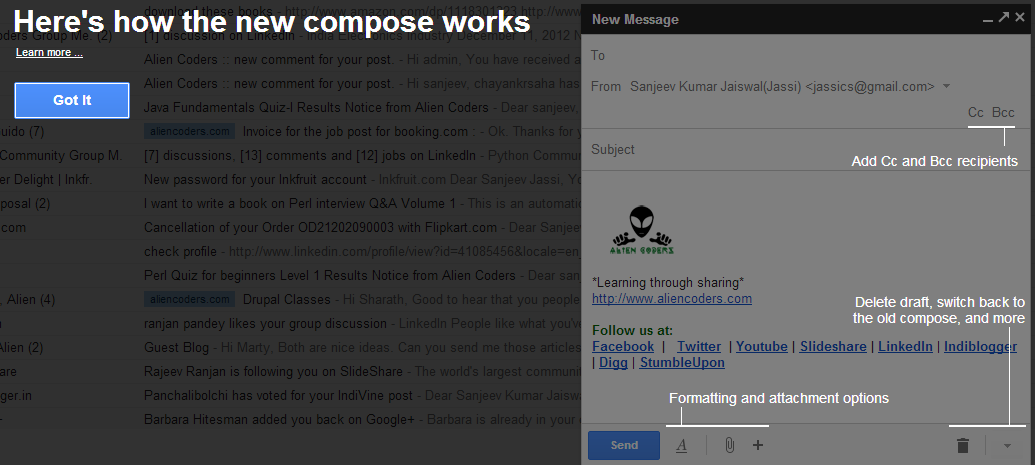
- You will be able to view new compose layout at right bottom corner like this, which have Cc, Bcc just below from and all other options at below like draft mode, text options, attachment options which I will show you in next screenshot
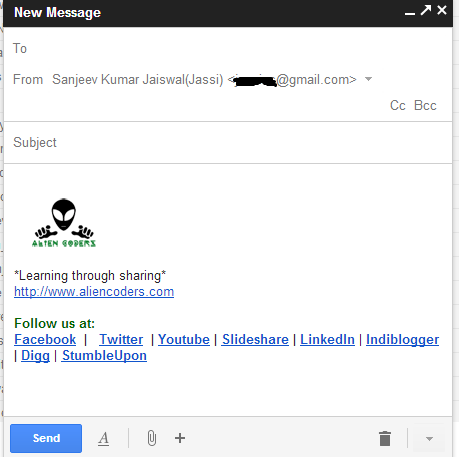
- After composing mail properly, here comes the fabulous job to attach High Definition Movie or Software in iso format ( more than 700 MB! ) or for e-books whose sizes are greater than 30 MB as I store many e-books in either Hard Drive or Dropbox and now at Google Drive 😀
When you hover mouse over “+” icon it will expand and will show you something like this
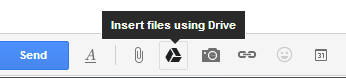
Now, this is what Google does to attach larger file sizes, It is actually allowing you to insert files from Google Drive where you can store file of any size which is now upto 10 GB for each file. Before this also I was doing the same. I was uploading files to https://docs.google.com which is now being redirected as https://drive.google.com
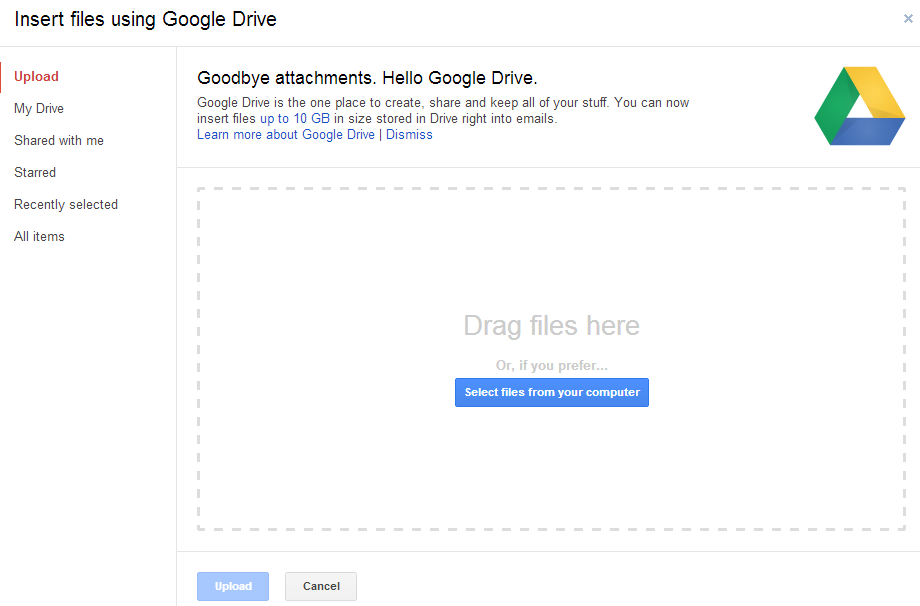
- To upload file size bigger than 25 MB and upto 10GB, you need to click on Google drive icon shown at the above image, then you will see something like this. You can upload files directly from your hard disk or using Google drive. It clearly mention you can upload files upto 10GB in size stored in Drive 😀 (But you will have only 5GB space in your drive!)
- Once you will upload file(s) successfully, you will have two options before sending, “Share & Send” or “Send without sharing”. Send without sharing means even you mail the attachment to the person; he/she will not be allowed to open. To open that attached file you need to give proper permission to that person. So better click on “Share & Send” option.
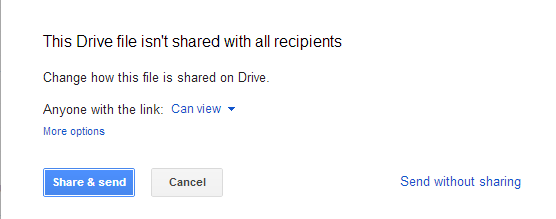
- But before clicking on “Share & send” button you need to share it with specific permission which you can do either by clicking “Can View” or “more option” just above the “Share & send” button as shown in the above example. If you click on “More option”, you will be able to see something like this
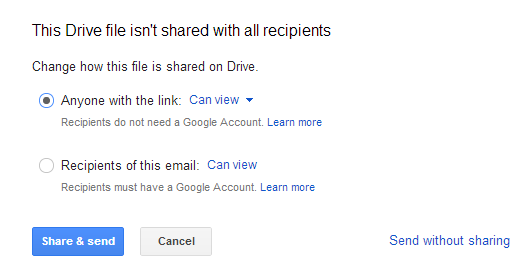
Now share with caution and then send it to the concerned person.
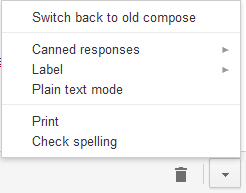
- If you don’t like, new compose layout or for experiment purpose you opted for newer layout then you can opt for older compose style by clicking on down triangle shaped icon then click on “Switch back to old compose” and Done!
Question: Google advertises that I can upload file size upto 10GB, then why I have only 5 GB quota?
Answer: In Google help page, they have mentioned clearly that this upload limit is of course bigger than free quota user, so one needs to purchase additional Google Drive. It also explains that what kind of file type can be uploaded and opened using Gmail attachment. I would suggest you to go through Google Help page before uploading anything or before purchasing any plans.
Here is the Google Drive Purchase plan: https://www.google.com/settings/storage/
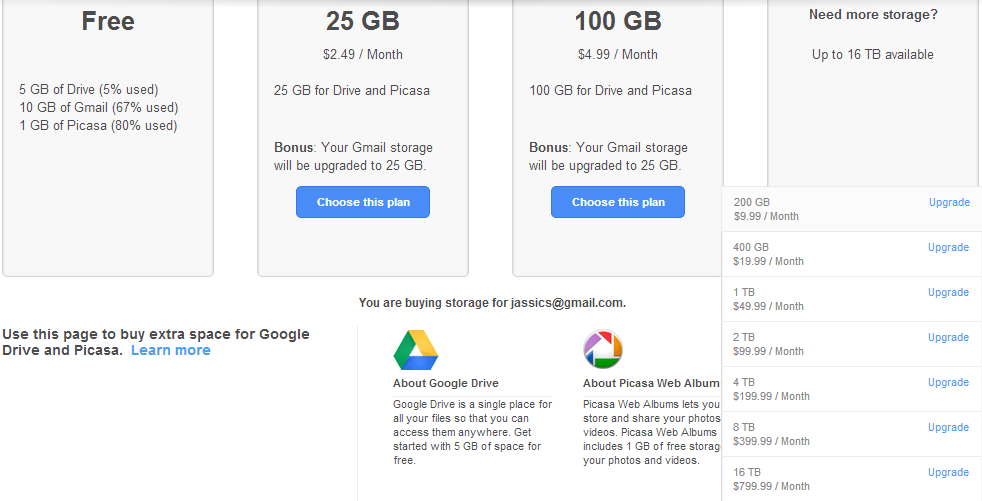
This link explains how to purchase Google Drive in details.
http://support.google.com/drive/bin/answer.py?hl=en&answer=2375128
Few things to note down:
- General attachment still allows only upto 25MB
- For free account holder, one can upload upto 5GB file at max
- To upload even more than 5Gb at a time you need to consider to upgrade package which I mentioned above
- I personally didn’t like new compose layout, although it looks good in most cases. What I didn’t like is, It’s hard to figure out to change email id while sending ( as I have 3 accounts associated with it ) or to edit subject
- I will still prefer old compose layout and will share larger files by uploading files directly to Google Drive instead of using mail layout
Internet Explorer is found vulnerable again
A vulnerability has been identified in Microsoft Internet Explorer, which could be exploited by remote attackers to take complete control of a vulnerable system. This issue is caused by a use-after-free error within the “mshtml.dll” library when processing a web page referencing a CSS (Cascading Style Sheets) file that includes various “@import” rules, which could allow remote attackers to execute arbitrary code via a specially crafted web page.