How to make rounded corners and other shapes like circle, heart, triangle etc using CSS3
If you are designing/developing a website, then basic elements will be HTML and CSS for sure apart from other biggie like jQuery, PHP/Perl blah blah. And page load into the browser also matters which is being determined by the size of images being used, js files, css files etc.
I still remember those days when I used to put images for every small shape like circle, rectangle, chat bubble, quotes, rounded corners etc. But using CSS3 you can not only save disk space but web space too!
There are few attributes in CSS through which you can do amazing stuffs. One of them is “border-radius”. This property allows us to add rounded corners to elements.
The border-radius property is a shorthand property for setting the four border-*-radius properties which mean you can specifically use top-left, top-right, bottom-right, bottom-left instead of that *
Its usual syntax is:
[css]
border-radius: 1-4 length|% / 1-4 length|%; /* Here 1-4 means four corners 😀 */
[/css]
Either we can use length that we define using em or px or we can use percentage. How we can achieve various shape using this property. Let’s see rounded corner stuff first. CSS Code:
[css]
<style type="text/css">
#round-corner{
padding:10px 40px;
background-color:#FF0000;
width:300px;
border-radius:25px;
}
</style>
[/css]
You could write border-raidus in em or percentage too even.
Something like:
[css]
border-radius: 2em 1em 4em / 0.5em 3em;
[/css]
which is equivalent to:
[css]
border-top-left-radius: 2em 0.5em;
border-top-right-radius: 1em 3em;
border-bottom-right-radius: 4em 0.5em;
border-bottom-left-radius: 1em 3em;
[/css]
Then write below code inside body tag:
[css]
<div id="round-corner">Isn't it amazing to use border-radius property instead of rounded images?</div>
[/css]
How the browsers interpret which em for whom if we missed any of those four corners?
Answer is simple, follow this rule:
The four values for each radii are given in the order top-left, top-right, bottom-right, bottom-left. If bottom-left is omitted it is the same as top-right. If bottom-right is omitted it is the same as top-left. If top-right is omitted it is the same as top-left.
How about having circle or oval shape using border-radius property?
You just need to include height, width in proper ratio and then border-radius would do the rest. What I meant is :
[css]
<style type="text/css">
#circle {
height: 70px;
width: 70px;
border-radius: 35px; /* or 50% */
background-color: #FF0000;
}
How to search files using the “find” command in Linux If you are at *nix system, whether you are System administrator, common user, programmer or whoever; you will surely need to find file using different criteria. For that *nix system has very powerful and efficient command called “find”.
The find command is a powerful *nix utility that allows the user to find files located in the file system through various criteria such as the file name, owner, group, size, inodes, when file was last accessed, when the file status was last changed, the file's permissions, even using regular expression pattern etc.
I will try to cover maximum usage of commands that you are gonna need for any such operations. I hope after reading those examples one will easily use find command for one's problem.
Syntax for find command:
[vim]
find where-to-look criteria what-to-do
[/vim]
Instead of explaining each options and then showing you its uses with examples, better to see the use of all options while going through different examples based on various requirements.
Examples 1. Find a file "alien.coders" that exists somewhere in the file system
[vim]
$ find / -name alien.coders -print
[/vim]
If the file is found the path to the file will be printed as output. On most platforms the -print is optional, however, on some *NIX systems nothing will be printed without using print. If you don’t provide any arguments, find searches recursively through all the directories.
2.Find a file without searching network or mounted file systems
[vim]
$ find / -name alien.coders -print -xdev
[/vim]
I found it useful, when you have mounted network drives or file systems that you do not want searched (Like Windows box or other remote servers). This will surely increase the search speed greatly if the mounted file system is large or over a slow network. "-mount" does the same thing as "-xdev" to make it compatible with other versions of find.
3.Find a file without showing "Permission Denied" messages
[vim]
$ find / -name alien.coders -print 2>/dev/null
[/vim]
When find tries to search a directory or file that you do not have permission to read the message "Permission Denied" will be output to the screen. The 2>/dev/null option sends these messages to /dev/null so that the found files are easily viewed.
4.Find a file, who's name ends with .coders, within the current directory and only search 3 directories deep
[vim]
$ find . -name *.coders -maxdepth 3 -print
[/vim]
-maxdepth option allows you to specify till how much deeper you want to search for a file by specifying n digit i.e. –max depth 3 in the above example.
5.Search directories "./dir1" and "./dir2" for a file "alien.coders"
[vim]
$ find ./dir1 ./dir2 -name alien.coders -print
[/vim]
6.Search for files that are owned by the user "aliens"
[vim]
$ find /alice/in/wonderland/ -user aliens -print
[/vim]
The files output will belong to the user "aliencs". Similar criteria are -uid to search for a user by their numerical id, -group to search by a group name, and -gid to search by a group id number.
7.Find a file that is a certain type. "-type l" searches for symbolic links ( manual page of find has lot more explanation on this)
[vim]
$ find /some/directory -type l -print
[/vim]
Several types of files can be searched for:
b block (buffered) special
c character (un-buffered) special
d directory
p named pipe (FIFO)
f regular file
l symbolic link
s socket
D door (Solaris)
8.Search for directories that contains the word "alien" but do not end with ".coders"
[vim]
$ find . -name '*alien*' ! -name '*.coders' -type d -print
[/vim]
The "!" allows you to exclude results that contain the phrases following it.
9.Search files which are modified between 10 and 60 minutes:
[vim]
find . -mmin +9 -mmin -61
[/vim]
(-mmin +or – n is for minutes and –mtime + or – n is for no of days ( n*24 hours format))
(-n means less than n and +n means more than n like -9 and +61 in that example)
10.find files n days older and above certain file size
We have already seen the use of mtime and we will combine with –size option to find files which are n days older and greater than some file size in *nix. This is very common scenario for system administrator people where they need to delete some large old files to free some space in the machine.
This example of find command will find which are more than 30 days old and size greater than 1MB (1024 Kilo bytes with k option or 1024*1024 Bytes with c option instead of M and G for GB i.e. –size +1G for greater than 1Gb file size).
[vim]
find . -mtime +10 -size +1M -exec ls -l {} \;
[/vim]
11. Search files which are writable by both their owner and group:
[vim]
find . -perm -220
[/vim]
or
[vim]
find . -perm -g+w,u+w
[/vim]
The power of find find becomes extremely useful when combined with other commands. One such combination would be using find and grep together or with xargs and awk etc.
[vim]
$ find dir-path -type f -name '*.txt' -exec grep -s Aliens {} \; -print
[/vim]
This sequence uses find to look in give path for a file (-type f) with a name ending in .txt. It sends the files it finds to the grep command via the -exec option and grep searches the file found for any occurrences of the word "Aliens".
If the file is found it will be output to the screen and if the word "Aliens" is found, within one of the found files, the line that "Aliens" occurs in will also be output to the screen.
12. Find files and print those files whose name contains core.two-or-more-numeric-digits : Without Regular Expression
[vim]
find directory-path -name "core.[0-9][0-9]*[0-9]" | xargs ls -lRt | awk '{print $9}'
[/vim]
With regular expression
[vim]
find directory-path -type f -regex ".*/core\.[0-9]*" | xargs -r ls -lRt | awk '{print $9}'
[/vim]
All commands would fetch you the same result. i.e it will display the pathnames of all files in the current directory and all sub directories.
If find command doesn’t locate any matching files then it will produce no output
You may specify as many place as you wish to search the file. Ex: find /etc/dev /home/aliencoders/ . –name test
-print action lists the names of files separated by a new line or even send find’s output to xrags though pipe which separates file names using white space. So, it may cause an error if space or new line is encountered in any file name.
No issues, we have better solution. Use “-print0” instead 😀
For better format output, try to use printf similar to C programming language.
ex: find . –name ‘[!.]*’ –printf ‘Name: %10f Size: %5s \n’
Note: The ordering of find's options is important for getting the expected results as well as for performance reason.
What is the real difference between exec and xargs (Source: unix.com)?
find . -name H* -exec ls -l {} \; executes the command ls -l on each individual file.
find . -name H* | xargs ls -l constructs an argument list from the output of the find commend and passes it to ls.
Consider if the ouput of the find command produced:
H1
H2
H3
the first command would execute
ls -l H1
ls -l H2
ls -l H3
but the second would execute
ls -l H1 H2 H3
the second (xargs) is faster because xargs will collect file names and execute a command with as long as a length as possible. Often this will be just a single command.
If file name is having space then xargs will fail but exec will work because each filename is passes to exec as a single value, with special characters escaped, so it is as if the filename has been enclosed in single quotes.
For more details about how to use different arguments and options type man find
If you are making a website using Drupal 6.x (I am using Drupal 6.24), then you can add/edit/delete user profile settings very easily by accessing this link: http://your-site-name/admin/user/profile
But, the Profile module is deprecated in Drupal 7, because it is already integrated to Drupal 7. Although, it is still there in hidden mode to provide an upgrade path for Drupal 6 sites that used it or if you are still living in Drupal 6.x world
In Drupal 7 you can find inbuilt profile module under: http://your-site-name/admin/config/people/accounts/fields
But, I assure you it will confuse you more (at least I got confused and didn’t had courage to experiment on it) and you will not be able to add your personal and professionals tab etc 😀
How to remove ^M and other non-printable characters from the file
If you are working or playing around with files on different O.S., and you are just copying/moving files from one O.S. based system to other. Unknowingly you are inviting non-printable character to come with! This specially happens when you open any file in Linux using any editor (vim in my case), which you got from windows based machines. You will see ^M at the end of each line (It is usually treated as carriage return/linefeed in Linux environment which we got from its step brother Windows :p ).
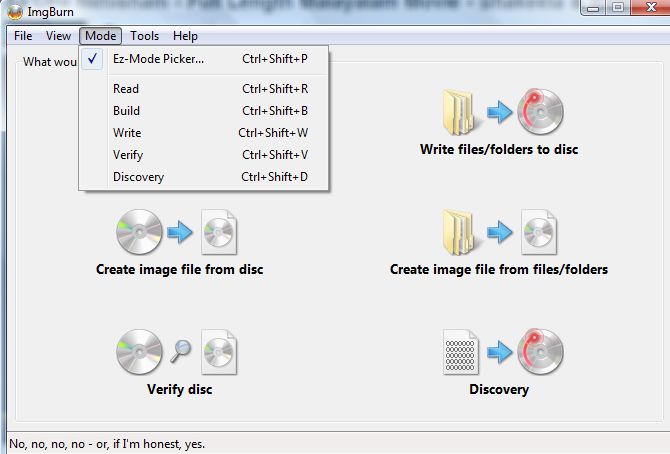
One of the regular important things, we do using our computer is burning CD/DVD and good burning software is not freely available always. Nero CD/DVD burning software is not free and its file size is little bigger too. It’s around 220MB approx.
But there are few CD/DVD burning applications are there in the market which is free of cost. I chose imgburn way back in 2008 and till then I prefer to use this application for any kind of CD/DVD or image burning related work.
It’s of 6 MB approx and it was launched in 2005. Its current version is 2.5.7.0 and you can download it from the given link. Download from any of the listed mirror links.
I have tried to explain its features, pros and cons using presentation and by showing the working steps about imgburn. Hope you will like our presentation and video on it.
What is Http Handlers?
An ASP.NET HTTP handler is the process that runs in response to a request that is made to an ASP.NET Web application. The most common handler is an ASP.NET page handler that processes .aspx files. When users request an .aspx file, the request is processed by the page handler.
HTTP handlers are of two types:
Synchronous HTTP Handlers: These handlers process the HTTP request in a synchronous manner and will return only when processing of the request for which it is called is complete.
Asynchronous HTTP Handlers: These handlers process the HTTP request in an asynchronous manner. It allows the user to make remote server calls to start an external process. This greatly improves performance as these handlers do not wait for the completion of external processes.
Normalization Resolved Normalization is one of the favorite topics of interviewee. It does not matter whether you have mentioned DBMS in your resume or not .This question is going to come and the funny part is that all of us know
what is normalization?
What are the different types of normalization?
So when this question on being asked the interviewer who have already prepared for it start with the history of normalization and end with the geography of normalization but when the next question for which they have not prepared i.e. apply normalization in real case scenario.
Now here comes the real part of normalization and just because of not proper concepts, people end up confusing themselves. So the idea is to not only to get familiar with normalization but also how to apply it in real time scenario.
What is Normalization?
Database designed based on ER model may have some amount of inconsistency, ambiguity and redundancy. To resolve these issues some amount of refinement is required. This refinement process is called as Normalization. I know all of you are clear with the definition, let’s go with :
what is the need of normalization?
What are the problems we can face if we proceed without normalization?
What are the advantages of normalization?
Asking question to oneself is the best way to get familiar with all the concepts.
The need of Normalization
I am going to show you one simple E-R model database.
Student Details
Course Details
Result details
1001 Ram 11/09/1986
M4 Basic Maths 7
11/11/2004 89 A
1002 Shyam 12/08/1987
M4 Basic Maths 7
11/11/2004 78 B
1001 Ram 23/06/1987
H6 4
11/11/2004 87 A
1003 Sita 16/07/1985
C3 Basic Chemistry 11
11/11/2004 90 A
1004 Gita 24/09/1988
B3 8
11/11/2004 78 B
1002 Shyam 23/06/1988
P3 Basic Physics 13
11/11/2004 67 C
1005 Sunita 14/09/1987
P3 Basic Physics 13
11/11/2004 78 B
1003 Sita 23/10/1987
B4 5
11/11/2004 67 C
1005 Sunita 13/03/1990
H6 4
11/11/2004 56 D
1004 Gita 21/08/1987
M4 Basic Maths 7
11/11/2004 78 B
In first look the above table is looking so arranged and well in format but if we try to find out what exactly this table is saying to us , we can easily figure out the various anomalies in this table . Ok let me help you guys in finding out the same.
Insert Anomaly: We cannot insert prospective course which does not have any registered student or we cannot insert student details that is yet to register for any course.
Update Anomaly: if we want to update the course M4’s name we need to do this operation three times. Similarly we may have to update student 1003’s name twice if it changes.
Delete Anomaly: if we want to delete a course M4 , in addition to M4 occurs details , other critical details of student also will be deleted. This kind of deletion is harmful to business. Moreover, M4 appears thrice in above table and needs to be deleted thrice.
Duplicate Data: Course M4’s data is stored thrice and student 1002’s data stored twice .This redundancy will increase as the number of course offerings increases.
Process of normalization:
Before getting to know the normalization techniques in detail, let us define a few building blocks which are used to define normal form.
Determinant : Attribute X can be defined as determinant if it uniquely defines the value Y in a given relationship or entity .To qualify as determinant attribute need NOT be a key attribute .Usually dependency of attribute is represented as X->Y ,which means attribute X decides attribute Y.
Example: In RESULT relation, Marks attribute may decide the grade attribute .This is represented as Marks->grade and read as Marks decides Grade.
Marks -> Grade
In the result relation, Marks attribute is not a key attribute .Hence it can be concluded that key attributes are determinants but not all the determinants are key attributes.
Functional Dependency: Yes functional dependency has definition but let’s not care about that. Let’s try to understand the concept by example. Consider the following relation :
IName- Name of the instructor who delivered the course
Room#-Room number which is assigned to respective instructor
Marks- Scored in Course Course# by student Student #
Grade –Obtained by student Student# in course Course #
Student#,Course# together (called composite attribute) defines EXACTLY ONE value of marks .This can be symbolically represented as
Student#Course# Marks
This type of dependency is called functional dependency. In above example Marks is functionally dependent on Student#Course#.
Other Functional dependencies in above examples are:
Course# -> CourseName
Course#-> IName(Assuming one course is taught by one and only one instructor )
IName -> Room# (Assuming each instructor has his /her own and non shared room)
Marks ->Grade
Formally we can define functional dependency as: In a given relation R, X and Y are attributes. Attribute Y is functional dependent on attribute X if each value of X determines exactly one value of Y. This is represented as :
X->Y
However X may be composite in nature.
Full functional dependency: In above example Marks is fully functional dependent on student#Course# and not on the sub set of Student#Course# .This means marks cannot be determined either by student # or Course# alone .It can be determined by using Student# and Course# together. Hence Marks is fully functional dependent on student#course#.
CourseName is not fully functionally dependent on student#course# because one of the subset course# determines the course name and Student# does not having role in deciding Course name .Hence CourseName is not fully functional dependent on student #Course#.
Student#
Marks
Course#
Formal Definition of full functional dependency : In a given relation R ,X and Y are attributes. Y is fully functionally dependent on attribute X only if it is not functionally dependent on sub-set of X.However X may be composite in nature.
Partial Dependency: In the above relationship CourseName,IName,Room# are partially dependent on composite attribute Student#Course# because Course# alone can defines the coursename, IName,Room#.
Room#
IName
CourseName
Course#
Student#
Formal Definition of Partial dependency: In a given relation R, X and Y are attributes .Attribute Y is partially dependent on the attribute X only if it is dependent on subset attribute X .However X may be composite in nature.
Transitive Dependency: In above example , Room# depends on IName and in turn depends on Course# .Here Room# transitively depends on Course#.
IName
Room#
Course#
Similarly Grade depends on Marks,in turn Marks depends on Student#Course# hence Grade
Fully transitively depends on Student#Course#.
Key attributes : In a given relationship R ,if the attribute X uniquely defines all other attributes ,then the attribute X is a key attribute which is nothing but the candidate key.
Ex: Student#Course# together is a composite key attribute which determines all attributes in relationship REPORT(student#,Course#,CourseName,IName,Room#,Marks,Grade)uniquely.Hence Student# and Course# are key attributes.
Types of Normal Forms
First Normal Form(1NF)
A relation R is said to be in first normal form (1NF) if and only if all the attributes of the relation R are atomic in nature
Student Details
Course Details
Result details
1001 Ram 11/09/1986
M4 Basic Maths 7
11/11/2004 89 A
1002 Shyam 12/08/1987
M4 Basic Maths 7
11/11/2004 78 B
1001 Ram 23/06/1987
H6 4
11/11/2004 87 A
1003 Sita 16/07/1985
C3 Basic Chemistry 11
11/11/2004 90 A
1004 Gita 24/09/1988
B3 8
11/11/2004 78 B
1002 Shyam 23/06/1988
P3 Basic Physics 13
11/11/2004 67 C
1005 Sunita 14/09/1987
P3 Basic Physics 13
11/11/2004 78 B
1003 Sita 23/10/1987
B4 5
11/11/2004 67 C
1005 Sunita 13/03/1990
H6 4
11/11/2004 56 D
1004 Gita 21/08/1987
M4 Basic Maths 7
11/11/2004 78 B
Table shown above Student Details ,Course Details and Result Details can be further divided. Student Details attribute is divided into Student#(Student Number) , Student Name and date of birth. Course Details is divided into Course# ,Course Name,Prerequisites and duration. Similarly Results attribute is divided into DateOfexam,Marks and Grade.
Second Normal Form (2NF)
A relation is said to be in Second Normal Form if and only If :
It is in the first normal form ,and
No partial dependency exists between non-key attributes and key attributes.
Let us re-visit 1NF table structure.
Student# is key attribute for Student ,
Course# is key attribute for Course
Student#Course# together form the composite key attributes for result relationship.
Other attributes are non-key attributes.
To make this table 2NF compliant, we have to remove all the partial dependencies.
StudentName and DateOfBirth depends only on student#.
CourseName,PreRequisite and DurationInDays depends only on Course#
DateOfExam depends only on Course#.
To remove this partial dependency we need to split Student_Course_Result table into four separate tables ,STUDENT ,COURSE,RESULT and EXAM_DATE tables as shown in figure.
STUDENT TABLE
Student #
Student Name
DateofBirth
1001
Ram
Some value
1002
Shyam
Some value
1003
Sita
Some value
1004
Geeta
Some value
1005
Sunita
Some value
COURSE TABLE
Course#
CourseName
Duration of days
C3
Bio Chemistry
3
B3
Botany
8
P3
Nuclear Physics
1
M4
Applied Mathematics
4
H6
American History
5
B4
Zoology
9
RESULT TABLE
Student#
Course#
Marks
Grade
1001
M4
89
A
1002
M4
78
B
1001
H6
87
A
1003
C3
90
A
1004
B3
78
B
1002
P3
67
C
1005
P3
78
B
1003
B4
67
C
1005
H6
56
D
1004
M4
78
B
EXAM DATE Table
Course#
DateOfExam
M4
Some value
H6
Some value
C3
Some value
B3
Some value
P3
Some value
B4
Some value
In the first table (STUDENT) ,the key attribute is Student# and all other non-key attributes, StudentName and DateOfBirth are fully functionally dependant on the key attribute.
In the Second Table (COURSE) , Course# is the key attribute and all the non-key attributes, CourseName, DurationInDays are fully functional dependant on the key attribute.
In third table (RESULT) Student#Course# together are key attributes and all other non key attributes, Marks and Grade are fully functional dependant on the key attributes.
In the fourth Table (EXAM DATE) Course# is the key attribute and the non key attribute ,DateOfExam is fully functionally dependant on the key attribute.
At first look it appears like all our anomalies are taken away ! Now we are storing Student 1003 and M4 record only once. We can insert prospective students and courses at our will. We will update only once if we need to change any data in STUDENT,COURSE tables. We can get rid of any course or student details by deleting just one row.
Let us analyze the RESULT Table
Student#
Course#
Marks
Grade
1001
M4
89
A
1002
M4
78
B
1001
H6
87
A
1003
C3
90
A
1004
B3
78
B
1002
P3
67
C
1005
P3
78
B
1003
B4
67
C
1005
H6
56
D
1004
M4
78
B
We already concluded that :
All attributes are atomic in nature
No partial dependency exists between the key attributes and non-key attributes
RESULT table is in 2NF
Assume, at present, as per the university evaluation policy,
Students who score more than or equal to 80 marks are awarded with “A” grade
Students who score more than or equal to 70 marks up till 79 are awarded with “B” grade
Students who score more than or equal to 60 marks up till 69 are awarded with “C” grade
Students who score more than or equal to 50 marks up till 59 are awarded with “D” grade
The University management which is committed to improve the quality of education ,wants to change the existing grading system to a new grading system .In the present RESULT table structure ,
We don’t have an option to introduce new grades like A+ ,B- and E
We need to do multiple updates on the existing record to bring them to new grading definition
We will not be able to take away “D” grade if we want to.
2NF does not take care of all the anomalies and inconsistencies.
Third Normal Form (3NF)
A relation R is said to be in 3NF if and only if
It is in 2NF
No transitive dependency exists between non-key attributes and key attributes.
In the above RESULT table Student# and Course# are the key attributes. All other attributes, except grade are non-partially , non – transitively dependant on key attributes. The grade attribute is dependant on “Marks “ and in turn “Marks” is dependent on Student#Course#. To bring the table in 3NF we need to take off this transitive dependency.
Student#
Course#
Marks
1001
M4
89
1002
M4
78
1001
H6
87
1003
C3
90
1004
B3
78
1002
P3
67
1005
P3
78
1003
B4
67
1005
H6
56
1004
M4
78
UpperBound
LowerBound
Grade
100
95
A+
94
90
A
89
85
B+
84
80
B
79
75
B-
74
70
C
69
65
C-
After Normalizing tables to 3NF , we got rid of all the anomalies and inconsistencies. Now we can add new grade systems, update the existing one and delete the unwanted ones.
Hence the Third Normal form is the most optimal normal form and 99% of the databases which require efficiency in
Sorting an array and hash elements in Perl This is the answer to Ques# 17 (a) and 23 under Perl Basics in Perl Interview Questions
There are many situations when we need to display the data in sorted order. For example: Student details by name or by rank or by total marks etc. If you are working on data driven based projects then you will use sorting techniques very frequently.
In Perl we have sort function which sorts a list alphabetically by default. But there is not the end. We need to sort:
an array numerically or
case insensitive strings or
case sensitive strings
hash contents by keys or
hash contents by values or
reverse of all above said points
How sorting works in Perl
Sort subroutine has three syntaxes and last one is the most used syntax.
sort SUBNAME LIST
sort BLOCK LIST
sort LIST
In list context, it sorts the LIST and returns the sorted list value. In scalar context, the behavior of sort() is undefined.
If SUBNAME or BLOCK is omitted, sorts in standard string comparison order.
Standard string comparison means based on ASCII value of those characters. Like @arr = qw (Call all). In this case it will be sorted as Call all which was not expected. So to make it work properly we use case-insensitive sort.
If SUBNAME is specified, it gives the name of a subroutine that returns an integer less than, equal to, or greater than 0 , depending on how the elements of the list are to be ordered. (The <=> and cmp operators are extremely useful in such routines.)
Note: The values to be compared are always passed by reference and should not be modified . $a and $b are global variable and should not be declared as lexical variables.
sort() returns aliases into the original list like grep, map etc which should be usually avoided for better readability.
As sorting always does string sorting, so to do numeric sorting we need to use a special syntax which a sort {$a ó $b} LIST. We will see these conditions using Perl codes.
How reverse sorting works
Systax to use reverse sort is reverse LIST. It works on sorted LIST usually. But in scalar context, it concatenates the elements of LIST and returns a string value with all characters in the opposite order.
In scalar context if argument is not passed it will reverse the value of $_
Ex:
[perl]$_ = “dlrow ,olleH”;
print scalar reverse; #in this case print reverse would not works because it expects a LIST
[/perl]
How <=> and cmp work?
These are actually binary equality operator. Binary operator usually gives (0 or 1) or (true or false) but these gives three values based on the comparison result.
Binary “<=>” returns -1, 0, or 1 depending on whether the left argument is numerically less than, equal to, or greater than the right argument.
Binary “cmp” returns -1, 0, or 1 depending on whether the left argument is stringwise less than, equal to, or greater than the right argument.
Never mix string and numeric values in LIST else sorting result will be fearsome 🙁
Try this out:
[perl]
my @arr1 = qw(1 two 3 0 4 Two 5 six 7 8 9 ten);
my @arr2 = sort {$a cmp $b} @arr1;
print “\n@arr2\n”;
[/perl]
Let go through the codes for different scenarios: Example 1: Sorting an array of strings (case-sensitive and case-insensitive examples)
[perl]
#!/usr/bin/perl
use strict;
use warnings;
my @strarr = qw(two Two six Six alien Coders Alien coderS);
my @sorted = sort {$a cmp $b} @strarr; # same result as of sort @strarr
my @sortedcase = sort { uc $a cmp uc $b } @strarr; #case-insensitivie
print “\n@sorted\n@sortedcase\n”;
[/perl] Output:
Alien Coders Six Two alien coderS six two
alien Alien Coders coderS six Six two Two
Note: try to always use case insensitive for better string sorting results.
Example 2: Sorting an array of numbers
The Perl sort function sorts by strings instead of by numbers. If you do it in general way it would fetch unexpected result.
[perl] #!/usr/bin/perl
use strict;
use warnings;
my @sorted_numbers = sort @numbers;
print “@sorted_numbers\n”;
[/perl] The output you would see would be:
001 01 1 109 22 23 3 65 7 9
To sort numerically, declare your own sort block and use the binary equality operator i.e. flying saucer operator <=>:
[perl]
#!/usr/bin/perl
use strict;
use warnings;
my @sorted_numbers = sort {$a <=> $b} @numbers;
print “@sorted_numbers\n”;
[/perl] The output would now be:
1 01 001 3 7 9 22 23 65 109
Note that $a and $b do not need to be declared, even with use strict on, because they are special sorting variables.
Example 3: Sorting array backwards (for string and numbers)
To sort backwards you need to declare your own sort block, and simply put $b before $a. or use reverse keyword after simple sort.
For example, the standard sort is as follows:
[perl] #!/usr/bin/perl
use strict;
use warnings;
my @strings = qw(Jassi Alien Coders);
my @sorted_strings = sort @strings;
print “@sorted_strings\n”;
[/perl] The output would be:
Alien Coders Jassi
To do the same, but in reverse order:
[perl]
#!/usr/bin/perl
use strict;
use warnings;
my @strings = qw(Jassi Alien Coders);
my @sorted_strings = sort {$b cmp $a} @strings; # or reverse sort @strings
print “@sorted_strings\n”;
[/perl] The output is:
Jassi Coders Alien
And for numbers:
[perl]
#!/usr/bin/perl
use strict;
use warnings;
my @numbers = (23, 1, 22, 7, 109, 9, 65, 3);
my @sorted_numbers = sort {$b <=> $a} @numbers; # or reverse sort {$aó $b} @numbers
print “@sorted_numbers\n”;
[/perl] The output is:
109 65 23 22 9 7 3 1
This was all about sorting array elements alphabetically or numerically. Now we will see how sorting works on hash elements.
Example 4: Sorting hashes by keys
You can use sort to order hashes. For example, if you had a hash as follows:
Suppose we want to display the members for each community sorted alphabetically or say by keys, then this code will do so:
[perl]
#!/usr/bin/perl
use strict;
use warnings;
If you want to sort the same hash by the values (i.e. the users beside each programming language), you could do the following:
[perl]
#!/usr/bin/perl
use strict;
use warnings;
my %members = (
C => 1,
Java => 7,
Perl => 12,
Linux => 3,
Hacking => 8,
);
# Using <=> instead of cmp because of the numbers
foreach my $language (sort {$members{$a} <=> $members{$b}} keys %members){
print $language . “: ” . $members{$language} . “\n”;
}
[/perl]
Output:
C: 1
Linux: 3
Java: 7
Hacking: 8
Perl: 12
Example: 5 Sorting complex data structures
We can also use sort function to sort complex data structures. For example, suppose we have an array of hashes (anonymous hashes) like:
[perl]
my @aliens = (
{ name => ‘Jassi’, age => 28},
{ name => ‘Somnath’, age => 27},
{ name => ‘Ritesh’, age => 24},
{ name => ‘Santosh’, age => 29},
{ name => ‘Ranjan’, age => 26},
{ name => ‘Kaushik’, age => 25},
);
[/perl]
And we wish to display the data about the people by name, in alphabetical order, we could do the following:
[perl]
#!/usr/bin/perl
use strict;
use warnings;
my @aliens = (
{ name => ‘Jassi’, age => 28},
{ name => ‘Somnath’, age => 27},
{ name => ‘Ritesh’, age => 24},
{ name => ‘Santosh’, age => 29},
{ name => ‘Ranjan’, age => 26},
{ name => ‘Kaushik’, age => 25},
);
foreach my $person (sort {$a->{name} cmp $b->{name}} @aliens) {
print $person->{name} . ” is ” . $person->{age} . “\n”;
}
[/perl] The output is:
Jassi is 28
Kaushik is 25
Ranjan is 26
Ritesh is 24
Santosh is 29
Somnath is 27
Sorting the same hash by age and using a subroutine (inline function)
Rather than writing the code inline, you can also pass in a subroutine name. The subroutine needs to return an integer less than, equal to, or greater than 0. Do not modify the $a and $b variables as they are passed in by reference, and modifying them will probably confuse your sorting.
[perl]
#!/usr/bin/perl
use strict;
use warnings;
my @aliens = (
{ name => ‘Jassi’, age => 28},
{ name => ‘Somnath’, age => 27},
{ name => ‘Ritesh’, age => 24},
{ name => ‘Santosh’, age => 29},
{ name => ‘Ranjan’, age => 26},
{ name => ‘Kaushik’, age => 25},
);
foreach my $person (sort agecomp @aliens) {
# it just replaced {$a->{age} <=> $b->{age}} by agecomp inline function
print $person->{name} . ” is ” . $person->{age} . ” years old\n”;
}
sub agecomp {
$a->{age} <=> $b->{age};
}
[/perl] The output would be:
Ritesh is 24 years old
Kaushik is 25 years old
Ranjan is 26 years old
Somnath is 27 years old
Jassi is 28 years old
Santosh is 29 years old
To find out more on sort function, run the command on Linux box:
perldoc -f sort
How to transfer the domain from one hosting provider or registrar to other
It’s always important to host your website to a reliable web hosting service provider. But sometimes due to lack of knowledge or much experience on these things we register our domain and signup for the hosting plans. Although all renowned hosting providers are doing great job but I preferably choose either blueshost.com or godaddy.com
I had few issues with godaddy.com, that’s why I postponed the plan to host my domain there and finally chose bluehost.com as I was using it from last 2 years without any hassle and Customer Support Service is awesome. I liked online chatting also 😉
These simple steps to transfer your domain from one hosting service provider to another or from one registrar to another will work for any such situation for any service provider. (Few things may change though)
Let’s start step by step to transfer domain from one registrar or one hosting provider to another Step 1
Make sure you have access to your present account and the domain name that you wish to transfer is unlocked. If not then either go to your admin panel (cpanel usually) and under domain section you will see domain manager icon/link. Click on that and then you will see unlock domain option.
If you are not able to figure out how to unlock the domain name and how to see/change EPP(Auth) code which you would be the basic step to transfer your domain name successfully. Contact the current registrar or the hosting provider to unlock the domain and to provide EPP or authorization code.
Step 2
I assume you are done with Step 1 and your domain is unlocked and you have EPP code with you. Now make sure your whois database information is upto date and turn off the privacy domain if it’s turn on else leave it.
This step is required because your new registrar will send the mail to the email id that appears in whois database for that domain name.
Step 3
Now either you will register the domain and host too with the same client or registrar may be different from the hosting provider. But I would suggest try to host your domain from whom you registered. For example: Blue Host Inc is a hosting provider and you can register the domain name from this company too. Its registrar is FastDomain Inc. So, choose hosting provider carefully and do the needful.
This step is required to make transferring easier. Once you register and have account with a new hosting provider and your account is verified there. If you are new to that hosting provider it may take 48 hours to get verified or it may take just few hours (for me it took 6 hours approx.)
Step 4
It is highly recommended that pointing the name servers to your new hosting provider before initiating a registration transfer because transfers can take 3-10 days to complete. During this time the name servers cannot be modified. If you point the name servers to it before starting a transfer, your domain will be pointed to it (bulehost DNS in my case) during the duration of the transfer and your site will show what is on Bluehost's servers.
Go to old account (I mean the existing account i.e. old one) and point the name server to point to your newly registered web hosting DNS. In my case it was bluehost, so
I updated Bluehost nameservers as:
ns1.bluehost.com (Primary Server Hostname)
ns2.bluehost.com (Secondary Server Hostname)
Once you have made this change, allow 24-48 hours for the changes to update across DNS resolvers worldwide, and your domain will be pointed to Bluehost’s name servers.
Step 5
Now you can login to your newly registered account’s dashboard. (For me it was bluehost cPanel) and click on the domain manager under the domain section.
Then Select the domain that you wish to transfer. (One can have as many domains linked with one account as possible). Then you will fugure out that there will be a link/icon to “Tranfer this domain to your account” (for me it showed aliencoders.org)
Read the information carefully and provide the EPP code that you got from your older account and click on continue.
Step 6
Now you will get email on the same email id that you have updated in your old account which will contain the verification code without which you will not be able to proceed.
So, if you don’t have access to the provided email address, contact the current registrar to update the WHOIS contact information. It will take hardly few minutes if everything is fine). I got within 10 minutes.
Step 7
I assume you got the confirmation code that I stated at step 6 and now use that code as the second verification code required by new registrar and click on continue button.
And update nameservers if required, and other option like renewal scheme, contact information, privacy option. Then agree to all terms and click on Add transfer/start transfer process.
Now your old registrar will contact you and will mail you to confirm the transfer. It would take 2-3 days to get mail from old registrar, so be patient. Then respond accordingly.
Note: These are a few points to keep in mind while transferring the domain name registration.
The transfer process takes 3-10 days once initiated. Ensure the domain name will not expire in this time frame to avoid potential problems with the transfer. If recently renewed, make sure it is at least 30 days after the renewal date to ensure you do not lose the additional time added with the current registrar.
When transferring a domain to bluehost, ICANN requires an additional year is added to the domain's current expiration date. The cost for this is $11.95 per domain. If your account has an available "Free Domain" credit, it will automatically be applied during the checkout process.
ICANN policy does not allow a domain name to be transferred from a registrar within 60 days of the date or registration or renewal.
If you would like to start hosting the domain with bluehost within 24-48 hours rather than waiting to complete registry transfer, contact the current registrar before starting the transfer and modify the DNS to ns1.bluehost.com and ns2.bluehost.com. Once the transfer is initiated, no change to the DNS can be made until the transfer is either canceled or has completed. (I did so and it worked perfectly for me)
Source: Blue Host Inc (Last four points mainly) and this article is based on bluehost process because I transferred here only.
Image source:http://domainnames.nikenya.com

 If you are making a website using Drupal 6.x (I am using Drupal 6.24), then you can add/edit/delete user profile settings very easily by accessing this link:
  One of the regular important things, we do using our computer is burning CD/DVD and good burning software is not freely available always. Nero CD/DVD burning software is not free and its file size is little bigger too. It’s around 220MB approx.
 How to transfer the domain from one hosting provider or registrar to other