use of field pragma in Perl

Perl LogoIt happens many times that you declare a variable name something and calling that variable name by something else. In case of hash in perl, calling that variable or assigning that variable will not give error. It will silently create that key value pair. This is called autovivification.

For ex:  
my $name = "Jassi";
$self->{name} = "Sanjeev aka Jassi"  # it will work as it is
$self->{Name} = "Jaiswal";                    # It will silently create another key value pair.
  # Now if you try to access $self->{name}, it will not give you     
  #Jaiswal. You will get "Sanjeev aka Jassi".

At above example you can see that our motto was to change the value of key “name” but by mistake we wrote “Name”, then also it got updated without any error. So being a human being, we do such typo mistakes and It will be very tough for us to find such bugs.

Before writing a program, lets keep in mind that what variables we are going to use and strict the program to use those variable name only. If I use any other variable than provided one, it should throw error. For this purpose we use “field” pragma.

#!c:/strawberry/perl/bin/perl.exe
{
package Student;

# You may like to give a list of attributes that are only allowed, and have Perl should exit with an error,
#if someone uses an unknown attribute.
# You can do this using the fields pragma i.e use fields fieldname1, fieldname2 etc"
# Isn't it nice feature to secure our code.
use fields 'name',
           'registration',
           'grades';

sub new {
    my($class, $name) = @_;
    $self = fields::new($class);    # returns an empty "strict" object
    $self->{name} = $name;        # attributes get accessed as usual
    return $self;                              # $self is already blessed
 }
}

my $classname = Student->new('Jassi');
$classname->{name} = 'Jassi D\'Costa';  # works
$classname->{Name} = 'foo';  # blows up. If I will not use field pragma, It will silently create this key value pair
                                                      
# for    $classname object.
# End of the program

Here is the screen-shot of the error that you will get.

Minimal things to know about map function in Perl

  Perl is such a nice language that even a beginner can write the fully working code by using simpler things available in Perl.  More you know about Perl  more crazy you will be about it. Its very famous for one liner stuffs and even it has many functions which can minimize our code, run time and our work too!

Map function in Perl is a nice example for it. You can replace you whole foreach code with map in a single line.

  • Perl’s  map functions evaluates expression or a set of block for each element of an array and returns another new array.
  • Each array element is get stored in $_ (local lexical), then it evaluates according to expression or block and pass it to new list of arrays.
  • As hash is nothing but an associative array so you can apply map on that also ex:  %hashVal = map  { lc($_)=>$_  }  @array;   (block example ) or %hashval  = map  + ( lc($_)=>$_ ) ,@array;    (expression example)
  • I just found few different way to write same map function: All will do the same thing , Its just use of regular expression and to differentiate block and expression things.
  • # Method 1 @ucnames = map( ( join " ",  map (ucfirst lc , split)  ) ,@names);
    print "\n########## Printing Values of \@ucnames using map Method 1 ############\n";
    print Dumper(@ucnames);
  • #Method 2 @ucnames = map { join " ",  map {ucfirst lc} split  } @names;
    print "\n########## Printing Values of \@ucnames using map Method 2 ############\n";
    print Dumper(@ucnames);
  • #Method 3 @ucnames = map { join " ", map { s/^(.)(.*)$/uc($1) . lc($2)/e; $_ } split } @names;
    print "\n########## Printing Values of \@ucnames using map Method 3 ############\n";
    print Dumper(@ucnames);
  • Another example :
    Suppose we have an array whose elements are double quoted and we need to remove that. map function could be very useful in this case
     my @out = map { s/"//g; $_ } @arr;

Note: Block does not need comma but expression needs coma explicitly see the examples using { block } and (expression). In simple ,it is

  • map { block } @array or
  • map {expression}, @array or
  • map + { block } , @array (will be treated as expression so comm. Is needed after } )or
  • map (expression , @array)

For fully working code on map function please visit this link For more details on map click here

Minimal Introduction to Perl

 Welcome to Perlistan world! I have been using Perl (Perl 5.10 specifically) from last 1 year and I am really fond of this programming language. There are hell lots of features exist for Perl but I have written only few which I felt is important and interesting for beginners.

Introduction
Perl (Practical Extraction & Report Language) is the Swiss Army knife for  scripting languages(rather call it programming language): powerful and adaptable. It was first developed by Larry Wall, a linguist working as a systems administrator for NASA in the late 1980s, as a way to make report processing easier.

Since then, it has moved into a large number of roles: automating system administration, acting as glue between different computer systems; and, of course, being one of the most popular languages for CGI programming on the Web.

Why did Perl become so popular when the Web came along?
There may be at least two most important  reasons:

First, most of what is being done on the Web happens with text, and is best done with a language that's designed for text processing. More importantly, Perl was appreciably better than the alternatives at the time when people needed something to use. C is complex and can produce security problems (especially with untrusted data), Tcl can be awkward and Python didn't really have a foothold.

Second: It also didn't hurt that Perl is a friendly language. It plays well with your personal programming style. The Perl slogan is “There's more than one way to do it,'' The growth of Internet also complemented Perl. The initial attempt at providing dynamic content was through CGI (even now CGI is used extensively), and Perl's remarkable text handling features made it a quick fit. CGI programming is now synonymous with Perl programming.

CPAN – Comprehensive Perl Archive Network, was set up to share Perl code. Perl supports modules and chances are that for 99% of the programming requirements, there is already a tested module in CPAN (for the remaining 1%, write modules and contribute to CPAN!). Using modules really mask the complexities of adhering to pre-defined standards and frees you to concentrate on your tasks – no point in re-inventing the wheel. Now, you have modules which handles graphics, CGI etc… You can also embed Perl code in your C/C++ programs. A very popular embedded Perl architecture is mod_perl for Apache web server.

Lets dive little bit deeper

Data manipulation
Perl can handle strings, dates, binary data, database connectivity, streams, sockets and many more. This ability to manipulate multiple data types help immensely in data conversion (and by the way, it is much faster than PL/SQL!). Perl also has provision for lists (or arrays) and for hashes (associative arrays). Perl also supports references, which are similar to the pointers in C. Lists, hashes and references together make it possible to define and manipulate powerful custom-defined data-types.

Portability Most of the Perl code will run without any change in Unix or Windows or Macintosh. Typical changes you might have to make include specifying file paths and use of low-level OS specific functions.

CGI CGI.pm. Period. Almost all CGI programs written today are using the CGI.pm module from CPAN. Even before this was written, people used to use Perl extensively for CGI programming. CGI.pm made the process streamlined and easy, even for beginners. The graphics library GD is used extensively in producing dynamic web charts. Ever since Kernighan and Ritchie came out with C programming language, people have started learning almost any programming language with the obligatory "Hello World" program. Let us do the same!

Hello World!

Here is the basic perl program that we'll use to get started.

[perl] #! /usr/bin/perl
# prints Hello world.
use strict;
use warnings;
print 'Hello world.';                # Print a message [/perl]

#!  is called sh-bang (she bang 😉 ). Always let it be your first line of code in your program.  Write the location of executable perl here. Always try to write use strict and use warnings in your program. It will minimize error and you will be following standard coding rules !

Comments Perl treats any thing from a hash # to the end of line as a comment. Block comments are not possible. So, if you want to have a block of comments, you must ensure that each line starts with #.

Statements Everything other than comments are Perl statements, which must end with a semicolon, like the last line above. Unlike C, you need not put a wrapping character \ for long statements. A Perl statement always ends with a semicolon.

Running Perl Write a small  program using a text editor, and save it. The first line of the program is a typical shell construct, which will make the shell start the interpreter and feed the remaining lines of the file as an input to the interpreter. After you've entered and saved the program make sure the file is executable by using the command

[perl]
chmod u+x perlfile
[/perl]

at the UNIX prompt, where perlfile  is the filename of the program (of course with .pl or .pm extension mostly). Now, to run the program, just type any of the following at the prompt.

[perl]
perl perlfile
[/perl]

If something goes wrong then you may get error messages, or you may get nothing. You can always run the program with warnings using the command

[perl]
perl -w progname
[/perl]

at the prompt. This will display warnings and other (hopefully) helpful messages before it tries to execute the program. To run the program with a debugger use the command

[perl]
perl -d progname
[/perl]

When the file is executed Perl first compiles it and then executes that compiled version. Unlike many other interpreted languages, Perl scripts are compiled first, helping you to catch most of errors before program actually starts executing. In this context, the -w switch is very helpful. It will warn you about unused variables, suspicious statements etc.


Minimal Introduction to JavaScript variables

JavaScriptJavaScript variables are used to hold values or expressions. A variable name can be as short like  x, or a more descriptive name, like carname.  Declaring variables is an integral part of any programming language. Developers declare variables to reserve address space in the computer's memory so that they can use it further as in fucntion or anywhere down the program. Variable can be Global or lexical. Always remember not to declare the same variable name at global place and if its being used by only one fucntion or only at one place declare it inside that block only.


Rules for JavaScript variable names and declaration:

  • Variable names are case sensitive (y and Y are two different variables). It should be followed throughout the code to avoid declaring two different variables with different cases. This also avoids syntax errors when running the code in the user's browser.
  • Always use  camel casing while declaring variable. ex: var alienCoders = "http://www.aliencoders.org"
  • Variable names must begin with a letter or the underscore character. ex: 123goAhead is wron
  • JavaScript variable can be created or declared by using reserved keyword "var". ex: var x=100; var carName="Mercedes Benz";
  • If you redeclare a JavaScript variable, it will not lose its original value unless and until you changed its value. var x=5; var x; After execution of these statements value of x will be still 5 only.
  • JavaScript is smart enough to understand the data type of variable just by its declared value. Ex: var x=5; (datatype is int) var y = "Me"; (string)
  • = is used for assignment and + is used for addition of two numbers or two strings. ex: var x=5; var y = 2+5 ; (o/p will be y =7) var place = "New "+"Delhi"; (o/p will be "New Delhi")

We will post about operators and data types very soon!

Everything about cd command in UNIX

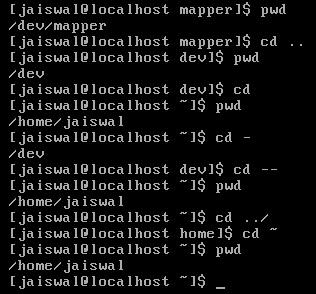
analysis of cd command.Hi Alien Coders….its not an alien thing to write about cd. Yeah cd(change directory) not CD(Compact Disc) 😛 . Either you are working on Windows or Unix flavors O.S, the most easiest and usual command is cd, correct?

cd means change directory (as everyone knows) and its more powerful in Unix rather than Windows i guess. Window is having only cd path_of_the_diretory or cd .. but in Unix or specifically in Linux cd command is having lots of options. Lets explore one by one:

1. cd path_of_directory This command is used to enter into the directory whichever is specified either absolute or relative Ex: # cd /home/jaiswal/songs/audio/bollywood (absolute path) # cd  songs/audio/bollywood   (relative path when u r already at /home/jaiswal)

2. cd .. This command is used to move one step up form the current directory. If you are at /home/jaiswal/songs/audio/bollywood (keep it as a base of the examples) and want to move one directory up use cd .. Ex: # cd ..  (now current directory will be /home/jaiswal/songs/audio) # cd ../../../movies  (moved up three directories and entered into movies directory now i.e. /home/jaiswal/movies)

3. cd – This command comes very handy when you are working with files and one is at other directory and one is at another directory. For example: suppose one file is at /opt/bin/perl/codes and other is at /opt/bin/perl/modules/jaiswal/modules Now go to one directory using cd. Like cd /opt/bin/perl/codes then again type cd /opt/bin/perl/modules/jaiswal/modules and now use cd – You will be returned back to previous one which you used with cd. now use cd – as many time as you wish to switch over those two directories.

Ex:

# cd /opt/bin/perl/codes
# cd /opt/bin/perl/modules/jaiswal/modules
# cd - /opt/bin/perl/codes
# cd - /opt/bin/perl/modules/jaiswal/modules
Yes , you are right cd – is doing two work at a time.

1. Bringing back to previous used cd directory path and 2. also print the current directory path just like pwd

4. cd — or cd ~ or cd Yes all three commands will let you drive to user's home directory most probably /home/user_name like /home/jaiswal ex: #  cd — or cd ~ or cd (don't write all three commands all together just i wrote. use any one if at one time buddy.) Windows have no such option as far as i have tried (if it is there let me know ) # pwd /home/jaiswal # I hope you will like it although even you know all these commands, you will find rarely any article on this which will explain like this. What say?