How to move or copy a file using Perl

There can be n number of ways to copy or move a file using Perl programming. Like invoking system command or using Linux or windows system command through backtick. But I found using a module called "File::Copy", nice and cleaner way to accomplish the task. It will take care of Operating System issues and other dependencies.
And the good thing is, it's available in core Perl!

So we will use File::Copy module and will call copy() function to copy the file and move() function to move the files.

Ok then, How it works?

Finding the length of an array and a hash

Learn PerlDetermining the length of an array and a hash

If you are working on Perl, then you will need to find the length or size of an array, hash, and array/hash elements very often.
Meaning of Size or length depends upon for which context you are talking about.  Generally it means the number of characters in a string, or the number of elements in an array/hash.
But, if you are using Unicode characters then the number of characters in a string may be different to the number of bytes in the string. So the in-built function length may give different result for different context.

We will see it by using different examples based on different problems:

Example 1. Finding length() of string
To determine the number of characters in an expression use the length() function:
    [perl]#!/usr/bin/perl
    use strict;
    use warnings;
 
    my $name = 'Jassi';
    my $size = length($name);
 
    print "$size\n";
    exit 0;[/perl]
This example prints the number of characters in the string $name:
    5

Example 2. Find the bytes used by string using length()
What, if you want to know the bytes occupied by the string not the characters it holds?  This may not matter if  you are using ASCII characters but it may, if you are using Unicode characters.
By default the length() function returns the number of characters. You can tell it to return the number of bytes by specifying use bytes; in the program as in this example:
  [perl]  #!/usr/bin/perl
     use strict;
    use warnings;
 
    my $char = "\x{263a}";    # A smiley face
    {
         use bytes;
        my $byte_size = length($char);
        print "Bytes: $byte_size\n";
        no bytes;
    }
    # Character size here
    my $size = length($char);
    print "Chars: $size\n";
     exit 0;[/perl]
This outputs:
    Bytes: 3
    Chars: 1
 
Note: either use closure or whenever you use “use bytes” try to use “no byets” once you are done

Number of element in an array
Example 3: using array’s last index
In Perl you can determine the last element of an array easily ($#array_name) and add 1 to it to find the number of elements in that array.
   [perl] #!/usr/bin/perl
    use strict;
    use warnings;

my @alien_members = qw(jassi Ritesh Ranjan som Santosh);
    my $size = $#alien_members + 1;
    print "$size\n";
    exit 0;[/perl]
This gives us:
    5
Example 4.  Using scalar context of an array
If you assign an array to a scalar variable, it will return the number of elements of that array:
  [perl]  #!/usr/bin/perl
     use strict;
    use warnings;
 
    my @alien_members = qw(jassi Ritesh Ranjan som Santosh);
    my $size = @alien_members;
 
    print "$size\n";
    exit 0;[/perl]
This gives us:
    5
Apart from being confusing to read, this method can lead to some easy mistakes. For example, consider the following program:
   [perl] #!/usr/bin/perl
     use strict;
    use warnings;
 
     my @alien_members = qw(Jassi Ritesh Ranjan som Santosh);
    print "@alien_members\n";
    print @alien_members."\n";
     exit 0;[/perl]
What would you expect it to print?
Each array elements to a new line like
Jassi
Ritesh
Ranjan …
Nope it would print
Jassi Ritesh Ranjan som Santosh
5
When double-quotes included, it treats arrays differently. The double-quotes cause Perl to flatten the array by concatenating the values into a string. So behind the stage, something like this happened.
“Join each array element by space and assign it to a scalar variable. So it became a string.” It is something like $size = “@alien_members”; which will differ from $size = @alien_members;

try to print these two statements and see the difference.
 But check second print output. Isn’t it strange?

Example 5. Arrays: never use length() to find the number of elements in an array.
You have seen  the use of length at Example#1 but still If you try to use the length() function on an array, it won't give you the desired output.
    [perl]#!/usr/bin/perl
 
    use strict;
    use warnings;
 
    my @alien_members = qw(Jassi Ritesh Ranjan som Santosh);
    my $size = length(@alien_members);
     print "$size\n";
    exit 0;[/perl]
The output is not what you thought:
    1
This is because the length() function requires a scalar, so the array is forced into scalar context.
And we saw already (example 4) that an array in scalar context already gives us the length. The example above is giving us the length of the length i.e. the length of 5 is 1. Hope it makes sense!

Example 6. Finding the number of elements using scalar() function
No doubt that Example 3 and 4 are correct but they aren't much clear and friendly to use in our program (readability problem you can say). Perl has the scalar() function which forces the array into scalar context which will give you the length of an array (even hash too):
   [perl] #!/usr/bin/perl
 
    use strict;
    use warnings;
 
    my @alien_members = qw(Jassi Ritesh Ranjan som Santosh);
    my $size = scalar(@alien_members);
 
    print "$size\n";
    exit 0;[/perl]
This also gives us the correct answer:
    5

Example 7. Finding the number of elements in a hash
Sometimes you will also want to have the number of elements of a hash. This is easily done using the keys() function to return the keys as an list, and the scalar() function to return how many keys there are (it is very common question in interviews too):
  [perl]  #!/usr/bin/perl
 
    use strict;
    use warnings;
 
    my %alien_members_rank = (
        Jassi => 1,
        Ritesh   => 2,
        Ranjan   => 3,
        Somnath    => 5,
        Santosh => 4
    );
    my $size = scalar(keys %alien_members_rank);
 
    print "$size\n";
    exit 0;[/perl]
The output of this program is:
    5
Note: it will not give 10 as you might have thought in context of an array. It can give you no of keys elements and then you can just multiply it by 2 😀

For more details on these functions, see also
    perldoc -f length
    perldoc -f scalar
    perldoc bytes


Minimal Introduction on Regular Expression

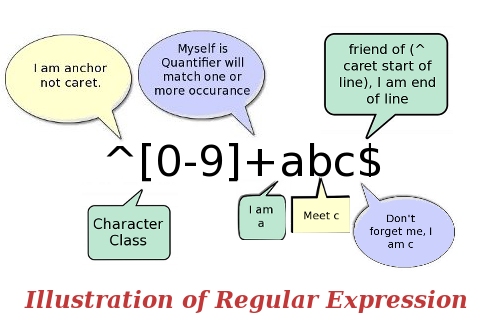
Regular expression IllustrationMinimal basics on Regular Expression (Non-technical )

This article is for those who have graduated from Computer Science background or have basic knowledge of natural language processing concepts. I will not share any coding stuffs in this post and all basic rules with examples will be posted in next article.
 In our graduation time we had one paper called Theory of Automata which dealt with NFA, DFA etc. There we had used some magic/wildcard symbols to complete the expression. Like “^(a|b*)+ababa?cd$”  I know it looks nothing more than a junk to a common man but it does lots of such things which saves our time and effort in real life of programming world.   Whatever you saw, was nothing but a small example of regular expression.

What is regular Expression?
It is a method to manipulate set of strings which is in some order or which makes some sense in real use. It is also called as pattern.  It provides a method to match, substitute, and transliterate set of patterns, text, strings. In programmers world it is also being called as regex or regexp.
Ex: All corrupt politicians substituted by honest politicians. We just need to use the pattern: s/corrupt/honest/ig

That’s it! Now our nation has all honest politicians in the world of regular expression. This was just a small example. It can do a lot. (Think about it -> sochiye jara :P.  It’s very famous phrase now in Indian television advertisement 😉 ) Of course to use this small but damn powerful tool, we need to follow some sets of rules which I will try to cover in my next article as its continued part.

Why Regular Expression?
Whenever we need to do something with the text, regex’s magic can be useful. Almost all text editors use regular expression to manipulate text contents. Like find something in a file or replace a pattern with new pattern etc.  For example:

  • replace all carbonate to polycarbonate
  • Find all coders word in a file. It should not match aliencoders, decoders, and encoders. It should match only coders
  • Replace nasty characters from Unix file which came from windows files like ^M
  • Find all Cisco Pix Firewall from different firewall products
Where we can use Regular Expression?
  • It can be used anywhere, where we need to manipulate a text file, set of strings using a pattern. It is being used in almost all the programming languages and Perl is a well-known language whose power lies behind regex.
  • It is being used in text editors, even in MS Word
  • If you want to replace a word, say by mistake you wrote gray instead of grey and it is having more than 50 such occurrences in a file. Just write a pattern and use it. Ex: s/gray/grey/ig.  It will change all gray to grey in a fraction of seconds.
  • You can save many lines by using regular expression rather than using nested if else.
  • If it’s Perl then you can use code also, instead of just a string pattern. You need to use x modifier for that.
  • One can use regular expression in grep and map function in Perl which can save many lines of codes ( an alternative to loop structure with if else conditions ). There are lot more instances.
  • Regular expression is used by all level of programmers from different programming language domain like C#.NET, JavaScript, Perl, Python, PHP
  • For Syntax highlighting, data validation using regex in your codes
  • Even search engines like Google also uses Regular Expressions.
Where we can avoid regular expression?
  • If work can be done using simple if else or loop. Ex: do ip address validation (1-3 digit in four octet) and then use if else to check octets lies between 0-255 range or not.
  • If you are using backtrack with greedy search, beware of using it. It may hang your system
  • If you need to use regex anyhow , then don’t try to put all things in one complex regex
  • It’s very powerful tool, if used wisely. Always try to use minimal greedy pattern like .*? instead of .*
What are the basic elements to learn in Regular Expression?
There are lots of things to learn to start writing regex from the scratch but If you get familiar with some of its technical terms and its meaning, then writing and understanding complex regex will be easy.
  • Character class: whatever you use inside [] will be treated as range with or options  i.e [a-z0-9A-Z] which means anything from a to z or A-Z or 0 to 9
  • Meta characters (special characters) : character that has special meaning in regular expression other than simple meaning. Like + in regular expression world means one or more occurrence not a simple addition. other examples are \w,\d,\S,.,\t, ^, $, |
Note: ^, $, \A,\Z, \<,\> are also called as anchors because it decides the start and end position in the pattern
  • Quantifier or range operators: It is used for defining range of the pattern like one or more, at least 2 or more, between 3 and 8 Ex:
    • \d{3,} means at least 3 digits or more  (ha){3} matches 3 ha i.e. hahaha (shortcut to laugh (he){3} -> hehehe 😛
    • \w +  means one or more occurrence of alphanumeric character including ‘_’
    •  Other quantifiers are ?, *, {} (Hint: greedy, non-greedy used for these)
  • Modifier or (pattern modifier): used after that pattern to modify the working of regular expression
    • Ex: s/old/new/ig means substitute old to new wherever it finds the word old with case insensitive property
    • Other modifiers are i.e. m,i,c,x,g ,d,s,o  etc which depends upon regular expression operators. Like e modifier can be used only for substitute regex operator
  • Saving the matched pattern using grouping pattern i.e. (\d+), if matched will be saved in $1
  • Regular Expression operators: it defines that the pattern is for matching or searching or transliteration i.e. m, s, tr
  • Other terms like greedy pattern, non-greedy pattern, backtrack etc. Like how .* and .*? works
That’s all for now.  I hope you can understand now about the basic use and technical terms used in regular expression. I will explain all such terms in details using Perl programming language in my next post

Online screen sharing software: TeamViewer

TeamViewer LogoTeamviewer: an online screen sharing and remote assistance software

What is Screen sharing and remote assistance?
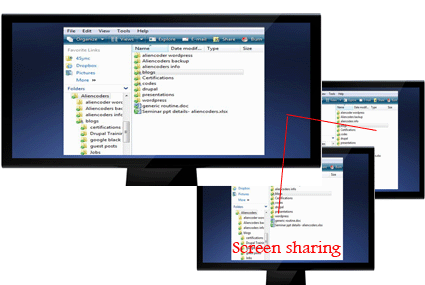
Screen Sharing
One can share the content of his/her computer to the other person using an application. Other person can see the same content whatever the first person wish to share either whole computer or a part of it. Like Browsers only or media players only etc.

Screen Sharing conceptRemote Assistance
When you wish to show your computer screen to others either in Local Area Network or through internet for various reasons, you need screen sharing application. If it is for the purpose to troubleshoot any computer related issues or file sharing or to help the other person sitting at far distance (connected through internet), we term it Remote Assistance

What is TeamViewer?
TeamViewer is an online screen sharing and remote assistance application which was first released in 2005 by a German Company GmbH.
It was voted 5 out of 5 by C|Net and 4.5 out of 5 by PCMag and currently it’s in #1 rank under Remote Assistance Application at download.com
It is free to use for personal use but you need to pay some extra bucks to make it professionally. Rates are different for different purpose like business or corporate. You can do video chatting through it too! One can share files using drag and drop functionality or you can develop your own secured private network (VPN).

TeamViewer CompatibilityIt supports more than 30 languages and is available in all Operating systems i.e.

  • All Windows Platforms
  • Linux and other x86 rpm based devices (you may need to use wine)
  • Mac
  • Andoid
  • iOS
Then, it’s a perfect solution for all of your ideas. Enjoy it!
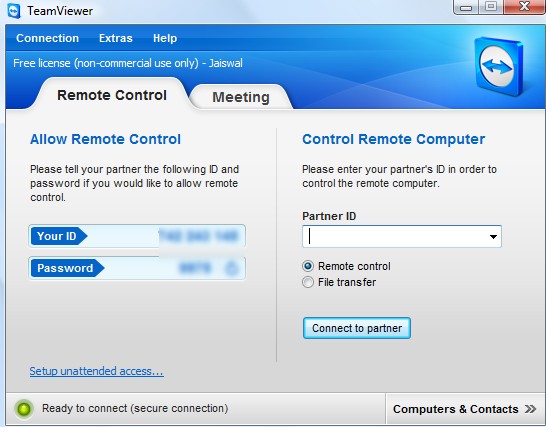
TeamViewer after installation

Why Teamviewer?
If you want to

  • share your system online for troubleshooting of your system or
  • want to demonstrate through presentation (ppt) to your client/students or
  • want to have an online meeting for any coaching classes or
  • want to have serious discussion online for a project with the team members
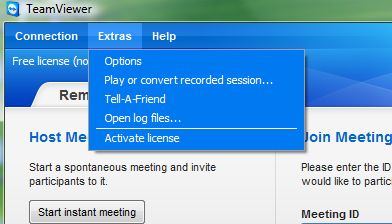
TeamViewer SettingsFeatures of TeamViewer (Advantages and Disadvantages)

Pros

  • It’s easy to use even for non-technical people
  • It’s free for personal use
  • You can do video chat too!
  • You can troubleshoot others system while sharing the screen (through internet connection)
  • It’s easy to use file transfer through drag and drop functionality (from version 7)
  • One can remotely access through smart phones
  • It is very easy to install and fast to connect to other systems.
  • You can customize the whole setting according to your convenience and it’s easy to do that
Cons
  • V7.x can connect to lower versions if he needs to access lower version TeamViewer based system  but vice-versa doesn’t work
  • File sharing and VPN connection is still little complex for common man
TeamViewer Custom Options
 
Version History and download links
Version History
It’s first release was way back in 2005 and gained popularity in no time. Latest versions are:
  • Windows: v7.0.12979 (3.4 MB)  added on 19th March, 2012
  • Linux:  v7.0.9348 (17.2 MB) added on 19th March, 2012
  • Android: v7.0.335 (1.7 MB) updated on 13th March, 2012
  • iOS: v7.0.9413 (19.5 MB) added on 7th February, 2012
  • Mac: v7.0.11023 (25.5 MB) on March, 2012

Official website: http://www.teamviewer.com/
Download Link: http://www.teamviewer.com/en/download/index.aspx

How to use it and how it works?
Everything from installing the software to the final setup has been described in this video which uses the slides too posted at slideshare.


How this Meeting feature works here?
To start an online meeting the presenter gives the Meeting ID to their participants. They can join the meeting by using the TeamViewer full version or by logging on to http://go.teamviewer.com/  and enter the Meeting ID.
It is also possible to schedule a meeting in advance.

How much secured this Teamviewer is?
TeamViewer uses RSA private/public key exchange (1024-bit) and AES (256-bit) session encoding.
In the default configuration, TeamViewer uses one of the servers of teamviewer.com to start the connection and then do routing of traffic between the local client and the remote host machine. However in 70% of the cases after the handshake a direct connection via UDP or TCP is established. UDP connection makes it much faster.

Here is the presentation for it on Slideshare:


RPM package manager for beginners

RPM Linux logoRPM is a powerful software manager for Linux. Earlier it was meant only for Redhat but now it is used in all the Distro which uses rpm for managing their software. 

//There are actually two types of Distro. One is RPM based and other is Debian based. Distro which uses .rpm software is called rpm based linux example: Redhat, fedora, centos etc  and  distro which uses .deb software is called debian based linux example: Ubuntu, Debian, Knoppix etc. This is simillar to Windows system. In windows .exe is used whereas in linux .rpm and .deb is used.//

RPM can install, remove, query and validate the software in the system. There are some good graphical programs which install rpm software but first i will tell you about command line method.

Querying the System

How to look which all software are installed in the system. Here is the command for it:

rpm -qa | more

Let me explain you this. Here rpm  tells the system that you are going to run rpm program. -q tells the sytem about Query operation. a in -qa is for listing all the software. |more is not the feature of rpm but is linux command which tells the system to list the output one page at a time.

How to get info for the single software. Here is the command for it:

rpm -qi vlc

Here i option require the specific package name. So specific package name is given, i.e vlc.

Installing Software in the System

rpm -ivh vlc.rpm

Here vlc.rpm is not the full package name, it is just an example. i is for install, v is for verbose message in case installation fails and h option show the progress mark with hash.

If  you want to update package the use U instead  of i i.e rpm -uvh vlc.rpm.

Removing Software

    rpm -e vlc

e option is used for erasing. But sometimes this will not work due to some dependency. vlc many be dependent on some othe package. so in this case -nodeps option is used. and the command is:

    rpm -e –nodeps vlc

Sometimes packages are not removed properly. For example, if you try to install software and the rpm says that it is alreay installed, and then when you try to remove it then rpm says it is not installed. In this case -force will help to remove this problem. Here is the command for it:

rpm -ivh –force vlc.rpm

Regarding Graphical installer of RPM

People who are working on Linux generally don't use graphical installer. For beginners i think they can have feel of it but i wont recommend this.

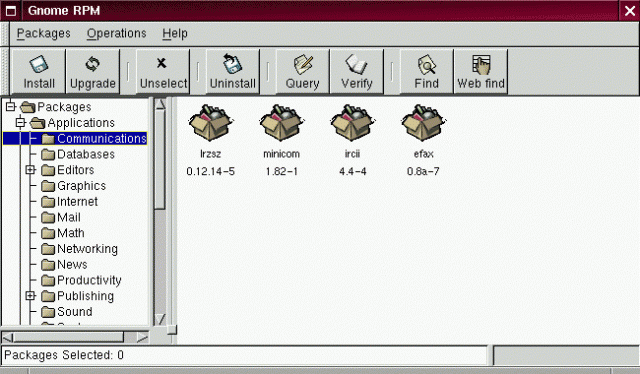
There is a software called GnoRPM. To start GnoRPM type gnorpm in the command line.

GnoRPM software


If you have any query related to package manager then just post your query here. There are some other good command line way to install software from internet without worrying about dependency, which will be posted as new topic. Just keep following us.


How to find the list of installed modules in Perl

This is one of the questions asked in many Perl related job interviews. See the question here: http://www.aliencoders.org/content/interview-questions-perl-freshers-and-experienced
There will be some situations when you will need to know about installed modules, its version or you may need to check if required module is installed or not with mentioned version or higher than that.

Here are few ways through which you can achieve the result that I found over the internet from different websites.

1. To list all installed Perl modules using perl script

[perl]
#!/usr/bin/perl   #change the path  with your perl location
use strict;
use warnings;
use ExtUtils::Installed;  # By default this module will be available in Perl

my $instmod = ExtUtils::Installed->new();
foreach my $module ($instmod->modules()) {
    my $version = $instmod->version($module) || “Version Not Found.”;
    print “$module version=$version \n”;
}
[/perl]

2. To list installed Perl modules using command line in Linux box

Try instmodsh command in linux box
and then type l to list modules or m to give particular module name or q to quit

[code] $ instmodsh[/code]

Output:
[code]Available commands are:
l            – List all installed modules
m    – Select a module
q            – Quit the program
cmd?[/code]
At cmd? prompt type l to list all installed modules:
[code]cmd? l[/code]
Output:
[code]Installed modules are:
Archive::Tar
CPAN
Compress::Zlib
MIME::Lite
Module::Build
Net::Telnet
PAR::Dist
Perl
Spiffy
Test::Base
Test::Simple
XML::Simple
cmd?
[/code]

This command itself is a perl script that use ExtUtils::Installed module. Try following command to see its source code:
[code]$ vi $(which instmodsh)[/code]
For more details, visit this link: http://perldoc.perl.org/instmodsh.html

3. To compare and check installed Perl modules with respect to given modules with its version

[perl]
#!/usr/bin/perl
use strict;
use warnings;
my @modules = ([‘SOAP::Lite’, 0.50],
           [‘IO::Socket’, 0],
           [‘HTML::Parser’, 3.26],
           [‘LWP’, 5.65],
          );

print “\n”,
      “==========================\n”,
      “Testing for the given  Perl modules\n”,
      “===========================\n”;
      
    for my $arr_ref (@modules) {
        my($mod, $ver) = @$arr_ref;
        print “$mod” . ($ver ? ” (version >= $ver)” : “”) . “\n”;
        
        eval(“use $mod” . ($ver ? ” $ver;” : “;”));
        if ($@) {
            my $msg = $ver ?
                      “\tEither it doesn’t have $mod installed,\n” .
                      “\tor the version that is installed is too old.\n” :
                      “\tIt does NOT have $mod installed.\n”;
            print “$msg\n”;
        }
        else {
            print “\tYour system has $mod installed ” .
                  “with version @{[ $mod->VERSION ]}\n\n”;
        }
    }

print “Module Testing Done!\n”;
[/perl]

Note: If you are putting module name dynamically, then use  @{[ $mod->VERSION ]} for version number
else $Module-Name::VERSION ex: $SOAP::Lite::VERSION

[perl]
print “SOAP::Lite Version is “. $SOAP::Lite::VERSION.”\n”;
#or
 print “$mod version is @{[ $mod->VERSION ]} \n”;
 [/perl]

4. To list Perl modules that comes preinstalled with the standard Perl package and installed from outside
[perl]
perldoc perlmodlib #lists all the modules that come with standard Perl package already
perldoc perllocal #lists all modules that is installed from outside
[/perl]
Both modules reveal lots of information about each installed modules like installation date, directory, module version etc.

How to change Blog items count in Drupal

If you are using Drupal CMS for your website and you are displaying recent blog post items in a block anywhere in your website. You will see that it shows 10 recent blog posts always. I was trying to make it to list only 5 recent items but I didn’t get any clue how to do that.

After googling for few hours I got some solutions which I am sharing below.

Root password lost – recover it here!

Need to login on to LINUX machine – but don’t have the privilege? – or want to gain root privilege?
Pre Requisite – you need the access physical or command line or console access to reboot the machine.

Follow the steps :-

  1. The very first screen when you restart the linux machine – press an enter or space whichever works and this will take you to the snapshot of step 2.

Kernel menu

                                                                                Fig 1

  1. You will get this screen –

edit-mode-option

                                                                                Fig 2

Press Enter. You will get the screen in Fig.3

Kernel console

                                                                                Fig 3

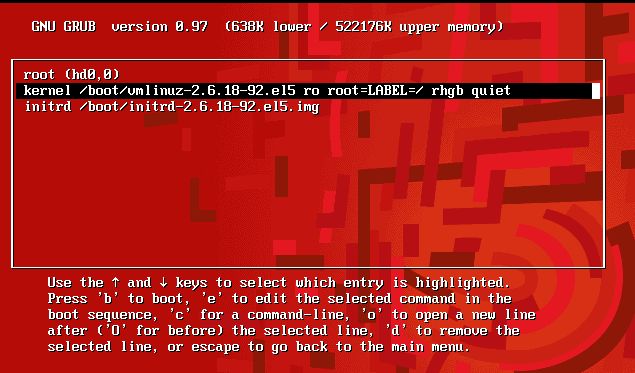
Press e in the end of 2nd line , the one starting with kernel, to enter the edit mode.

  1. You will get the screen in fig 4, add “s” at the end to login next time in single user mode Type Enter

single user mode

4. After the step 3 you will get this screen, press b to reboot.

After single user edit

  1. After the reboot, below is the screen you will get-

After Reboot

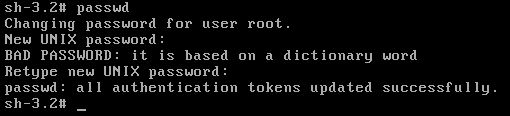
Now you can change the password by typing passwd,it won’t ask you this time for the old password.

password change

Now, you have successfully changed the root password.

PS : Remove thes “, that you have put in there previously by using the same procedure. And next time you reboot you can login as root!!

Any query/help/suggestion/feedback regarding this is welcome. Please feel free 🙂 

Steps to run your system faster without any software

fast systemThis step by step procedure is for those users who use Windows and facing slowdown of their computer systems which may cause due to several reasons. Just follow tslow systemhose listed points; you don’t need to use any 3rd party tool to cleanup files and to respond your system in faster way.
I presume that you have basic knowledge of running commands through run commands and know to browse files and folders if stated to do so. I also presume that your system is not infected with any spywares, malwares or viruses. (Then these steps would go in vain)

  1. Go to run command and type regedit to open registry editor. (shortcut key: windows key + R)

    1. Now browse through the below given path
      HKEY_LOCAL_MACHINE/Software/Microsoft/Windows/CurrentVersion/Explorer/VolumeCaches
      i.e. at first click on HKEY_LOCAL_MACHINE then software under its tree structure then windows and so on…..
  1. Reach upto VolumeCaches, and then delete every folder listed under it one by one. (click on folder and press del key then click on yes)
  1. Open run command again and type %temp% to list contents of temporary files under the present user account.
    The path to that specific folder is “C:\Users\username\AppData\Local\Temp”  (change username to original value like Aliencoders or Jassi etc.)
  2. Open run command once more and type temp then press enter to list the contents under Windows Temporary Files ie. “C:\Windows\Temp”
  3. Remove Temporary internet files associates with Internet Explorer. (I am sure most of the users are still using this system’s default browser ) which is at
    C:/Users/username/AppData/Local/Microsoft/Windows/Temporary Internet Files

Note: You can delete it through Internet Explorer browser also.

  1. open internet explorer
  2. click on tools (check at right side top)
  3. then click on Internet Option (usually it will be at last in the list )
  4. click on general tab if you are not at general tab.(by default it will be in general tab only)
  5. click on delete under Browsing history (which will be after Home page) or click on settings under the same heading and click on view files button. You will be taken to the same folder about which I was talking.
  1. Delete apps which are not required or frequently used  from install/uninstall wizard.
    You can browse that wizard by typing appwiz.cpl at run prompt. (Now you know to open run command prompt and to type something? If, not then do it again because you will need it frequently)
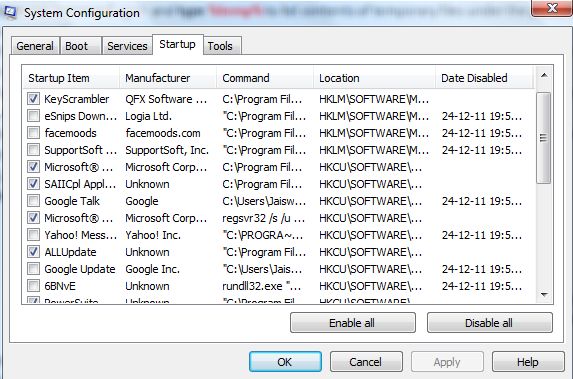
  2. msconfig settingsOpen Run command and type msconfig to open System Configuration settings
    then go through each tab minutely and if you feel you don’t need any application under boot services, startup etc just uncheck those applications and press apply and then Ok. (settings will be effective after restart which you can do later too!)
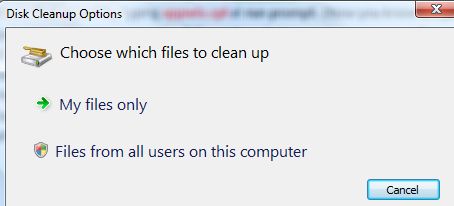
  3. cleanmgr screenshotOpen Run command one more time. Type  cleanmgr  and press enter to cleanup unwanted files (unwanted/unused according to system software )
    Click on My Files only and then choose drive to do system cleanup.
  4. Remove/move (cut and paste) materials from desktop, My Documents, My music, My pictures , Downloads (C:\Users\Jaiswal\Downloads) folders (it will be usually in C drive where O.S. is installed)

Note: Don’t keep huge file size stuffs , important stuffs on desktop or in my documents or even in C directory. ( If your system crashes or you need to install fresh Windows O.S. then these files will get deleted. So better to save in other directory like D:\ or E:\ etc)

  1. If you wish to clean unwanted stuffs through GUI based applicationand don’t want to go through the above mentioned steps  then go for Ccleaner