How to install VLC Media player in CentOS 6.x

How to install VLC Media player in CentOS 6.x step by step
I installed CentOS v6.4 in my system and started installing various applications to make my system a place for programmers with some entertainment applications. I tried to play mp3 songs and video songs but rhythm, Mplayer gave below errors for that I had to do lots of hard work just to listen a song, I was not in mood to explore and search and download those missing plugins.
 

So, I decided to install one of my all-time favorite player (KMPlayer when I am using Windows) VLC media player. It was not so easy to install it in CentOs as it seemed. I though downloading rpm package or tar file would do the things. But it required lots of steps before playing the first song in VLC.

You need to install listed four libraries before installing vlc in your local repository:

  • epel
  • remi
  • rpmfusion-free
  • rpmfusion-nonfree
Here are the working steps to install VLC Media player in CentOS 6.x:
 
Step 1
First you need to make a local repository of epel by using yum command (login as root to use yum command) below command:
 
# yum localinstall –nogpgcheck http://download.fedoraproject.org/pub/epel/6/i386/epel-release-6-8.noarch.rpm


Then type y to get epel installed properly. Then you will see the confirmation message like this:


Step 2
Now you need to install remi by using below command:
# yum localinstall –nogpgcheck http://rpms.famillecollet.com/enterprise/remi-release-6.rpm


Type y and complete the installation. You will see below image after successful completion.


Step 3
Now install rpmfusion free by typing below command
# yum localinstall –nogpgcheck
http://download1.rpmfusion.org/free/el/updates/6/i386/rpmfusion-free-release-6-1.noarch.rpm


Type y to complete the installation


Step 4
Now install rpmfusion nonfree library by using below command
# yum localinstall –nogpgcheck http://download1.rpmfusion.org/nonfree/el/updates/6/i386/rpmfusion-nonfree-release-6-1.noarch.rpm


Type y to complete the installation 
 

Step 5
You may skip this step. But just to confirm that all above libraries went well and you are able to find vlc info from the repository. If yes, then proceed to install VLC else you have some issue.
 
# yum –enablerepo=remi-test info vlc


Step 6
Now you can install VLC easily. Just type the below command:
# yum –enablerepo=remi-test install vlc


Step 7


Now it’s the time to play a song using VLC Media player. You may find it under application or use command prompt and type start vlc (be sure you are running the command as a non-root user else it will give error).

Whitepaper to troubleshoot SQL Server performance problems

SQL FinetuningHere is the Abstract of my whitepaper on SQL Counterpart to troubleshoot SQL Server proformance which is really helpful for DBA.
 
The primary goal of this paper is to provide important counters in the PERFMON and SQL server Profiler while tackling resource bottlenecks for diagnosing and troubleshooting SQL Server performance problems in common customer scenarios by using publicly available tools. This paper can be used as a reference or guide for database administrators, database developers and for all MS SQL users who are facing performance issues.
You can download this presentation in pdf format from here.


Introduction

Performance is one of the major factors for successful execution of any site or business. So performance tuning becomes one of the major tasks for the database administrators.Many customers can experience an occasional slowdown of their SQL Server database. The reasons can range from a poorly designed database to a system that is improperly configured for the workload. As an administrator, you want to proactively prevent or minimize problems and, when they occur, diagnose the cause and, when possible, take corrective actions to fix the problem. For troubleshooting common performance problems by using publicly available tools such as SQL Server Profiler, System Monitor (Perfmon), and the new Dynamic Management Views in Microsoft SQL Server™ 2005.

 
The primary goal of this paper is to provide useful counters in the PERFMON and SQL server Profiler while handling resource bottlenecks for diagnosing and troubleshooting SQL Server performance problems in common customer scenarios by using publicly available tools.
 
While using tools such as PERFMON and SQL server profiles we use all of the counters which increase the file size (e.g. trace file) and also the unnecessary time needed for the analysis. This brings us to the goal of this paper, which to showcase the useful or necessary counters. Target audience of this article is the database administrators and developers throughout the world, who are facing database performance issues.
 

Scope

This article is not proposing a new software development methodology. It is not promoting any particular software or utility. Instead, the purpose of this article is to provide important counters in the PERFMON and SQL server Profiler while tackling resource bottlenecks for diagnosing and troubleshooting SQL Server performance problems in common customer scenarios by using publicly available tools.
 

Important System monitor (Perfmon) counters and their use

The SQL Statistics object provides counters to monitor compilation and the type of requests that are sent to an instance of SQL Server. You must monitor the number of query compilations and recompilations in conjunction with the number of batches received to find out if the compiles are contributing to high CPU use. Ideally, the ratio of SQL Recompilations/sec to Batch Requests/sec should be very low unless users are submitting ad hoc queries. Batch Requests/sec, SQL Compilations/sec and SQL Recompilations/sec are the key data counters for SQL Server: SQL Statistics.
 
In order to find Memory bottlenecks we can use Memory object (Perfmon) such as Cache Bytes counter for system working set, Pool Non paged Bytes counter for size of unpaged pool and Available Bytes (equivalent of the Available value in Task Manager)
 
I/O bottlenecks can be traced using Physical Disk Object. Avg. Disk Queue Length represents the average number of physical read and writes requests that were queued on the selected physical disk during the sampling period. If your I/O system is overloaded, more read/write operations will be waiting. If your disk queue length frequently exceeds a value of 2 during peak usage of SQL Server, then you might have an I/O bottleneck.
 
Avg. Disk Sec/Read is the average time, in seconds, of a read of data from the disk and Avg. Disk Sec/Write is the average time, in seconds, of a write of data to the disk.
Please refer below table while analyzing the trace file.
 
Avg. Disk Sec/read (value) or Avg. Disk Sec/Write Comment
Less than 10 ms Very Good
Between 10 – 20 ms okay
Between 20 – 50 ms slow, needs attention
Greater than 50 ms Serious I/O bottleneck
 
 
Physical Disk: %Disk Time is the percentage of elapsed time that the selected disk drive was busy servicing read or writes requests. A general guideline is that if this value is greater than 50 per cent, it represents an I/O bottleneck. Avg. Disk Reads/Sec is the rate of read operations on the disk. You need to make sure that this number is less than 85 per cent of the disk capacity. The disk access time increases exponentially beyond 85 per cent capacity and Avg. Disk Writes/Sec is the rate of write operations on the disk. Make sure that this number is less than 85 per cent of the disk capacity. The disk access time increases exponentially beyond 85 per cent capacity.
 

Important SQL profiler counters and their use

If the Perfmon counters indicate a high number of recompiles, the recompiles could be contributing to the high CPU consumed by SQL Server. We would then need to look at the profiler trace to find the stored procedures that were being recompiled. The SQL Server Profiler trace gives us that information along with the reason for the recompilation.
 
We can use the SP:Recompile and SQL:StmtRecompile events to get this information. The SP:Recompile and the SQL:StmtRecompile event classes indicate which stored procedures and statements have been recompiled. When you compile a stored procedure, one event is generated for the stored procedure and one for each statement that is compiled.
 
However, when a stored procedure recompiles, only the statement that caused the recompilation is recompiled (not the entire stored procedure as in SQL Server 2000). Some of the more important data columns for the SP:Recompile event class are listed below. The EventSubClass data column in particular is important for determining the reason for the recompile.
SP:Recompile is triggered once for the procedure or trigger that is recompiled and is not fired for an ad hoc batch that could likely be recompiled. In SQL Server 2005, it is more useful to monitor SQL:StmtRecompiles as this event class is fired when any type of batch, ad hoc, stored procedure, or trigger is recompiled.
 
The key data columns we look at in these events are EventClass, EventSubClass, ObjectID (represents stored procedure that contains this statement), SPID, Start Time, Sql Handle and Text Data.

Profiler

Profiler can run, similar to Performance Monitor, either in a GUI mode, or in an automated manner with outputs to files or databases. Sitting and watching the GUI window is usually referred to as SQL-TV. That may be a good way to spot check issues on a database server, or do some ad hoc troubleshooting, but for real performance monitoring you need to set up an automated process and capture the data for processing later. Profiler collects information on events within SQL Server.
 
Cursors, Database, Errors and Warnings, Locks, Objects, Performance, Scans, Security Audit, Server, Sessions, StoredProcedures, TSQL and Transactions are the broad categories of events used in profiler.Each of these categories has a large number of events within it. Rather than detail all the various options, the following is a minimum set of events for capturing basic TSQL performance.
 
Stored Procedures – RPC:Completed which records the end point of a remote procedure call (RPC). These are the more common events you'll see when an application is running against your database.
 
Stored Procedures – PC:Completed which would be calls against procedures from the system itself, meaning you've logged into SQL Server and you're calling procedures through query analyzer, or the server is calling itself from a SQL Agent process.
 
TSQL: SQL Batch:Completed and these events are registered by TSQL statements running locally against the server which is not the same as a stored procedure call, for example:
 
SELECT * FROM table name. Each of these events can then collect a large number of columns of information, each one may or may not be collected from a given event, depending on the event and column in question and each one may collect different data from the event, again depending on the event and column in question. These columns include but are not limited to which can be analyzed with the help of below table.
 
 
Column Name Usage
TextData In the events listed textdata column represents the text of the stored procedure call, including the parameters used for the individual call, or the SQL batch statement executed.
ApplicationName This may or may not be filled in, depending on the connections string used by the calling application. In order to facilitate trouble shooting and performance tuning, it's worth making it a standard within your organization to require this as part of the connection from any application.
LoginName The NT domain and user name that executed the procedure or SQL batch
CPU This is an actual measure of CPU time, expressed in milliseconds, used by the event in question.
Reads These are the count of read operations against the logical disk made by the event being captured.
Writes Unlike the Reads, this is the physical writes performed by the procedure or SQL batch.
Duration This is the length of time that the event captured took to complete. In SQL Server 2000 this piece of data is in milliseconds. As of SQL Server 2005, this has been changed and is now recorded in microseconds. Keep this in mind if you're comparing the performance of a query between the two servers using Trace events.
SPID The server process ID of the event captured. This can sometimes be used to trace a chain of events.
StartTime This record the start time of the event.
 
 
In short, a great deal of information can be gleaned from Profiler. You may or may not be aware, but in previous versions of SQL Server, running Trace, as Profiler was called previously, against a system could bring the system to its knees before you gathered enough information to get a meaningful set of data. This is no longer true.
 
It is possible to turn on enough events and columns to impact the performance of a system but with a reasonable configuration Profiler will use much less than 1% of system resources. That does not mean that you should load up counters on the GUI and sit back to watch your server. This will add some load and can be easily avoided. Instead, take advantage of the extended stored procedures that are available for creating and managing SQL Traces. These will allow you to gather data and write it out to disk (either a local one or a remote one).
 
This means that you'll have the data in a transportable format that you can import into databases or spreadsheets to explore search and clean to your heart's content. You can also write the results directly to a database, but I've generally found this to be slower, therefore having more impact on the server, than writing to a file. This is supported by recommendations in the BOL as well. Here is a basic script to create a trace for output to a file.
 
In order to further limit the data collected, you may want to add filters to restrict by application or login in order to eliminate noise:
 
EXEC sp_trace_setfilter
      @trace_id, 
      @columnid,
      @logicaloperator,
      @comparisonoperator,
      @value
So, for example to keep any trace events from intruding on the data collection above, we could add below fields.
EXEC sp_trace_setfiter
   @trace_id = @TraceId,
   @columnid = 10, –app name column
   @logicaloperator = 1, — logical "or"
   @comparisonoperator = 0, — equals
   @value = N'SQL Profiler'
 
The output can be loaded into the SQL Server Profiler GUI for browsing or you can run this procedure to import the trace data into a table.
 
SELECT * INTO temp_trc
   FROM fn_trace_gettable('c:\temp\my_trace.trc', DEFAULT);
 

Evaluating Profiler data

 Now that you've collected all this data about your system, what do you do with it? There are many ways in which you can use Profiler data. The simplest approach is to use the data from the Duration column as a measure of how slowly a procedure is performing.
 
After collecting the information and moving it into a table, you can begin writing queries against it. Grouping by stored procedure name, stripping off the parameters from the string, will allow you to use aggregates, average, maximum, and minimum, to outline the poorest performing procedures on the system. From there you can look at their CPU or I/O and query plans in order to identify the tuning opportunities available to you.
 
With the release of SQL Server 2005, one additional piece of functionality was added to Profiler which will radically increase your ability to identify where you have performance issues. You now have the ability to load a performance monitor log file and a profiler trace file into the Profiler. This allows you to identify points of time when the server was under load and see what was occurring within the database at the same time.
 
 SQL Server Performance chart

For Memory bottlenecks we can use SQL Server: Buffer Manager Object and Low Buffer cache hit ratio, Low Page life expectancy, High number of Checkpoint pages/sec and High number Lazy writes/sec counters in Profiler.


Conclusion

 We can say that database administrators, database developers and all MS SQL users who are facing performance issues will be able to save their precious time while using Perfmon and SQL server Profiler. As we know that capturing and analyzing a trace file is tedious and time taking task which can be eased with the help of this paper.
         
Most of the time as soon as we receive a database performance issue we use all the counters irrespective of their usage and importance and so, this paper will provide important counters in the PERFMON and SQL server Profiler while tackling resource bottlenecks. And as we know that performance is one of the major factors for successful execution of any site or business. So performance tuning becomes one of the major tasks for database administrators and this paper will help in reducing their burden.

You can view the same article at slideshare too!

References

How to use Perl to fetch website details

Whenever I was surfing any good technical website,  I was getting curious to know what’s its page rank, alexa rank, where it is hosted, who handles its mails, when this domain was registered and by whom, when it will get expired and so on.
For all these, I had to visit different websites to gather all such information, then I thought it’s better to write a script which will fetch all the details for me and came up with site info details script using Perl.
Fully working code is available here.

Creating a JAX–WS Web Service Using IBM RAD and WebSphere 6.1

Creating a JAX –WS Web Service Using IBM RAD and WebSphere 6.1

I will discuss today creating a jax-ws web service using IBM RAD and websphere 6.1 .The theoretical parts I will cover in some other article. Today I am going to just show you all that how a jax-ws web service can be created using IBM RAD and websphere 6.1 and believe me if you are in learning phase then you will feel very happy to create web service of your own J. I will write in steps with the screen shots attached so that it will be easy for you.

You can download this article in pdf format from here.

Step 1:
          Create a new IBM RAD Workspace.
Step 2:
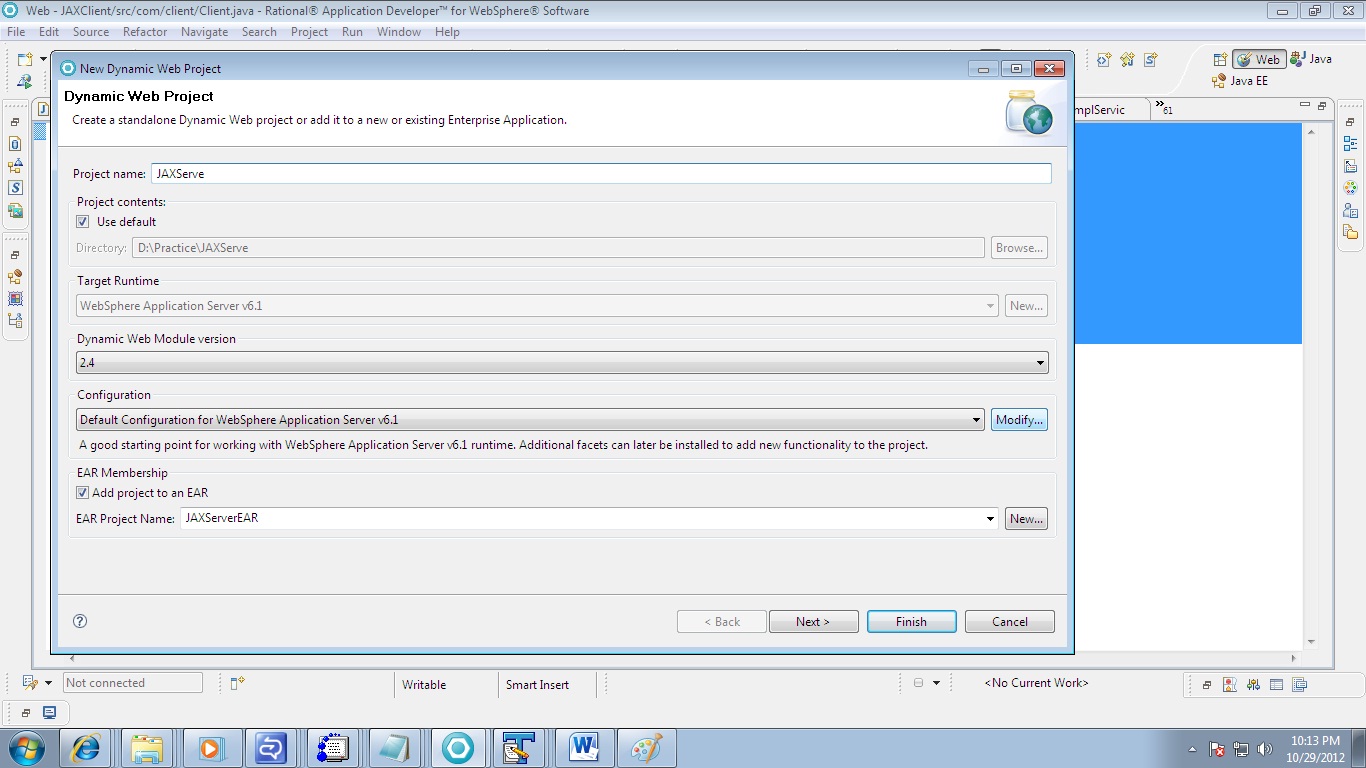
          Create a new Dynamic Java Project named “JAXServer”. We need to enable WebService Feature pack of WAS 6.1. Follow the below snapshot.

Enter the Project name as JAXServer.
In Configuration Click on Modify Button
Fig-1
  
 
Select WebSphere 6.1 Feature Pack for WebServices and then press Ok. And then Click on Next and Finish.

Fig-2

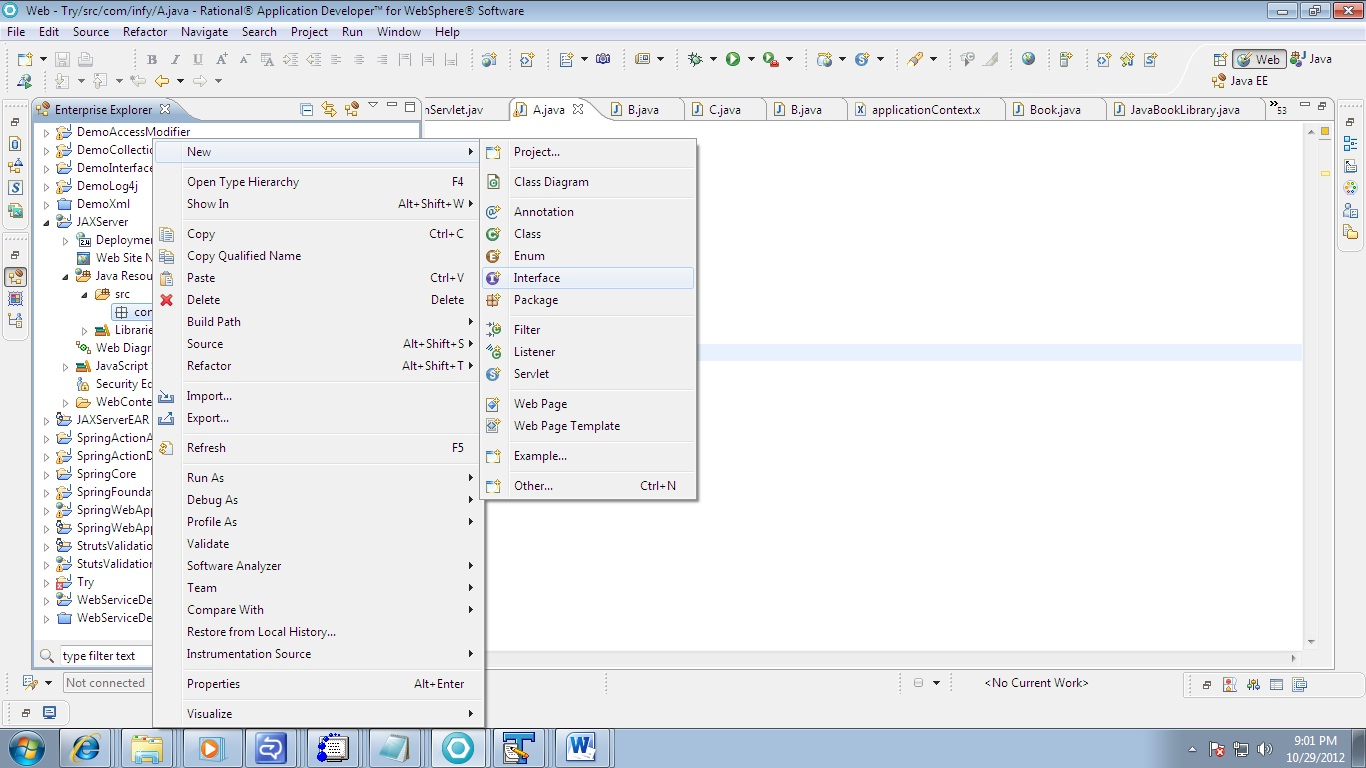
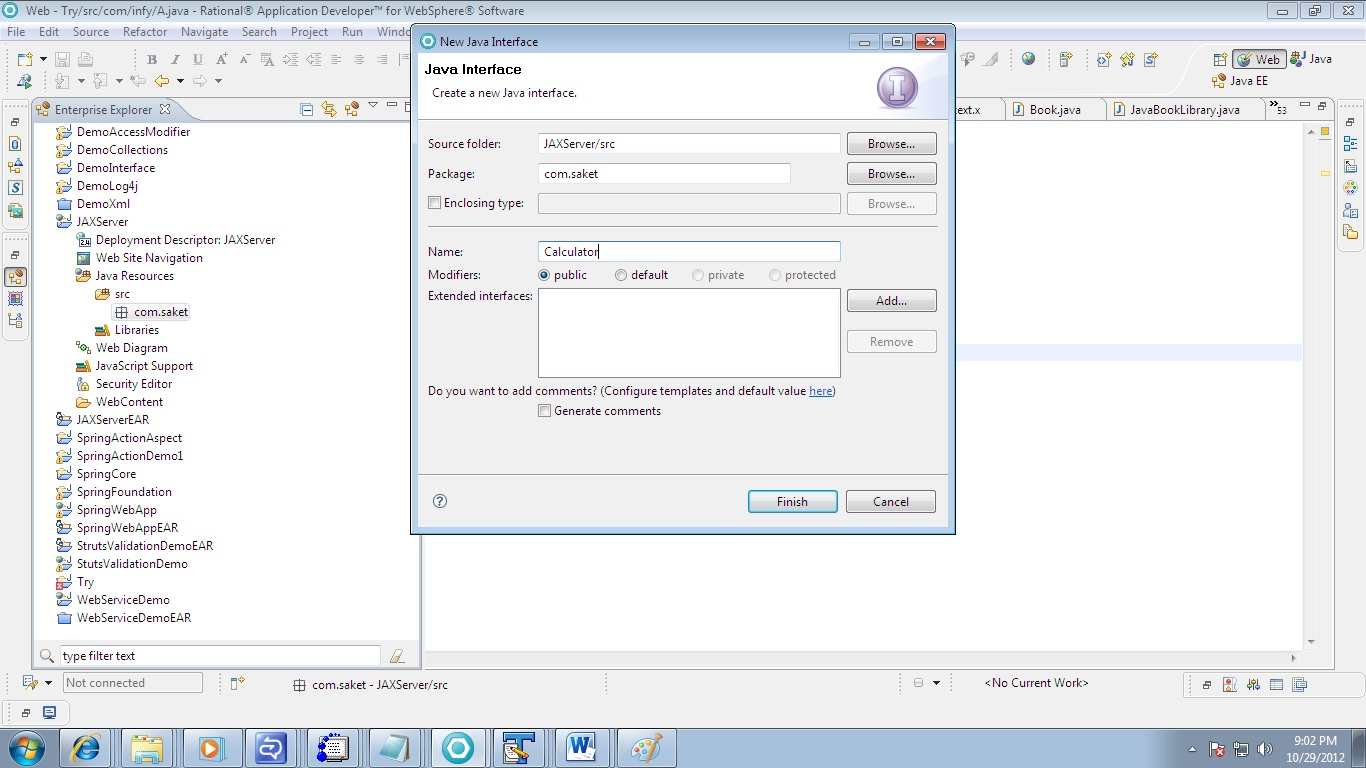
Step 3:         Create a new endpoint interface for defining our endpoint class. Right click in the src folder and add new interface and name it as “Calculator” in the com.pp package

Fig-3

Fig-4

 
 Step 4:
          Now we will define an interface for our calculator program. Write the below code in the Calculator interface.     

package com.pp;
 
import javax.jws.WebMethod;
import javax.jws.WebService;
 
@WebService
public interface Calculator {
 
          @WebMethod
          public int add(int var1, int var2);
}

 
Step 5:
          Now we should define an implementing class for our interface. We should  now create a class in the same package and name it as “CalculatorImpl”. This class will implement the Calculator interface and override the add method. The code that must be written inside CalculatorImpl class is given below.
 

package com.pp;
 
import javax.jws.WebService;
 
@WebService(endpointInterface=" com.pp.Calculator")
public class CalculatorImpl implements Calculator{
 
          public int add(int var1, int var2) {
                   return var1+var2;
          }
}

 
Now everything is explained via snapshot.
 
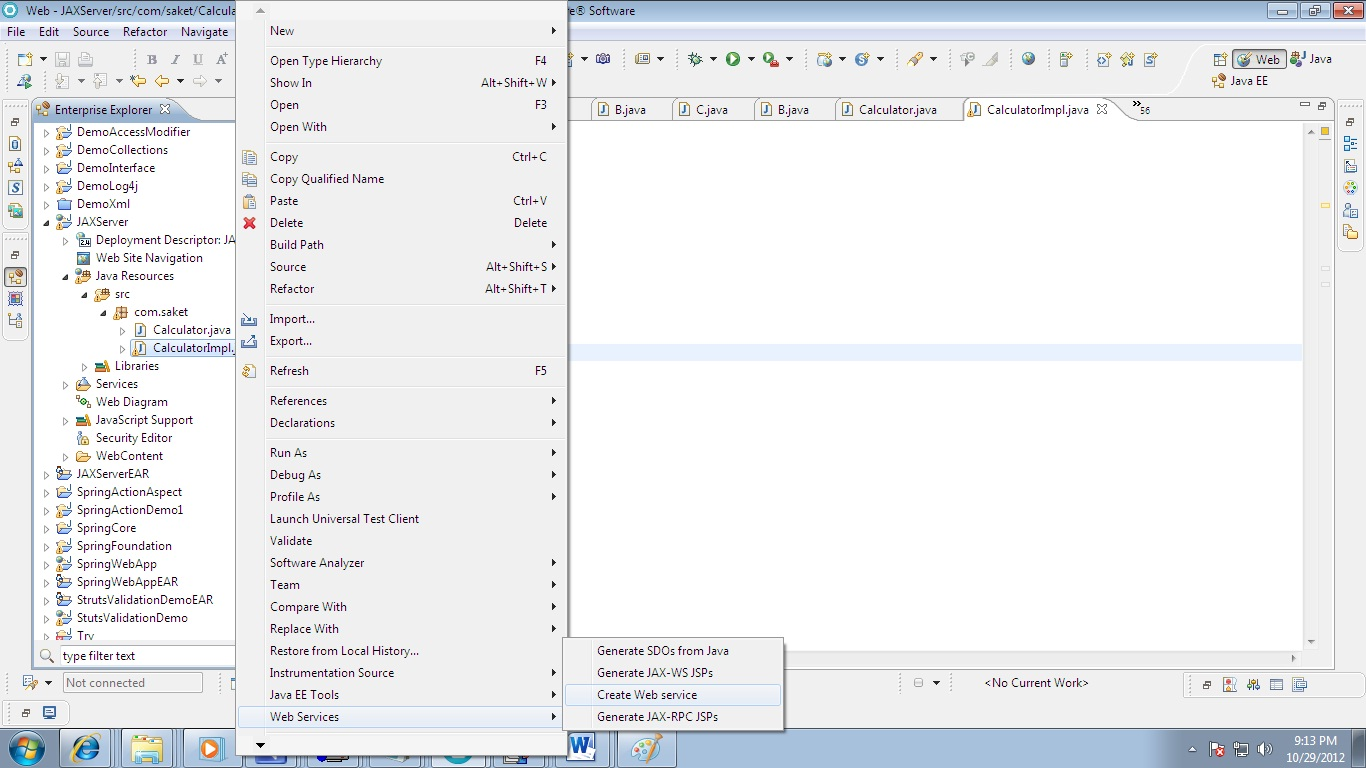
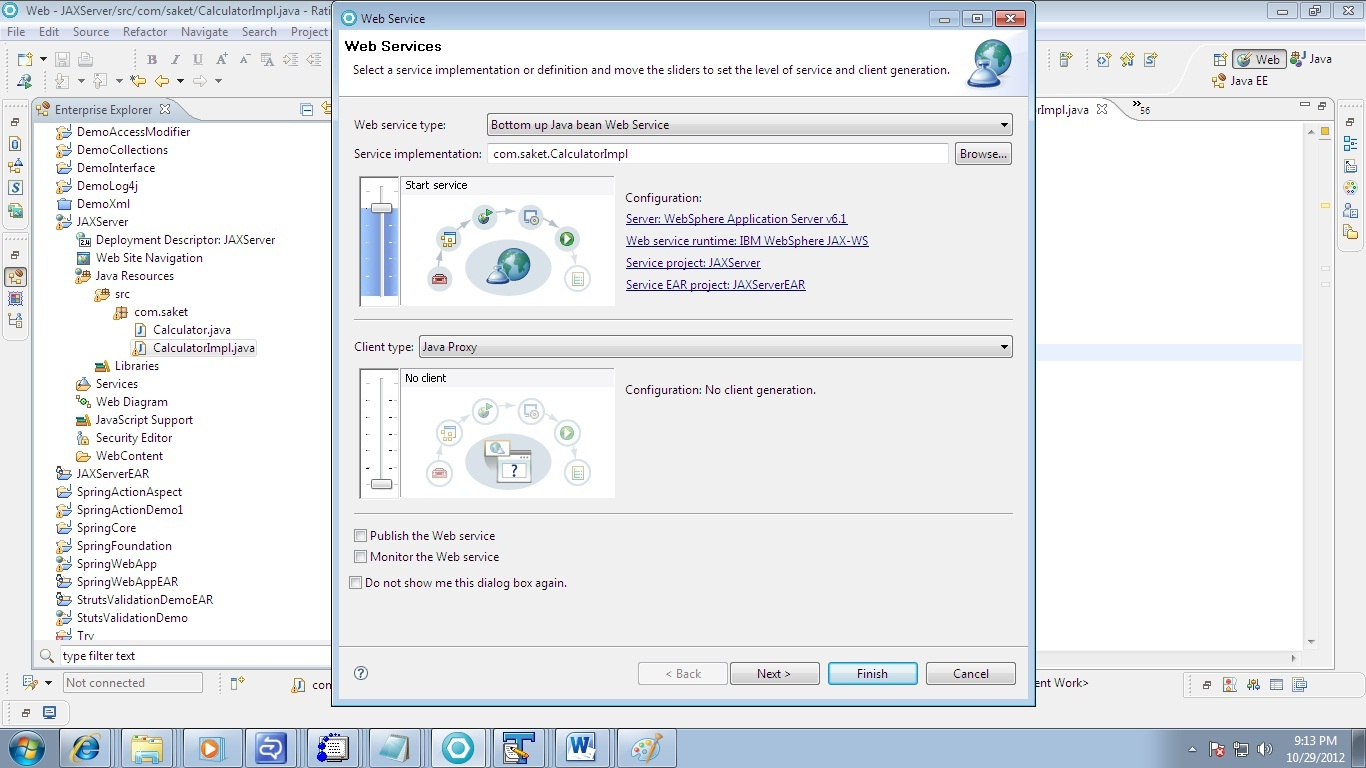
Step 6: Go to the Impl class and right click->WebServices->CreateWebService

 Fig-5
 
Service Implemtation class should show the name of Impl Class. Here CalculatorImpl

Fig-6
 
Check the Option Generate WSDL file into Project


Fig-7
 
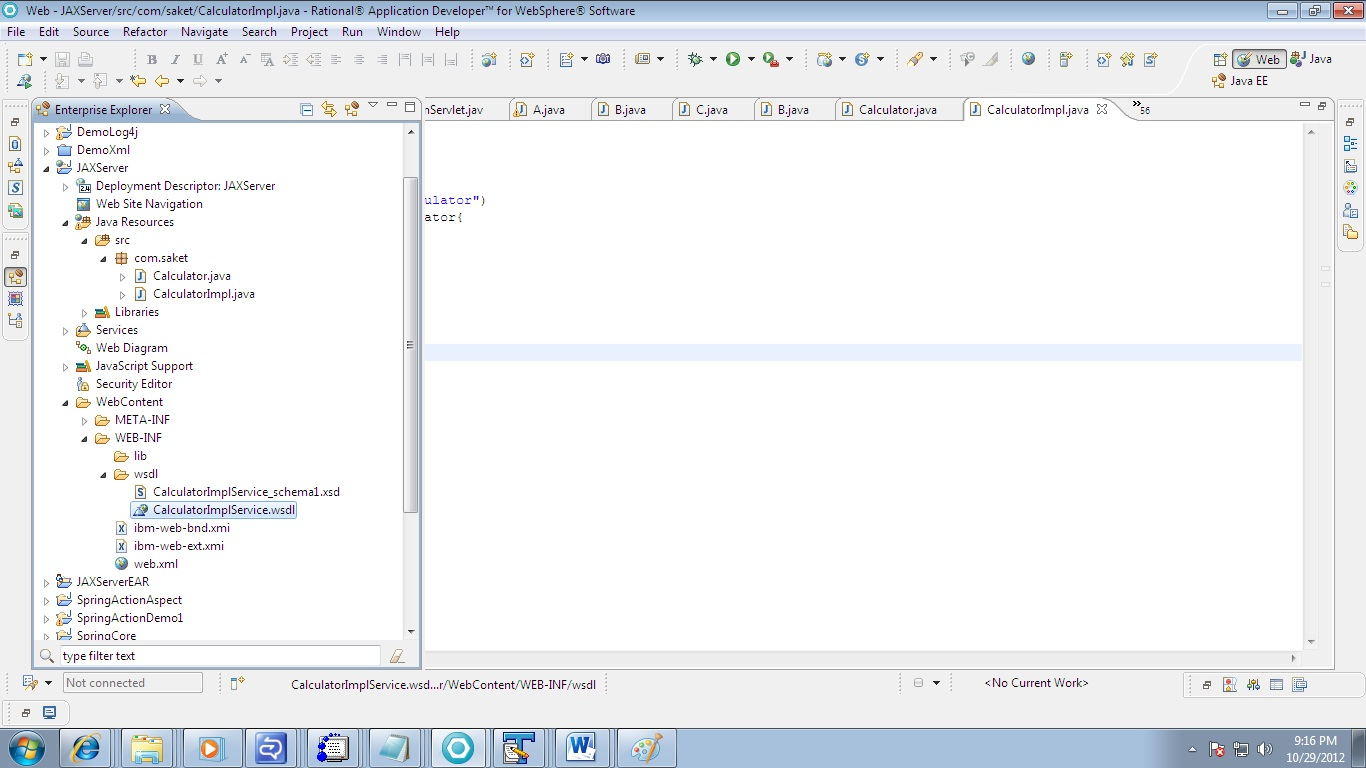
Step 7: When you click finish Wsdl will be auto genarted and you webService will be deployed. Expand the Project JAXServer and look for wsdl in wsdl folder.
 

Fig-8
         
 Step 8:
          Now validate the wsdl and Test using WebService Explorer
Fig-9

Step 9:
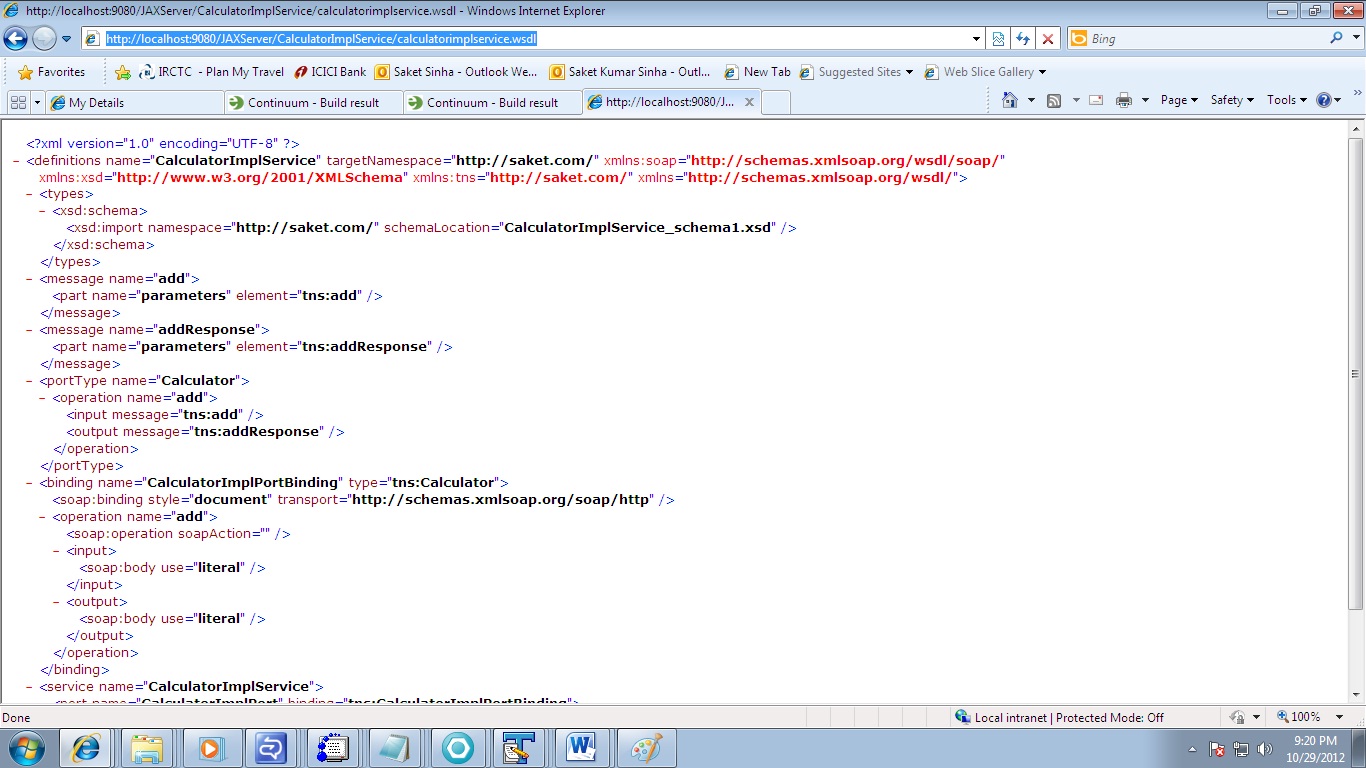
          Now let us check the wsdl document that would have got generated. Type the below URL in the internet exlplorer.
This address is there in soap:address location in WSDL

http://localhost:9080/JAXServer/CalculatorImplService?wsdl

        
Step 10:
          You would get the wsdl file that would have been generated for our Calculator endpoint.

Fig-10

 
Step 11:
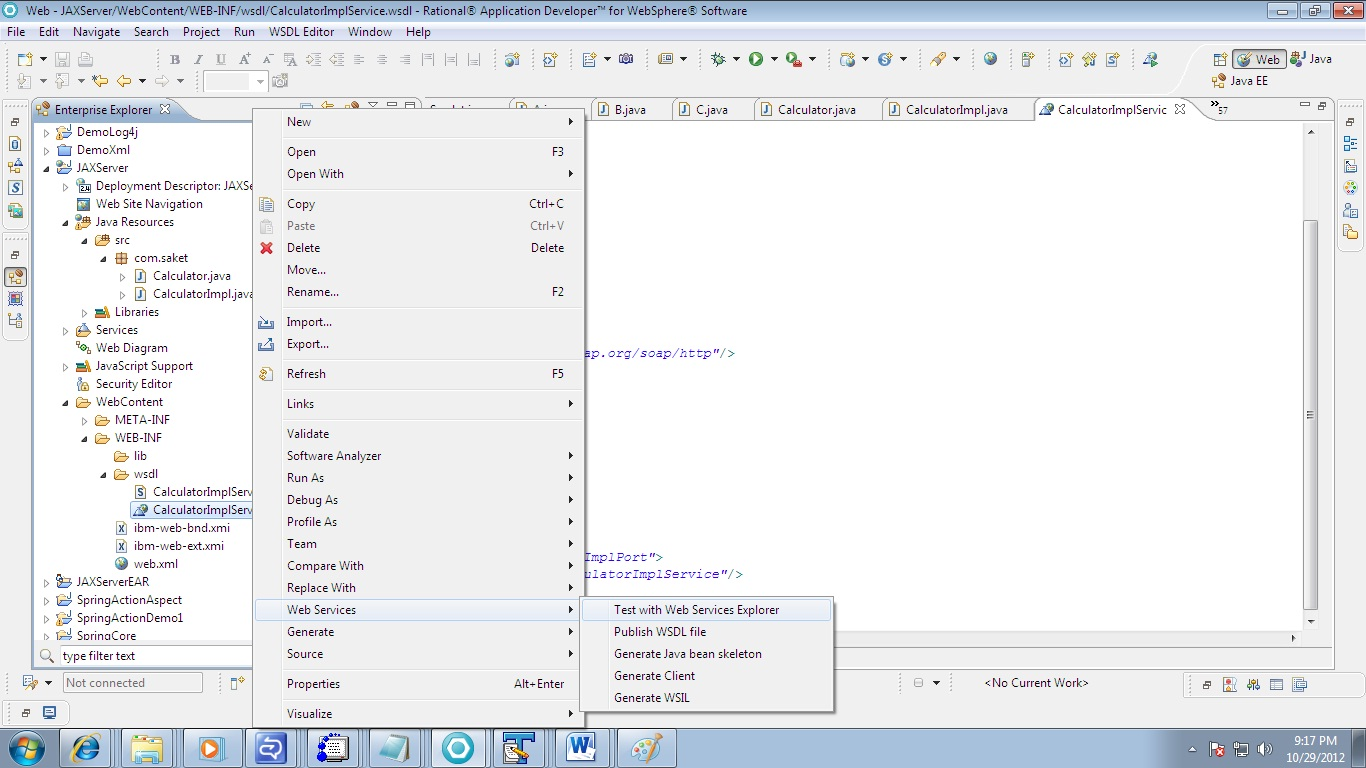
          So far we have created a service and published it. Next thing is that we must test with WebService Explorer. Right click on wsdl->WebServices->Test with WebServices Explorer

Fig-11

 
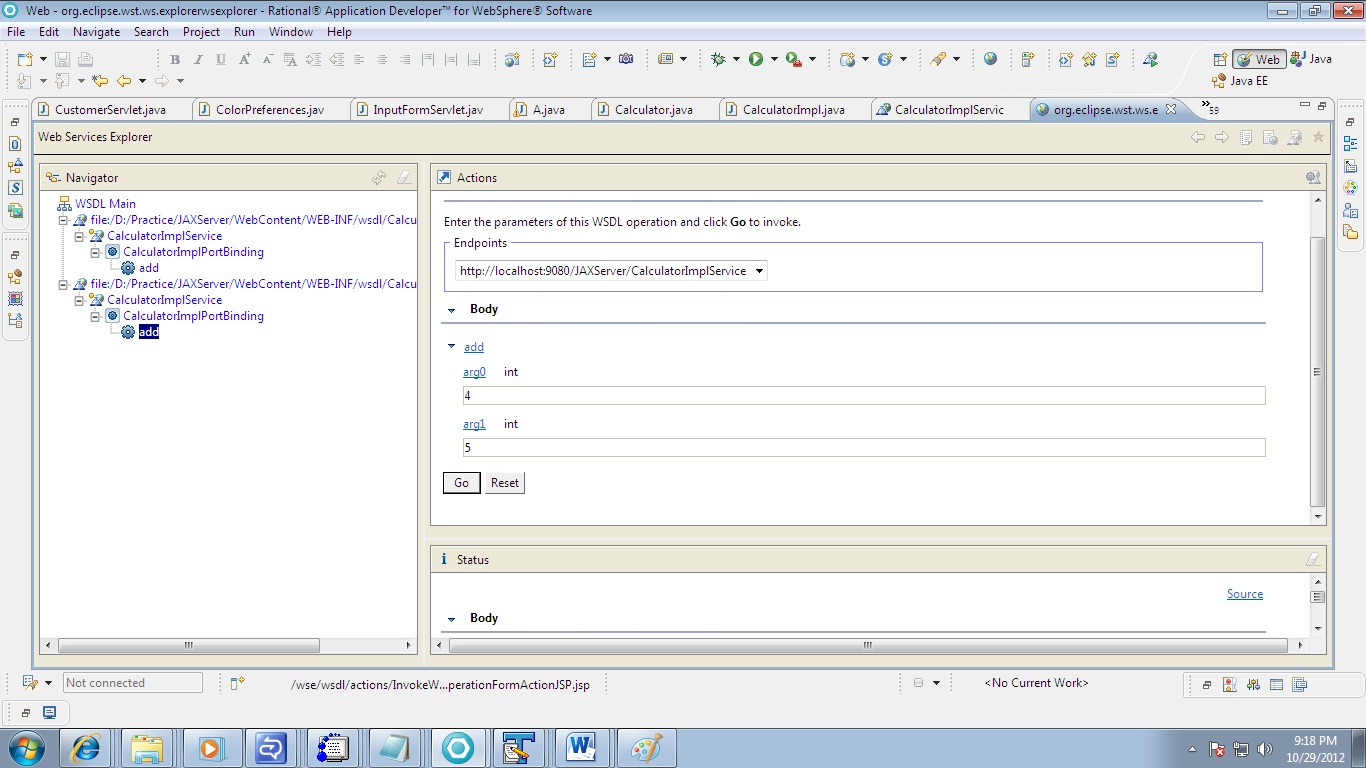
Click on the add link in under Operation

Fig-12
 
 
Enter the value of arg0 and arg1
For Ex : 4 and 5 I have entered
Fig-13


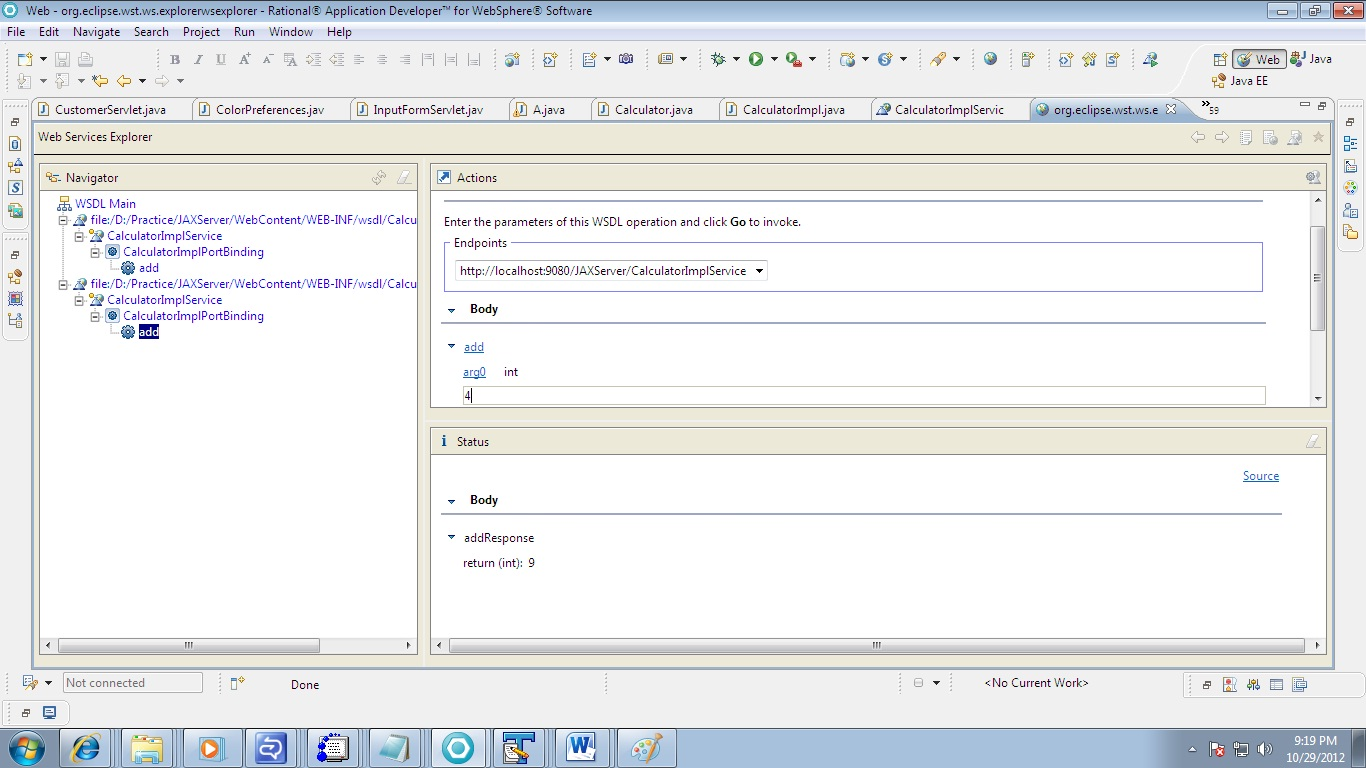
 You should see the result as 9

Fig-14
 
Now you Web Service is Up and running.
 
Step 12: Client Creation
          Create a new Dynamic Web project titled “JAXClient”.
Step 13:
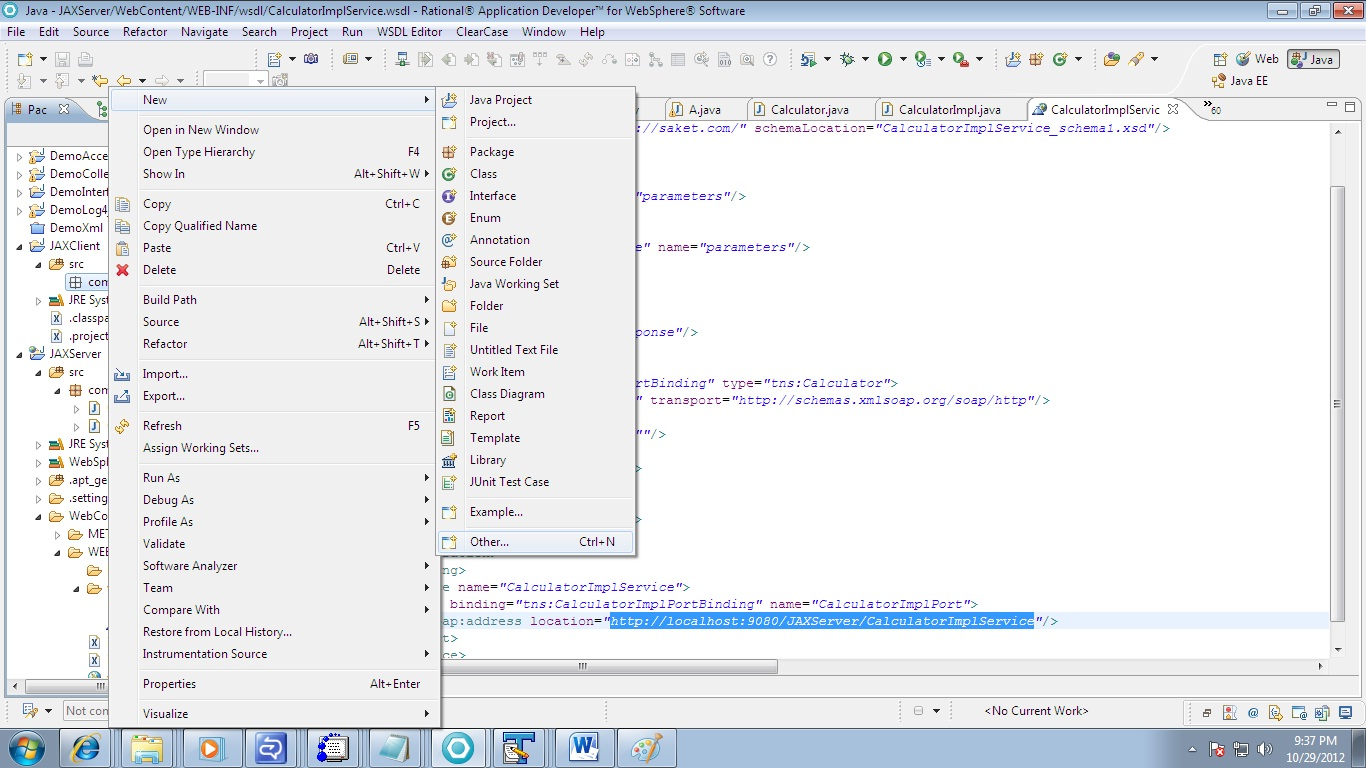
          Now we need to create the various stubs required for accessing the service. The stubs can be auto generated. Create a package com.client and follow the diagram.
Right click on package com.client->New->Other
 Fig-15

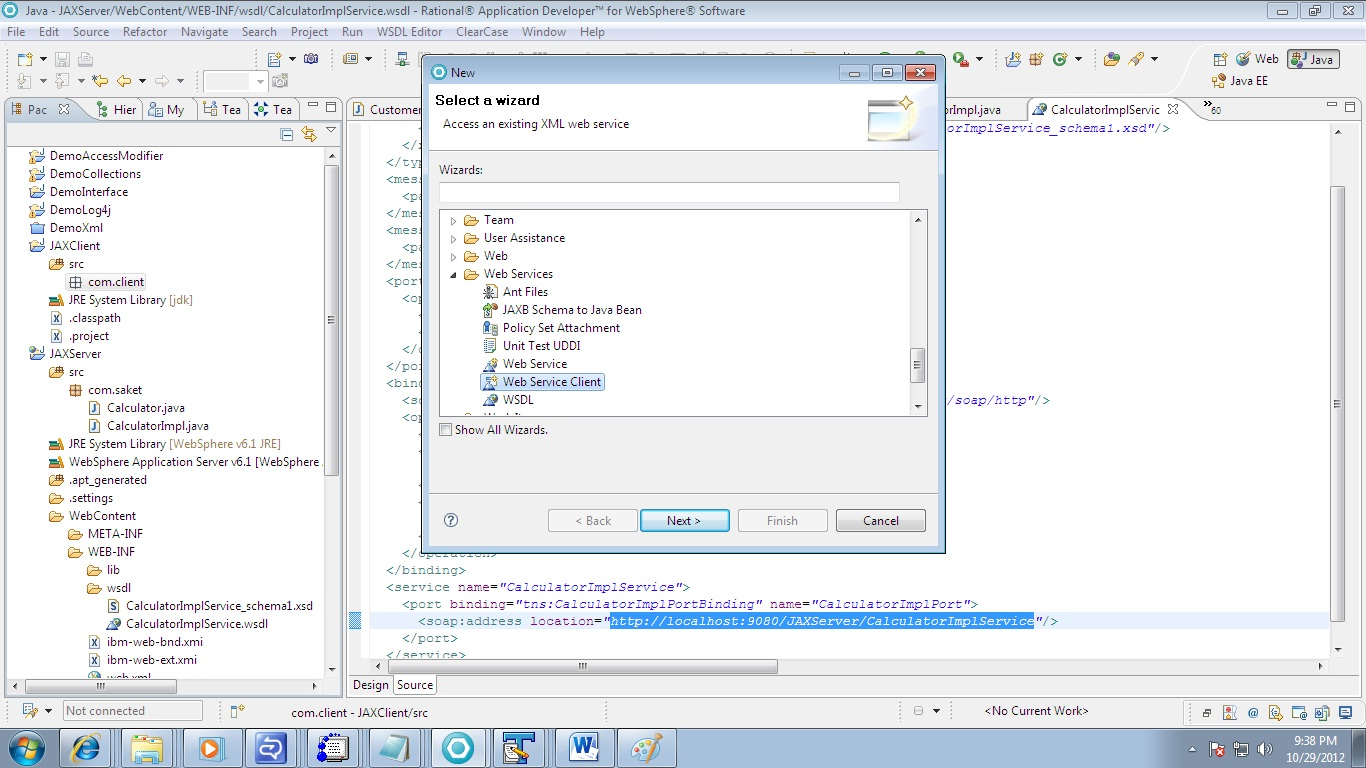
Under Web Services Select Web Service Client. Click on Next

fig-16
 
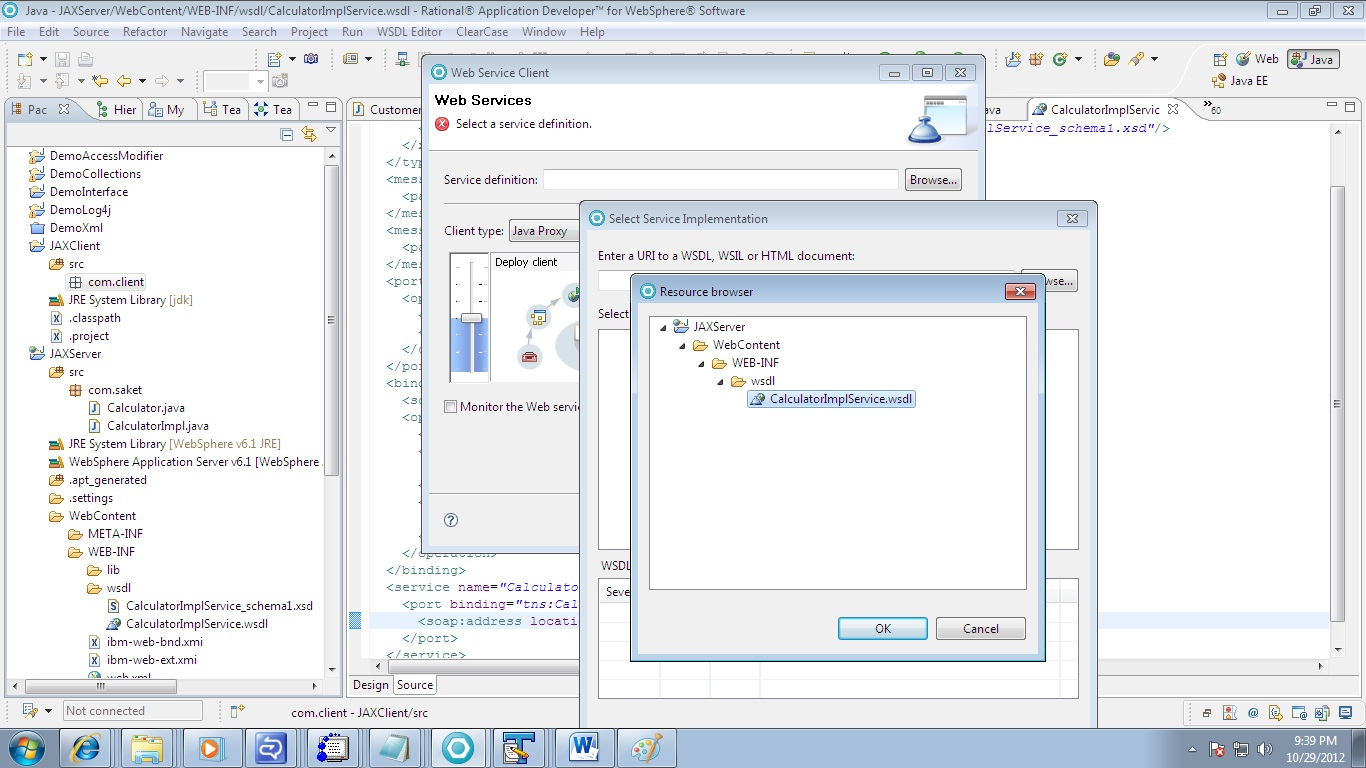
Click on Browse Button of Service Definition and select the WSDL file of JAXServer Project.
Press Ok.

 fig-17
 
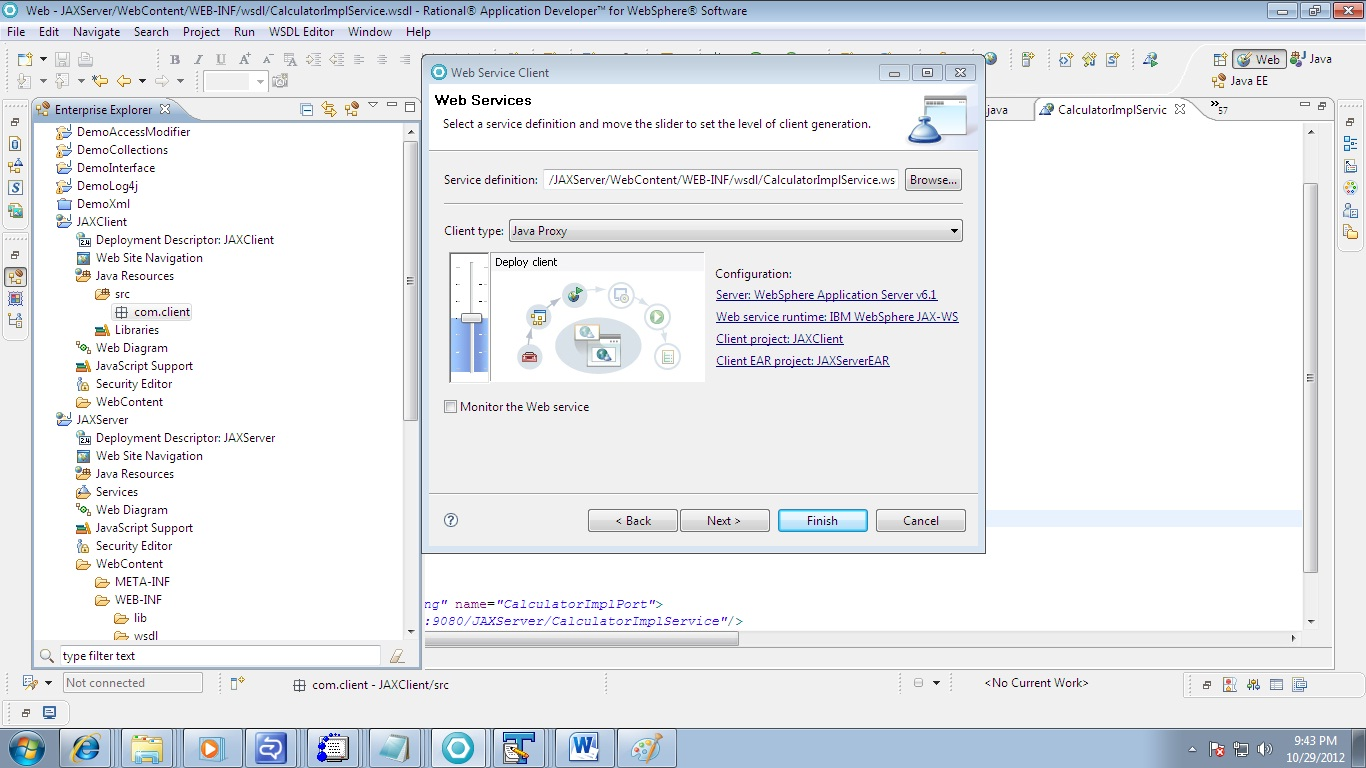
When you have pressed OK. You will see the below window. Verify The path and Configuration mentioned is correct or not.
Server : WebSphere Application Server 6.1
WebService Runtime: IBM webSphere JAX-WS

Fig-18
 
 
 Click on Finish. All the required files will be auto generated. See the below
snapshot
 
Fig-19
 
Step 14:
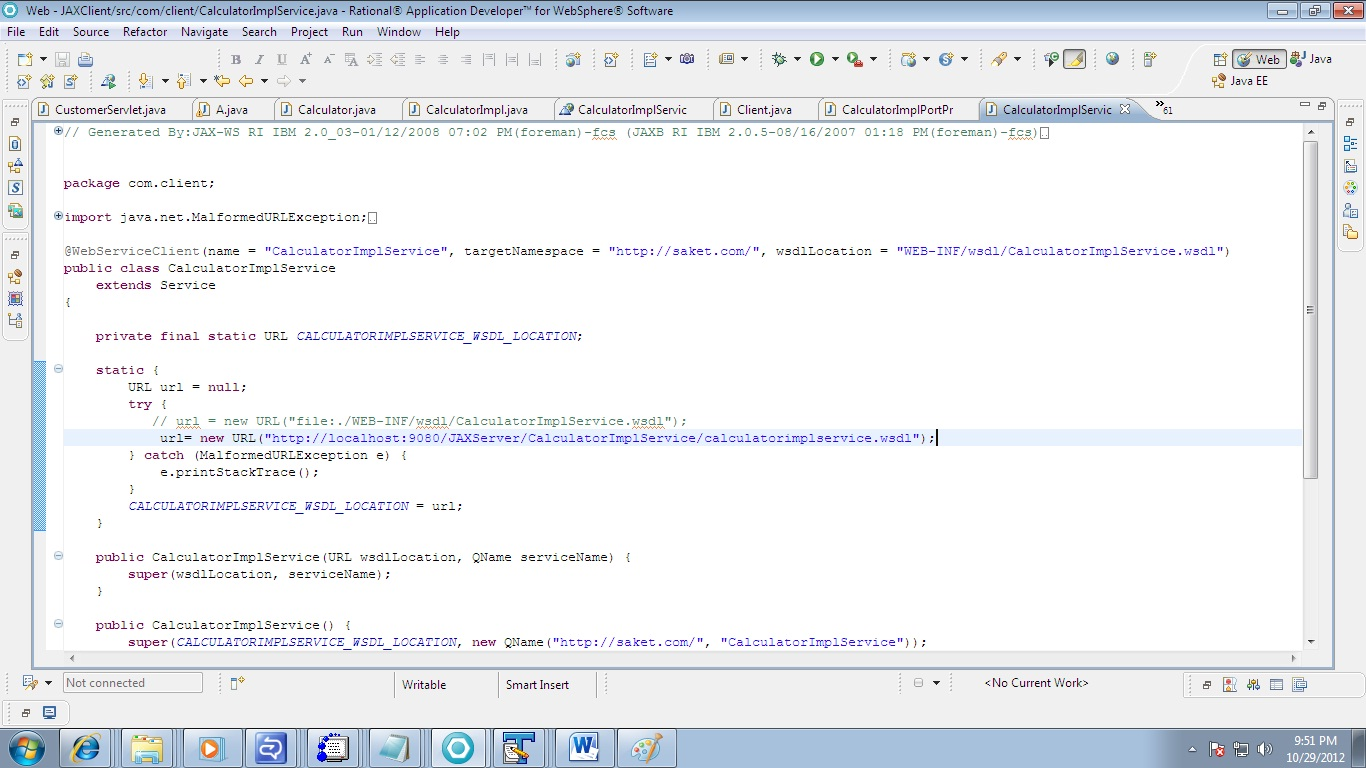
          Go to the class CalculatorImplService in com.client package
          The Client project uses WSDL . You need to change it the url.
          See the below snapshot.
          I have changed the URL to
          http://localhost:9080/JAXServer/CalculatorImplService/calculatorimplservice.wsdl


 Fig-20
Step 15:
          Now Remove the WebSphere Library from the Project.
          We Need only the WebSphere thin client jar for WebService Client.
          Follow the below steps
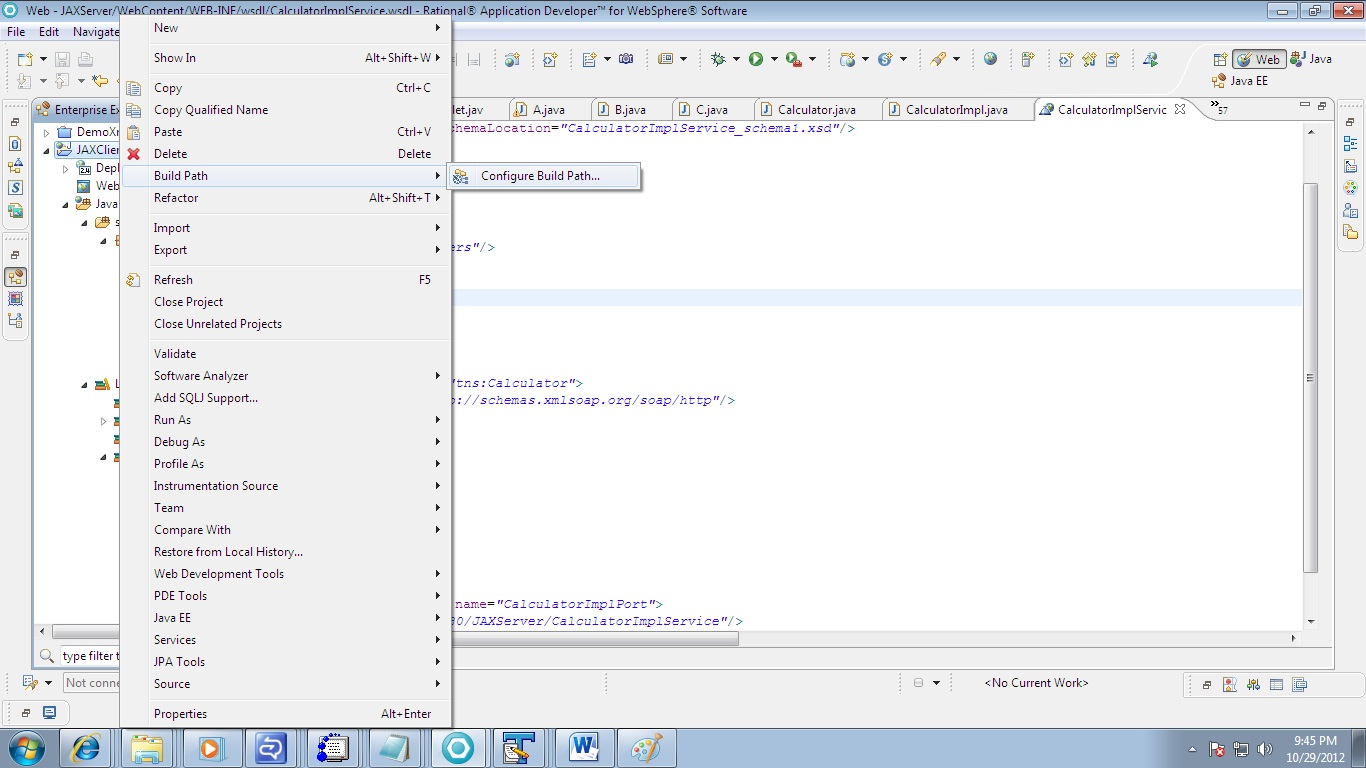
         Right Click on JAXClient->BuildPath->Configure Build Path
         
Fig-21
 
 
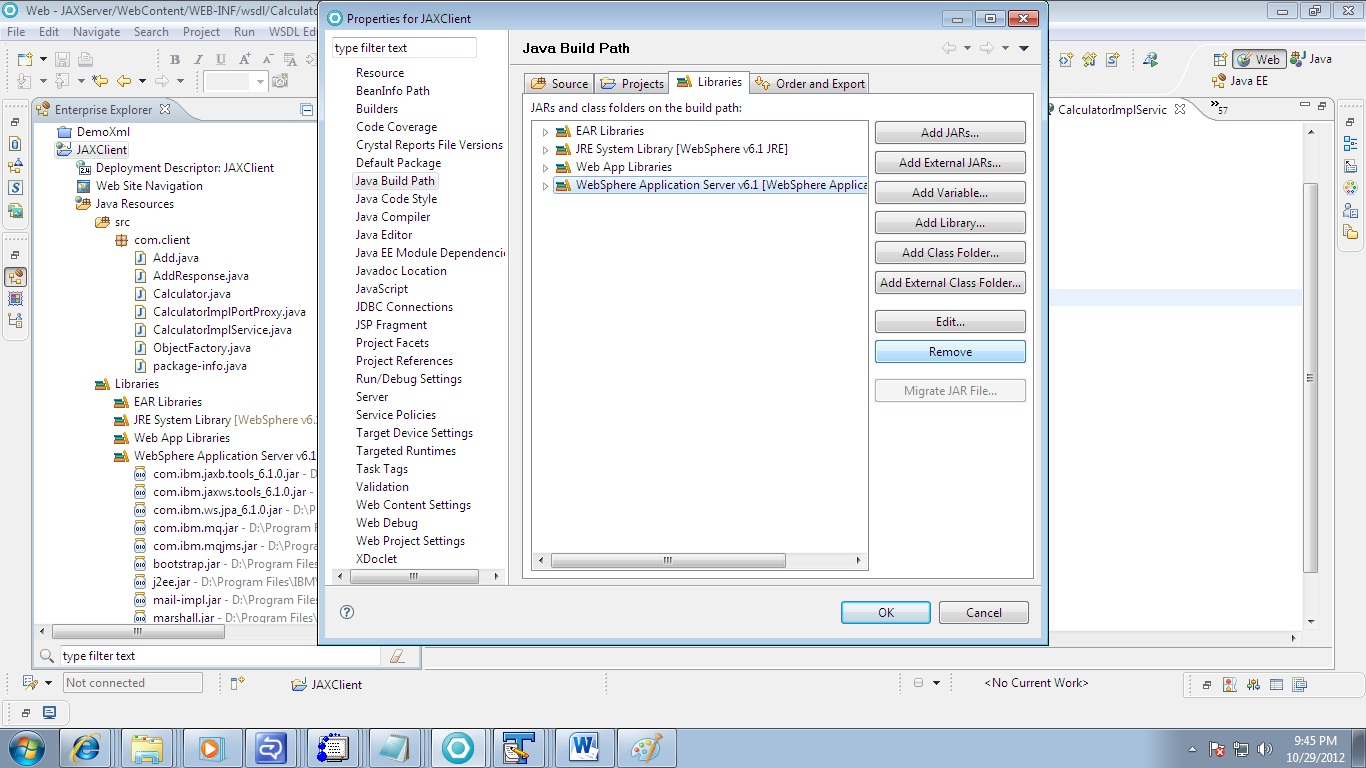
Under Libraries Tab -> Click on WebSphere Application Server 6.1. Click On Remove.
And Press OK.

Fig-22
 
When You do this all the class in client package will be marked with red sign. So we need to add thin client jar.
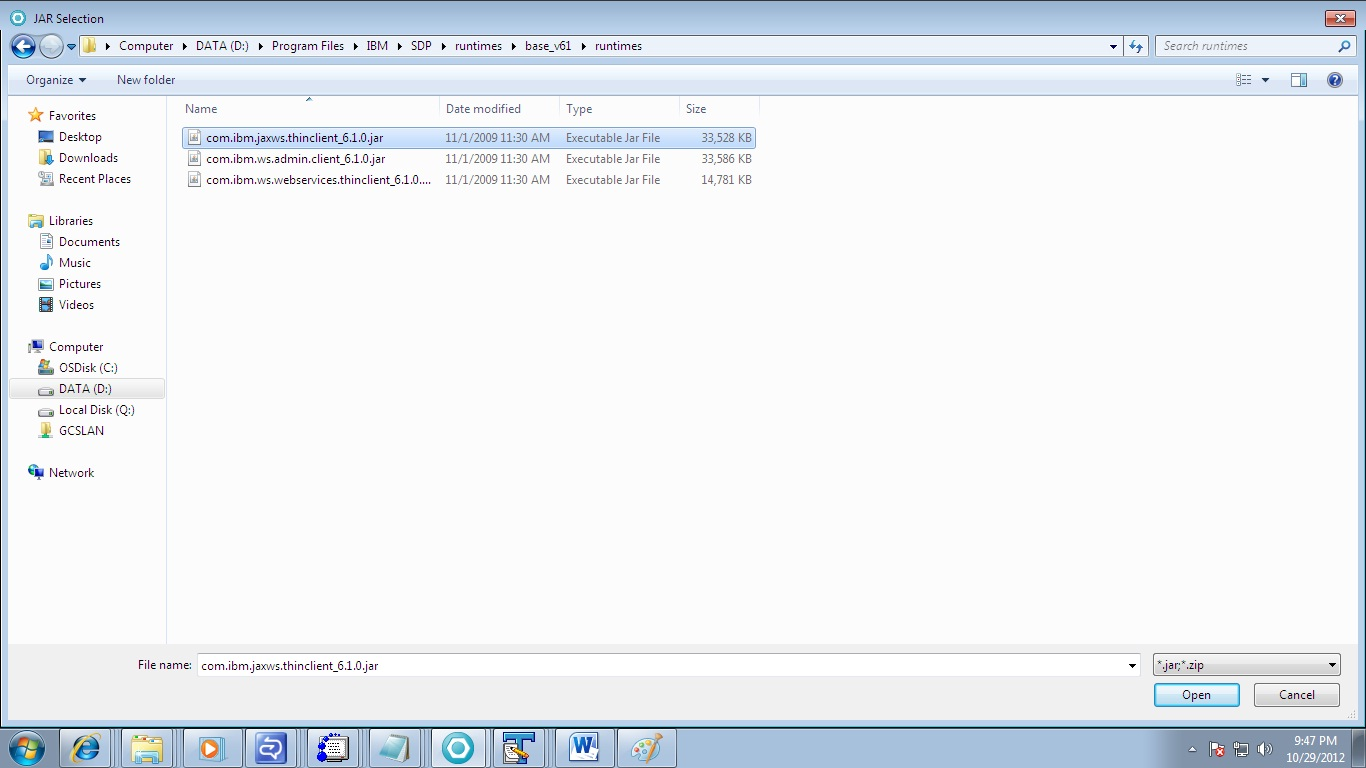
For me the location of thin client jaxws jar is
D:\Program Files\IBM\SDP\runtimes\base_v61\runtimes
So accordingly you need to add this
com.ibm.jaxws.thinclient_6.1.0.jar to the JAXClient by clicking on Add External Jars under Configure Build Path Option.
Fig-23

Step 16:
          we need to create a client program that invokes the server through the stub.
 
Step 17:
          Create a new Java class “Client” in the com.client package.
 
 
Step 18:
          Write the below code inside the Client class to invoke the stubs.


package com.client;
 
public class Client {
          public static void main(String[] args) {
                   CalculatorImplService service = new  CalculatorImplService();
                   Calculator calculator = service.getCalculatorImplPort();
                   int var1 = 20;
                   int var2 = 50;
                   int value = calculator.add(var1, var2);
                   System.out.println("my Web services program : ");       
                   System.out.println(value);
          }
}


Step 19:
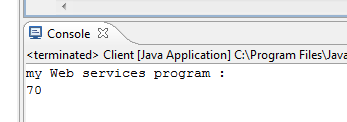
          Execute the Client.java as java Application. You would get the following output in the console
Fig-24

Step 20:
          We have created a web service and deployed it successfully.
 
In the next article I am going to explain the theoretical details as well as how to create a secure web service and how any client can invoke it using certificates i.e public key.

You can view this article at SlideShare too!

Generating XML with CakePHP

Generating XML with CakePHP
Cake PHP LogoXML plays a pivotal role in transferring and storing data over the World Wide Web. It is a markup language, much like HTML, which is designed to carry data but not display it. If you need to carry out data transmission in any kind of web based application, you need to generate a XML file. The process of generating XML is a smooth sail, if you have the power of CakePHP with you. Let us take a tour of the various steps involved in generating XML using CakePHP development platform.

Steps Involved in XML Generation Via CakePHP:
1.       First off, edit the routes.php file present within the config directory of your CakePHP application. You will need to add the following short code snippet to the routes.php file in order  to enable XML extension parsing in CakePHP:
Router::parseExtensions('xml');
This snippet tells CakePHP to parse the XML extension. We are, now, ready to generate XML for our web application.

2.       In this step, we will set up Controller action that will be helpful in dynamically generating XML file in CakePHP and fetch data from the application. Setting up Controller will result in an error-free and well-formatted XML file in CakePHP. We have the option of configuring the setting of Controller action in such a way that it gets activated only if the XML makes a request. This means, when we have .xml in the end. To facilitate this procedure, you can use the Request Handler component. You have the option of either declaring the Request Handler at the top of the Controller or including it in the AppController so that it can be utilized throughout the application.

The task of a request handler is to detect and process requests. In the current scenario, it will allow us in detecting whether or not a particular request is XML. If the request is XML, we will deliver an XML file view and an empty layout. Otherwise, we will not perform any action. The following code snippet will help you in adding Request Handler to your application:
var$components= array('RequestHandler');
 Here’s a preview of the controller action while generating XML file in CakePHP:

[php]
function xmlgen($id=null){
 if ($this->RequestHandler->isXml())//check if xml request is made
 {
 $this->layout="empty";//empty layout for xml,create an empty layout in app/views/layouts/empty.ctp
// find playlist    from provided id
 $data=$this->Playlist->find("first",array("conditions"=>array("Playlist.id"=>$id));
 $this->set(compact('data'));
 }
Else
{
//don nothing if request is not xml ,or you can redirect somewhere.
}
}
[/php]
 
This action might look simple, just like any other action, but it will be operational only if the file is XML, otherwise it will not work.

3.       In this step, we will set up the view of our XML file in accordance to the Controller Action that we created in the previous step. We will be creating an XMl view for the action xmlgen() that we just created. These views will be created and stored in the XML folder created under the views folder. This means the view xmlgen.ctp will be stored under the following location:
app/views/yourcontrollername/xml/xmlgen.ctp

Suppose the name of our controller is ‘Favorites’, then xmlgen.ctp will be created under the following path:
app/views/favorites/xml/xmlgen.ctp
This is how the view for XML generation in CakePHP will appear:
[php]
<?php
echo $this->Xml->header();//XML header
?>
<favorites version="1" xmlns="http://xspf.org/ns/0/"&gt;
<title><?php echo $data['title']; ?></title>
<creator><?php echo $data['author']; ?></creator>
<link>www.eaxmple.com</link>
<trackList>
<?php foreach($data['Songs'] as $plist):?>
<track>
<location><?php echo$plist['Song']['loc']; ?></location>
 <creator><?php echo$plist['Song']['a_name']; ?></creator>
 <album><?php echo$plist['Song']['a_name']; ?></album>
<title><?php echo$plist['Song']['sname']; ?></title>
 <duration><?php echo $data['Song']['Time']; ?></duration>
<link><?php echo$plist['Song']['loc']; ?></link>
</track>
<?php endforeach;?>
</trackList>
</ favorites >
 [/php]

These were some of the essential steps involved in generating XML file using CakePHP framework. These steps show how CakePHP lets you create well-formatted XML file with minimum coding and least efforts.
 
Author Bio:- Steve Graham is a pro in PHP Web Development associated as a web writer with Xicom Technologies Ltd. A CMMI Level 3 firm, offering web based services to it's esteemed clientele worldwide.

[Solved] Problem in viewing Hindi font on websites

In my previous post, I explained the way to read/write hindi or different regional fonts in MS word using several steps.
Here is the quick reference of it.

You may face a situation when you open some website and you see only rounded or square symbols intead of real text. You are not able to figure out, what to do. Then my suggestion is to follow below mentioned steps. It will surely help to get rid of such issues. I am using Windows 7 to test these features.

Steps to View Hindi or different font in website:

  1. If you are seeing square symbol over the page then follow the steps mentioned at our previous post
  2. If you are seeing round symbol, then there is problem with your browser's setting.

You need to find out Encoding sub-menu which remains present in different browser at different location. First location Encoding Menu and then make sure utf-8 encoding is checked. 

I will show it using screenshot for three major browsers i.e. IE, Mozilla Firefox and Google Chrome.

For Internet Explorer
utf-8 encoding setting in IE

For Mozilla Firefox
utf-8 encoding setting in Firefox

For Google Chrome
utf-8 encoding setting in Google Chrome

Warning: If you see Auto-Select (in IE) or Auto-Detect (in Chrome and Firefox) option, try to uncheck it, if possible.
Please leave your comment if you find it useful and if it helped you someway.

[tips] How to use Google Search efficiently

I am using Google Search engine almost all the time since 2006 and learned lots of things to manipulate Google search in much easier way. I know I am little late to share this and you will have lots of such posts over the internet. But, presentation and thoughts for the same things are always different for different authors.  I would basically show you the real power of Google Search engine and strong evidence to prove that why I love and prefer Google Search Only πŸ˜€
More than 80% internet users use Google Search engines followed by Bing then Yahoo etc…
You can download the pdf version of this article from here
 

Results Taken from statowl.com to show you how Google has captured the search engine market share πŸ˜€

 
market share of search engines

 
Without wasting your time let’s dive into Google’s real power. I will demonstrate every possible situation with a scenario and how to get benefit of that scenario using Google Search Engine.
 
Example 1
You need to know what all things you searched using Google Search engine i.e.
History of what you browsed till date. What you will do?


Answer is simple, either type google.com/history or history.google.com;  you will be able to see the search strings that you used to search using Google Search.
Link for Google History:http://history.google.com (make sure you are logged in using Google account)
 Google History
 
Example 2
What you will do, if you would see a mail in different language? Or somebody sent you few lines in chat that you didn’t understand and seem Latin & Greek to you? Or somebody updated their Facebook status in different language and you wish to respond in the same language?
 
Once again Google search is there to help you in doing so. Use Google’s inbuilt Language translator. Here is the link for Google translator: http://translate.google.com/
 
Google Translator
 
 
Example 3
Do you want to know Flight timings?
 
If you type flights, then it will display you all flights leaving from your location. It gets your remote location using IP Address. Ex: flights or flight
Flights search result


If you want to know flight from one location to another type flights from location1 to location2
Ex:  flights form Hyderabad to Kolkata
flights from to search result
 
Example 4
Do you want to know my best online dictionary?
 
Yes, it’s Google again. Just type define: word
Ex: define: obfuscated

define search result

 
Example 5
What if you don’t know the correct spelling or misspelled some words?
 
Don’t worry now Google is damn smart to rectify it automatically and will display you result for the correct one.  If you didn’t mean what Google shows, still you have option to search for whatever you typed.
misspelled

 
Example 6
Is it rainy season or sunny at Dhanbad? Do you need to know weather forecast where you live or any place?
 
1.   Type weather only to show weather information where you live ex: weather
weather search result
2.   Type weather for place-name or weather place-name for that particular place. Ex: weather Redmond or Weather for Dhanbad
 
weather for place name

Example 7
Do you want to know the time of a place?
 
1.   Type time only to see your local time ex: time
time search result
2.   Type time in place-name or simply time place-name ex: time in Redmond
 

time for place search result

Example 8
It’s movie time dude!
 
Type movie at search box and it will display all movies in all theatres nearby your places. Ex: movie
movies search result

movie movie-name will display that movie list in all theatres Ex: movie taken 2
 movie movie-name

 
movie movie-name for place-name will display movie in that place in all theatres of that movie. Ex: movie resident evil retribution for Bangalore
 
movie movie-name place-name
 
movie for place-name to display all movies in that place in all theatres: movie for City of Brussels

 movie for place-name


Example 9
I want to use Google as a converter either its mass converter or volume or digital storage etc.
 
Just type subject1 to  subject2

i.e. Celcius to farenhite or
Ton to kg or Byte to bit

Google Converter

Example 10
Did you see my online Calculator?
Actually it’s yours also, in real it’s Google’s πŸ˜› Just type calculator to see what I meant.
 
Google calculator
 
Example 11
Do you want an exact search result whatever you have typed?
 

Then, type phrases in double quotation to do so. Ex: “I am a blogger”

exact phrase search result

Now, before going ahead, we need to know few terms which will be used during Goggle Search. These terms may not seem very useful to common users but it will be very informative and useful for tech savvy and Information Security Community (Bad and Good both).

·         inurl
It will display the pages which will have certain keyword in links i.e. url

Ex: inurl:signup
 inurl search result
·         allinurl
This will display all links/url which will have all given keywords in their urls. It will be useful when you need to search only those websites which will meet given criteria. Like show all links which will have any connection with vim related stuffs under Linux.
ex: allinurl: linux vim
 allinurl search result
 
·         intitle
It will allow to search the text used in title of any webpage. Ex: intitle:Linux
If you use more than one word then, it will search the first word in title and other words anywhere either in title or contents. Ex:intitle: Linux vim grep and check the result.

If you want to search all the terms in title only, you need to use other option i.e. allintitle πŸ˜€
 intitle search result
 
·         allintitle
It will allow searching all listed words in title of any webpage. Suppose, you wish to see only those web pages which have CCNA, Questions and TCP keywords in their title.  Ex: allintitle:CCNA Questions TCP
Compare the result with above option i.e. intitle
     allintitle
·         intext


It display all results which is being included in intext command and ignores to search for that keyword in links/urls or titles. So use it wisely. If you wish to see in link or title too use other options along with it J like intext:help intitle:perl  inurl:hack
    
     intext search result

·        allintext
It will display only those pages which will contain all the mentioned words in that web page. Ex: allintext: map grep perl
    allintext Search Results
 
 
·         filetype


This will restrict Google to show only those links which will have those filetype in that urls/links
Suppose you want to find out all doc files over internet or any links which will either have pdf or ppt and will have LTE keyword in title
Ex: filetype:pdf OR filetype:ppt intitle:LTE
 
       filetype search result

·         site
It shows the result for given phrase within given websites only. It is useful when you wish to search something in a particular website like perl in aliencoders.org.
ex: site:aliencoders.org Perl or
site:aliencoders.org intitle:perl to find all titles having perl in it under aliencoders.org website

     site search result

 
·         related
It will list all the pages which are similar to the given website. Sometime we know about one website and we are looking other useful websites similar to that, by that time it will be really helpful.  Ex: related:naukri.com
 
      related search result

·         cache
It will display the page that Google has already in its cache. It can be updated one or outdated one. It will be useful when you want to see something from old site which may not exist now or have deleted that content.
cache:url-name keyword(optional)
 
There should not be any gap between cache: and url. If keyword is provided, then it will highlight those words while displaying the page.
Ex: cache:aliencoders.org
 
 
Example 12
Need to search particular file type like doc or pdf or torrent or sql or cfg or php?
 Want to search torrent file for a movie name then use filetype:extension
Ex: iron man 2 filetype:torrent
 
Example 13
Want to search within a particular site of some known file type which some phrase in it?
Suppose I want to check all doc files under in domain or gov domain which has confidential word anywhere as title or link or text etc.
Type site: site-name or tld filtype:file-extension keyword
Ex: filetype:doc site:in confidential  or check another example of filetype mentioned above
 
 
Example 14
Want to search related pages similar to this site
Try using related:url-name to locate similar websites. There should not be any space between relate: and site name
Ex: related:facebook.com or related:indiblogger.in
 
 
Example 15
Want to ignore something from your search?
 
Use – ex: highlight important words using double quotes and ignore words using – in front of that word
i.e. fish “curry”  mustard-onion
 
Example 16
Need to know email id?
All Gmail ids stored in excel sheet and contains IISc. keyword too
intext:@gmail.com filetype:xls IISc
 
All IISc official ids
intext:@iisc.ernet.in filetype:xls IISc
 
Official email id of specific person stored in either doc or pdf or xls format
intext:@iisc.ernet.in filetype:xls  OR filetype:doc OR filetype:pdf    "Anil Kumar Sharma" or
intext:@iisc.ernet.in filetype:xls  OR filetype:doc OR filetype:pdf    "AnubhavSinha"
 
Example 17
Want to find key/patches of software?
 
Try typing crack:software-name version
Ex: crack:Camtasia Studio v8.0.2.918
 
Example 18
We need to list all urls which has indexing enabled and contain perl related stuffs in chm or pdf format.
 
Using “Index of ” syntax to find sites enabled with Index browsing

Ex: index of /ebooks intext:pdf OR intext:chm perl

Index of search result

How it plays an important role for hacker/crackers/penetration testers?

It can be used to gather the basic information required for further process of hacking or penetration testing of any websites. According to my experience, this would be the part of social engineering.
They will not do anything. They will just combine one or more such techniques shown above to get desired result. Like password file, configuration file, database details, server details etc.

                                                                                                                                     
Some more tips:

  • Google search is not case-sensitive, so don’t bother about case stuffs
  • Use lesser words to get accurate and more results
  • Use web friendly word like headache instead of my head is paining
  • Punctuation marks never matter for Google search. (bad news for grammar pedantic πŸ˜› )

Source (I got some help from here too!)
http://www.google.com/insidesearch/tipstricks/all.html
 
We have uploaded it's pdf version at slideshare.net too! Those who wish to read it or download it from there, they can do that very well.

Author: Sanjeev Kumar Jaiswal (Jassi)
Email id: admin@aliencoders.org (feel free to mail or comment on this article)
Website: http://www.aliencoders.org
Facebook Page: https://www.facebook.com/aliencoders
Twitter : http://www.twitter.com/aliencoders
 

Video on basic terms to know in Drupal

This video covers all the basic terminology which a Drupal users should know. I installed Drupal 7.15  online using bluehost  web hosting services and then explained all the options which an Administrator will see after logging in.
Here is our previous video on youtube:

Topics which I tried to explain are:

Whatever you knew about chmod is wrong

Something that you don’t know about Chmod under Linux

chmod in LinuxIf you are working on Linux environment and working on some programs/scripts then you might have used chmod often for sure. Many of us think that what’s there in chmod to remember. Why people write so many articles on one of the simplest command in Linux which even a newbie use it like anything.
Then my question to all Linux users is that “how many octets a full permissions set have?”. I know, many Linux users would say three within three seconds but it’s four literally. Stumped right?

Usually we write
[vim]
chmod 777 file
[/vim]
But what we are actually saying:
[vim]
chmod 0777 file
[/vim]

The first octet works the same way as the other three works, as it has the same 3 possible values that adds to make the octet :
4 – setuid (letter used for it: s)
2 – setgid (letter used for it: s)
1 – sticky bit (letter used for it: t)

Note: your first octet will always be reset to 0 when using chown or chgrp on files. We need not to worry when using chown and chgrp. It’s effective only on chmod then: D

Let’s see what those 3 values mean for the first octet.
Setuid (4 or s)
Using digit 4 or s for any file means you are setting a userid to that files i.e. setuid. If you do setuid on binary files, you're telling the operating system that you want this binary file to be executed as the owner of the binary file always.

So, let's say the permissions on a binary are set like this:
[vim]
# chmod 4750 some_binary
# ls -al some_binary
-rwsr-x— 1 root coders 0 Feb 13 21:43 some_binary
[/vim]

You'll notice the small 's' in the user permissions blocks instead of x  – this means that if a user on the system executes this binary, it will run as root with full root permissions. Anyone in the coders group can run this binary too! Because the execute bit is set for the group also. So, when the binary will get executed, it will run with root permissions. Isn’t it fascinating (Kind of masquerading without credentials πŸ˜› )

Be cautious with setuid! Anything higher than 4750 can be proved dangerous else it would allow everyone to run the binary as the root user. Also, if you allow full access plus setuid, you will be opening yourself up for the real mess:

[vim]
# chmod 4777 some_binary
# ls -al some_binary
-rwsrwxrwx 1 root coders 0 Feb 13 21:43 some_binary
[/vim]

Not only can every user on the system execute this binary, but they can edit it before it runs at root! It goes without saying, but this could be used to beat up your system pretty badly. If you don’t allow enough user permissions for execution to anyone, Linux will throw the mysterious error as uppercase 'S' into your terminal:
[vim]
# chmod 4400 some_binary
# ls -al some_binary
-r-S—— 1 root coders 0 Feb 13 21:43 some_binary
[/vim]

Since no one can execute this script anyways (except root), you get the capital 'S' in output.

Setgid (2 or s -> little confusion right?)
Setgid is almost same as setuid, but the binary runs with the privileges of the owner group rather than the user's privileges. This isn't quite so useful in I guess, but in case you need to know what’s this so I wrote minimal amount of it :D, here's how the permissions come out:
[vim]
# chmod 2750 some_binary
# ls -al some_binary
-rwxr-s— 1 root coders 0 Feb 13 21:43 some_binary
[/vim]

And if you again neglect the execution permission to everyone you get ‘S’ but this time group’s execution place:
[vim]
# chmod 2400 some_binary
# ls -al some_binary
-r—-S— 1 root coders 0 Feb 13 21:43 some_binary
[/vim]

Sticky Bit (1 or t)
This one is the trickiest term for a Linux file permission, and very important too. Its best example is your world writable /tmp directory (or any other world writable location like /var/log/ etc). Since world writable locations allow users to do anything with creating, editing, appending, and deleting files, which can be a total haphazard if certain users share a common directory and users like me played a prank by deleting it: P.

Let's say users work in an organization and they work on a file in a world writeable directory. One user gets mad upon the false praise of other coders from his manager. So, he deleted all of the files that belong to that poor user L . Obviously, this could lead to a much more vulnerable situation. If you apply the sticky bit on the directory, the users can do anything they want to that files  but they can't write to or delete files which they didn't create (They can create new file though). Awesome feature, right? Now, how you can set the sticky bit:
[vim]
#chmod 1777 /tmp
# ls -ld /tmp
drwxrwxrwt 3 root root 4096 Feb 13 21:57 /tmp
[/vim]

If you want to see T instead of t in your output, please do the same mistake that I pointed in above two points i.e. don’t give execute permission to anyone. πŸ˜›
[vim]
#chmod 1744 /tmp
# ls -ld /tmp
drw-r–r-T 3 root root 4096 Feb 13 21:57 /tmp
[/vim]

How this setuid and setgid works on directory?
Setting the setgid bit on a directory means whatever files you have created in that directory will be owned by the group who owns the directory. No matter what your primary group is, any files you make will be owned by the group who owns the directory.

setuid is meant to implement on files especially binary files. So, setting the setuid bit on a directory has no effect in almost all Linux Distros. I didn’t test much on this to various *nix variants.

For your knowledge: The setuid bit was invented by Dennis Ritchie. His employer, AT&T, applied for a patent in 1972; the patent was granted in 1979 as patent number US 4135240 “Protection of data file contents”. The patent was later placed in the public domain.

So, if you are interested, please do some homework and let us know also what special stuffs you found there πŸ˜€