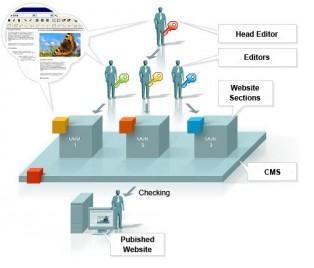
The basic optimizations that everyone forgets -SEO

The basic optimizations that everyone forgets

SEO tipsThe design looks good and promising and you are about to make it live. But wait, the job does not end here.
Do you like to own a website that people cannot even find easily while surfing in Google?
You definitely not like the idea of owning a website that comes with barrage of problems. You can not even think of it right. But, it happens.

Even after taking so many precautions, you eventually find that you have missed out on some vital points that create big issue with your website’s online visibility. Here, we are going to share some basic seo techniques that you should not give a miss no matter what.

Meta tag: Just keeping the name of your website in the title is not going to help you make your website appear in some related search queries. You need to add some keywords in the title and Meta description sections of your website if you are to see your website getting a descent amount of traffic to targeted keywords. Do not stuff keywords in title and Meta description section as it will be treated as spam and your website might get penalized for that. Just try to keep it simple and natural.

Set Canonical: Google still treats www and non www version of a website as different URLs and that means, if URLs of your website are not getting redirected from non www to www version, it is creating internal duplicate content. This will certainly not augur well for the visibility of your website. To fix this issue, all non www URLs of the website need to be redirected to with www version via 301 permanent redirection.

Cross Browser Compatibility: This is another vital issue. You do not like to see your website opening like hell in IE because of poor cross browser compatibility issue. Now, before your make your website live, you need to check that the website is rendering perfectly in all major browsers. A poor browsing experience can ruin all your chances of making it big in the virtual world, so give it your best shot if you do not want to face an embarrassing situation at the end.

Validation: You need to make sure that your website conforms to the rules set by W3. Besides that your website does not have any error within it. Some common errors are missing alt tags, forget to close tags etc. Before making your website live, you should check them all otherwise, it will be a huge downer for both the users and search engines.

Analytics: Do not forget to add analytic codes in your website. Without them you will not be able to get indepth analysis of your website. Just create a Google Analytics account and there you go.

Prefetch and Prerender: You do not like to wait, no one does. So, it is your moral duty to preload some pages of your website so that visitors would not have to wait. Just specify the URL that you want to preload with both these two tags and there you go.

Alt tag: Do not forget to add alt tag against all the images of your website. Since Google or other search engines cannot read images, you should always use alt tags against all the images of your website. This will increase the chances of your website appearing in google image search.

Page Load: Make sure that your website is not taking long time to get loaded. If your website takes more than 5 seconds to get loaded, it will cost you dearly. You might lose your visitors and a steady decline is what you are likely to see in the Google analytics report. To fix this thing, you need to follow certain rules religiously. You should not use large images no matter what. Do not use inline CSS or JS files as they contribute significantly to your website’s loading time. Create separate files and put all the codes therein. It will help you reduce page loading time to a great extent.

Read and Reread: Make sure that you have read all the content precisely. Typos are quite common these days and therefore, you should go through all the content of your website to minimize the chances of typos.

Sitemap: You need to have two versions of sitemap – HTML and XML. XML sitemap is for search engine submission purpose whereas HTML sitemap is for users who could otherwise unable to reach to some URLs of your website.

Robots.txt: Robots.txt is a simple txt file that needs to be placed at the root folder. It gives search engines the direction which pages you want them to crawl and which you want them exclude from their index. Just use the Disallow and Allow tags judiciously and there you are done.

If you have checked all of the above mentioned points, I can dare say that your website is in good shape and it is the time to make it live.

Author Bio
James Arnold is a passionate blogger. He has been writing articles on different promotional codes at coupon blogs where you can find discount for laithwaites wineand zagat wine promo code. He is a regular writer for a coupon website that has amazing offer on zagat wine coupon, laithwaites wine promo code and other promotional code.

Image source: yourseotips.com

Public relations (PR) Progress With Social Media

Public RelationsPublic relations (PR) play an important role in promoting image of an organization. PR department is the connection between the public and organization which utilizes various media. With the changing times, the way PR is handled is also changed. All old-cum-traditional PR practices are to be revised or replaced with the new social media methods.

The change is imminent. If organizations are not geared up for change, it is very likely that they lose substantially and it will be high time for them to built new systems or leverage systems at a later stage. We shall find how PR can be leveraged to achieve the maximum benefit from the changed life styles of the people being influenced by various modes of social media.

Change from Stone Age to Space Age

Traditional public announcements of press releases are replaced with online news releases. Television ads are replaced by YouTube videos. Pamphlets and brochures are replaced by emails and social networking sites. There is no more physical printing on paper.

Your hands are dirt free when every potential customer is informed and updated through online medium. You can reach your friends, customers, employees, competitors and competitors’ customers through social media platforms.

Changed PR’s work style

Present generation of PR executives are engaged with social media right from the morning to the evening. On a typical working day, a PR executive starts his job by leaving comments on Facebook, Twitter and discussion forums. He accepts or rejects friends’ requests and sends new requests to add as friends on social networking sites.

He may publish a blog with the latest happenings on his company and post the link on Twitter and Facebook. Next, he will check for the available nice stuff on social bookmarking sites like Digg, Stumbleupon, etc. He will be busy in sending emails to friends and employees.

By the evening, he will be busy in doing research on the next blog post that should be delivered. He leaves comments and adds friends from other bloggers.

Information and its proliferation

In all the PR activities, preparation of content takes first priority. The content should be search engine optimized. The content should present the right information in right time and should reach the right people. It should erect interest in the audience and make them discuss about the things presented. Various means of content can be utilized.

It can be through blogs, images, videos, presentations, PDF files and Podcast. Before releasing any content, the content should be presented with appropriate title and description. Keywords should be analyzed and link building strategy should be chalked out. The content should be promoted through various social media platforms.

On our discount coupon site that offers carbonite and sittercity discount coupons, the main promotion of the blog’s content is done through social media platforms and hence most of the traffic is also from social media sites.

Blog platform – the PR desk

It is imperative to have a dedicated blog site with the organization’s paid domain name. Blogging gets coverage from search engines, social bookmarking sites, social news sites and social networks.

Focus on public

Traditional PR practice confines to offline promotion. Latest and current PR practice caters to both online and offline community. A single promotional activity through traditional means takes months of planning and demands lot of budgetary allocation.

In the changed scenario, it is possible to promote on a daily basis or even on hourly basis. You have direct access to millions of online subscribers who read blogs, who makes friends through Facebook, who watch videos on YouTube than on television, who check social bookmarking sites before purchasing an item, etc. PR’s focus has shifted from ‘attracting media for coverage’ to ‘attracting public through social media platforms’.

Multiple opportunities

Social media opportunities are in galore from all angles. This is the time to seize opportunities from every possible interaction with others you come across. PR should be active enough to respond queries. It is a two way process unlike traditional ‘one to many’ publicity campaigns. You should participate in discussions and should be open to listen and take advice.

Importance of building relationships

PR can reach public through Facebook and Twitters. It is essential to build relations on one to one and one to many basis. It is difficult to build relations or bond without building a rapport with them that come across you. You should introduce yourself, you should talk about common interests, you should answer questions and these steps will create confidence and will lead to relationships. These relationships will pay you back in PR promotions.

Promoting promotions

The content can be promoted through social networking sites (Facebook and Twitter), social bookmarking sites (Del.iciu.us), videos (YouTube) and photos (flickr).

Monitor your growth

You can monitor how your blogs are being marketed through various means. You can monitor how they are shared through Facebook and Twitter. You can monitor discussion on forums and you can subscribe to RSS feeds to monitor all the activities with a single tool.

You will be able to gauge the success by tracking the visitors that you have attracted to your website or promotion platform. You will be able to gauge the number of new leads created. For gauging these statistics, you can deploy tool like, Google Analytics.

Has your PR desk changed or yet to change? Let me know if you are better off?

Jane also writes for YouLoveCoupons, discount coupon site that features carbonite and sittercity discount coupon deals, among the others. Here are a couple of cool discount deals for you: carbonite coupon codes, sittercity referral code.

Video on Drupal for beginners

This video is about Drupal basics for beginners. Those who don't know what is Drupal ? what is CMS? Here is the small introduction on it. Please read before going through this video tutorials.
In this video listed features have been dealt with:

  • Prerequisites before using Drupal Based CMS.
  • Small introduction about WAMP (Windows Apache MySQL and PHP)
  • Drupal’s official website from where you can download Drupal latest version CMS, all modules and themes
  • After downloading and setting up WAMP , it deals with installation process
  • some common issues with Drupal while installation like

    • settings.php file missing, copy default.settings.php and rename it as settings.php in the same folder
    • 8MB memory issue, how to increase it to 16MB
    • MySQL Database missing problem
  • After installing, this video deals with little introduction of block, menu, themes and modules
  • How to post content in blog and forum section
  • How to make dropdown menu items under Aquia Marina theme

In the next video we will elaborate usages of each and every topic like profiles, taxonomy, pathuato, system logs,  file uploads, comments, content type, user management etc.

Dive Deep into PING Command

Ping CommandWe all are aware of PING command, hardly any person has not used  this command using computer in day to day life but there are lot of this you may not  be aware of . So, I’ll be going to take you deep into the "PING" command .

Before getting into deep, lets get into the basics first some of the things you may not be knowing.

What Does PING means ?
PING stands for Packet Internet Gropher.

Why we use it ?
It is a network utility in computer which sends the ICMP or ECHO packets to test the reachability of host on an Internet Protocol (IP) network .

What is ICMP packet ?
ICMP is internet control message protocol having port number 7 . Every protocol having a port number .You can check list of protocos with their port numbers here:

http://www.iana.org/assignments/service-names-port-numbers/service-names-port-numbers.xml

We can use several options with PING to enchance it’s capability .

  • -t : Specifies that ping continue sending Echo Request messages to the destination until interrupted. To interrupt and display statistics, press CTRL-BREAK. To interrupt and quit ping, press CTRL-C.
  • -a : Specifies that reverse name resolution is performed on the destination IP address. If this is successful, ping displays the corresponding host name.
  • -n Count : Specifies the number of Echo Request messages sent. The default is 4.
  • -l Size : Specifies the length, in bytes, of the Data field in the Echo Request messages sent. The default is 32. The maximum size is 65,527.
  • -f : Specifies that Echo Request messages are sent with the Don't Fragment flag in the IP header set to 1. The Echo Request message cannot be fragmented by routers in the path to the destination. This parameter is useful for troubleshooting path Maximum Transmission Unit (PMTU) problems.
  • -i TTL : Specifies the value of the TTL field in the IP header for Echo Request messages sent. The default is the default TTL value for the host. For Windows XP hosts, this is typically 128. The maximum TTL is 255.
  • -v TOS : Specifies the value of the Type of Service (TOS) field in the IP header for Echo Request messages sent. The default is 0. TOS is specified as a decimal value from 0 to 255.
  • -r Count : Specifies that the Record Route option in the IP header is used to record the path taken by the Echo Request message and corresponding Echo Reply message. Each hop in the path uses an entry in the Record Route option. If possible, specify a Count that is equal to or greater than the number of hops between the source and destination. The Count must be a minimum of 1 and a maximum of 9.
  • -s Count : Specifies that the Internet Timestamp option in the IP header is used to record the time of arrival for the Echo Request message and corresponding Echo Reply message for each hop. The Count must be a minimum of 1 and a maximum of 4.
  • -j HostList : Specifies that the Echo Request messages use the Loose Source Route option in the IP header with the set of intermediate destinations specified in HostList. With loose source routing, successive intermediate destinations can be separated by one or multiple routers. The maximum number of addresses or names in the host list is 9. The host list is a series of IP addresses (in dotted decimal notation) separated by spaces.
  • -k HostList : Specifies that the Echo Request messages use the Strict Source Route option in the IP header with the set of intermediate destinations specified in HostList. With strict source routing, the next intermediate destination must be directly reachable (it must be a neighbor on an interface of the router). The maximum number of addresses or names in the host list is 9. The host list is a series of IP addresses (in dotted decimal notation) separated by spaces.
  • -w Timeout : Specifies the amount of time, in milliseconds, to wait for the Echo Reply message that corresponds to a given Echo Request message to be received. The default time-out is 4000 (4 seconds).
  • TargetName : Specifies the destination, which is identified either by IP address or host name.
  • /? : Displays help at the command prompt.

Coming to the point :

How does it work ?

When we execute PING command      For Example: >ping www.google.com

Basically  the process of ping takes place in two steps :

a)      [REQUEST ICMP PACKET]: ICMP packets will be send to Google Server to check if  we have reachability to google server or not ? This step will complete process from only one side.

b)      [REPLY ICMP PACKET]: Google Server will reply and let our system to know  reachability is compete and thus complete 2 way process.

Now, a single ICMP packet contains a lot of information that we will going to study now .

I did  ping www.google.com and captured icmp packets to understand it better:

cmd

What we can observe from here ?

Google Server IP is 74.125.236.51

 You can even put this ip or whatever will come in your case ( google search engine has many servers) on browser instead of  this.

I captured those ICMP packets on wireshark to look what's inside it ?

wireshark


We can see, in info- two types of echo packets:  request and reply.

Now, Understanding what’s behind those echo packets ?

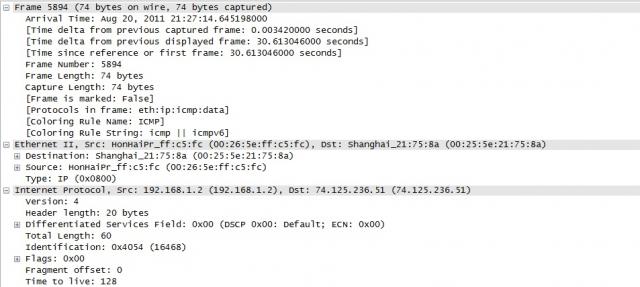
captured-packets-1

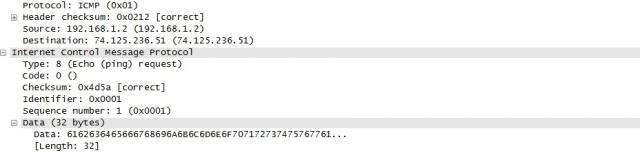
captured-packets-2

  •  Version – This should always be set to 4.
  •  Internet Header Length – The length of the header in 32 bit words.
  • Type of Service – This should be set to 0, as this is the only legit setting according to
  •  Total Length – Total length of the header and data portion of the packet, counted in octets.
  •  Identification , Flags and Fragment offsets – Ripped from the IP protocol.
  • Time To Live – How many hops this packet will survive.
  • Protocol – which version of ICMP is being used (should always be 1).
  • Header Checksum – .This field is recomputed at every host that changes the header, which means pretty much every host that the packet traverses over, since they most often change the packets TTL field or some other.
  • Source Address – The source address from whom the packet was sent. This is not entirely true, since the packet can have another source address, than that which is located on the machine in question. The ICMP types that can have this effect will be noted if so.
  • Destination Address – The destination address of the packet.

There are also a couple of new headers that are used by all of the ICMP types. The new headers are as follows, this time with a few more notes about them:

  •  Type – The type field contains the ICMP type of the packet. This is always different from ICMP type to type. For example ICMP Destination Unreachable packets will have a type 3 set to it. For a complete listing of the different ICMP types. This field contains 8 bits total.
  • ·Code – All ICMP types can contain different codes as well. Some types only have a single code, while others have several codes that they can use. For example, the ICMP Destination Unreachable (type 3) can have at least code 0, 1, 2, 3, 4 or 5 set. Each code has a different meaning in that context then. For a complete listing of the different codes, see the ICMP types. This field is 8 bits in length, total. We will discuss the different codes a little bit more in detail for each type later on in this section.
  •  Checksum – The Checksum is a 16 bit field containing a one's complement of the ones complement of the headers starting with the ICMP type and down. While calculating the checksum, the checksum field should be set to zero.

Hope this is informative for you.

Thank you !

4 simple steps to use fonts other than English in MS word

[caption id="" align="alignleft" width="155"]Windows Custom font Windows Custom font[/caption]

Most of the internet or computer users use Microsoft Office word for document purpose (Those who use Microsoft Operating Systems). This blog will show you how to use different text fonts other than English text.
For example: How to use Hindi , Punjabi, Bengali, Tamil, Malayalam fonts in MS word.

Follow these steps to install your desired fonts:

  1. Download the fonts that you wish to use in MS word. Foe ex: Hindi, Marathi, Bengali, Punjabi, Tamil, Malayalam etc.   It should have .tff extension. Ex: hindi_font.tff
  2. Save this font anywhere in your system and then copy it to fonts directory. You can reach to Fonts directory in 2 ways
    1. Open C:/Windows/Fonts (will work in Any Windows O.S. like XP, Vista, Win7 etc)
    2. Got to Control panel there you will see Fonts Directory in Windows XP and Control Panel\Appearance and Personalization\Fonts for Windows Vista users
  3. Open that Fonts Directory and just paste the fonts. You are Done!
  4. Now open MS word and you will see that font name or font style in your font field.

I have tested it on Windows XP and Windows Vista only. If you find any issues in installing fonts into your system or  facing problem in using it. Please let us know we may solve your issues.

You can download few common fonts that may be useful for you from the attached links shown below:

Minimal thing that one should know about CSS 3 -Part I

CSS Logo-aliencodersMinimal Introduction About CSS 😉 CSS means Cascaded Style Sheet which is a style sheet language used to describe the layout (look and feel) of a document in Markup Language. CSS is designed primarily to enable the separation of document content (written in HTML or a similar markup language) from document presentation, including elements such as the layout, colors, and fonts.

This separation can improve content accessibility, provide more flexibility and control in the specification of presentation characteristics, enable multiple pages to share common formatting, and reduce complexity and repetition in the structural content (such as by allowing for tableless web design).

CSS can also allow the same markup page to be presented in different styles for different rendering methods, such as on-screen, in print, by voice (when read out by a speech-based browser or screen reader) and on Braille-based, tactile devices. While the author of a document typically links that document to a CSS style sheet, readers can use a different style sheet, perhaps one on their own computer, to override the one the author has specified.

CSS specifies a priority scheme to determine which style rules apply if more than one rule matches against a particular element. In this so-called cascade, priorities or weights are calculated and assigned to rules, so that the results are predictable. The CSS specifications are maintained by the World Wide Web Consortium (W3C).

Internet media type (MIME type) text/css is registered for use with CSS by RFC 2318 (March 1998). Its has gone through different version till date. Its lates version is CSS 3 which  has been under development since December 15, 2005. The minimal topic that one should know to use CSS 3 are written in structured way here and from the next post, we will try to explain all topics one by one.

1. External, Internal, Inline

2. Syntax h1{color:#FFFFFF;} or selector {property:value}

3. ID vs Class

4. Styling

  • Text styling

i. Color ii. Letter-spacing iii. Word-spacing iv. Text-align (left, center, justify, right) v. Text-indent vi. Text-transform (uppercase, lowercase, capitalize) vii. Text-decoration (none, overline, line-through, underline, blink) viii. Line-height

  • Font

i. Font-family ii. Font-style (normal, italic, oblique) iii. Font-size iv. Font-weight v. Font-variant (normal, small-caps)

  • List

i. List-style 1. List-style-image 2. List-style-type (circle, square, alpha, roman, latin, decimal-leading-zero) 3. List-style-position (inside, outside)

  • Table
  • Links

i. a:link ii. a:visited iii. a:hover iv. a:active

  • Background (color, image, position, attachment (scroll, fixed),repeat)

i. Background-color:#colorcode ii. Background-image: url(‘path of image’) iii. Background-position:left top/left center/left bottom/x pos y pos iv. Background-attachment:scroll/fixed/inherit v. Background-repeat: repeat/repeat-x/repeat-y/none 5. Box Properties

  • Model
  • Border
  • Margin
  • Padding
  • Outline

6. Dimension

  • Height
  • Width
  • Max-height
  • Min-width

7. Visibility and display

  • Visibility:hidden collapse(useful for table. Works in IE if !doctype is defined)
  • Display: block or inline or none

8. Positioning

  • Fixed (fixed position is positioned relative to the browser window)
  • Relative (relative positioned element is positioned relative to its normal position.)
  • Absolute (An absolute position element is positioned relative to the first parent element that has a position other than static. If no such element is found, the containing block is <html>)
  • Static (default)
  • Z-index

9. Float and clear

  • Float (left, right, none, inherit)
  • Clear (left, right, both, none, inherit)

10. Pseudo class

  • :focus (ex: input:focus { color:green;})
  • :first-child (ex: p:first-child{color:blue;})

11. Pseudo elements

  • :after
  • :before
  • :first-letter
  • :first-line

12. Opactiy (css3)

  • Opacity: 0-1 (FF)
  • filter:alpha(opacity=x). (for IE x=0-100)

Follow this link for CSS examples

CSS

  1. External, Internal, Inline
  2. Syntax h1{color:#FFFFFF;} or selector {property:value}
  3. ID vs Class
  4. Styling

    • Text styling

i. Color

ii. Letter-spacing

iii. Word-spacing

iv. Text-align (left, center, justify, right)

v. Text-indent

vi. Text-transform (uppercase, lowercase, capitalize)

vii. Text-decoration (none, overline, line-through, underline, blink)

viii. Line-height

    • Font

i. Font-family

ii. Font-style (normal, italic, oblique)

iii. Font-size

iv. Font-weight

v. Font-variant (normal, small-caps)

    • List

i. List-style

1. List-style-image

2. List-style-type (circle, square, alpha, roman, latin, decimal-leading-zero)

3. List-style-position (inside, outside)

    • Table
    • Links

i. a:link

ii. a:visited

iii. a:hover

iv. a:active

    • Background (color, image, position, attachment (scroll, fixed),repeat)

i. Background-color:#colorcode

ii. Background-image: url(‘path of image’)

iii. Background-position:left top/left center/left bottom/x pos y pos

iv. Background-attachment:scroll/fixed/inherit

v. Background-repeat: repeat/repeat-x/repeat-y/none

  1. Box Properties

    • Model
    • Border
    • Margin
    • Padding
    • Outline
  2. Dimension

    • Height
    • Width
    • Max-height
    • Min-width
  3. Visibility and display

    • Visibility:hidden collapse(useful for table. Works in IE if !doctype is defined)
    • Display: block or inline or none
  4. Positioning

    • Fixed (fixed position is positioned relative to the browser window)
    • Relative (relative positioned element is positioned relative to its normal position.)
    • Absolute (An absolute position element is positioned relative to the first parent element that has a position other than static. If no such element is found, the containing block is <html>)
    • Static (default)
    • Z-index
  5. Float and clear

    • Float (left, right, none, inherit)
    • Clear (left, right, both, none, inherit)
  6. Pseudo class

    • :focus (ex: input:focus { color:green;})
    • :first-child (ex: p:first-child{color:blue;})
  7. Pseudo elements

    • :after
    • :before
    • :first-letter
    • :first-line
  8. Opactiy (css3)

    • Opacity: 0-1 (FF)
    • filter:alpha(opacity=x). (for IE x=0-100)

Follow this link for CSS examples


Safety tips for mobile users

be safe while talking on mobile Hi friends, according to present scenario every people who are above 14 are having mobile (except those who can't afford it). Its good thing to have to be in touch with friends and families but it may turn into devil if you misuse it either knowingly or unknowingly. So, its the right time to know that what we should do and what we should not do with mobile.

  • Only give your mobile number out to people you know and trust. (Specially for girls)
  • Don't do any transaction through smart phone if password or any personal information is getting to be stored in your mobile.
  • Don't talk rubbish or don't harass anyone on phone, it comes under Cyber Crime. (while break up couples usually do so. So beware guys!)
  • Avoid, unless absolutely needed, connecting to an unsecured wireless network through your mobile (whici is having wi-fi facility)
  • Do not use your mobile phone to communicate with strangers. Only text and call people or businesses you know in real life.
  • Never reply to text messages from people you don’t know. (One or two messages you can do to know his/her identity, if possible)
  • Make sure you know how to block others from calling your phone. Using caller id ,you can block all incoming calls or block individual names and numbers.
  • Make a record of your Electronic Serial Number (ESN) and/or your International Mobile Equipment Identity (IMEI) number. You can find out your IMEI number by pressing *#06# on your mobile phone's keypad, it will display a 15 digit number – that is your IMEI number.
  • If your phone is lost or stolen, report it to your local police station and your network operator immediately.
  • Think about how a text message might be read before you send it. (Married couples may face many issues because of such messages. No need to explain i guess)
  • You should never give anyone else's number out without their permission.
  • You should never take pictures or videos of anyone with your phone if you do not have their permission.
  • Do not allow others to take pictures or videos of you without your permission. Remember – these pictures and videos can be posted to the Internet.
  • Be careful if you meet someone in real life who you only "know" through text messaging. Even though text messaging is often the "next step" after online chatting, that does not mean that it is safer.

We follow most of the steps but knowingly or unknowingly we do such mistakes which leads towards Cyber crime. So, play safe, be safe and make the nation Cyber crime free nation. Source: http://www.staysafeonline.org