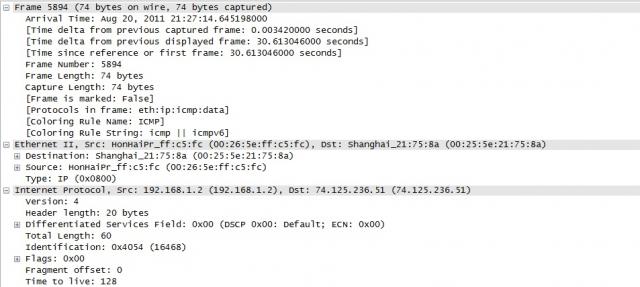
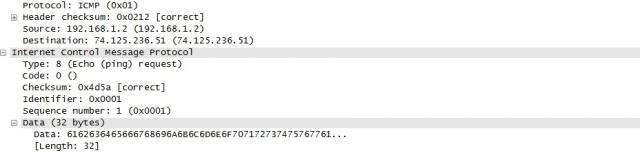
 We all are aware of PING command, hardly any person has not used this command using computer in day to day life but there are lot of this you may not be aware of . So, I’ll be going to take you deep into the "PING" command .
Before getting into deep, lets get into the basics first some of the things you may not be knowing.
What Does PING means ?
PING stands for Packet Internet Gropher.
Why we use it ?
It is a network utility in computer which sends the ICMP or ECHO packets to test the reachability of host on an Internet Protocol (IP) network .
What is ICMP packet ?
ICMP is internet control message protocol having port number 7 . Every protocol having a port number .You can check list of protocos with their port numbers here:
http://www.iana.org/assignments/service-names-port-numbers/service-names-port-numbers.xml
We can use several options with PING to enchance it’s capability .
-
-t : Specifies that ping continue sending Echo Request messages to the destination until interrupted. To interrupt and display statistics, press CTRL-BREAK. To interrupt and quit ping, press CTRL-C.
-
-a : Specifies that reverse name resolution is performed on the destination IP address. If this is successful, ping displays the corresponding host name.
-
-n Count : Specifies the number of Echo Request messages sent. The default is 4.
-
-l Size : Specifies the length, in bytes, of the Data field in the Echo Request messages sent. The default is 32. The maximum size is 65,527.
-
-f : Specifies that Echo Request messages are sent with the Don't Fragment flag in the IP header set to 1. The Echo Request message cannot be fragmented by routers in the path to the destination. This parameter is useful for troubleshooting path Maximum Transmission Unit (PMTU) problems.
-
-i TTL : Specifies the value of the TTL field in the IP header for Echo Request messages sent. The default is the default TTL value for the host. For Windows XP hosts, this is typically 128. The maximum TTL is 255.
-
-v TOS : Specifies the value of the Type of Service (TOS) field in the IP header for Echo Request messages sent. The default is 0. TOS is specified as a decimal value from 0 to 255.
-
-r Count : Specifies that the Record Route option in the IP header is used to record the path taken by the Echo Request message and corresponding Echo Reply message. Each hop in the path uses an entry in the Record Route option. If possible, specify a Count that is equal to or greater than the number of hops between the source and destination. The Count must be a minimum of 1 and a maximum of 9.
-
-s Count : Specifies that the Internet Timestamp option in the IP header is used to record the time of arrival for the Echo Request message and corresponding Echo Reply message for each hop. The Count must be a minimum of 1 and a maximum of 4.
-
-j HostList : Specifies that the Echo Request messages use the Loose Source Route option in the IP header with the set of intermediate destinations specified in HostList. With loose source routing, successive intermediate destinations can be separated by one or multiple routers. The maximum number of addresses or names in the host list is 9. The host list is a series of IP addresses (in dotted decimal notation) separated by spaces.
-
-k HostList : Specifies that the Echo Request messages use the Strict Source Route option in the IP header with the set of intermediate destinations specified in HostList. With strict source routing, the next intermediate destination must be directly reachable (it must be a neighbor on an interface of the router). The maximum number of addresses or names in the host list is 9. The host list is a series of IP addresses (in dotted decimal notation) separated by spaces.
-
-w Timeout : Specifies the amount of time, in milliseconds, to wait for the Echo Reply message that corresponds to a given Echo Request message to be received. The default time-out is 4000 (4 seconds).
-
TargetName : Specifies the destination, which is identified either by IP address or host name.
-
/? : Displays help at the command prompt.
Coming to the point :
How does it work ?
When we execute PING command For Example: >ping www.google.com
Basically the process of ping takes place in two steps :
a) [REQUEST ICMP PACKET]: ICMP packets will be send to Google Server to check if we have reachability to google server or not ? This step will complete process from only one side.
b) [REPLY ICMP PACKET]: Google Server will reply and let our system to know reachability is compete and thus complete 2 way process.
Now, a single ICMP packet contains a lot of information that we will going to study now .
I did ping www.google.com and captured icmp packets to understand it better:
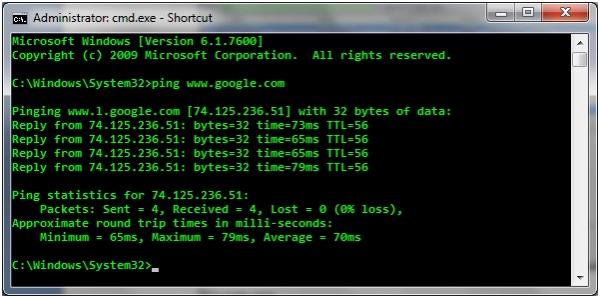
What we can observe from here ?
Google Server IP is 74.125.236.51
You can even put this ip or whatever will come in your case ( google search engine has many servers) on browser instead of this.
I captured those ICMP packets on wireshark to look what's inside it ?
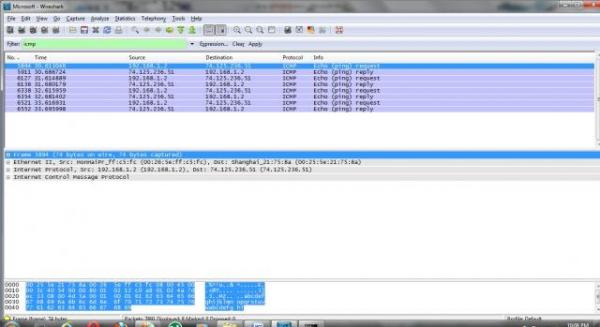
We can see, in info- two types of echo packets: request and reply.
Now, Understanding what’s behind those echo packets ?


-
Version – This should always be set to 4.
-
Internet Header Length – The length of the header in 32 bit words.
-
Type of Service – This should be set to 0, as this is the only legit setting according to
-
Total Length – Total length of the header and data portion of the packet, counted in octets.
-
Identification , Flags and Fragment offsets – Ripped from the IP protocol.
-
Time To Live – How many hops this packet will survive.
-
Protocol – which version of ICMP is being used (should always be 1).
-
Header Checksum – .This field is recomputed at every host that changes the header, which means pretty much every host that the packet traverses over, since they most often change the packets TTL field or some other.
-
Source Address – The source address from whom the packet was sent. This is not entirely true, since the packet can have another source address, than that which is located on the machine in question. The ICMP types that can have this effect will be noted if so.
-
Destination Address – The destination address of the packet.
There are also a couple of new headers that are used by all of the ICMP types. The new headers are as follows, this time with a few more notes about them:
-
Type – The type field contains the ICMP type of the packet. This is always different from ICMP type to type. For example ICMP Destination Unreachable packets will have a type 3 set to it. For a complete listing of the different ICMP types. This field contains 8 bits total.
-
·Code – All ICMP types can contain different codes as well. Some types only have a single code, while others have several codes that they can use. For example, the ICMP Destination Unreachable (type 3) can have at least code 0, 1, 2, 3, 4 or 5 set. Each code has a different meaning in that context then. For a complete listing of the different codes, see the ICMP types. This field is 8 bits in length, total. We will discuss the different codes a little bit more in detail for each type later on in this section.
-
Checksum – The Checksum is a 16 bit field containing a one's complement of the ones complement of the headers starting with the ICMP type and down. While calculating the checksum, the checksum field should be set to zero.
Hope this is informative for you.
Thank you !
 Gahan, CCIE #8593