Google panda and Google penguin penalties and the way to avoid them

Google panda and Google penguin penalties and the way to avoid them
 Google Penguin and PandaAs discussed in my first post on how SEO has changed in the last 6 months, the risk of getting a Google penalty is higher than ever if you do not take the appropriate measures. Bad links use to get ignored and now they count against your site. In this post I will go over both Google Panda and Google Penguin and the measures you need to take to avoid them.


Penguin and Panda
Both are algorithmic penalties that act like a filter and run once a month. If your site falls within the right parameters, it won’t be affected, however if it doesn’t, then a penalty will be placed on your site. Both penalties target over optimization and are designed to rid the internet of web spam; Google Panda focuses of onsite over optimisation whereas Google Penguin targets over optimisation of backlinks.
 
On-site SEO
It is important to set up your site correctly. Without correctly implemented onsite SEO, you will very much be swimming against the tide so to speak when it comes to ranking your site but you will also potentially be opening yourself up for a penalty.
 
The important thing to remember here though in terms of preventing a Panda penalty is to make sure that you don’t have any duplicate content and you don’t stuff your content with keywords, keeping your keyword densities below 2.5%. If you have any duplicate content, make sure you add canonical tags to the page:
<link rel=”canonical” href=”http://www.yourdomain.com/correct-page&rdquo; />
 
A good tool to use to check keyword densities is SEO Quake which is a plugin for your browser and is available for Firefox, Safari, Opera and Chrome.
 
Link Building
Google Penguin looks at the anchor text diversity of the links that you have built. The belief is that a site with a low anchor text diversity has probably got a high amount of manually created links – links deliberately built to manipulate the search results and improve your search rankings. Remember, Google says that you are not allowed to build any type of link with the intention of improving your search ranking.
 
When it comes to link building, most effort is placed on building a large amount of links to a site but often with no real strategy. Most people do not even track the links they have built which leaves themselves open to a penalty.
 
What to record
It is vital to keep records of the links that you have built. The easiest way to do this is with an Excel spread sheet. In the spread sheet you want to record the following information:
  • Backlink URL (the URL of the page linking to your site)
  • Backlink domain URL (the domain of the site that links to your website)
  • Linked to page (the page the backlink links to on your website)
  • Anchor text (the text in the link)
  • Live link status (is the link still live)
  • Backlink URL Indexed (is the backlink URL indexed)
  • Domain Indexed (is the backlink domain indexed in Google)
  • Backlink URL PR (the PR of the backlink URL)
  • Domain PR (the PR of the domain linking to your site)
  • Username and password where applicable (so you can amend the link if necessary)
  • Type of link (wiki, press release, web 2.0 etc.)
 
To find out the backlinks going to your site, use all of the backlink analysis tools at your disposal. Backlink analysis tools are effectively mini search engines and all use a slightly different system to find links. The more tools you use the more links you are likely to find. You should also include the URLs of the backlinks that you have created. The links you have built won’t show up in backlink analysis tools if they haven’t been indexed yet.
 
To find the other information I use a tool called Scrapebox. You will have to use private proxies when compiling the information otherwise the Google will temporarily block your URL and your data will be inaccurate.
 
Penalty Analysis page
Once you have this data, you need to create a penalty analysis page. I personally do this in the same spread sheet and simply create another tab so that I have all of the data for a site in one place but you can create another spread sheet should you wish. In this spread sheet, you need to create the following fields:
  • Total links
  • Number of domains – copy the domain column into a new tab and remove duplicates and record the number
  • Number of exact match anchors – use the formula =COUNTIF(Tier1!$D:$D,”keyword”) for this and complete the tier1!$D:$D section by highlighting your anchor text column and replacing keyword with your keyword
  • Number of broad match anchors – same as above expect use “*keyword*” as this will find any rows with you keyword in but not exclusive to
  • Number of links that do not include your keyword = total number of links-exact match anchors-broad match anchors
  • Percentage of unique domains – this is total link-number of domains divided by total number of links
  • Percentage links exact match anchor – this is number of exact match anchors divided by the total number of links
  • Percentage links broad match anchor – this is the number of broad match anchors divided by the total number of links
  • Percentage links without your keywords – this the number of links without keywords divided by the total number of links
You will need to create a new row for each of your keywords.
 
Any other information that you wish to record such as deindexed links can be done so using the same COUNTIF formula described above, obviously changing the data fields where appropriate. I only do this if I need to find out information that I don’t already know e.g. when I look at a site for the first time. For people that are optimising their own sites though, you will know what links you have built.
 
Factors like deindexed links are only appropriate when people have used link networks like ALN which Google have clamped down on in recent months. I would avoid using such networks as you don’t need them to rank a site and you’re asking for trouble if you us them.
 
What to look for
There are no exact numbers to look out for however if your exact match anchor text diversity is up near the 30% mark, you need to start building links with more generic anchors. If you have a number of links with generic anchors that have not been indexed yet, you can focus on getting them indexed. If necessary, you can alter the links too using the username and password that you have recorded.
 
Author Bio
Jack Willis is an online marketer at Marketing Grin and has been doing search engine optimisation for over 5 years. Marketing Grin offers a variety of different SEO packages for companies large and small and also helps recover sites that have been hit with a penalty.

The dos and don’ts of SEO

The dos and don’ts of SEO
Getting to the top of the search engines is big business. If you aren’t on the first page for your particular search term, you probably won’t receive many clicks. Nearly all users click on an ad in the top 3 positions. Getting your site to these positions though takes careful planning and effective implementation. Far too many people dive straight in and start building links when they actually don’t know the current state of their website and what needs doing to improve it. In this post I’m going to go through the fundamentals of ranking a website, illustrating what to do and what not to do. It isn’t an SEO blue print and rather a post to ensure that you keep on track and put your efforts into the right areas.

How Grinch Penetrates Defenses

Tech Grinches have been quite busy this year round with their evil activities – snatching away happiness from people by stealing their confidential data. There have been high statistics recorded for data breach in year 2012. The most unfortunate have been the retail business, where company data have been targeted most often and with ease. The Grinch and his companions have used specific tools to attack people this year – keyloggers and spyware being the most useful modes of attack.

Search engine optimisation has changed, have you?

Search engine optimisation has changed, have you?
Black hat White HatThe search engines have gone through a lot of changes in the last 6 months which has completely shaken up the SEO industry. Even reputable companies that have always applied ‘white hat’ SEO practises are no longer safe and some big named sites were hit by Google penalties. So what’s changed?

 
For many years there has been a debate about what is black hat SEO – the frowned upon way to optimise a website, and what is white hat SEO – the best practises approach.

Although Google always said that you were not allowed to create links in order to manipulate the search results and any links built purely for the purpose of improving rankings were considered as web spam and black hat, most people believed that black hat was manually created links and provided they created links manually, they were safe from a penalty. Google Penguin proved just how wrong that was.
 
How it used to be
Up until 6 months ago, Google would ignore poor links going to a site and would only take into account good links. If you had some poor links going to your site, Google’s advice would be not to worry about it.
 
When building links, the best practises approach was always to put your keywords in the anchor text. This was because it made your links highly relevant to your keywords and therefore carried a significant amount of link juice. You are only able to manipulate anchor text though if you have built the links yourself. If people have naturally linked to your site, the chances are they would have used different anchors giving you huge anchor text diversity. 
 
Poor links now count against you
In an attempt to cut down on web spam, Google started to penalise sites with poor anchor text diversity by introducing Google Penguin. This was a huge moment in the SEO world as now low quality links have a negative effect on sites.
 
What is a low quality link?

Low quality links are any links that do not appear to be naturally built. Google believes that links should be naturally created by people writing good quality content and others sharing that content. Any links built purely for the purpose of link building are considered as web spam.
 
Google Penguin

Google PenguinGoogle Penguin is an algorithmic penalty that works like a filter and only runs once a month and penalises sites that have unnatural link profiles. An unnatural link profile is one that has low anchor text diversity for the reasons mentioned earlier.

 
Google Penguin caused a huge shack up in the SEO world and marked the change of how links are built. Post Google Penguin, poor quality links have a negative effect on a site and can significantly alter sites rankings.
 
The difficulty with Google Penguin though is that it opened the door to negative SEO. Some savvy competitors will deliberately launch a negative SEO attack on sites in an attempt to lower their link diversity and trigger a penalty. On the plus side though, savvy SEOs can remove unwanted content which is great for online reputation campaigns!
 
Google Panda
Google Panda was first introduced in early 2011 with regular updates being released. In the last 6 months Google has really been clamping down on over optimisation and have been penalising over optimised sites through Google Panda.
 
Panda targets sites with duplicate content and pages that have been stuffed with keywords. Duplication issues are more prevalent in ecommerce sites as often products are filed under several categories causing duplicate pages. Also people get lazy and copy manufacturer descriptions rather than writing their own.
 
Effects on SEO
As a result of Google penguin, anchor texts are now much longer and a lot more varied. Google Panda has caused web masters to be very careful about the content on their sites. In years gone by web master would stuff keywords into their sites in a deliberate attempt to manipulate the search engines. Now though web masters are doing the opposite and are actually de-optimising their site making sure they have very low anchor text diversity.
 
Google Disavow tool
To protect against negative SEO, Google launched a disavow link tool in early October 2012 where users can submit links from their link profile that they wish to be ignored. It is essentially a crowd sourcing tool whereby webmasters do a lot of the spam filtering on behalf of Google. The difficulty with this though is that a lot of SEOs don’t know what they are doing and will simply disavow all of their links and start again. This is making Google believe that certain links are spam links when they are not.
 
Example
Imagine if you put together a really good link building campaign and saw some good movement in the search engine results pages but someone else built links to the same sites and didn’t diversify their links and then got hit with Google Penguin and so reports these links to Google causing these links then get taken down. There is nothing wrong with the sites that link to these sites, only the 2nd person didn’t know what they were doing. 
 
Is this a useful tool or a recipe for disaster? I will let you make your own mind up…
 
How to protect against Google Penguin penalties
Google Penguin UpdateProtecting against Google penalties is simply a case of knowing your link profile. You should be running regular live link reports that detail your exact match e.g. keyword, and broad match anchors e.g. keyword with extra text, of all of your indexed links.
There are no exact figures that you should be looking for as every niche is different but if any of your keywords have anchor text diversities of 30% or higher, you should be looking to reduce them by building links with generic anchors. A natural link profile will have a high percentage of branded anchor text (your company’s name) and a high level of naked URLs (www.yourdomain.com).
 
How to protect against Google Panda penalties
Protecting against Panda penalties should happen automatically if you have set up your website correctly. The important things to note are that your content is original and not copied and that you haven’t stuffed it with keywords. If you have written it yourself, you will know whether it is original or not. If you buy content, make sure you check it is original by running it through Copyscape before buying it. Really your content should have keyword densities of lower than 2.5%.
 
Identifying penalties
If you get hit with a penalty, it is very important to understand which penalty you have been hit by so that they can formulate a plan on how to recover. Often people assume they have been hit by a certain penalty simply because their rankings have dropped and there is a lot of discussion about that particular penalty in the forums. Before taking any action, you need to understand what penalty you were hit by so that you are able to take action otherwise you are likely to make the situation worse rather than better.
 
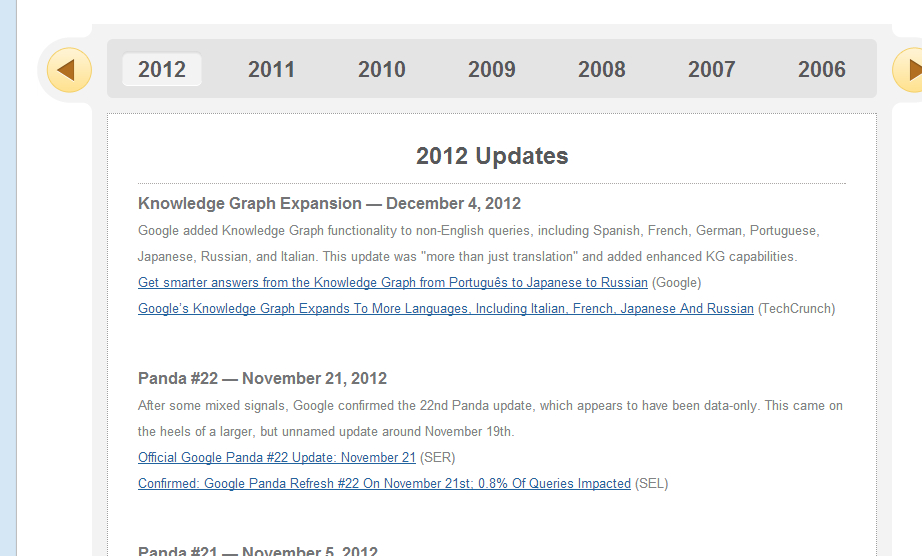
Google algorithm change history
SEOmoz have a page on their site that details all of the algorithm changes and the date at which they happened. This is a good place to start if your site suddenly tanks in the search engine result pages (SERPs) to see if there has been any algorithm changes recently. If there hasn’t, look at your website files to see if your site has been hacked and if you are hosting files that you shouldn’t be. Make sure you change the settings so that you can see hidden files!
If there have been algorithm changes at a similar time to when your website dropped in the SERPs then the next step is to understand what penalty you have been hit by.
 SEO-moz chart

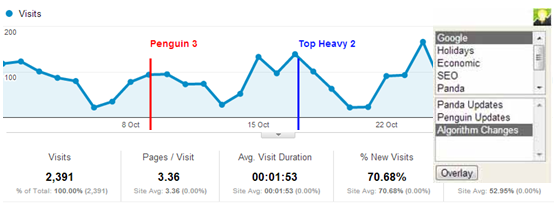
I analyse the different penalties using a tool called Chartelligence which allows you to overlay algorithm changes over your Google Analytics data or Quantcast data and identify which penalty you were affected by and when. It is a free Google Chrome plugin and really simple to use.
chartelligence chrome plugin

Once you know what penalty it was, you can set about fixing the problem.

Summary
The SEO world is ever changing and this was never truer than in the last 6 months. With the right approach, search engine optimisation delivers a huge amount of value to any business. You can easily protect against any penalties.
 
Let’s see what the next 6 months has installed!
 
Author Bio
Jack Willis is the Managing Director of Marketing Grin, an online marketing agency that provides search engine optimisation to a number of businesses of varying size and in a variety of different industries. Jack has over 5 years’ experience in online marketing and particularly enjoys getting stuck into online marketing campaigns where he can use all of his online knowledge. Jack also has a good level of experience in running Google AdWords campaigns, being an AdWords qualified professional, and of running social media optimisation campaigns.

Lenovo IdeaPad Yoga 13 – First Look

Lenovo IdeaPad Yoga 13When you have a product named Yoga, you know you can expect some impressive physical contortion. And that's exactly the case with Lenovo's new IdeaPad Yoga 13 – the technology giant's Windows 8-enabled foray in the hybrid computer domain.

The specialty of this device is that its screen, in laptop form, can be tilted all the way back and behind to enable it to function as a tablet! But that's not the Yoga 13's only highlight by any "stretch" of the imagination – here’s a more detailed look featuring the Intel Core i5 model:

Design
The aforementioned flip-back screen is undoubtedly the conspicuous physical facet and indeed useful. However, the pivot holding the screen is a bit loose, which may cause some stability and operating issues.
The Yoga 13 bears a pleasing black and silver chassis with the prominent Lenovo logo embossed on the screen lid.  The hybrid computer is 13.1 inches (expectedly) long, 8.9 inches wide, and 0.67 inches in depth. While these dimensions are commendable for a laptop configuration, things aren't quite so sanguine on the tablet front – the Yoga 13 feels awkward and unwieldy when in tablet form. The sizeable 3.4-pound weight doesn't help matters much either.      

The 13.3-inch display is, although not completely high definition, still impressive at a 1600 by 900-pixel top resolution. Further, the screen boasts a widescreen viewing mode as also IPS capacitive knowhow making the viewed content extremely vivid and amenable to touch responses. The physical AccuType-enabled keyboard, save for a few unusually cramped keys, is adequate while the touchpad is above average. Incidentally, the physical keyboard automatically disables itself when the tablet form is activated. 
 
Ports and Connectivity
The Yoga 13 is armed with a fair mixture of connectivity choices to permit quick and easy sharing of data. These functionalities include:

  • USB (2.0) port
  • USB (3.0) port
  • Combination port
  • HDMI port
  • SD and MMC card slot

In addition, the hybrid computer also possesses Wi-Fi (802.11 b/g/n) and Bluetooth linking abilities for heightened user convenience. The only minor gripe is that the power port is shaped like a USB port sometimes leading to confusion.
 
Functioning

  • The Yoga 13 runs on a 3rd generation Intel Core i5 (3317U) processor and also have an Integrated Intel HD Graphics (4000) card thereby rendering decent performance and agility.
  • Besides the device is equipped with 4GB of DDR3 RAM and a 128GB Solid State Drive (SSD) further enhancing its overall functionality.    

As mentioned earlier, the Yoga 13 ships with the all-new Microsoft Windows 8 operating system, which has already impressed technology enthusiasts with its adaptability, speed, and spruced-up interface.   
The included battery is commodious and is capable of sustaining the device for a good 5 hours of moderate use.

The Yoga 13 also comes with the ensuing neat functions:

  • The capability to control multimedia functions through motions using the provided web camera
  • The ability to recover quickly from a flawed state using OneKey
  • A distinctive element that keeps the system surprisingly cool at all times.

Verdict
The Lenovo IdeaPad Yoga 13 has the features and a special new-age feel about it to lure customers, especially those not overly concerned with its "above $1000" price tag.

Allan Goltz likes writing articles related to Technology News, Gadget Reviews and How To. He also does guest posting for buycharter.com – a site that offers savings and current information on charter tv.

Technorati Claim Token: G2KY2Y3CQGQ5
 

5 Ways To Purchase The Latest Mobile Phone

5 Ways To Purchase The Latest Mobile Phone
5 Ways To Purchase The Latest Mobile PhoneThese days’ mobile phones have become part of everyone’s life. We see all ages of people using cell phones irrespective of their age and gender. Everyday market is flooded with latest mobile and there are many ways you can buy it, and here are 5 simple ways how you can buy latest mobile phone.

Personal saving: It is one of the simple ways to purchase latest mobile phones. One of the very important things how you can afford buying latest gadgets is from your personal savings. Try to save what you can, it doesn’t matter how much you can and get into the habit of savings.

Developing the habit of savings can help you to put aside some money for your future purposes. If you want to experience the best and latest technology and when there is no other option to you buy a mobile phone, it must for you to do the saving from your incomes. Buying mobile phones from personal funds is best and wise choice when compared to any other methods.

Short term loans: There are lots of commercial organisations and banks which lend money for people, who cannot afford to buy gadgets or accessories for domestic purposes. Talk with different lenders who offer loans and compare the interest rates with other lenders and select the one who gives loans for the lowest rates. Also enquire about PPI claims with your lender for this particular loan and opt for these types of insurance claims if possible, which can be utilised when you are unable to pay off your debts due to misfortune situations like job loss, sickness or illness etc.

EMI: This is also one of type of loans where you pay some amount initially and the remaining amount will be paid by your financial supporter or banker. Many average salaried people will opt for these types of repayments. It is easy monthly instalment where you the payoff the amount based on your monthly incomes. Here the loan is sanctioned based on your monthly incomes and your payment history and one of other facility here is you can decide on your own how much amount you would like to pay per month. If your employer gives you the choice of an advance loan from your salary this can also be used for buying mobile phones.

Borrow money from people: You can discuss the matter with your friends and family that you want to latest mobile phone and also inform that you are short of money; require financial support to purchase mobile phone. You can also seek help from outside, search for different friends who are ready to give for money for your personal needs, for this you can tell them that you are ready to pay interest for borrowed money.

Online shopping: Many people prefer to buy products or gadgets online because you can compare products from different brands, you can check whether the price is in your budget or not and one of the main reasons is that you can also get latest mobile phones from online stores with reasonable prices.  If you prefer to buy any product online check for site popularity and credibility in delivering the ordered goods, and also look for password protection while making payments through credit cards or debit cards.

Author Bio:
My name is Maria.  I am a tech writer from Manchester.  I am into Finance, Technology, Travel, and Health :).  Catch me @financeport
 

Deciding Whether You Need to Purchase Instagram Likes for your Account

Instagram is a fantastic, straightforward, visual social networking site that enables you to promote your business, or service through images. There are several different factors that you need to consider when setting up your account, and one is whether to purchase Instagram likes. This can be beneficial to your community, however, some people prefer to take time and build their site slowly.

10 Ways Photoshop Can Help You in Web designing

10 Ways Photoshop Can Help You in Web designing
web designing using photoshop
When it comes to developing images for webdesign, no tool is more versatile than Photoshop. Although Illustrator may be better suited for creating graphics from scratch, Photoshop has an abundance of tools including basic creation. It's the other tools for images that makes Photoshop such a powerful asset. What can be done with this popular program?


1. Resolutions – The first thing you should know is that producing images for the Internet only needs to be 72 pixels. While you can use images that are larger in resolution, the will become larger in file size taking a computer longer to render it.

2. Buttons – Creating buttons in Photoshop is relatively easy. Thanks to the Bevel and Emboss tool, you can put an outer bevel on a simple square image and give it a 3D protruded look as if you were looking at a real button. Through the use of CSS rollover image commands, you can have this button one color while changing to a different color once the mouse moves across it.

3. Gradients – Photoshop has the ability to place gradients in your text, images, backgrounds, and more using any number of colors you wish. You could easily create a an effect of the entire spectrum of the rainbow in any selected layer. There are hundreds of ways that the gradient ability can be used in regards to designing stunning effects for anything you are making.

4. Shadows – In the layer commands, Photoshop can create drop shadows for the image. This is great for assisting in simulating 3D effects that seem to rise up off of the screen.

5. Outer Glow – The outer glow ability can make your selected image stand out. This creates an aura around the image of any color and size you like. This works great for getting attention to your text.

6. Product Collage – By selecting individual products from multiple images, you can drag them into a single image to create a collage. For instance, dragging multiple automobiles into a single header image would work great for a car dealership or seller website.

7. Be anywhere – Much like create a collage, you can select yourself and become super-imposed on a background of your choosing. This method has created a lot of controversy since the early days of Photoshop for it allows anyone with the skills to fake nearly any image imaginable. You could put the Titanic sinking on Mars, if you felt the inspiration to do so.

8. Backgrounds – For webdesigns, using imagery for the background can be created in Photoshop as well. The background is a good place to test out gradient controls, and these types of images only need to be about three pixels wide. Backgrounds will cycle the image repeatedly on the Internet and creating a gradient look doesn't take much.

9. Appearance Enhancement – Did you know that you could make the text of your website look like it was written on 2,000 year old parchment? You can create the look in Photoshop and use the image as a background in a table or CSS command. 

10. Banner Creation – To make your own banners, they need to be 468 x 60 as a common configuration. You can put any image or images into a banner to make it an attractive advertisement. However, putting too much pizazz in a banner could make it too large of a file and could possible cause issues trying to upload it to your server or a banner exchange program.

From banners to text, Photoshop has the ability to do it all. Since the mid '90s, this program has been the forerunner for the graphic designer coupled with Illustrator. It's a tool that can make any image more or less than it really is.

Author Bio:
Jason Miner plays a vital role for www.blogcarnival.com.  He is an expert in writing topics of different categories.  He is helping the carnival team to grow & working on making this an even better place for bloggers.
 

Google Presents Autopilot

Google Presents Autopilot
The program by developed Google allows a "driver" to check email and talk on a cell phone on the go, without being a fender-bender: the car drives on autopilot. But still sleeping is not allowed: ??the system warns you when the situation should be taken under a human control.

The correspondent of The Wall Street Journal ran through a 101 Route with Chris Urmson, a Google programmer-developer of the autopilot. The Lexus braked when it was undercut by the Audi, passed it back and continued his way clear of the reckless driver. Lexus was driven by robot. Urmson did not even touch the wheel: "It’s surprisingly natural".