
A new HTTP method just shipped that GET and POST have needed for 25 years. 1. What is it QUERY is a new HTTP request […]
Category: Web Development



How to Create your Own Theme in WordPress
So you are a dab hand at HTML, CSS, JavaScript, and PHP. You’ve been making awesome websites for a while now, and you’ve heard about […]
Adding the Skype Share Button in WordPress
In today’s tech-savvy era, almost every person uses Skype to communicate with their loved ones. Not only people use Skype for personal communication but also […]

Countdown Timer using JavaScript only
If you are into web development and trying to build an application where you need to show countdown timer. For example session expiry countdown. Here […]
HTML5 Timeline History – Inforgraphics
This infrographics shows how HTML5 First draft evolved in 2009 and how HTML5 is gaining momentum in almost every web based projects.
Minimal JSON Fundamentals that Web Developers should know
What is JSON?
JSON is short notation for “JavaScript Object Notation”, and is a way to store information in an organized, easy-to-access manner. It gives us a human-readable collection of data that we can access in a really logical manner.
Download its pdf version from here
Features of JSON
-
JSON is lightweight text-data interchange format
-
JSON is language independent
-
JSON is "self-describing" and easy to understand
- It is derived from the JavaScript programming language for representing simple data structures and associative arrays, called objects. Despite its relationship to JavaScript, it is language-independent, with parsers available for most programming languages.
|
JSON uses JavaScript syntax for describing data objects, but JSON is still language and platform independent. JSON parsers and JSON libraries exists for many different programming languages. Why to use JSON Over XML? There are times when you may be unsure what format to choose when transmiting data between a server and web application. Here are a few reasons why you might choose to use JSON rather than XML and a few why you might choose XML rather than JSON. What is XML? Reasons to choose JSON over XML
Reasons to choose XML over JSON
|


Much Like XML
-
JSON is plain text
-
JSON is "self-describing" (human readable)
-
JSON is hierarchical (values within values)
-
JSON can be parsed by JavaScript
-
JSON data can be transported using AJAX
Much Unlike XML
-
No end tag
-
Shorter
-
Quicker to read and write
-
Can be parsed using built-in JavaScript eval()
-
Uses arrays
-
No reserved words
Why JSON?
For AJAX applications, JSON is faster and easier than XML:
Using XML
-
Fetch an XML document
-
Use the XML DOM to loop through the document
-
Extract values and store in variables
Using JSON
-
Fetch a JSON string
-
eval() the JSON string
JSON syntax is a subset of JavaScript syntax
JSON Syntax Rules
JSON syntax is a subset of the JavaScript object notation syntax:
-
Data is in name/value pairs
-
Data is separated by commas
-
Curly braces hold objects
-
Square brackets hold arrays
JSON Name/Value Pairs
JSON data is written as name/value pairs.
A name/value pair consists of a field name (in double quotes), followed by a colon, followed by a value:
"firstName" : "kantepalli"
This is simple to understand, and equals to the JavaScript statement:
firstName = "kantepalli"
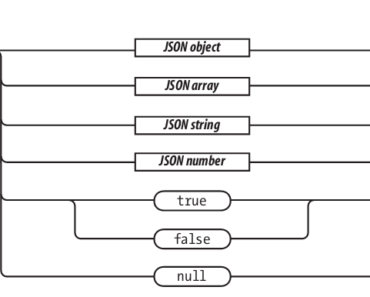
JSON's basic types are:
-
Number (double precision floating-point format in JavaScript, generally depends on implementation)
-
Boolean (true or false)
-
Array (an ordered sequence of values, comma-separated and enclosed in square brackets; the values do not need to be of the same type)
-
Object (an unordered collection of key:value pairs with the ':' character separating the key and the value, comma-separated and enclosed in curly braces; the keys must be strings and should be distinct from each other)
-
null (empty)
JSON Objects
JSON objects are written inside curly brackets. Objects can contain multiple name/values pairs:
{ "firstName":"kantepalli" , "lastName":"rajasekhar" }
This is also simple to understand, and equals to the JavaScript statements:
firstName = "kantepalli"
lastName = "rajasekhar"
JSON Arrays
JSON arrays are written inside square brackets. An array can contain multiple objects:
Syntax :

[javascript]{
"employees": [
{ "firstName":"kantepalli" , "lastName":"rajasekhar" },
{ "firstName":"uday" , "lastName":"kiran" },
{ "firstName":"shiva" , "lastName":"kondur" }
]
}[/javascript]
In the example above, the object "employees" is an array containing three objects. Each object is a record of a person (with a first name and a last name).
JSON Uses JavaScript Syntax
Because JSON uses JavaScript syntax, no extra software is needed to work with JSON within JavaScript.
With JavaScript you can create an array of objects and assign data to it like this:
-
Converting a JSON Text to a JavaScript Object
-
One of the most common use of JSON is to fetch JSON data from a web server (as a file or as an HttpRequest), convert the JSON data to a JavaScript object, and then it uses the data in a web page.
-
For simplicity, this can be demonstrated by using a string as input (instead of a file).
JSON Example – Object From String
Create a JavaScript string containing JSON syntax:

[javascript]var txt = '{ "employees" : [' +
'{ "firstName":"rajasekhar" , "lastName":"kantepalli" },' +
'{ "firstName":"uday" , "lastName":"meduri" },' +
'{ "firstName":"shiva" , "lastName":"kondur" } ]}';[/javascript]
Since JSON syntax is a subset of JavaScript syntax, the JavaScript function eval() can be used to convert a JSON text into a JavaScript object.
The eval() function uses the JavaScript compiler which will parse the JSON text and produce a JavaScript object. The text must be wrapped in parenthesis to avoid a syntax error:
var obj = eval ("(" + txt + ")");
Use the JavaScript object in your page:
Example
[javascript]<p>
First Name: <span id="fname"></span><br />
Last Name: <span id="lname"></span><br />
</p>
<script>
document.getElementById("fname").innerHTML = obj.employees[1].firstName
document.getElementById("lname").innerHTML = obj.employees[1].lastName
</script>[/javascript]
JSON Parser
The eval() function can compile and execute any JavaScript. This represents a potential security problem.
It is safer to use a JSON parser to convert a JSON text to a JavaScript object. A JSON parser will recognize only JSON text and will not compile scripts.
In browsers that provide native JSON support, JSON parsers are also faster.
Native JSON support is included in newer browsers and in the newest ECMAScript (JavaScript) standard.
Storing JSON Data in Arrays
A slightly more complicated example involves storing two people in one variable. To do this, we enclose multiple objects in square brackets, which signifies an array. For instance, if I needed to include information about sachin and dhoni's information in one variable,
[javascript]var india = [{
"name" : "sachin",
"age" : "40",
"gender" : "male"
},
{
"name" : "dhoni",
"age" : "32",
"gender" : "male"
}];[/javascript]
To access this information, we need to access the array index of the person we wish to access.
For example, we would use the following snippet to access info stored in india:
document.write(india[1].name); // Output: dhoni
document.write(india[0].age); // Output: 40
Object with nested array
This object contains comma-delimited key/value pairs and a nested array. The nested array can be accessed with the object name, property or 'key' containing the array and an array index.
[javascript]newObject = {
"first": "kantepalli",
"last": "rajasekhar",
"age": 25,
"sex": "M",
"location": "hyd",
"interests": [ "reading", "playing", "browsing" ]
}
console.log( newObject.interests[0] ); //Reading (dot ‘.’ notation)
console.log( newObject["interests"][0] ); //Reading (bracket ‘[]’ notaion)[/javascript]
Object with nested object
This object contains multiple comma-delimited key/value pairs and a nested object. To access an object within an object, property names or 'keys' can be chained together -or- property names can be used like an array in place of indexes.
[javascript]newObject = {
"first": "kantepalli",
"last": "rajasekhar",
"age": 25,
"sex": "M",
"location": "hyd",
"favorites": {
"color": "sky blue",
"sport": "cricket",
"hobby":"browsing"
}
}
console.log( newObject.favorites.color ); //sky blue
console.log( newObject["favorites"]["color"] );//sky blue[/javascript]
Object with nested arrays and objects
This object is more complex and typical of what might come from an API. It contains key/value pairs, nested arrays and nested objects. Any of its elements can be accessed with a combination of the above techniques.
[javascript]newObject = {
"first": "kantepalli",
"last": "rajasekhar",
"age": 25,
"sex": "M",
"location": "hyd",
"interests": [ "Reading", "playing", "browsing" ],
"favorites": {
"color": "Blue",
"sport": "cricket",
"hobby":"browsing"
},
"skills": [
{
"category": "javascript",
"tests": [
{ "name": "jquery", "score": 90 },
{ "name": "jlinq", "score": 96 }
]
},
{
"category": "DB",
"tests": [
{ "name": "sql", "score": 70 },
{ "name": "msbi", "score": 84 }
]
},
{
"category": "frameworks",
"tests": [
{ "name": "dhtmlx", "score": 97 },
{ "name": "extjs", "score": 93 }
]
}
]
}
console.log( newObject.skills[0].category );//javascript
console.log( newObject["skills"][0]["category"] );//javascript
console.log( newObject.skills[1].tests[0].score );//70
console.log( newObject["skills"][1]["tests"][0]["score"] );//70
[/javascript]
How to parse json data with jquery / javascript?
Assuming your server side script doesn't set the proper Content-Type: application/json response header you will need to indicate to jQuery that this is JSON by using the dataType: 'json' parameter.
Then you could use the $.each() function to loop through the data:
[javascript]$.ajax({
type: 'GET',
url: 'http://example/functions.php',
data: { get_param: 'value' },
dataType: 'json',
success: function (data) {
$.each(data, function(index, element) {
$('body').append($('<div>', {
text: element.name
}));
});
}
});[/javascript]
or use the $.getJSON method:
[javascript]$.getJSON('/functions.php', { get_param: 'value' }, function(data) {
$.each(data, function(index, element) {
$('body').append($('<div>', {
text: element.name
}));
});
});[/javascript]
Serialization and De-serialization :
-
what if we need to store this object in a cookie?
-
What if we need to pass the object to a web services via an Ajax request?
-
What if that web service wants to return a modified version of the object?
The answer is serialization:
Serialization is the process of turning any object into a string.
De-serialization turns that string back into a native object.
Perhaps the best string notation we can use in JavaScript is JSON — JavaScript Object Notation. JSON is a lightweight data-interchange format inspired by JavaScript object literal notation as shown above. JSON is supported by PHP and many other server-side languages (refer to json.org).
There are two JSON methods in JavaScript:
-
JSON.stringify(obj) — converts an JavaScript object to a JSON string
-
JSON.parse(str) — converts a JSON string back to a JavaScript object
Unfortunately, very few browsers provide these methods. To date, only Firefox 3.5, Internet Explorer 8.0 and Chrome 3 beta offer native support. Some JavaScript libraries offer their own JSON tools (such as YUI) but many do not (including jQuery).
This converts a JSON string to an object using eval().
Before you rush off to implement JSON serialization functions in all your projects, there are a few gotchas:
-
This code has been intentionally kept short. It will work in most situations, but there are subtle differences with the native JSON.stringify and JSON.parse methods.
-
Not every JavaScript object is supported. For example, a Date() will return an empty object, whereas native JSON methods will encode it to a date/time string.
-
The code will serialize functions, e.g. var obj1 = { myfunc: function(x) {} }; whereas native JSON methods will not.
-
Very large objects will throw recursion errors.
-
The use of eval() in JSON.parse is inherently risky. It will not be a problem if you are calling your own web services, but calls to third-party applications could accidentally or intentionally break your page and cause security issues. If necessary, a safer (but longer and slower) JavaScript parser is available from json.org.
Stringify:
Convert a value to JSON, optionally replacing values if a replacer function is specified, or optionally including only the specified properties if a replacer array is specified.
JSON.stringify(value[, replacer [, space]])
Description
JSON.stringify converts an object to JSON notation representing it.
[javascript]assert(JSON.stringify({}) === '{}');
assert(JSON.stringify(true) === 'true');
assert(JSON.stringify("foo") === '"foo"');
assert(JSON.stringify([1, "false", false]) === '[1,"false",false]');
assert(JSON.stringify({ x: 5 }) === '{"x":5}');
JSON.stringify({x: 5, y: 6}); // '{"x":5,"y":6}' or '{"y":6,"x":5}'[/javascript]
Properties of non-array objects are not guaranteed to be stringified in any particular order. Do not rely on ordering of properties within the same object within the stringification.
Boolean, Number, and String objects are converted to the corresponding primitive values during stringification, in accord with the traditional conversion semantics.
If undefined, a function, or an XML value is encountered during conversion it is either omitted (when it is found in an object) or censored to null (when it is found in an array).
Space argument
The space argument may be used to control spacing in the final string. If it is a number, successive levels in the stringification will each be indented by this many space characters (up to 10). If it is a string, successive levels will indented by this string (or the first ten characters of it).
JSON.stringify({ a: 2 }, null, " "); // '{\n "a": 2\n}'
Using a tab character mimics standard pretty-print appearance:
JSON.stringify({ uno: 1, dos : 2 }, null, '\t')
// returns the string:
// '{ \
// "uno": 1, \
// "dos": 2 \
// }'
A JSON stringifier goes in the opposite direction, converting JavaScript data structures into JSON text. JSON does not support cyclic data structures, so be careful to not give cyclical structures to the JSON stringifier.
var myJSONText = JSON.stringify(myObject, replacer);
If the stringify method sees an object that contains a toJSON method, it calls that method, and stringifies the value returned. This allows an object to determine its own JSON representation.
The stringifier method can take an optional array of strings. These strings are used to select the properties that will be included in the JSON text.
The stringifier method can take an optional replacer function. It will be called after the toJSON method (if there is one) on each of the values in the structure. It will be passed each key and value as parameters, and this will be bound to object holding the key.
The value returned will be stringified.Values that do not have a representation in JSON (such as functions and undefined) are excluded.Nonfinite numbers are replaced with null. To substitute other values, you could use a replacer function like this:
function replacer(key, value) {
if (typeof value === 'number' && !isFinite(value)) {
return String(value);
}
return value;
}
toJSON behavior
If an object being stringified has a property named toJSON whose value is a function, then the toJSON method customizes JSON stringification behavior: instead of the object being serialized, the value returned by the toJSON method when called will be serialized. For example:
[javascript]var obj = {
foo: 'foo',
toJSON: function () {
return 'bar';
}
};
[/javascript]
var json = JSON.stringify({x: obj});
json will be the string '{"x":"bar"}'.
To convert a JSON text into an object, you can use the eval() function. eval() invokes the JavaScript compiler. Since JSON is a proper subset of JavaScript, the compiler will correctly parse the text and produce an object structure. The text must be wrapped in parens to avoid tripping on an ambiguity in JavaScript's syntax.
var myObject = eval('(' + myJSONtext + ')');
The eval function is very fast. However, it can compile and execute any JavaScript program, so there can be security issues. The use of eval is indicated when the source is trusted and competent. It is much safer to use a JSON parser.
In web applications over XMLHttpRequest, communication is permitted only to the same origin that provide that page, so it is trusted. But it might not be competent.
If the server is not rigorous in its JSON encoding, or if it does not scrupulously validate all of its inputs, then it could deliver invalid JSON text that could be carrying dangerous script. The eval function would execute the script, unleashing its malice.
To defend against this, a JSON parser should be used. A JSON parser will recognize only JSON text, rejecting all scripts. In browsers that provide native JSON support, JSON parsers are also much faster than eval. It is expected that native JSON support will be included in the next ECMAScript standard.
[javascript]var myJSONObject = {"javascript": [
{“jquery": "framework1", "exp": "expert"},
{"dhtmlx": "framework2", " exp ": "expert"},
{"sencha": "framework3", " exp ": "middle"}
]
};
var myObject = JSON.parse(myJSONtext, reviver);[/javascript]
The optional reviver parameter is a function that will be called for every key and value at every level of the final result. Each value will be replaced by the result of the reviver function. This can be used to reform generic objects into instances of pseudoclasses, or to transform date strings into Date objects.
[javascript]myData = JSON.parse(text, function (key, value) {
var type;
if (value && typeof value === 'object') {
type = value.type;
if (typeof type === 'string' && typeof window[type] === 'function') {
return new (window[type])(value);
}
}
return value;
});
[/javascript]
Difference between JSON and JSONP
Ajax – "Asynchronous Javascript and XML". Ajax loosely defines a set of technologies to help make web applications present a richer user experience. Data updating and refreshing of the screen is done asynchronously using javascript and xml (or json or just a normal http post).
JSON – "Javascript Object Notation". JSON is like xml in that it can be used to describe objects, but it's more compact and has the advantage of being actual javascript. An object expressed in JSON can be converted into an actual object to be manipulated in javascript code.
By default, Ajax requests have to occur in the same domain of the page where the request originates. JSONP – "JSON with padding" – was created to allow you to request JSON resources from a different domain. (CORS is a newer and better alternative to JSONP.)
REST – "Representational State Transfer". Applications using REST principles have a Url structure and a request/response pattern that revolve around the use of resources. In a pure model, the HTTP Verbs Get, Post, Put and Delete are used to retrieve, create, update and delete resources respectively. Put and Delete are often not used, leaving Get and Post to map to select (GET) and create, update and delete (POST)
Example :
[javascript]
<!DOCTYPE html>
<html>
<head>
<style>img{ height: 100px; float: left; }</style>
<script src="http://code.jquery.com/jquery-1.5.js"></script>
</head>
<body>
<div id="images">
</div>
<script>
$.getJSON("http://api.playme.com/artist.getTracks?pMethodName=?",
{
artistCode: "421",
apikey: "[Your API key here]" ,
format: "jsonp"
},
function(data) {
$.each(data.response.tracks.track, function(i,track){
$("<img/>").attr({
src: track.images.img_256,
alt: track.name
}).appendTo("#images");
});
});
</script>
</body>
</html>
[/javascript]
JSON to XML and XML to JSON converter online
http://www.utilities-online.info/xmltojson/#.UlVPzdKnqBc
JS Beautifier
References :
-
http://www.copterlabs.com/blog/json-what-it-is-how-it-works-how-to-use-it/
-
http://www.codeproject.com/Articles/210568/Quick-JSON-Tutorial
Books:
-
JavaScript Good parts-Douglas Crockford
-
JavaScript for webdevelopers- Nicholas C. Zakas
- jQuery: Novice to Ninja by Earle Castledine and Craig Sharkie
You can view its pdf version uploaded at Slideshare:
Creating Webpages with Fonts for All Browsers
As budding web designers, it is our goal to create web pages that are both functional and aesthetically pleasing. Pages that display above par aesthetics are memorable and invite the viewer to linger. There are many ways to achieve this difference. One way is to use non-standard fonts. This tutorial will explain how to write different fonts into your html code, the danger of non-standard fonts, and how to circumvent that danger.
10 Ways Photoshop Can Help You in Web designing
10 Ways Photoshop Can Help You in Web designing

When it comes to developing images for webdesign, no tool is more versatile than Photoshop. Although Illustrator may be better suited for creating graphics from scratch, Photoshop has an abundance of tools including basic creation. It's the other tools for images that makes Photoshop such a powerful asset. What can be done with this popular program?
When it comes to developing images for webdesign, no tool is more versatile than Photoshop. Although Illustrator may be better suited for creating graphics from scratch, Photoshop has an abundance of tools including basic creation. It's the other tools for images that makes Photoshop such a powerful asset. What can be done with this popular program?
1. Resolutions – The first thing you should know is that producing images for the Internet only needs to be 72 pixels. While you can use images that are larger in resolution, the will become larger in file size taking a computer longer to render it.
2. Buttons – Creating buttons in Photoshop is relatively easy. Thanks to the Bevel and Emboss tool, you can put an outer bevel on a simple square image and give it a 3D protruded look as if you were looking at a real button. Through the use of CSS rollover image commands, you can have this button one color while changing to a different color once the mouse moves across it.
3. Gradients – Photoshop has the ability to place gradients in your text, images, backgrounds, and more using any number of colors you wish. You could easily create a an effect of the entire spectrum of the rainbow in any selected layer. There are hundreds of ways that the gradient ability can be used in regards to designing stunning effects for anything you are making.
4. Shadows – In the layer commands, Photoshop can create drop shadows for the image. This is great for assisting in simulating 3D effects that seem to rise up off of the screen.
5. Outer Glow – The outer glow ability can make your selected image stand out. This creates an aura around the image of any color and size you like. This works great for getting attention to your text.
6. Product Collage – By selecting individual products from multiple images, you can drag them into a single image to create a collage. For instance, dragging multiple automobiles into a single header image would work great for a car dealership or seller website.
7. Be anywhere – Much like create a collage, you can select yourself and become super-imposed on a background of your choosing. This method has created a lot of controversy since the early days of Photoshop for it allows anyone with the skills to fake nearly any image imaginable. You could put the Titanic sinking on Mars, if you felt the inspiration to do so.
8. Backgrounds – For webdesigns, using imagery for the background can be created in Photoshop as well. The background is a good place to test out gradient controls, and these types of images only need to be about three pixels wide. Backgrounds will cycle the image repeatedly on the Internet and creating a gradient look doesn't take much.
9. Appearance Enhancement – Did you know that you could make the text of your website look like it was written on 2,000 year old parchment? You can create the look in Photoshop and use the image as a background in a table or CSS command.
10. Banner Creation – To make your own banners, they need to be 468 x 60 as a common configuration. You can put any image or images into a banner to make it an attractive advertisement. However, putting too much pizazz in a banner could make it too large of a file and could possible cause issues trying to upload it to your server or a banner exchange program.
From banners to text, Photoshop has the ability to do it all. Since the mid '90s, this program has been the forerunner for the graphic designer coupled with Illustrator. It's a tool that can make any image more or less than it really is.
Author Bio:
Jason Miner plays a vital role for www.blogcarnival.com. He is an expert in writing topics of different categories. He is helping the carnival team to grow & working on making this an even better place for bloggers.