PD94bWwgdmVyc2lvbj0iMS4wIiBlbmNvZGluZz0iVVRGLTgiPz4KPCEtLWdlbmVyYXRvcj0namV0cGFjay0xNS44LWEuMyctLT4KPCEtLUpldHBhY2tfU2l0ZW1hcF9CdWZmZXJfTWFzdGVyX1hNTFdyaXRlci0tPgo8P3htbC1zdHlsZXNoZWV0IHR5cGU9InRleHQveHNsIiBocmVmPSIvL2FsaWVuY29kZXJzLm9yZy9zaXRlbWFwLWluZGV4LnhzbCI/Pgo8c2l0ZW1hcGluZGV4IHhtbG5zPSJodHRwOi8vd3d3LnNpdGVtYXBzLm9yZy9zY2hlbWFzL3NpdGVtYXAvMC45Ij4KIDxzaXRlbWFwPgogIDxsb2M+aHR0cHM6Ly9hbGllbmNvZGVycy5vcmcvc2l0ZW1hcC0xLnhtbDwvbG9jPgogIDxsYXN0bW9kPjIwMjYtMDMtMTVUMTU6MDA6MzFaPC9sYXN0bW9kPgogPC9zaXRlbWFwPgo8L3NpdGVtYXBpbmRleD4K
Everything about cd command in UNIX
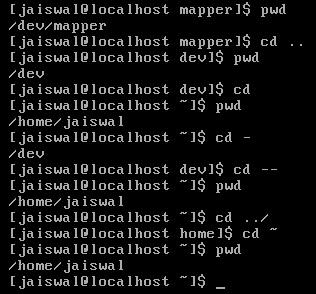 Hi Alien Coders….its not an alien thing to write about cd. Yeah cd(change directory) not CD(Compact Disc) đŸ˜› . Either you are working on Windows or Unix flavors O.S, the most easiest and usual command is cd, correct?
cd means change directory (as everyone knows) and its more powerful in Unix rather than Windows i guess. Window is having only cd path_of_the_diretory or cd .. but in Unix or specifically in Linux cd command is having lots of options. Lets explore one by one:
1. cd path_of_directory This command is used to enter into the directory whichever is specified either absolute or relative Ex: # cd /home/jaiswal/songs/audio/bollywood (absolute path) # cd songs/audio/bollywood (relative path when u r already at /home/jaiswal)
2. cd .. This command is used to move one step up form the current directory. If you are at /home/jaiswal/songs/audio/bollywood (keep it as a base of the examples) and want to move one directory up use cd .. Ex: # cd .. (now current directory will be /home/jaiswal/songs/audio) # cd ../../../movies (moved up three directories and entered into movies directory now i.e. /home/jaiswal/movies)
3. cd – This command comes very handy when you are working with files and one is at other directory and one is at another directory. For example: suppose one file is at /opt/bin/perl/codes and other is at /opt/bin/perl/modules/jaiswal/modules Now go to one directory using cd. Like cd /opt/bin/perl/codes then again type cd /opt/bin/perl/modules/jaiswal/modules and now use cd – You will be returned back to previous one which you used with cd. now use cd – as many time as you wish to switch over those two directories.
Ex:
# cd /opt/bin/perl/codes Yes , you are right cd – is doing two work at a time.
# cd /opt/bin/perl/modules/jaiswal/modules
# cd - /opt/bin/perl/codes
# cd - /opt/bin/perl/modules/jaiswal/modules
1. Bringing back to previous used cd directory path and 2. also print the current directory path just like pwd
4. cd — or cd ~ or cd Yes all three commands will let you drive to user's home directory most probably /home/user_name like /home/jaiswal ex: # cd — or cd ~ or cd (don't write all three commands all together just i wrote. use any one if at one time buddy.) Windows have no such option as far as i have tried (if it is there let me know ) # pwd /home/jaiswal # I hope you will like it although even you know all these commands, you will find rarely any article on this which will explain like this. What say?
Uncategorized
VSAM Error Processing
The way VSAM handles error conditions , many I/O errors that cause COBOL program to abend when we use non-VSAM access method do not cause an abend when we use VSAM.Instead the file status is being used to indicate the nature of the problem.
What is Google WAVE and PROJECT NATAL
 A GOOGLE Wave is an application by google that collaborates several Google features. A user who has installed Google wave will be able to access and use Google features like Orkut, Google Talk and Gmail efficiently.
Google wave can also check for errors (grammatical and spelling) as well translate text to forty different languages. Google has not yet announced when Wave will be released.
For the User’s Convenience, Google will open source part of the code so that users can develop or Modify the features of the program. Upcoming days , no need to use of different browser , in Single place you can use all features of google. Microsoft is working on Project Known as ‘NATAL’ , which on completion would probably be the new face of gaming. It involves gaming without the use of any controllers. End users will be able to play games or interact with the interface with gestures and spoken commands on their existing Xbox consoles. The device would be around nine inches and a motion sensor would be placed either above or below the device. It would feature face and voice recognition as well as full body 3D motion capturing capabilities.
Observers are expecting it to be launched up to end of 2010.
How to find out , who is Invisible (In Gmail)
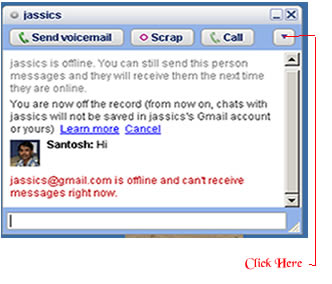 There is simple trick to find out Invisible user. The Gmail Chat application that is present on the left pane of the site allows users to appear 'Invisible' to their contact. For this , You will need the 'Google Talk' desktop application. One you have logged on to your account, follow these steps to determine which of your contacts is invisible :
- Open 'Google Talk' chat application
- Search for contact by typing his/her name in the search box
- Once the name of the contact shows up in the contact list click the entry to open the chat window.
- Click the dropdown arrow present under the close button and click ‘Go off the record’ .
- If you receive a message saying , “<user ID> @ gmail.com is offline and can’t receive messages right now’ then user is logged off".
- If the above message does not appear after you send a message then user is invisible mode.
This trick is working in most cases so far. However , there may be varying results in case of users who log on to Google talkusing third party tools like mobile chat applications.
Tool to get information about site: whois and whosip (for windows)
Hi friends, you might be using some 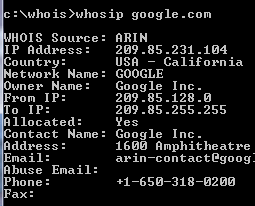 online site to know the details about any ip address or website like ip-adress.com or whois.domaintools.com In Linux or Unix based O.S there is a utility call whois , if you are familiar with whois and wish to do the same operation in windows then you might find whois and whosip tools useful.
How to get work done on Windows:
Step 1: Download whois or whosip (or both ,depending upon your interest). These software will be in zip format.
Step 2:
- Make a folder anywhere in your PC, like C:/whois/
- go to that folder i.e. whois (here in example)
- extract any one of these or both (again on your interest)
Step 3: open run command type cmd then go to c:/whois location and type whois domainname hostname(optional) or whosip domainname hostname (for summary) or whosip -r domainname (for detailed information)
Here domain name can be either website name or its IP address. Ex: whois google.com whosip google.com whosip -r google.com Note: the information that you will see through whois and whosip may differ What I observed from the output is whois <domain name> will give you the information about domain name whereas whosip <domain name> would give you the information about registrar where that domain name got registered etc. So, if you wish to know something about hostname use whois or if you wish to know where that domain name got registered and all then use whosip.
An alternative to winrar : 7-zip
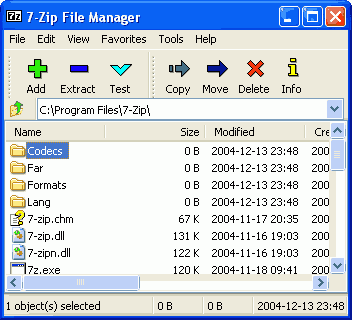 In our day today life, we use at least one of the rar application for sure. It may be used to compress your codes, files, movies, songs whatever it is.
Winrar seems bit popular in this area but it now freeware or open source application. And I get annoyed when I double click on any .rar files it open winrar application and says buy it or use trial version. Then I was trying to find better compression application than winrar and guess I got success in that.
7-zip is the alternative to winrar or any compression application. It supports nearly all feasible format for your system. Its an open source software, so you can download it freely from here (32 bit) and from here for 64 bit pc
- It is of 1 MB size and supports near around 70 languages.
- Its latest version is 9.13 in beta relaease and 4.65 under stable release
- It supports under any windows platform like XP/Vista/ME/2000, hopefully it would work on 7 also
- 7-Zip compresses to zip format 2-10% better than most of other zip compatible programs.
- 7-Zip compresses to 7z format 30-70% better than to zip format
Compression ratio depends upon what you are going to compress. Like if you are going to compress any .exe file then it will not compress much because its already compressed. Use it and revert back your feedback here.
Pidgin: Universal Chat software v2.6.6
 Every time when you wish to chat with your friends and foes, you have to open separate chat software for that like msn, skype, yahoo, gtalk and so on. Why not to use only one software for all these stuffs.
Then I saw one site called meebo.com (its really a cool one, web based chat site). It allows you to login with your yahoo or gmail or skype etc ids. But if you are looking for a software that will provide you such facilities , then pidgin is there.
Pidgin (formerly named Gaim) is a multi-platform instant messaging client, based on a library named libpurple.
Libpurple has support for many commonly used instant messaging protocols, allowing the user to log into various different services from one application. libpurple is intended to be the core of an IM program. When using libpurple, you'll basically be writing a UI for this core chunk of code. Pidgin is a GTK+ frontend to libpurple, and Adium (like pidgin but for Mac OS X) is a Cocoa frontend. Whatever be your chat program, whatever language you use, if you are going to connect with network, user dialogue box, user authentication in fancy manner; you have to use libpurple. It is being used by pidgin, meebo, EQO(for mobile users), Adium etc.
It’s an open source software and written in C and its plugins are written in C#, Python, Perl etc. Its file Size is 14.10 MB and latest Version is 2.6.6 Pidgin supports following chat networks: AIM, ICQ, Google Talk, Jabber/XMPP, MSN Messenger, Yahoo!, Bonjour, Gadu-Gadu, IRC, Novell GroupWise Messenger, QQ, Lotus Sametime, SILC, SIMPLE, MXit, MySpaceIM, and Zephyr. It can support many more with plugins.
It Supports many international and lots of regional languages too like Kannada, Gujarati , Telugu, Punjabi, Marathi and Hindi (of course). It supports almost all popular languages over the world. Whatever be your OS you can use it (Windows and Linux is common).
It became very popular after 2007 and today millions of people use it worldwide. It supports all famous chat networks like
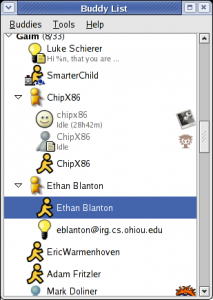
- Bonjour
- Gadu-Gadu
- Google Talk
- Groupwise
- ICQ
- IRC
- MSN
- MXit
- MySpaceIM
- SILC
- SIMPLE
- Sametime
- XMPP
- Yahoo!
- AIM
- Zephyr
- Now Facebook chat also being supported through XMPP network.
But I found only one demerit in it, that is why I use it rarely. If you are logged in with your yahoo account , next time if you will login with your gmail account, it will show you your yahoo and gmail friend list together (imagine in case of yahoo, gmail, msn, aol: how long list you will be having). One more thing is that, if you are using it alone then its ok. If your friends also gets logged in through the same software then he/she will be able to see your whole friend list also (Isn’t it bad?). I hope in next version they will do something to this issue.
Uncategorized
ESET’s nod32 and smart security 4
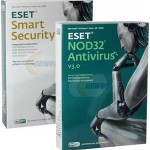 Hi friends I am using this anti-virus from last 3 years and believe me i never got anything in mind to change this software and to use other. What i like most in ESET’s Nod32 is:
- It doesn’t slowdown your system
- It updates recent virus signature database automatically
- Very user friendly and its just like a German shepherd, it will never allow any unwanted stuffs to get in.
- It is written in assembly language, so its but obvious that it will have fast execution than other software.
ESET is having its two products mainly. They are ESET Nod32 and ESET Smart Security and it comes for home edition, business edition and enterprise edition. you can download softwares related to eset from its own site. click here
Features of NOD32 4.0.467 :
- ThreatSense technology — a single optimized Anti-Threat engine for analyzing code to identify malicious behavior, such as viruses, spyware, adware, phishing and more
- Unprecedented heuristic analysis capable of discovering new malware threats as they emerge • Powerful virtual PC emulation technology enables unpacking and decryption of all types of archives and run-time packing • Able to clean active malware running in memory
- Protects at multiple infiltration points, including HTTP, POP3, SMTP and all local and removable media
- Removes infections from files that are locked for writing (e.g., loaded DLL file) • Prevents infected files from being opened and executed, and warns on creation of infected files
- Automatic execution on system startup • Supports multiple Terminal Server environments
- Supports scanning of mapped network disks and many more .
It will be hardly 34 MB and its latest version is 4.0.467 Final It has home edition, business edition, mobile edition as an option; whatever you need you can get the download link form here. You can give it a trial i am sure you will be loving it. One thing i will suggest that use USB disk security system with it then you will never have any kind of virus problem in your system.
Bit Torrent: an introduction about torrents
Bit Torrent  is the name of a peer-to-peer (P2P) file distribution protocol, and is the name of a free software implementation of that protocol.
A Protocol is a formal description of message formats and the rules that two computers must follow in order to exchange those messages. P2P is a jargon for Peer-to-Peer file sharing. File sharing is not a new phenomenon. The first of the file sharing clients appeared in early 1999 and reached mainstream popularity within a few months. Peer-to-Peer file sharing is now a seven year old phenomenon, and by many subscribers would be considered a fundamental Internet service.
Some terms associated with file sharing: Peer:A peer is one instance of a BitTorrent client running on a computer on the Internet to which other clients connect and transfer data. Usually a peer does not have the complete file, but only parts of it. However, in the colloquial definition, “peer” can be used to refer to any participant in the swarm (in this case, it’s synonymous with “client”).
Seeder : A seeder is a peer that has a complete copy of the torrent and still offers it for upload. The more seeders there are, the better the chances are for completion of the file.
Leech : A leech is usually a peer who has a negative effect on the swarm by having a very poor share ratio – in other words, downloading much more than they upload. Most leeches are users on asymmetric internet connections and do not leave their BitTorrent client open to seed the file after their download has completed. However, some leeches intentionally avoid uploading by using modified clients or excessively limiting their upload speed. The term leech, however, can be used simply to describe a peer or any client that does not have 100% of the data. U can say like us student who serrves the pc for our download purpose just after the download we cut-off the connection. So we are are all leachers!
Torrent : A torrent can mean either a .torrent metadata file or all files described by it, depending on context. The torrent file contains metadata about all the files it makes downloadable, including their names and sizes and checksums of all pieces in the torrent. It also contains the address of a tracker that coordinates communication between the peers in the swarm.
Tracker : A tracker is a server that keeps track of which seeds and peers are in the swarm. Clients report information to the tracker periodically and in exchange receive information about other clients to which they can connect. The tracker is not directly involved in the data transfer and does not have a copy of the file.
File sharing characteristics : Peer-to-Peer usage follows the typical 80/20 rule, in that 80% of files downloaded (by volume of total traffic)represent only 20% of the files available (by number of unique files available). In fact, research shows the breakdown is closer to 90/10. The language used for bit comet command is C++ while bit torrent works on Python.
Limitations and security : BitTorrent does not offer its users anonymity. It is possible to obtain the IP addresses of all current, and possibly previous, participants in a swarm from the tracker. This may expose users with insecure systems to attacks.
Another drawback is that BitTorrent file sharers, compared to users of client/server technology, often have little incentive to become seeders after they finish downloading. The result of this is that torrent swarms gradually die out, meaning a lower possibility of obtaining older torrents. Some BitTorrent websites have attempted to address this by recording each user’s download and upload ratio for all or just the user to see, as well as the provision of access to older torrent files to people with better ratios. Also, users who have low upload ratios may see slower download speeds until they upload more. This prevents users from leeching, since after a while they become unable to download much faster than 1-10 kB/s on a high-speed connection. Some trackers exempt dial-up users from this policy, because they cannot upload faster than 1-5 kB/s.
BitTorrent is best suited to continuously connected broadband environments, since dial-up users find it less efficient due to frequent disconnects and slow download rates.
Some facts to be known about torrents:
Q: What are the five best torrent search engine?
A: As of October 2, 2006, the 5 Best Bit Torrent search engine sites are listed below. This list is selected from hundreds of reader votes, and voted on each week by a small panel of torrent download users. The criteria used to evaluate these torrent sites: breadth and depth of database, database currency, ease of use and searching, speed of access,general integrity of files, information provided on the torrent P2P community, price of membership, and readers’ comments.
1.The Pirate Bay (the piratebay.org)
2.Torrentz.com (its a torrent search engine)
3.Isohunt (this one is also cool)
4. Demonoid (i use it frequently)
5. Desitorrents.com (for indian movies)
Q. What Are the good BitTorrent software packages?
A: 1. uTorrent (has all the functions a torrent downloader, yet it very small memory foorprint)
2. Azureus (A  Java lan
 guage client; was the best until uTorrent software came along)
3. ABC
4.Bitlord (Nice-looking GUI appearance )
5.BitComet (Good, but losing popularity to uTorrent and Azureus)
6.The Original BitTorrent Client (Authored by Bram Cohen himself; no fancy GUI here, but it downloads quickly)
Q: How are torrents special? How is the torrent community different from Kazaa or Limewire?
A: Like the other file-sharing networks (Kazaa, Limewire, Gnutella, eDonkey, and Shareaza) BitTorrent’s primary purpose is to distribute large media files to private users. Unlike most P2P networks, however, BitTorrent stands out for 5 major reasons:
1. BitTorrent networking is NOT a publish-subscribe model like Kazaa; instead, BitTorrent is true Peer-Peer networking where the users do the actual file serving.
2. Torrents enforce quality control by filtering out corrupted and dummy files, ensuring that downloads contain only what they claim to contain.
3. Torrents actively encourage users to share (“seed”) their complete files, while punishing users who “leech”.
4. BitTorrent can achieve download speeds over 1500 kilobits per second.
5. BitTorrent code is open-source, advertising-free, and adware/spyware-free. This means that no single person profits from BitTorrent’s success.
An important thing to note is that download speeds are controlled by Torrent tracking servers, who monitor all swarm users. If you share, tracker servers will reward you by increasing your alotted swarm bandwidth (sometimes up to 1500 kilobits per second).
Similarly, if you leech and limit your upload sharing, tracking servers will choke your download speeds, sometimes to as slow as 1 kilobit per second. Indeed, the “Pay It Forward” philosophy is digitally enforced! Leeches are not welcome in a BitTorrent swarm.
Latest Posts
Understanding PL-7008: Your Guide to AI Agent Certification
Mastering API Fundamentals & API Security with these learning resources
DevSecOps Learning Resources to start with
Application Security Interview Questions: Expert Guidance and Insights
Study Plan to learn common skills in Cybersecurity