INTERRUPTING LOOPS(break and continue) IN PHP
1. Break keyword
The PHP break keyword is used to terminate the execution of a loop prematurely.
Once break statement executed , it immediately terminates the loop and no further iterations are made.
In the following example the condition test becomes true when the counter value reaches five:
Author: santosh
PHP for beginners -Lesson 6
WHILE LOOP IN PHP
Code will execute continue till condition reached false.
Syntax:
initialization – set your counter above while loop
{
code here…
increment/decrement
}
Parameters :
condition – Loop will continue till condition is TRUE.
increment/decrement – increase or decrease your counter , this parameter should be before end of loop.
PHP for beginners -Lesson 5
 FOR LOOP IN PHP
Code will execute continue till condition reached false.
Syntax:
Parameters :
initialization – set your counter, execute only once.
condition – Loop will continue till condition is TRUE.
increment/decrement – increase or decrease your counter , this parameter will execute at end of loop.
Example 1 : Display 1 to 5 numbers using For loop.
Output : 1 2 3 4 5
Example 2 : Display table of input number
Output: 5 10 15 20 25 30 35 40 45 50
Example 3 : Fibonacci series
What is Fibonacci Numbers?
Below sequence called Fibonaci series
0,1,1,2,3,5,8,13,21,34,55,89,,144………. (f3 =f2+f1 and given f1=0, f2=1)
By definition, the first Fibonacci number is 0 and second Fibonacci number is 1. Then each subsequent number is calculated based on sum of the previous two.
Output : 1 2 3 5 8 13 21 34
Example 4 : Prime number from 1 to 100
A Prime Number can be divided – only by 1 or itself. And it must be a whole number greater than 1
Output : 2 3 5 7 11 13 17 19 23 29 31 37 41 43 47 53 59 61 67 71 73 79 83 89 97
PHP for beginners -Lesson 4
Minimal Basics on Switch statements
What is switch statement in php ?
Switch is a conditional statement , which perform specific action according to various condition. It is equivalent to If else strcutures.
Syntax :
[php]switch (variable) {
case label1:
This block will execute if variable=label1;
break;
case label2:
This block will execute if variable=label2;
break;
case label3:
This block will execute if variable=label3;
break;
default:
This block will execute if variable not matching with any label;
}
[/php]
variable can be integer,string, character, float, double etc..
switch is similar to if..elseif..esle statement.
Note : break is required , if you missed break then it will check next case and execute default case also.
$num = 2;
switch($num){
case 1:
echo "My number is One";
break;
case 2:
echo "My number is Two";
break;
case 3:
echo "My number is Three";
break;
default :
echo "Not matching";
}
?>
Output : My number is Two
1. Checking vowel & consonant(Only for Small case letter)
$c = 'u';
switch($c){
case 'a':
echo "$c is Vowel";
break;
case 'e':
echo "$c is Vowel";
break;
case 'i':
echo "$c is Vowel";
break;
case 'o':
echo "$c is Vowel";
break;
case 'u':
echo "$c is Vowel"; break;
default:
echo "$c is Consonant ";
}
?>
Output : u is Vowel
2. Wishing birthday on current date
switch($dob){ case "10/02":
echo "Happy birthday Somnath";
break;
case "23/07":
echo "Happy birthday Santosh";
break;
case "18/08":
echo "Happy birthday Anil";
break;
case "04/09":
echo "Happy birthday Jassi";
break;
case "11/12":
echo "Happy birthday Ritesh";
break;
default: echo "No birthday party";
} ?>
if Today's date is – 23/07/2011
Output : Happy birthday Santosh
PHP for beginners -Lesson 3
In this tutorial we will discuss about various ways to write if else condition with basic example.
If Statement Syntax :
if (condition){
code to be executed if condition is true;
}
Sample Code :
PHP for beginners -Lesson 2
Usages of echo, print, print_r, var_dump(), printf()
Echo:
1) echo does not return a value.
2) This is faster than 'print' (*)
3) You can pass multiple expression
Print:
1) print return a value
2) This is slower than echo (*)
3) it takes single expression
PHP for beginners -Lesson 1
Hey guys,
We will be updating basic to advanced level PHP tutorials by examples which will help all PHP programmers whether he/she is novice or professional one.
In this lesson we will show you how to print values on browser. Basically there are 5 ways to print the output value on browser.
Google’s gmail, orkut and now Google TV
 When i saw this news on internet, i got surprised that now google TV will be in the market and if its google then i twill surely put its best infront of the world. Although world is growing at faster rate but still in internet era people use to watch Television and but everyone wish to access net and wish to watch television together. Right?
Now its possible because Google has entered into the television world. If there’s one entertainment device that people know and love, it’s the television. In fact, 4 billion people across the world watch TV and the average American spends five hours per day in front of one*.
Recently, however, an increasing amount of our entertainment experience is coming from our phones and computers. One reason is that these devices have something that the TV lacks: the web. With the web, finding and accessing interesting content is fast and often as easy as a search.
But the web still lacks many of the great features and the high-quality viewing experience that the TV offers. So that got us thinking…what if we helped people experience the best of TV and the best of the web in one seamless experience? Imagine turning on the TV and getting all the channels and shows you normally watch and all of the websites you browse all day — including your favorite video, music and photo sites.
We’re excited to announce that we’ve done just that. Google TV is a new experience for television that combines the TV that you already know with the freedom and power of the Internet. With Google Chrome built in, you can access all of your favorite websites and easily move between television and the web. This opens up your TV from a few hundred channels to millions of channels of entertainment across TV and the web.
Your television is also no longer confined to showing just video. With the entire Internet in your living room, your TV becomes more than a TV — it can be a photo slideshow viewer, a gaming console, a music player and much more. Google TV uses search to give you an easy and fast way to navigate to television channels, websites, apps, shows and movies.
For example, already know the channel or program you want to watch? Just type in the name and you’re there. Want to check out that funny YouTube video on your 48” flat screen? It’s just a quick search away. If you know what you want to watch, but you’re not sure where to find it, just type in what you’re looking for and Google TV will help you find it on the web or on one of your many TV channels.
If you’d rather browse than search, you can use your standard program guide, your DVR or the Google TV home screen, which provides quick access to all of your favorite entertainment so you’re always within reach of the content you love most. Because Google TV is built on open platforms like Android and Google Chrome, these features are just a fraction of what Google TV can do. In our announcement today at Google I/O, we challenged web developers to start coming up with the next great web and Android apps designed specifically for the TV experience.
Developers can start optimizing their websites for Google TV today. Soon after launch, we’ll release the Google TV SDK and web APIs for TV so that developers can build even richer applications and distribute them through Android Market. We've already started building strategic alliances with a number of companies — like Jinni.com and Rovi — at the leading edge of innovation in TV technology. Jinni.com is a next-generation TV application working to provide semantic search, personalized recommendation and social features for Google TV across all sources of premium content available to the user. Rovi is one of the world's leading guide applications.
We’re looking forward to seeing all of the ways developers will use this new platform. We’re working together with Sony and Logitech to put Google TV inside of televisions, Blu-ray players and companion boxes. These devices will go on sale this fall, and will be available at Best Buy stores nationwide.
You can sign up here to get updates on Google TV availability. This is an incredibly exciting time — for TV watchers, for developers and for the entire TV ecosystem. By giving people the power to experience what they love on TV and on the web on a single screen, Google TV turns the living room into a new platform for innovation. We're excited about what’s coming. We hope you are too.
Source: Google Blog
What is Google WAVE and PROJECT NATAL
 A GOOGLE Wave is an application by google that collaborates several Google features. A user who has installed Google wave will be able to access and use Google features like Orkut, Google Talk and Gmail efficiently.
Google wave can also check for errors (grammatical and spelling) as well translate text to forty different languages. Google has not yet announced when Wave will be released.
For the User’s Convenience, Google will open source part of the code so that users can develop or Modify the features of the program. Upcoming days , no need to use of different browser , in Single place you can use all features of google. Microsoft is working on Project Known as ‘NATAL’ , which on completion would probably be the new face of gaming. It involves gaming without the use of any controllers. End users will be able to play games or interact with the interface with gestures and spoken commands on their existing Xbox consoles. The device would be around nine inches and a motion sensor would be placed either above or below the device. It would feature face and voice recognition as well as full body 3D motion capturing capabilities.
Observers are expecting it to be launched up to end of 2010.
How to find out , who is Invisible (In Gmail)
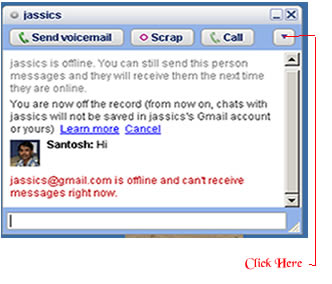 There is simple trick to find out Invisible user. The Gmail Chat application that is present on the left pane of the site allows users to appear 'Invisible' to their contact. For this , You will need the 'Google Talk' desktop application. One you have logged on to your account, follow these steps to determine which of your contacts is invisible :
- Open 'Google Talk' chat application
- Search for contact by typing his/her name in the search box
- Once the name of the contact shows up in the contact list click the entry to open the chat window.
- Click the dropdown arrow present under the close button and click ‘Go off the record’ .
- If you receive a message saying , “<user ID> @ gmail.com is offline and can’t receive messages right now’ then user is logged off".
- If the above message does not appear after you send a message then user is invisible mode.
This trick is working in most cases so far. However , there may be varying results in case of users who log on to Google talkusing third party tools like mobile chat applications.