Internet Transfer speed (MBps vs Mbps or MBps vs mbps)

.MBps is an abbreviation for Megabytes per second, whereas mbps and Mbps are abbreviations for megabits per second. Eight megabits equal one Megabyte. These abbreviations are commonly used to specify how much data can be transferred per second between two points.

To put megabits and Megabytes in perspective, lets back up for just a moment. One bit of data is a single “on” or “off” digit, a one or zero. It takes eight bits to represent a single character, or one byte of data. * 8 bits = 1 byte * 1000 bytes = 8 kilobits (kb) = 1 Kilobyte (KB) * 1000 Kilobytes (KB) = 8 megabits (mb) = 1 Megabyte (MB)

We must also translate speed to value when considering Internet service plans, advertised by download and upload speeds expressed in kilobits per second (kbps) or megabits per second.

For example, a typical Digital Subscriber Line (DSL) plan might have an upper transfer limit of 1,500 kbps, which can also be expressed as 1.5 mbps. A cable plan might be advertised with speeds up to 5,000 kbps or 5 mbps; and fiber optic Internet can reach speeds of 50 mbps or more.

Keep in mind that today all internet speed is coming in the multiple of Mega/Kilo bit per second(m/kbps), not in Mega/Kilo byte per second(M/KBps). For converting KB/s to kbps (bit rate from Byte values), the equation is basically as follows: <K> KiloBytes * 1,024 = <t> total Bytes <t> total Bytes * 8 = <b> bits <b> bits / 1,000 = <k> kilobits For example: 30 KB/s * 1,024 = 30,720 Bytes per second 30,720 Bytes per second * 8 = 245,760 bits per second 245,760 bits per second (bps) / 1,000 = (approximately) 246 kbps (245.8 kb/s)

And for kbps to KB/s (Byte values from bit rates), you switch the equations: <k> kilobits per second * 1,000= <b> total bits per second; <b> bits / 8 = <t> total Bytes per second; and <t> / 1,024 = <K> KiloBytes per second.

For example: 128 kbps (k) = 128,000 bits per second (k*1000=b) = 16,000 Bytes per second (b/8=t) , or about 15.6 KB/s (t/1,024=K) . So a 512\128 internet connection would give you about 62.5 KB/s maximum download, and about 15.6 KB/s upload (max). And a 1500\128 service (1.5 mbps download cap) would give you about 183.1 KiloBytes per second, maxium download and about 15.6 KB/s upload(max).

Note: "These are optimum bandwidths. Actual bandwidth may vary due to network traffic and and are not guaranteed. The difference between maximum speed and average speed can be especially large in wireless technology, or cable internet. The varying amount of data traffic on the Internet (and your own LAN, if applicable) and the condition of your computer equipment affect the speed of any connection at any given time." ;

"Keep in mind that [even with a 1.5 mbps connection] you will not normally see 1.5 megabits in a speed test … due to overhead the more commonly seen speed with this type of connection is in the neighborhood of 1200-1250."

Uncategorized

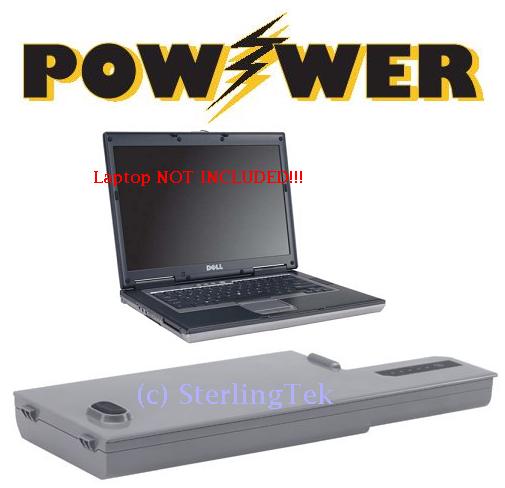
Maximize Laptop Battery Life:

Maximize Laptop Battery Life:

1.  Dim your screen
2.  Close unnecessary background program such as ITunes, AvaFind, Google search etc
3.  Cut down external devices such as USB devicces
4.  Run off a hard drive rather than CD/DVD
5.  Use Hibernate not standby
6.  Exercise the Battery: Do not leave a charged battery dormant for long periods of time. Once charged, you should use the battery at least once every two to three weeks.

7.  Ensure the battery contacts are clean:  clean the metal battery contact points with some soft cloth and alcohol?
8.  No Multitasking: Try to reduce the work load of the system when on battery
9.  Fully charging/discharging
10. Use screen savers 'Blank'
11. Turn off bluetooth and wireless devices
12. Install more memory/RAM to make your hard drive not too often spinning
13. Reduce temperatue: If you have your laptop on your lap and it is burning you, you are shorting the battery life and charge-cycle capability because you have interfered with its cooling system.
14. Make sure your battery and charger match and you have a quality charger, since even small differences in output voltage of the charger can have dramatic impact on the lifespan of your battery.

Secure your PC – Online Banking : Essential Security Measures

Online banking is quite a handy way to keep track of your finances. You simply log on through your bank's website, and you can do things like set up standing orders, transfer money to people or other accounts, and order cheque books. Online banking also allows you to get financial deals that are just not on offer in the offline world. For convenience sake, you can't beat an online bank! However, this popularity of online banking has not gone unnoticed by the criminal fraternity. We'll show you some popular attacks on your money, and what you can do to prevent them.

Phishing

One of the most common ways that a criminal will attempt to part you with your money is through something known as Phishing. Phishing is pronounced FISH-ING. It's the Internet's equivalent of this popular sport. The fisherman is a criminal, the bait is usually an email that attempts to panic you into action, and the fish is you! The criminal will send out thousands of email using a list he got from a spammer. The email that is sent pretends to be from a bank. Let's call it the Wee Bank.

Most people the criminal sends the email to will not have an account with the Wee Bank. But some will. It's those few that he's after. In the email, you may be warned that your banking details need updating, and that it's essential that you act now to protect your account. They'll usually try to scare you into taking action. And there's always a link for you to click on. All you need to do is to click on the link and you'll be taken to a secure area where you can enter your details. If you click on any of these links, you'll be taken to a page that does indeed look like your bank's website. Except it's not.
One trick the criminal may use is to have an address that looks similar to your bank's.
Your real bank is this: Real Address Take a closer look at the address bar, though, and you may see something like this: Spoofed Address The address has been spoofed. The "w" is now "vv" – two V's and not one W. But some spoofed addresses are quite difficult to spot, and even fool the more experienced surfers. You need to look for other clues in your browser. One thing that all browsers will have are padlock icons. These are supposed to tell you that the site is using security measures. If you're using Internet Explorer 7, you'll see this to the right of the address bar:
Click on the padlock and you'll see information about the security certificate (the one in the image below is for 2checkout – a genuine source): Internet Explorer 7 Security Click the link that says View Certificates, and you'll see something like this: View Certificates Click the Details and


Certification Path tabs at the top. There should be plenty of details for you to view. Make sure the certificate has not expired. In the image above, the security certificate is from a good source, and it's still valid (at least, it was when this article was written). The Firefox browser has more visual clues than Internet Explorer. Notice the address bar from Firefox: The address bar will turn yellow on a secure site, and the padlock is just to the left of the blue down arrow. Firefox also has another padlock. Look in the bottom left and you'll see this: Double click the padlocks and you'll see the security certificate. Notice the name of the website to the left of the padlock.

This one is from a legitimate source – 2checkout.com One more thing to note. The address for a secure site normally starts with https. If the "s" is missing, it's not a secure site! A last word of warning, however: these visual clues have been know to be spoofed by the criminals!

If in doubt, remember this: You bank will NEVER send you an email asking for your login details! If you receive such an email, forward it to your bank. And DON'T click on the link! The same is true for other secure websites that hold your money – PayPal never send you emails asking you to confirm your details!

For a more detailed look at Phishing, there's an excellent Wikipedia article here: Phishing Article The latest versions of Firefox and Internet Explorer have anti-Phishing measures built in. You should make sure these are turned on when accessing secure websites. (In Internet Explorer 7, click Tools > Phishing Filter > Check this Website.)

Password Protection

We've all got passwords. In fact we've all got LOTS of passwords! We've got so many that it's become increasingly difficult to keep track of them all. Banking passwords are no different. But the recommendation is to keep changing each one every few months or so! Because the whole password process is cumbersome, some people have one password for all of the sites on the internet that ask for them. This is something you should NEVER do! You need a different password for each site.

The reason is simple – if a criminal has your password for one website, he's got them for all your sites – he could clean you out! The problem is, how do you remember them all? One technique for password creation is to take letters and numbers from a favourite song, saying, or something that's special to you. For example, a favourite song of yours may be "happy birthday to you"!

To turn this into a password, take the initial letters of each word. You'd then have this: hbty Not very secure, but easy to remember. Let's complicate it a bit, by adding some capitals: HBty Slightly more secure. Let's add a number: HB2y Getting better. How about a non alpha-numeric character? HB_2y Adding non alpha-numeric character helps password security enormously. Let's make the password longer by singing Happy Birthday to Home and Learn: HB_2y_HBdhAL Now, not only is the password longer, but it has a mix of numbers, lowercase and uppercase letters, and non alpha-numeric character. This makes it more secure, and harder for criminals to guess. (The password is now "Happy Birthday to you. Happy Birthday dear Home and Learn".) A password like this is also easier for you to remember.

Passwords should never be just four characters long! The reason is that criminals may have password-cracking software. Using such software, short passwords can be cracked in no time at all. Use at least 8 characters. Duke University have a good page here that tells you how long it would take to crack a password of up to 8 characters. The amount of time needed to crack a password rises dramatically: Duke University Password Information

You and Your PC

You should never log in to your bank account using somebody else's computer. Simply because you have no idea what security measures they take, and whether or not the computer is infected. Internet cafes are also not somewhere you should be entering security information. In an internet cafe, all the data you enter is logged and saved by the owners (they may be forced to do this by law). You can never be sure that your data is safe from prying eyes. Also, what if you forget to log out properly?

The next person who uses the computer could see all of your details, and have access to your bank account! The only place you should be entering your bank details are from your own PC. Of course, you need to make sure that your own computer is safe from infection, and take sensible security measures when it comes to the emails you receive. Follow the suggesting on our site and your PC will be just that much more secure than it was yesterday! Source: http://www.homeandlearn.co.uk/BC/bcs5p7.html

SPEED UP UR ACROBAT READER (ALMOST LIKE NOTEPAD)

. Steps to follow:
1. Go to the installation folder of acrobat reader (C:\program files\adobe\acrobat7.0\reader\.. whatever)

2. Move all the files and folders from the "plug_ins" directory to the "Optional" directory. (I repeat.. cut and paste the files NOT copy & paste).

Also make sure that acrobat reader is not open else it will lock the files and not allow you to move the files). Now your acrobat reader will load very fast and almost as good as notepad.. enjoy it…….

Uncategorized

Automatically Turn On Num Lock, Scroll Lock, Caps

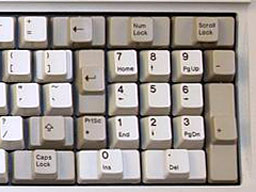
When you start your PC, Num Lock, Scroll Lock, and Caps Lock don't automatically toggle on. You can automatically turn each of them on or off whenever your PC starts, for all accounts on the PC. As a practical matter, most people probably want to have only Num Lock automatically turned on, but this Registry hack allows you to force any combination of keys on or off.

Steps to follow:

1. Run the Registry Editor and go to HKEY_USERS\.Default\Control Panel\Keyboard.
2. Find the String value InitialKeyboardIndicators. By default, it is set to 0, which means that Num Lock, Scroll Lock, and Caps Lock are all turned off.
3. Set it to any of the following values, depending on the combination of keys you want turned on or off:
0        Turns off Num Lock, Caps Lock, and Scroll Lock
1        Turns on Caps Lock
2        Turns on Num Lock
3        Turns on Caps Lock and Num Lock
4        Turns on Scroll Lock
5        Turns on Caps Lock and Scroll Lock
6        Turns on Num Lock and Scroll Lock
7        Turns on Caps Lock, Num Lock, and Scroll Lock Exit the Registry. When you restart, the new setting will take effect

Uncategorized

Multi yahoo messenger and google talk without any patch or any software!!!!

Multi yahoo messenger & google talk without any patch or any software!!!! Yahoo Messenger:
Follow these steps
1. Go to Start —-> Run . Type regedit, then enter .
2.Navigate to HKEY_CURRENT_USER ——–> Software —>yahoo —–>pager—->Test
3.On the right pane , right-click and choose new Dword value .
4.Rename it as Plural.
5.Double click and assign a decimal value of  1.

Restart It's done!! Now close registry and restart yahoo messenger .

For signing in with new id open another messenger.

Goolge Talk: Follow these steps:
1. Go to the properties of the google talk Start -> gtalk -> Right Click & select properties
2. Under "Target" change the last word with /nomutex that is in place of /startup u hav to write /nomutex thas it.

i.e Target:   "C:\Users\sujit\AppData\Roaming\Google\Google Talk\googletalk.exe" /startmenu 
It should be: Target:   "C:\Users\sujit\AppData\Roaming\Google\Google Talk\googletalk.exe" /nomutex

Your gtalk is now multi login. Enjoy!

Uncategorized

Enable disable USB port using registry editor

When I was in college, many times I needed to disable system's USB port so that nobody other than me can use that port. So what I was doing is simply editing registry editor for USB port everytime. When I had to use it, I was enabling it else I would be keeping it inactive and would rather say to my friends that "buddy! USB port has some problem in my system :(" 

I know you might have seen such a common topic here there always but whats the harm in keeping such stuffs in our site too! So I shared it here (may be little bit late, but i am sure it will still help many people from our blog :))
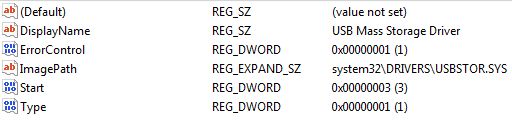
Now the trick lies here in registry editor USBSTOR keyword which is under HKEY_LOCAL_MACHINE\SYSTEM\CurrentControlSet\Services To disable the access to USB port, in Vista/Windows XP and 2000, follow the steps below  (I have not tested it on Win 7. Please someone verify it and let us know)

1. Click Start, and then click Run.
2. In the Open box, type regedit, and then click OK.
3. Locate, and then click the following registry key: HKEY_LOCAL_MACHINE\SYSTEM\CurrentControlSet\Services\USBSTOR
4. In the right pane, double-click Start.
5. In the Value data box, type 4 (REG_DWORD), click Hexadecimal (if it is not already selected), and then click OK. 6. Quit Registry Editor.

To re-enable a disabled port, follow these steps below:
1. Click Start, and then click Run.
2. In the Open box, type regedit, and then click OK.
3. Locate, and then click the following registry key: HKEY_LOCAL_MACHINE\SYSTEM\CurrentControlSet\Services\USBSTOR
4. In the right pane, double-click Start.
5. In the Value data box, type 3, click Hexadecimal (if it is not already selected), and then click OK.
6. Quit Registry Editor. Or else If you are lazy person like me 🙂 then just save two different .reg files one for enabling and other for disabling purpose.

Steps To make one click working for enbaleUSB:
1. Open Your favorite editor or simply notepad
2. Type these lines there: REGEDIT4 [HKEY_LOCAL_MACHINE\SYSTEM\CurrentControlSet\Services\USBSTOR] "Start"="3"
3. Save it as enableUSB.reg (You could save it as anything but for our comfortness I wrote like that. extension should be .reg anyhow)

In the same way to disable USB port follow these steps:
1. Open Your favorite editor or simply notepad
2. Type these lines there: REGEDIT4 [HKEY_LOCAL_MACHINE\SYSTEM\CurrentControlSet\Services\USBSTOR] "Start"="4"
3.Save it as disableUSB.reg

Download Indian Rupee Font for Free

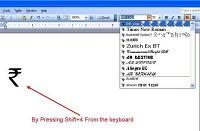
Want to download the Indian Rupee symbol font and test drive it on your computer? Thanks to Foradian Technologies, you can do just that. Although it would take time for the Indian Rupee (INR) symbol (approved by the Indian cabinet) to find its way in PC and laptop keyboards, mobile phone keypads, and other computing devices, Foradian Technologies has wasted no time in giving users an early glimpse into how the Indian Rupee font will look on the PC.

Download the TrueType Font (.ttf) for the Indian Rupee Symbol from Foradian Technologies' website for free and give it a try. By default, the Indian Rupee font is mapped to the grave accent (`) symbol on your PC's keyboard and you can use the Indian currency font immediately after installing it — just drag the Rupee font to Windows' Font folder.

The website also has an installation tutorial in case you need help installing the Indian Rupee font. The font works well, to say the least, and looks good. Check out and download the latest version of the free Indian Rupee font.

Triggers and Procedures in MySQL

Introduction
MySQL Triggers
are one of the newer features in MySQL that are helping to make it a viable alternative for large enterprise applications. So, what are MySQL triggers, and why does MySQL's ability to use them make it more attractive to serious database users?

Simply put, triggers are small programs that are stored in the database itself, and are activated by database events which often originate at the application layer. These precipitating database events are UPDATE, DELETE or INSERT queries.

The trigger itself may execute before or after the query that initiates it. Triggers are often used to maintain the integrity of data across tables of an application.
When a user on a website makes a purchase, for example, the first action that occurs in the database may be that a credit is inserted into an accounting table. By way of a trigger this action could initiate a chain reaction of events in other tables throughout the application. The product count of an item could be decremented in an inventory table, a debit deducted from a customer's account balance in another table, a store credit applied to yet another table.

Why to use procedures

You may say that you have been doing this all along in your applications using PHP or Perl or Python or ASP code. What's the big deal about using MySQL triggers? Well, there are some advantages to using triggers over application code for maintaining integrity of data across tables.

A trigger generally performs the types of tasks described faster than application code, and and can be activated easily and quickly behind the scenes and does not need to be a part of your application code. This saves time and spares you from redundant coding. If you ever port your application to another language, chances are your triggers can stay in place without modification, along with your tables and other database objects.

Explanation

To demonstrate how MySQL triggers work, let's set up two simple tables on a database we'll call “sales_records” that have data that is interdependent. Imagine a database that tracks the sales records of three salespeople at a department store.
They work in the electronics department selling things like TVs , stereos, and MP3 players. We have the main table that keeps a record of each sale made. It records the amount of the sale (sale_amt), the date (date), the name of the salesman (name), his id number (employee_id), and the product id (prod_id). We'll call this table (cleverly enough) “sales”.

In the second table, we want to keep some data that will allow us to easily keep track of how each salesperson is doing. It will include the salesperson's id (employee_id), name (name), total number of sales (total_sales), and a column that keeps each salesperson's average amount per sale (ave_sale). We want to see who's moving the high-end items. We'll call this table “performance”.

How to use Triggers and Procedures

Now comes the hard part. As I mentioned, triggers are database objects just as tables are. Triggers, however, are able to execute procedural code that modifies data in your tables. In this case, we want our trigger to fire before any INSERT statement that executes in the sales table. When a sale record is inserted in the sales table, the salesperson's totals must be updated in the performance table. The following code can be typed in your favorite text editor and pasted into your console at the MySQL prompt.

Before you do that though, you want to execute this line: mysql: Delimiter $$ Our procedural code uses semicolons at the end of statements, so we need to set a different delimiter to let MySQL know when our code block is over, and so that it doesn't stop processing our block when it hits a semicolon. Keep in mind that after you finish your block you will have to set the delimiter back to the semicolon, or end any subsequent commands with the new delimiter.

For example if you made errors in your CREATE TRIGGER block and want to delete it, DROP TRIGGER; won't work unless you set the delimiter back to the semicolon. Here is the code for the trigger: OK, let's talk about the code.

  • Using the CREATE TRIGGER statement, we've initiated the trigger, naming it 'sales_bi_trg'. MySQL triggers can fire before or after an INSERT, UPDATE or DELETE event.
  • This one fires before any data is inserted in the 'sales' table. The FOR EACH ROW clause signifies that the block will act on each row that meets the criteria of our SQL statements.
  • The keywords BEGIN and END enclose the trigger statements that will execute when the trigger fires.
  • There are two variables declared. The first is 'num_row' which checks to see if the employee has who has made the sale that is to be entered, has had a sale entered in the performance table previously. If there are no employee_id's that match, then this is the employee's first sale, and this meets the 'ELSE' condition of our “IF' statement. This data will be entered as an insert in the performance table rather than an update. If the 'num_row' is greater than 0, then the performance table will be updated. The second variable, 'tot_rows', is a count of how many sales the employee has in the 'sales' table. This value is used to calculate the employee's average sale.
  • The count is being done before the sale is inserted in the sale table, so we have to add one to it. When the 'performance' table is updated the average sale = total_sales/(tot_rows+1).
  • If our MySQL trigger is working correctly, the 'performance' table will keep a running total of each salespersons total sales, and also the average amount of their total sales. It will do this independently of your application code and be portable to any application platform. To give it a whirl, insert some data into the 'sales' table and monitor the content of the 'performance' table. Here is the statement: Change the numbers and names and try it a few times. (Remember, an employee keeps the same employee_id number for each of his sales.)

If you're feeling adventurous, start thinking about how the MySQL trigger would have to be extended to account for UPDATE and DELETE statements on the 'sales' table. Another eg :

create trigger tb1_bi_trg before insert on tb1 for each row begin declare rnk int;
select new.rank into rnk;
if rnk<=4 then insert into tb2 set salary=5000;
else insert into tb2 set salary=2000;
end if;
end
create view v as select rank,name,marks*rank as income from tb1;

Another eg :
CREATE TABLE Employee1( id int, first_name VARCHAR(30), last_name VARCHAR(15), start_date  DATE, end_date      DATE, city  VARCHAR(10), description   VARCHAR(15) );

insert into Employee1 values (01,'Girish','Tewari','20081225',  '20100625','Nainital','Programmer');

insert into Employee1 values (02,'Komal','Choudhry','20071122', '20100421','Meerut','Programmer');

insert into Employee1 values (03,'Mahendra','Singh','20061012',  '20070512','Lucknow','Programmer');

select * from employee1;

CREATE TABLE Employee_log( user_id       VARCHAR(15), description   VARCHAR(100) );

CREATE TRIGGER Employee_Trigger AFTER UPDATE ON employee1
                 FOR EACH ROW BEGIN INSERT into Employee_log (user_id, description)
                VALUES (user(), CONCAT('Id with ',NEW.id,' is modified ', ' from ',OLD.start_date, ' to ', NEW.start_date));
END$$

update employee1 set start_date='20061231';
PROCEDURES : delimiter // create procedure procedure_name begin select * from table_name; end delimiter ;

Now call the procedure call procedure_name(); it will shows all the contents of the table table_name. declaring variable in a procedure : After "begin" just write the followings declare variable_name datatype(size) default default_value; eg: declare x int default 0 we can also declare more than 1 variables at a time declare x,y int default 0

Assigning variables
declare total_count int default 0 set total_count = 10;
declare total_products int default 0 select count(*) into total_products from products;

In mysql console you can see what you have written in the procedure i.e you can see the code of the procedure by using :

select body, definer, (and/or any other column available) from mysql.proc where name='your_procedure'

Uncategorized

The implementation of MIMO feature will double the data rate of mobile communication !!!

The implementation of MIMO feature will double the data rate of mobile communication !!! MIMO stands for Multiple Input, Multiple Output.

MIMO basic principle :-

MIMO stands for  Multiple Input, Multiple Output. Need of MIMO :- (1)High data rate :-  wireless communications links with transmission rates nearing 1 Gigabit/second

(2)Provide high speed links that still offer good Quality of Service (QoS)