It is the hub of a business house, the nerve center of the IT system of a company and holds crucial information that is vital to the growth and progress of the organization. It is thanks to a database that transactions ranging in the millions take place on a day to day basis.
This makes the database a vital cog in the wheel of enterprise and its management a point where no compromise can be acceptable. Database management is the proper utilization of resources so as to let a database function with maximum efficiency and management systems of this kind have become a product and a service just like any other. Companies vie with one another to offer the best in terms of performance, price, functionality and administration ease and support.
You can choose between an open source database system or something packaged for you. Some of the world’s leading brands are in the database business. You will recognize the names of IBM, Oracle, Hewlett-Packard, Microsoft, Hitachi and Sybase among others.
When it comes to the all-important question of how to choose the right database management system, here are a few points to keep in mind.
1. Size of organization
The size of the company you work for will determine whether your programs will be complex or simple. So start with size. If yours is a start- up, for instance, you can even manage with good original software form your own desktop PC or laptop. All you need at this point is perhaps some basic organization functions and retrieval options.
If yours is a larger enterprise, then you need a database that runs on a mainframe and can handle different and numerous numbers of workstations in the network. Considering that the information needs to be shared across thousands of computers, the mainframe needs to be sturdy and capable of withstanding massive amounts of traffic. So start with the size of the organization.
2. Type of organizational structure
Depending on the style of database organization you like, you could look for database management systems that suit your needs as well. For instance, in the hierarchical database type of structure, there is greater communication among managers who need to see how different components of a system harmonize with one another, as in the case of a computer network. A relational database on the other hand is the grouping of data together by connecting different pieces of information along the lines of shared and similar attributes.
3. Cost of database management system
It is important to consider the cost of the system without compromising on the quality of the product. The rule of the thumb is that the more complex the software, the more expensive it will work out to be. While you might wish to consider buying inexpensive software as a short term gain, expensive software may work out to be the better bet in the long run if it is of superior quality.
4. -Track record of manufacturer
This brings us to the obvious point of reputation and track record of manufacturer. It makes no sense to be stingy when it comes to investing in something that will be pressed into service every single day, around the clock. Make sure that the system you’re choosing comes with great pedigree and offers state-of-the-art-security. This will more than compensate for whatever amount you tjoml may be excessive right now.
5. Information retrieval
How might you like your information to show up? As a chart or a graph or as a list for easier reading of bills of materials? A well formatted report in PDF or excel sheet design may be a pleasure to behold. Depending on what your answer is, you can find a database management system of your choice.
The right database obviously makes a vital difference to your organization. So be cautious when you make your choice.
This is a guest post by Nathan Brown of buyatt.com, a site that offers savings and current information on at&t Uverse as well as att.com services.
Gnu Privacy Guard or GnuPG or popularly known as GPG is a GPL Licensed alternative to PGP (Pretty Good Privacy) and its openPGP complaint program for *nix people based on rfc 4880. It is part of GNU software project started in 1991 by Werner Koch and majorly funded by German Government. Download its pdf format from here.
Its basic use is to send encrypted mails or files to the recipient who can decrypt these using its private key. It is based on public and private key mechanism for encryption/decryption. We can encrypt any of our data using our own key pair and send it to the person who can read the message if he has the proper key to decrypt it! Many people use public key generated by gpg to verify his email signature too!
It uses following algorithm for various purposes used for safe message communication:
Pubkey: RSA, RSA-E, RSA-S, ELG-E, DSA
Cipher: 3DES, CAST5, BLOWFISH, AES, AES192, AES256, TWOFISH
Hash: MD5, SHA1, RIPEMD160, SHA256, SHA384, SHA512, SHA224
Compression: Uncompressed, ZIP, ZLIB, BZIP2
Why GPG?
Because it is free and meant to be a replacement of PGP.
Gpg is a CLI program but there are many GUI also through which you can manage keys easily like seahorse for GNOME (yum install seahorse) and KGpg for KDE.
It allows you to encrypt and sign your data, includes a key management system as well as access modules for all kind of public key directories.
If you wish to encrypt your message while sending mail to someone important, you may try this method.
You can share your public key and other users can download it to verify signature in mails/files sent by you for authenticity. It would stop social engineering through email even would stop spams send in the name of your friend’s id.
Applications of GPG
GPG encryption has been added to graphical email client like Evolution for email security.
There is a GNOME front-end application for managing PGP and SSH keys called “Seahorse” which integrates with Nautilus, gedit and Evolution too for encryption, decryption etc.
Enigmail is a data encryption/decryption extension for Mozilla Thunderbird and the SeaMonkey which uses GPG
Mozilla Firefox also gets GPG enabled using Enigform.
GnuPG is being used for Windows Explorer and Outlook through GPG4win tool which are wrapped in the standard Windows installer to make GnuPG easier to get installed and to be used in Windows systems.
It uses hybrid encryption techniques i.e. it uses a combination of symmetric key cryptography for speed and public-key cryptography for easy secured key exchange. By default GnuPG uses the CAST5 symmetrical algorithm.
As a matter of fact, GnuPG does not use patented or otherwise restricted software or algorithms. Instead, GnuPG uses a variety of other, non-patented algorithms.
It will be clearer that how GnuPG works once we see the working of gpg commands step by step:
Which version of gpg we are going to use?
gpg command to generate keys
Analysis of freshly created directory (.gnupg) and files inside it.
Once you get public and private key. You must keep private key safe, once you forget it then you will never be able to decrypt the data. So, better take private key backup.
Want to see the list of public and private keys?
Encrypt the message for specific recipient
Decrypt the encrypted message
GPG commands explained
Which version of gpg we are going to use?
[vim][sjaiswal@AlienCoders ~]$ gpg –version
gpg (GnuPG) 1.4.5
Copyright (C) 2006 Free Software Foundation, Inc.
This program comes with ABSOLUTELY NO WARRANTY.
This is free software, and you are welcome to redistribute it
under certain conditions. See the file COPYING for details.
[vim][sjaiswal@AlienCoders ~/gpg_test]$ gpg –gen-key
gpg (GnuPG) 1.4.5; Copyright (C) 2006 Free Software Foundation, Inc.
This program comes with ABSOLUTELY NO WARRANTY.
This is free software, and you are welcome to redistribute it
under certain conditions. See the file COPYING for details.
Please select what kind of key you want:
(1) DSA and Elgamal (default)
(2) DSA (sign only)
(5) RSA (sign only)
Your selection? 1
DSA keypair will have 1024 bits.
ELG-E keys may be between 1024 and 4096 bits long.
What keysize do you want? (2048) 4094
Requested keysize is 4094 bits
rounded up to 4096 bits
Please specify how long the key should be valid.
0 = key does not expire
<n> = key expires in n days
<n>w = key expires in n weeks
<n>m = key expires in n months
<n>y = key expires in n years
Key is valid for? (0) 3m
Key expires at Mon 03 Feb 2014 04:46:09 AM MST
Is this correct? (y/N) y
You need a user ID to identify your key; the software constructs the user ID
from the Real Name, Comment and Email Address in this form:
"Heinrich Heine (Der Dichter) <heinrichh@duesseldorf.de>"
Real name: Sanjeev Jaiswal
Email address: sjaiswal@gmail.com
Comment: "GPG Key Test"
You selected this USER-ID:
"Sanjeev Jaiswal ("GPG Key Test") <sjaiswal@gmail.com>"
Change (N)ame, (C)omment, (E)mail or (O)kay/(Q)uit? O
You need a Passphrase to protect your secret key.
We need to generate a lot of random bytes. It is a good idea to perform
some other action (type on the keyboard, move the mouse, utilize the
disks) during the prime generation; this gives the random number
generator a better chance to gain enough entropy.
.++++++++++.+++++++++++++++..+++++..++++++++++++++++++++.+++++++++++++++++++++++++.
+gpg: /home/sjaiswal/.gnupg/trustdb.gpg: trustdb created
gpg: key CBE9BE42 marked as ultimately trusted
public and secret key created and signed.
To generate keys using gpg, it would ask which kind of key you wish to use; you can choose any of the given option. Type 1 or 2 or 5.
Type the keysize between the given range
Then provide the expiration date of key. You can use days,weeks, months, years.
Once you are done with expiration days, use the next option carefully. Type Real name, Email and comment appropriately as it will be used while encrypting the data and will ask the recipient name. it will match recipient name before matching the keys.
Then type anything using keyboard, do mouse activities etc to speed up random generation of keys else it may take lot of time.
Once it will get created, .gnupg directory under your home directory will be there. Use ls to see what all files got created.
Analysis of freshly created directory (.gnupg) and files inside it
gpg.conf -> it contains all options set by you. Unless you specify which option file to use (with the command line option "–options filename"), GnuPG uses the file ~/.gnupg/gpg.conf by default. Check strings gpg.conf for more details.
pubring.gpg -> public key stored here. You should export it in ASCII format to send it to others.
pubring.gpg~ -> backup of public key
random_seed -> it contains all random keys used for encryption that you might be typing while generating keys.
secring.gpg -> it’s the secret key ring and one should keep it safe. Better have its backup
trustdb.gpg -> its trusted db which contains signatures, expiration date etc. and from time to time the trust database must be updated so that expired keys or signatures and the resulting changes in the Web of Trust can be tracked.
Normally, GnuPG will calculate when this is required and do it automatically.
Type the message and save it in text file, let’s say message.txt
[vim][sjaiswal@AlienCoders ~/.gnupg]$gpg recipient Sanjeev Jaiswal –encrypt message.txt
[/vim]
It will create message.txt.gpg , which is an encrypted file. To decrypt it, you need to type passphrase that you had typed while generating keys.
Or
[vim]gpg -r real-name –out secrets_to_aliencoders –encrypt secrets
[/vim]
which will have encrypted message in secrets_to_aliencoders
You need a passphrase to unlock the secret key for
user: "Sanjeev Jaiswal ("GPG Key Test") <sjaiswal@gmail.com>"
4096-bit ELG-E key, ID 38765DB9, created 2013-11-05 (main key ID CBE9BE42)
gpg: encrypted with 4096-bit ELG-E key, ID 38765DB9, created 2013-11-05
"Sanjeev Jaiswal ("GPG Key Test") <sjaiswal@gmail.com>"
Hi
This is Sabnjeev
Or
[vim][sjaiswal@AlienCoders ~/.gnupg]$ gpg –output secrets_from_tom –decrypt secrets_to_aliencoders
[/vim]
Which would save the decrypted message in secrets_from_sanjeev
Editing Key
[vim]gpg –edit-key sjaiswal@gmail.com
[/vim]
There is more:
Photo IDs
GnuPG has the ability to add a photo ID to a public key, exactly as in recent Windows versions of PGP. A photo ID attached to a public key can help other users to identify the owner of the key. To add a photo ID to your own public key, use the command "gpg –edit-key <name>" and then enter "addphoto". GnuPG will ask for the filename of a suitable JPEG. No other types of image files can be used.
If you want to see a photo ID on a particular key, enter the command "–show-photos" before using the command "gpg –list-keys <name>". If <name> is omitted, GnuPG will display all the photos (if any) after listing all the keys in your public keyring. Alternatively, if you want photos to be displayed in all cases by default, you should uncomment the line "# show-photos" in the options file inside !GnuPGUser.
Output of trustdb
[vim][Sanjeev@AlienCoders]$ gpg –update-trustdb
gpg: 3 marginal(s) needed, 1 complete(s) needed, PGP trust model
gpg: depth: 0 valid: 1 signed: 7 trust: 0-, 0q, 0n, 0m, 0f, 1u
gpg: depth: 1 valid: 7 signed: 3 trust: 0-, 0q, 4n, 3m, 0f, 0u
gpg: the next trustdb check will be done on 2014-02-04
[/vim]
The first line shows you the actual trust policy used by your GnuPG installation, and which you can modify at your needs. It states that a key in your keyring is valid if it has been signed by at least 3 marginally trusted keys, or by at least one fully trusted key.
The second line describes the key of level 0, that is the key owned by you. It states that in your keyring you have one level zero key, which is signed by 7 keys. Furthermore among all the level zero keys, you have 0 of them for which you haven't yet evaluated the trust level. 0 of them are the keys for which you have no idea of which validity level to assign (q="I don't know or won't say"). You also have 0 keys that you do not trust at all (n="I do NOT trust"), 0 marginally trusted keys (m="I trust marginally"), 0 fully trusted keys (f="I trust fully") and 1 ultimately trusted keys (u="I trust ultimately").
The third line analyzes the keys of level 1 in your keyring. You have 7 fully valid keys, because you have personally signed them. Furthermore, among the keys that are stored in your keyring, you have 3 of them that are not signed directly by you, but are at least signed by one of the fully valid keys. The trust status counters have the same meaning of the ones in the second line. This time you have 4 keys signed by you but for which you do not trust at all the owner as signer of third party's keys. On the other side, 3 of the 7 keys that you have signed are marginally trusted. This means that you are only marginally confident that the owners of those keys can verify well the keys that they sign.
[vim][Sanjeev@AlienCoders]$ gpg –check-trustdb
gpg: 3 marginal(s) needed, 1 complete(s) needed, PGP trust model
gpg: depth: 0 valid: 1 signed: 7 trust: 0-, 0q, 0n, 0m, 0f, 1u
gpg: next trustdb check due at 2014-02-04
[/vim]
If you wish to know other commands that you may use using gpg then try
[vim]man gpg
[/vim] or
[vim]gpg –help
[/vim]
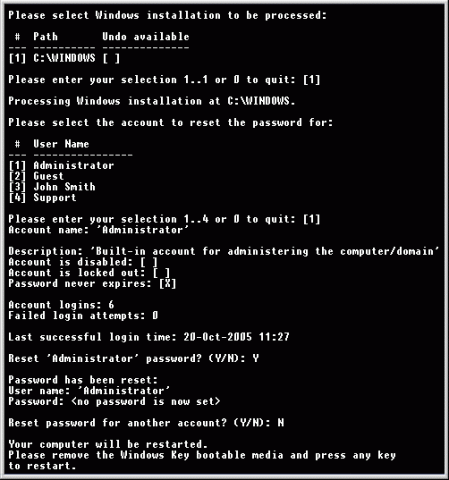
Have you ever imagined, what will happen, if you would forget or compromised your login password in Windows O.S.?
There may be a situation when your friends or relatives may play prank with you and will change administrator password. What you will do then?
In short, if you are using Windows Operating Systems and want to get rid of forgotten/lost password or want to reset almost all the existing password at one go. Then “Windows Key Enterprise Edition is for you only.”
Here are the listed features of this particular software:
Just burn it into CD and you are done!
Features
100% recovery rate
All passwords are reset instantly
Windows 7 New!, Vista, Vista SP1 supported
All Windows Workstations supported
All Windows Servers supported, including Server 2008 (Windows Key Professional and Enterprise editions only) New!
Resets passwords with a bootable CD-ROM
Resets passwords with a bootable USB drive (Windows Key Professional and Enterprise editions only)
Resets secure boot options: startup password or startup key disk
Displays account properties
Supports all Service Packs
Supports RAID/SCSI/SATA drives Updated!
Its latest version is: 10.3.2585 whose archived size is: 5.12 MB (8.2 MB approx in iso format). It’s a shareware software. So you need to pay to use its full version. You can try demo though.
Other versions are Windows Key Professional and Windows Key only which has limited features.



 Have you ever imagined, what will happen, if you would forget or compromised your login password in Windows O.S.?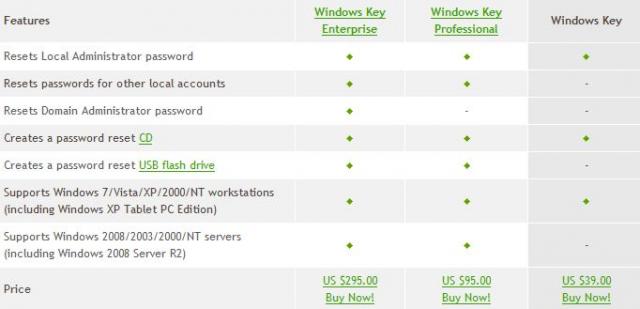
Visitor Rating: 5 Stars