6 Minimal Steps to make your site popular

[caption id="" align="alignleft" width="140"] Website url domain[/caption]

There is more than 50 millions website over the internet. And more are getting daily mostly by bloggers, wordpress or other such blog networking providers. How Google is ranking amongst all these and how you can make your website popular. I jotted down few basic ground rules which will surely help you to make your site much popular.

6 Minimum steps are there that one can implement to make their site popular:

  1. Quality matters not quantity
    1. You might have observed that there are many sites which are having hundreds of posts but not even listed in top 10 pages of Google Search. And there are few website which are having very few articles but are very popular over the internet. What mattersis “Quality not the Quantity”.
    2. Try to write/post such contents which is worthy for users.  Your contents should be unique. It should not be just copy-paste from other websites. It may degrade your website ranking.
    3. Before writing any content, try to do some Google work to see if such articles are already there in market. How you can make your article unique and how you can compete with existing article over the internet.
    4. Choose title for the content which will be unique and much popular over internet. Like top 5 , minimal 5 steps, 5 basic steps, top 10 best or something like that. Ex: Top 10 programming language in 2010 
  2. [caption id="" align="alignleft" width="121"] SEO Importance[/caption]

    Search Engine Optimization(SEO)

    1. All search engines have one thing in common. That is they will search keywords through metadata at first. If the title of your article matches with the contents inside it. You may get good reputation over the internet
    2. There should not be any broken links. Every web page should have forward and backward link.
    3. Whenever you are posting any articles try to excerpts (not more than 160 words), keywords, description, author description etc.
    4. Website should not be too slow to get loaded; else users may lose their interest over the content. Don’t use much graphics, and image icons (At least you can avoid them at your home page)
  3. Publicity
    1. Done with above 2 steps! You and your website will not be much popular if there are not much loyal users to visit your website regularly. You can drive the mass users only by publicity.
    2. Spread the words through all popular social networking websites like Twitter, FaceBook, Orkut, MySpace, Google Buzz etc.
    3. You can share  your articles at  reddit.com, dzone.com, stumbleupon.com,dig.com
    4. You should use some popular forums or blog to post your quality comments and contents, where you can use your website address in your signature. You will get huge traffic through this way too.
    5. Use feedburner or any rss for feeds
    6. Try to put follow us and share button to your website
  4. Choice of Domain Name, Hosting Server
    1. Choose domain name according to your website’s objectives. If it’s for programming purpose then domain name should be contain something like code, codes, coding or programmer, programming etc. Ex: http://www.aliencoders.org  (for code sharing, discussions, blogging etc)
    2. Domain name length should not be too lengthy. Users find tough to type long domain names (Although there is no harm in it.)
    3. Choosing Popular and good web hosting server always matters. They have already good reputation over internet, search engines etc. So choose good web hosting servers like godaddy.com (most popular in its area)
  5. Choice of Themes, plugins and CMS
    1. There are hardly 5-10% internet users who are good with all coding stuffs and can make website at their own. Mostly people use customized layouts or better say CMS (Content Management Systems) which can be used by any newbies too. Little internet knowledge would do your work.
    2. If you here only for blogging purpose, you should think about wordpress.com, bloggers.com these are two most famous platform available for bloggers.
    3. If you are here to discuss or to provide solutions or something like community based stuffs, you should use phpbb3, SMF, vBuletin, myBB etc.  They all are fully customized and you don’t have to think much about second step (SEO).
    4. If you are thinking to have everything at your box try to use Drupal, Joomla etc.
    5. Use email subscription template , so that interested users can subscribe to your website through email.
  6. Regular Updates to draw attention of users
    1. Once you get loyal users and people are coming to your website regularly, you should not disappoint them by not submitting contents on regular basis.
    2. Try to post 2-3 articles on daily basis instead of putting 10 articles on 1 day and no articles on another day.
    3. If possible post your contents and publish it everywhere at 8 a.m. and 6 p.m. Because by that time internet traffic remain more in comparison to other time.
    4. There should not be any broken links in your website
    5. Try to include sitemap for your website.

I hope, it will be useful for internet users. Comments are always cherished

 

Top 10 Gmail labs for Gmail lovers

Gmail LabGmail is one of the most popular free Email service from Google. Gmail has a feature call Gmail labs, using it you can add many new features to your Gmail account. You can access Gmail lab under Setting -> Labs.

Gmail settingsgmail labs


If you will enable at least one of the lab then a shortcut will create at the top right corner as shown below:


As if Gmail wasn’t powerful enough, you can find all sorts of goodies and extra features in Gmail Labs. The list is pretty massive, so I’ve narrowed down to 10 favourite labs to help increase your email productivity.

1. Multiple Inboxes This is one of our favorite Gmail features —there’s just so much you can do with it. Multiple Inboxes has you covered by letting you stack extra lists of emails—whether they are labels, starred messages, or any other Gmail search—in your main inbox window. There’s no limit to what you can do with Multiple Inboxes, so if you’ve ever felt anything was missing from Gmail’s inbox organization, you can make it yourself here. Note that, unfortunately, Multiple Inboxes does not currently work with Gmail’s Priority Inbox feature, so you’ll have to decide which is more important to you for a particular account.

2. Message Sneak Peek The Message Sneak Peek feature is simple, but pretty useful—instead of opening up every message you get, you can just mouse over them(or right Click) to see what’s inside a message. That way, you don’t have to go through to trouble of opening it, marking it as unread, or filtering it if you can’t deal with it right away. message sneak peek

3. Inserting Images The Inserting Images lab will help you out by letting you insert images easily—whether you upload them from your computer or link to an external source on the net—with the press of a button. Note that if you’re running Google Chrome or Safari, you don’t need this lab enabled—you can just drag and drop images right  inot the Gmail. 

4. Undo Send This is a great feature. Just imagine this… you have to mail someone an important email and you type the email with some big typos in it. When you just begin to read your email you accidentally click the “Send” button and then you realize that there were some typos. With this labs feature you can cancel the email which is being sent or if it has been sent, you will have 30 seconds to undo this and then you can edit the email and send it with relief. undo send

5. Default ‘Reply to All’ When multiple people are involved in an email thread, one person will break off by accidentally hitting the “Reply” button instead of “Reply All”, and then everyone else misses that part of the conversation. Save yourself from being “that guy” by enabling the Default Reply to All Lab, which changes Gmail’s Reply button into a Reply All button. On the occasions you want to reply just to one person, you’ll still be able to do so by hitting the dropdown menu next to the Reply All button.

default reply to all

6. Google Docs Previews Even if you aren’t the biggest fan of Google Docs, the Google Docs previews Lab is pretty useful—it not only lets you preview shared Google Docs, but it also lets you view any Google Docs compatible format before downloading it. That means the next time someone sends you a Word document, Excel spreadsheet, or PDF and you don’t want to download it and open it up in Office, you can see what’s inside just by viewing its Google Docs preview.

Google Docs in Gmail

7. Custom Keyboard Shortcuts A Gmail keyboard shortcut is another great feature of Gmail. There are a lot of keyboard shortcuts but if you use this great feature, you can change the keyboard shortcuts to your comfort. This feature could make the use of Gmail very easy.

Custom keyboard shortcuts for gmail

8. Message Translation This is another important labs feature. If you have got an important email but it is in another language, you can use this labs feature to translate it to English or your preferred language. It use Google Translate for the translations.

Message ranslation in Gmail

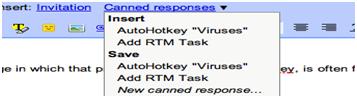
9. Canned Responses If you find yourself doing a lot of repetitive typing, the Canned Responses lab will save you a lot of trouble. Just enable the lab, set up those messages you find yourself sending over and over again, and then send them with the click of a button. You can even send them automatically using filters and use them with external services (like automating Remember the Milk tasks). Note also that you can use OS-wide text expansion if you need to do this outside of Gmail—though what’s nice about Gmail’s canned responses is that you can use them no matter what computer you’re on.

Canned response enable

Canned response in Gmail

10. Mouse Gestures You can use this as another shortcut for using Gmail. Use your mouse to navigate with gestures. Hold right-click and move the mouse left to go to a previous conversation, move it right to go to the next conversation, and move up to go back to the inbox view.

Mouse gesture in Gmail

Safety tips for mobile users

be safe while talking on mobile Hi friends, according to present scenario every people who are above 14 are having mobile (except those who can't afford it). Its good thing to have to be in touch with friends and families but it may turn into devil if you misuse it either knowingly or unknowingly. So, its the right time to know that what we should do and what we should not do with mobile.

  • Only give your mobile number out to people you know and trust. (Specially for girls)
  • Don't do any transaction through smart phone if password or any personal information is getting to be stored in your mobile.
  • Don't talk rubbish or don't harass anyone on phone, it comes under Cyber Crime. (while break up couples usually do so. So beware guys!)
  • Avoid, unless absolutely needed, connecting to an unsecured wireless network through your mobile (whici is having wi-fi facility)
  • Do not use your mobile phone to communicate with strangers. Only text and call people or businesses you know in real life.
  • Never reply to text messages from people you don’t know. (One or two messages you can do to know his/her identity, if possible)
  • Make sure you know how to block others from calling your phone. Using caller id ,you can block all incoming calls or block individual names and numbers.
  • Make a record of your Electronic Serial Number (ESN) and/or your International Mobile Equipment Identity (IMEI) number. You can find out your IMEI number by pressing *#06# on your mobile phone's keypad, it will display a 15 digit number – that is your IMEI number.
  • If your phone is lost or stolen, report it to your local police station and your network operator immediately.
  • Think about how a text message might be read before you send it. (Married couples may face many issues because of such messages. No need to explain i guess)
  • You should never give anyone else's number out without their permission.
  • You should never take pictures or videos of anyone with your phone if you do not have their permission.
  • Do not allow others to take pictures or videos of you without your permission. Remember – these pictures and videos can be posted to the Internet.
  • Be careful if you meet someone in real life who you only "know" through text messaging. Even though text messaging is often the "next step" after online chatting, that does not mean that it is safer.

We follow most of the steps but knowingly or unknowingly we do such mistakes which leads towards Cyber crime. So, play safe, be safe and make the nation Cyber crime free nation. Source: http://www.staysafeonline.org

What is Google WAVE and PROJECT NATAL

natalA GOOGLE Wave is an application by google that collaborates several Google features. A user who has installed Google wave will be able to access and use Google features like Orkut, Google Talk and Gmail efficiently.
Google wave can also check for errors (grammatical and spelling) as well translate text to forty different languages. Google has not yet announced when Wave will be released.

For the User’s Convenience, Google will open source part of the code so that users can develop or Modify the features of the program. Upcoming days ,  no need to use of different browser , in Single place you can use all features of google.    Microsoft is working on Project Known as ‘NATAL’ , which on completion would probably be the new face of gaming. It involves gaming without the use of any controllers. End users will be able to play games or interact with the interface with gestures and spoken commands on their existing Xbox consoles. The device would be around nine inches and a motion sensor would be placed either above or below the device. It would feature face and voice recognition as well as full body 3D  motion capturing capabilities.

Observers are expecting it to be launched up to end of 2010.

How to find out , who is Invisible (In Gmail)

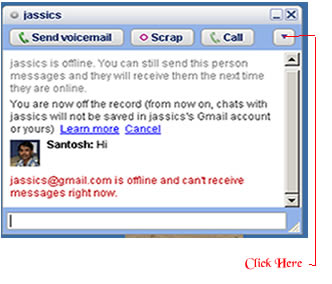
offline line User There is simple trick to find out Invisible user. The Gmail Chat application that is present on the left pane of the site allows users to appear 'Invisible'  to their contact. For this , You will need the 'Google Talk' desktop application. One you have logged on to your account, follow these steps to determine which of your contacts is invisible :

  • Open 'Google Talk' chat application
  • Search for contact by typing his/her name in the search box
  • Once the name of the contact shows up in the contact list click the entry to open the chat window.

  • Click the dropdown arrow present under the close button and click ‘Go off the record’ .
  • If you  receive a message saying , “<user ID> @ gmail.com is offline and can’t receive messages right now’  then user is logged off".
  • If the above message does not appear after you send a message then user is invisible mode.

This trick is working in most cases so far. However , there may be varying results in case of users who log on to Google talkusing third party tools like mobile chat applications.