How to make effective media sharing in home through broadband connection

Media Sharing In Your Home through Your Broadband Internet Connection – How to Make It More Effective
 
One of the concerns of people who perform different activities online like games, video streaming, VoIP, etc. is the bandwidth. Having a continuous internet service whether through expensive plans or cheap broadband, can enable you to perform these internet related activities, but there are ways where an internet user can do these with utmost convenience, depending on priority. This is with a downloadable custom Firmware, DD-WRT. Modifying the settings may take some time but if this is the trade-off for a better performance of your internet activities, then it should be worth it.

WD Live TV Hub: A must have Electronic Device

Review on an awesome electronic gadget: WD Live TV Hub
WD TV Live Hub Overview
“Bring your digital life to high definition big screen or any old screen at your home”. This sounds interesting. Isn’t it? Being from 21st century, where a 5 years old kid plays with mobile and computers, we need something unique apart from saving our bigger files for future use by using external hard disk.

I still remember when my friend bough computer, I simply asked what you will do with so much space (80 GB). Now 1 Terabyte (1 TB is equivalent to 1024 GB or simply say approx… 1000 GB) does not sufficient for future use. Whosoever is buying laptop, desktop etc.  looking for 500 GB internal hard disk at least (purely my assumption).


Hard disk either internal or external is meant for data storage from a doc file (merely in a KB) to Blu-ray quality movie of 8 GB size approx… But If I need to watch movies, video songs, serials on bigger screen like 40 inch television or 5 feet white screen using projector. By that time using laptop or computer system will not be a better idea! (Of course we can do all these but there must some awesome way to do it.)
Even simple external hard disk can’t suffice our needs, although it can store thousands of high quality movies in its 1 TB space but to access any of its file we need to connect it through our system anyway. How about an electronic gadget that:
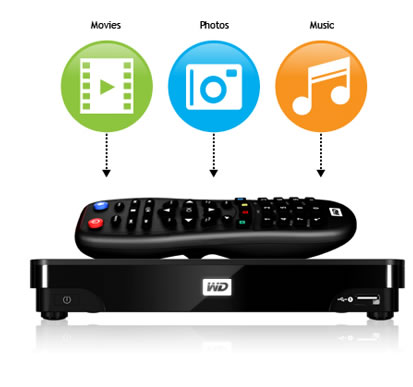
  • Can be used to watch stored data directly at bigger screen like TV without using computer?
  • Can be used to surf internet on TV
  • Can be shared across other computer using LAN/WAN
  • Can be treated as multimedia player which can play any format even mkv,m2ts without any hassle
Yes, I know you can’t read any more boring lines. Let come to the point. I bought an electronic device solve my problem of storing extra files into an external hard disk and the same device can be used to watch/access those files using a remote on TV or any bigger screen. Here comes, Western Digit’s Live TV Hub which has lots of features that will compel to you have one in your home.

Features that I liked:

  • Easy to operate
  • 1 TB or 2 TB storage capacity
  • Can access internet using LAN wire
  • One can access its data using a switch or by directly connecting through LAN wire
  • One can operate this device using smartphone app (available in android and iphone )
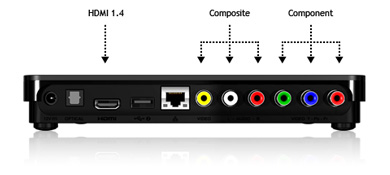
  • One can access it using LAN wire, through HDMI port, through old 3 pin socket (used in older TV)
  • Transfers/uploads  files easily across the network
  • One can use usb keyboard to surf net on TV instead of laptop screen 😀
  • It support full HD video playback(1080p)
  • You can directly see video camera’s content through this device
  • The player automatically synchronizes with watched folders so new content from any PC, Mac, or USB storage will be added to the WD TV Live Hub.
  • It supports usb v2.0, HDMI v1.4
  • It has 2 usb ports, one HDMI port, one optical audio output port, composite and component socket for TV and TFT monitors. (But I faced problem while accessign files using USB. I need to experiment more on it. )
WD TV Live Hub
File Format supported:
  • Video AVI (Xvid, AVC, MPEG1/2/4), MPG/MPEG, VOB, MKV (h.264, x.264, AVC, MPEG1/2/4, VC-1), TS/TP/M2T (MPEG1/2/4, AVC, VC-1), MP4/MOV (MPEG4, h.264), M2TS, WMV9, FLV (h.264) 
  • Photo – JPEG, GIF, TIF/TIFF, BMP, PNG
  • Audio – MP3, WAV/PCM/LPCM, WMA, AAC, FLAC, MKA, AIF/AIFF, OGG, Dolby Digital, DTS
  • Playlist – PLS, M3U, WPL
  • Subtitle – SRT, ASS, SSA, SUB, SMI 
Note: It doesn’t support amazon store, iTunes store
  • It supports many languages like English, French, Dutch, Korean, Russian etc.
  • It costs around $180 (9000 INR approx. ) It may vary at present.
  • My Rating 4.5 out of 5

Here is much more detail about it. http://wdc.com/en/products/products.aspx?id=570
 

Minimal introduction to .NET Technology

.NET LogoBefore I Should start writing about .net technology. I want to share my personal experience with .net. When I used to hear  .net in my college days , I had the feeling that may be its something different  that is why it is not in our syllabus .I knew C , C++ ,java  in college and studied these as best I can .

But I was “Zero” when it comes to .net with the supporting language as C#. The story of .net started in my life after joining Infosys and now I find this quite interesting and easy .So I feel so many guys like me who used to give most of their time  peeping sexy gals profile on facebook in college rather  than want to know about  new technology. So this article is going to help those guys .

The first question what is .net? Is it a language?  Is it a technology? Ok If I can find what is .net? Then what is C# .net? what is Vb .net ? what is ASP.net ? What is ADO.NET ? ohh so much of .NET lets go and sleep .So let’s try to understand all the terms  one by one so that if next time if someone will ask do you know .net then you can fool him or her  for 20-25 minutes :P.


WHAT IS DOT.NET ?
The  .NET Framework (pronounced dot net ) is a software Framework that runs primarily on Micorsoft windows  .It includes a large library and provides language interoperability across several programming  languages  .Now in layman terms it’s the most easiest framework I have encountered to work on .Everything is Drag and drop here and you can create a full – fledged Web application or Windows application in one night .Let’s talk about the various properties of .NET. There are so many new features introduced in .NET but I am going to discuss only those which are interesting and helpful in doing practical’s later .
 
  1. Interoperability:  Language interoperability is the ability of code to interact with code that is written using different programming language .Language interoperability can help maximize code reuse and, therefore, improve the efficiency of the development process. It is achieved by the use of CTS (common type system) .Inside CTS the mapping is there for different data types .For ex.  Declaring and defining an integer variable in different programming language is different.
  2. CLR (Common Language Routine Engine ) : The CLR is the execution engine of the .NET Framework. All  .NET programs execute under the supervision of the CLR , guaranteeing certain properties and behaviours in the area of memory management, security , and exception handling .
  3. BCL (Base class library ) :The base class library (BCL), part of the framework class library (FCL) , is a library of functionality available to all languages using the .NET framework .The BCL provides classes that encapsulate a number of common functions , including file reading and writing , graphic rendering , database interaction , XML document manipulation and So on .
  4. CA (Code Access Security) : Code Access Security is based on evidence that is associated with a specific assembly   
Current version of .net framework is 4.5 released on 29th feb 2012 . Requirements are Microsoft visual studio 2011 and windows 8 . I am using .net framework 3.5 with Microsoft visual studio 2008 on Windows Xp .The framework 4.0 was introduced on 12th april 2010 compatible with visual studio 2010 and window 7.

Now after knowing that .net framework is basically used to create web application. Then a Java user can question why should I go for .Net when whatever work .Net is doing that can be done in java. So let’s discuss few points that you can give to that Java guy to realise him or her the importance of .Net . So let’s concentrate on few points that when should we go for .NET ?

  1. If the application is window specific then use .NET.
  2. .Net is language independent so if the team has multiple expertise C#,Vb,C++, developers can still work on the same project with different skill sets.
  3. The important thing is IDE , its very simple to use and deployment is very simple .
One of the cons of .net over java is that java is a free source. Also if you are using linux then use Java.

What is C# .Net ?
When the language used to develop the application in .net Framework is C# then we say it as C# .net .The mother of language C# is C++ not C . The equation goes  as mentioned below :
C —————>        C++  ——————>  C# ( the two ++ of C++ is again sandwiched by two ++ and formed #)
And I feel C# is very powerful language. I will show its power in detail in my coming articles .

What is Vb.Net ?
When the language used to develop the application in .net  Framework is Visual basic we say it as vb.Net. Vb.net is also object oriented but if I have to chose between C# and vb then I will chose C# because of a simple reason that I like the coding style and it is quite familiar otherwise performance wise there is no such difference between these two languages.

What is ASP.NET ?
ASP is abbreviated as Active Server Pages. ASP .Net is a web application framework developed and marketed by Microsoft to allow programmers to build a dynamic  websites , web applications and web services. It was released in January 2002 with Microsoft .net framework  version 1.0  and is the successor of Microsoft active server pages. Here we can use any of the language between C# or Vb based on our comfort level with a particular language.
Features :

1.Pages : ASP.NET Web pages, known officially as Web Forms,[8] are the main building block for application development. Web forms are contained in files with an ".aspx" extension; these files typically contain static (X)HTML markup, as well as markup defining server-side Web Controls and User Controls where the developers place all the required static and dynamic content for the Web page. Additionally, dynamic code which runs on the server can be placed in a page within a block <% — dynamic code — %>, which is similar to other Web development technologies such as PHP, JSP, and ASP. With ASP.NET Framework 2.0, Microsoft introduced a new code-behind model which allows static text to remain on the .aspx page, while dynamic code remains in an .aspx.vb or .aspx.cs or .aspx.fs file (depending on the programming language used)

2. Directives : A directive is special instructions on how ASP.NET should process the page. The most common directive is <%@ Page %> which can specify many attributes used by the ASP.NET page parser and compiler.

What is ADO.Net ?
Ado stands for ActiveX data object. ADO.NET is a set of computer software components that programmers can use to access data and data services. It is a part of the base class library that is included with the Microsoft .NET Framework. It is commonly used by programmers to access and modify data stored in relational database systems, though it can also access data in non-relational sources.
ADO.NET is conceptually divided into consumers and data providers. The consumers are the applications that need access to the data, and the providers are the software components that implement the interface and thereby provides the data to the consumer.

I hope you all are clear with the definitions of all the basic terms related to .Net.

Prashant Prakash
Microsoft Technology Analyst in 3.5 framework

IBM – The Great Mind Challenge 2011

TGMC The Great Mind Challenge (TGMC) is a programming contest by IBM, India to help engineering students in testing their skills. Student Engineers interested to  join software industry can get lot of exposure from this. 

How this can help Engineering/programming students ?
This contest is made for students interested in programming only. Biggest opportunity for final year students as they can use this for final year project and i believe this can change your future. You can grab an opportunity to work with IM (Information Management software) team of IBM.

wolverinetyagi


Launched in 2004, TGMC is an innovative program that addresses the need to better educate millions of students for a more competitive information technology (IT) workforce by partnering with colleges and universities.

Every year, the growth and reach of TGMC has increased, seeing a marked increase in the number of students who are keen to participate in such an endeavor. In fact, TGMC is now listed in the Limca Book of Records as the largest technological contest of its kind – testament to the fact that there is a need in today’s competitive world for such an initiative that supports, guides, and challenges students to higher goals.

Universities provide excellent learning environments, but find it difficult to teach students about an IT transformation in progress unless those driving the transformation – IT companies at the helm of transformation – provide real-time input and support. TGMC is an out reach of the IBM Academic Initiative, a global program that facilitates the collaboration between IBM and educators to teach students the IT skills they need to be competitive and keep pace with changes in the workplace.

The IBM Academic Initiative includes an online portal that provides access to software, training, and course materials, most at no charge. Available within the Academic Initiative web site, IBM offers hundreds of resources for integration into college curricula to help teach students how to master the fast-growing market of open technologies. Through this initiative, IBM is working with students to build technology and science skills.
 

Have questions? Call us toll-free at 1800-425-9366.

We are available from 8 a.m. to 6 p.m. Monday through Friday.
You can also visit our FAQs, e-mail us at tgmc@in.ibm.com or post a question on our group message board.

Source: www.ibm.com

Hurry UP!!

Last date for joining is 31st october.

Click Here to know more


Free Online course on Artifical Intelligence from Stanford University

Those who are from Computer background i.e. B.Tech or M.Tech degree holder in ECE/EEE/IT/CS or MCA etc have the great opportunity to attend Introductory classes on Artificial Intelligence By two most most influential professors in technical field.
This course is 10 weeks long. The in-class version starts Tue, Sept 27. The online version begins Mon, Oct 10, 2011 and ends on 16th December

They are:
Peter Norvig is Director of Research at Google Inc. He is also a Fellow of the American Association for Artificial IntelligPeter Norvigence and the Association for Computing Machinery.

Norvig co-authored Artificial Intelligence: A Modern Approach, which is the world's most popular text book on Artificial Intelligence. Artificial Intelligence: A Modern Approach is used in over 1,200 universities in over 100 countries, and it has been translated into 12 languages.

Prior to joining Google, Norvig was the head of the Computational Sciences Division at NASA Ames Research Center, making him NASA's senior computer scientist. He received the NASA Exceptional Achievement Award in 2001.

He has served as an assistant professor at the University of Southern California and a research faculty member at the University of California at Berkeley Computer Science Department, from which he received a Ph.D. in 1986 and the distinguished alumni award in 2006.
He has over fifty publications in Computer Science, concentrating on Artificial Intelligence, Natural Language Processing and Software Engineering

and
Sebestian ThrunSebastian Thrun is a Research Professor of Computer Science at Stanford University, a Google Fellow, a member of the National Academy of Engineering and the German Academy of Sciences. Thrun is best known for his research in robotics and machine learning.

Fast Company Magazine selected him as the fifth most creative person in business, the UK Telegraph included him in their list of 100 living geniuses, and Popular Science included him in their list of Brilliant Ten.

His self-driving car was named one of the 50 best inventions of 2010 by Time Magazine, and Scientific American named Thrun one of the 50 business and technology leaders. 
Thrun is the inaugural winner of the AAAI Ed Feigenbaum Prize and a recipient of the Max Planck Research Award. Thrun will be conference chair of the IJCAI 2013 conference  in Bejing, China.

You can get the other details like

  • Who should attend
  • Course description
  • Passing requirements
  • Prerequisites

from http://robots.stanford.edu/cs221/index.html

for other details like how this class will work, how to register or any FAQ related to this course. Visit: http://www.ai-class.com/

Features of different Mail Providers

Different Mail ProvidersThere are many mail providers  over the web but I would state the features of 5 highly popular or useful mail providers. (It’s totally my views, so it may differ person to person).

Gmail, Yahoo, rediff, mail.com, in.com ,lycos, facebook.com, gmx.com, hotmail, aol, gawab, mail.ru, 126.com are a few to include in that list.

1.       Gmail

gmail iconI have already explained why I like Gmail most. There is not much to write here again about this lovely mail provider. You can read our previous post based on Gmail.
In short let me tell you that

·         it’s  easy to operate

·         it’s really very fast

·         7 Gb+ space

·         Attachment up to 25 MB

·         So many lab features

·         Can login to multiple account at one time

·         Access a lot of services just by having one mail id. Like blogspot, analytics, webmaster, adsense, google+

·         Audio and video chat with soothing enhancements

·         Easy to access through mobile devices too

2.       Yahoo

Yahoo iconAfter Gmail, I can say Yahoo mail is ubiquitous over the web, mobile devices, iPad etc with unlimited storage facility, chatting etc.

·         It has almost unlimited storage capacity

·         Attachment limit is 25 MB

·         Keyboard shortcuts are there and are having similar to desktop like interface too

·         No labeled message as far as I have experienced

·         No IMAP access to its mail, so no support for desktop email programs

·         Yahoo! Mail offers free email accounts with yahoo.com, ymail.com and rocketmail.com domains.

·         It can be found in mobile devices too!

3.       Hotmail

hotmailWindows Live Hotmail is again a free email service with unlimited storage and can be considered the most secured mail provider over the internet.

·         Easy to use

·         Very simple layout as compared to Gmail

·         Maximum file size allowed is only 10MB

·         It doesn’t offer IMAP Access

·         You can set hotmail to accept mail from the people who are in your address book.

·         Live messenger is very famous. So nothing more to discuss about it.

·         A vacation auto-responder answers emails in your absence (Almost all mail providers have this feature)

4.       GMX

gmx icon·         It’s a reliable email service filtered well of worms, viruses etc and provides unlimited online storage.

·         It offers a rich web interface which may make you to feel better and more interactive.

·         POP and IMAP access are allowed in GMX

·         No chat and no support for handheld devices

·         50 MB attached file size limit

5.       Mail.com

mail.com iconIt’s good for forwarding mail with various domain names and attachment limit for any file is 50 MB. But it lacks security features and trust of other webmail services.

·         You can choose your mail id from 200 listed domain names. ex: sanjeev@writeme.com or jassi@techie.com (sounds interesting )

·         It offers a calendar and notepad too but can’t beat Gmail’s features.

·         50 MB file attachment size limit.

·         Spam and virus protection is little weak (which may be of major concern while choosing this mail provider)

·         It’s online calendar, solid address book feature may attract intern users

There are other major mail providers also but I think these are at the top with respect to storage, popularity, user friendly aspects.
Rediff has changed its look, now it’s easy to navigate date wise, easy to delete, easy to attach file etc but still I am not sure if it has attracted as many users as those 5 mail providers have.

Here is the comparison of list of web mail providers: http://en.wikipedia.or/wiki/Comparison_of_webmail_providers
5 ways to socialize effectively through Google+

Google+Life is enriched by actively participating in the society. As you know, there are innumerable ways to maintain contacts, communicate and share information through social networking sites. Of late blows the whistle, Google+, being cooked by imaginative Google engineers who are testing and letting tasted by select few user invites, has already spread fumes out. Google+ can help you socialize in a better way.
If you are not sure about the how to’s of Google plus, this tutorial on Google+ will be of help.

Better contact management

The first step to socialize is maintaining contacts. You can easily maintain groups in different circles. Friend contacts can be placed under friends circle, family members can be placed under family circle and co-workers can be placed under employee circles and fans can be placed under fans circles.

You can name a circle as you want. Interactions will be made on a circle basis. What you post in one circle will not reflect in other circle. You can add your friend both in employee circle and friend circle in which case he gets information from both circles. Using circles you can bring friends from other networks like Facebook and Twitter also.

Sharing information

Sharing of information is vital to be social. Sparks is an interesting feature through which you can gather information on various topics of interest. In fact, the Google+ search engine will gather interesting links on its own just by opting the topics of your choice. You can share music, photos, videos and links with a single circle or all circles.

Google is planning to promote music in a big way including sharing, offering live music performance and group listening parties. If you post some interesting or useful piece of item which may be text or image or video, members from your circles can comment on it. By actively approving the comments or replying the comments, you can make it a live platform.

You can even write blogs on your own and start uploading them! Here lies the great opportunity to promote yourself or your products and services, although Google+ does not support business officially as of now.

Face to Face (F2F) Chat

Don’t you love talking with your loved ones, as if you are right in front of them? With ‘Hangouts’ you can gather yourself for video face to face chat. Multiple people can participate in this anytime and anywhere. With video chat, you can share and explain things in a better way, better understand the feelings of other people by closely watching them. If you are bored and no one is readily available, you can watch YouTube videos too while on hangout.

Instant Messaging

If you want to be in touch with your friends through simple text messages, you can do so through ‘Huddle’. You will be able to send short messages to individual or circle.

Of course, you and the one who receives need to use Android application to achieve this. When you invite a new person to the conference, he will be able to access the context from the time of his joining only.

Social gaming

Social gaming is going to be a big boon in the coming days. Google+ is on the way to create an altogether new platform to enthuse both young and old.

Have you tasted Google+? What is your experience?

About our guest author:
Dr. Jane H Sheeba is Research Scientist in Centre for Nonlinear Dynamics at Bharathidasan University.
She runs a self help blog Find All Answers. She is part of the team at Coupon Triumph, a site that features Bistro MD and Diet to go discount coupons among the others. Here are 2 coupons for you: bistro md coupons, diettogo discount 15%.


Youtube founder acquired Delicious too!

Delicious IconQ: What is Delicious? It’s ok that it’s a adjective/noun but what is its role in internet world?

Ans:
  Delicious (formerly del.icio.us, pronounced "delicious") is a social bookmarking web service for storing, sharing, and discovering web bookmarks. The site was founded by Joshua Schachter in 2003 and acquired by Yahoo! in 2005, then sold to Chad Hurley and Steve Chen on April 27, 2011. By the end of 2008, the service claimed more than 5.3 million users and 180 million unique bookmarked URLs.It is headquartered in Sunnyvale, California.   
 Source: Wikipedia

Q:  Why delicious? Any use for us?

Ans:  Well, this website is very famous for bookmarking your links related to anything over internet. Its main advantage is that you can access it anytime using internet. Usually, we bookmark our favorite links into the browser only. But what if that browser gets crashed or we upgrade that browser or we installed fresh piece of O.S and browser?  Everything will be gone.
So, It’s a nice idea to bookmark our links online and can share it to the whole world. You can save your online bookmarked links private or public. You can access other’s public book marked links too.

Q: Earlier it was owned by Yahoo but now by Youtube owner. Will it affect anything to our account or bookmarked links?
Ans:
 Yahoo! has announced that Delicious has been acquired by the founders of YouTube, Chad Hurley and Steve Chen. As creators of the largest online video platform, Hurley and Chen have firsthand expertise enabling millions of consumers to share their experiences with the world. Delicious will become the part of their new Internet Company, AVOS.

To continue using Delicious, you must agree to let Yahoo! transfer your bookmarks to AVOS. After a transition period and after your bookmarks are transferred, you will be subject to the AVOS terms of service and privacy policy.

Q: What is this AVOS?
Ans:
AVOS is a new Internet company founded by Chad Hurley and Steve Chen who, in 2005, founded YouTube, the world's largest online video platform. Before YouTube, Hurley and Chen were early employees at PayPal, a leading online payment service that is now part of eBay. Delicious will become a part of AVOS, based in San Mateo, California.

Q: What we need to do to use our old bookmarked links and to continue using it?
Ans:
 1. Delicious in its current form will be available until approximately July 2011.

 2. After that, you will no longer be able to use your existing Delicious account and will not have

access to your existing bookmarks or account information.

3. To continue using Delicious, you must agree to let Yahoo! transfer your bookmarks to AVOS.

Q: What are the reason that Yahoo is transferring the existing bookmarks to AVOS?

Ans:Reasons are:

•        Continue uninterrupted use of Delicious.

•        Keep your Delicious account and all your bookmarks.

•        Enjoy the same look and feel of Delicious today plus future product innovations.

Source: Yahoo Inc

Q: Is it good to have account there after its acquisition to AVOS?
Ans:
Well AVOS is the company whose owner founded Youtube the world’s most popular online video platform. So, it has great future in those hands. I would suggest one should agree to AVOS’s Terms and policies and continue to use bookmarks as we were doing earlier.


Alphabets for Programmers’/Developers’ Kids

Alphabets for IT kidsA: ASP/ActionScript/Ada/AJAX

B: Basic

C: C/C++/C# /ColdFusion

D: Delphi

E: Eiffel

F: Fortran

G: Go

H: Haskell

I:  IronPython

J: JAVA/JavaScript/jQuery/JSON/JCL

K: ksh

L: Lua/Lisp

M: MySQL/MATLAB

N:  NewtonScript

O: Object-C/Oracle

P: Perl/PHP/Python

Q: QtScript

R: Ruby/REXX

S: SQL/Smalltalk

T:  Tcl

U: Unix Shell

V: VBScript/Visual C++/Visual Basic

W: WinBatch

X: XML/XSLT

Y: YQL (Yahoo Query Language)

Z:  ZPL (Z-level Programming Language)


Review on Motorola Backflip with Android v2.1

Motorola backflipDays are gone when you need to spend more than 20k INR to have a fully featured smartphone with Android O.S. Motorola hits the market with few best mobile handsets in medium range too. I would rather say it saves Motorola market in India. Motorola Milestone, Motorola Defy and Motorola backflip are to name a few (charm, quench etc are also there in the market).

Yesterday one of my friend Ritesh Kamal bought Motorola backflip. After seeing its sleek design and features and I became a good fan of Motorola too (this time Motorola attracted me rather than Nokia or Sony Ericson). It has very sexy look, easy to handle, 3 way navigation system, Android O.S.  v2.1 and can be upgraded to v2.2

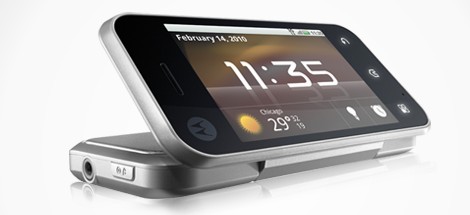
The Motorola Backflip is a Touchscreen Android mobile phone with Reverse flip keyboard and Rear directional touch-pad.The reverse flip design puts the Motorola Backflip in table top mode and transforms it into a hands-free video player,Music player,Digital picture frame or alarm clock.
It  also features MOTOBLUR that lets you stream your emails and social networks into one feed. And with a secure server as a backup, you’ll never really lose it. Bad news for Indian customer is that Motoblur is not there in Indian Motorola backfliip handset. (But I didn’t find any difficulties even without that.)
 

Its costs 14,255 INR and trust me its worthy for that.  I liked few features in it which are:

Motorola Backflip in action

Pros

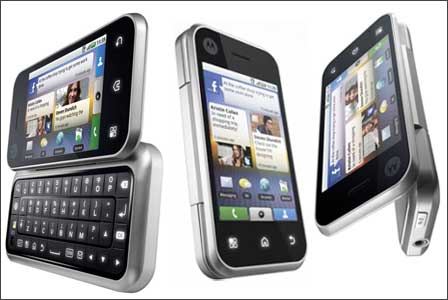
  • Rear backtrack pad is Motorola’s patent technology. It gives feel like you are using mini laptop
  • You can use the same 5 MP camera with autofocus and led flash, for front and rear purpose. It means while 3G Video calling , it will use 5 MP camera which is really amazing. Isn’t it?
  • Its finishing , Reverse QWERTY keypad (Scratch Resistant) makes it very sexy handset to keep it in your hand
  • Its having capacitive touchscreen.
  • It is using 5 desktop modes, which means you can use 5 different themes with different applications at the same time.
  • Its 3D navigation of Images and slideshow feature makes to feel like I am using Apple’s product
  • You can  keep it over table and can watch videos/movies just like you are watching in your system.
  • You can record video at 24fps of QVGA quality which is again a good thing at this price.
  • It has loudspeakers and 3.5 mm jack too for music lovers like my friend.
  • Google map, GoogleTalk, Facebook applications are already there.
  • Many other attractive & impressive  applications exist in this handset. We need to explore more and then revert back again to you.

Cons

  • When you use earphone, its sound quality is not so good as compared to Sony but who cares. Noting is perfect in this world!
  • Radio is not there. Again, I don’t care, because rarely I use this feature.
  • Motoblur is Motorola’s new technique to make smooth effect to UI navigation which is missing in Indian Version. (It should be in Indian version too)

Motorola backtrack touchpadIt’s a real good competitor for HTC wildfire, Xperia X10 Mini pro, Nokia N97 Mini, Nokia C6, Samasung Wave and many more handsets.

Hardware Specifications

  • Network    GSM 850 MHz / 900 MHz / 1800 MHz / 1900 MHz
  • UMTS    UMTS 850 MHz / UMTS 1900 MHz / UMTS 2100 MHz
  • Data Network    EDGE / UMTS / HSDPA 7.2 Mbit/s / HSUPA
  • 3G Network    a big Yessssssssssss
  • Smartphone    ofcourse Yes
  • Operating System    Android OS (2.1 upgradable upto 2.2)
  • Processor    Qualcomm MSM7201A, 528 MHz
  • RAM    256 MB
  • ROM    512 MB
  • Internal Memory    256 MB
  • Weight    4.69 oz / 133 g
  • Dimension    4.25″ x 2.09″ x 0.6″
  • 10.8 cm x 5.31 cm x 1.52 cm
  • Internal Display Screen    3.1-inch 262K Color TFT LCD Touch screen (320 x 480 pixels), little smaller huh
  • Touchscreen    Yes
  • Sensor    Yes. Accelerometer Sensor
  • External Display Screen    No
  • Battery Type    Lithium Ion 1380 mAh
  • Battery Life    Talk: 6 hours continuosly
  • Standby: 315 hours (13 days approx.)
  • QWERTY Keyboard    Yes. 20-key QWERTY Keyboard, super sleek design. You are gonna love it, when you will start using it.
  • Predictive Text Input    Yes. T9
  • Speakerphone    Yes
  • Expandable Memory Slot    Yes. microSD / microSDHC. Supports Up to 32GB
  • GPS System / GPS Navigation    Yes. A-GPS. Supports LBS

Email, Messaging, and Office Functionalities

  • Email    Yes. Supports POP3 / IMAP4 / SMTP
  • SMS    Yes
  • EMS    Yes
  • MMS    Yes
  • Internet Browsing / WAP    Yes. Full Internet Browser
  • Instant Messenger    Yes
  • Microsoft Office Mobile    No

Software and Games

  • Games    Yes
  • JAVA    Yes, Downloadable
  •   Alarm, Calendar, Calculator, TO-DO, Notes and many more

Phone Book

  • Multiple Numbers Per Contact    Yes
  • Picture ID    Yes
  • Ring ID    Yes

Digital Camera

  • Mega Pixel    5.0
  • Zoom    Yes (4x only)
  • Autofocus    Yes
  • White Balance Controls    Yes
  • Geo-targetting    Yes

Music and Audio

  • MP3 Music Player    Yes. Supports AAC, AAC+, AMR, eAAC+, MP3, WAV Music Files.
  • Playlist    Yes
  • Shuffle    Yes
  • Voice Memo & Voice Mail    Yes

Video and Camcorder

  • Video Player    Yes. Supports 3GP, H.263, H.264, MPEG4 Video Files.
  • Video Recorder    Yes. Records at QVGA (320 x 240) resolution, 24 fps (Frames Per Second)
  • Streaming Video    Yes

Connectivity

  • Bluetooth    Yes
  • Bluetooth Stereo Headset (A2DP)    Yes
  • Infrared    No
  • Wi-Fi (WLAN)    Yes. Supports 802.11b / 802.11g / 802.11i
  • USB    Yes. microUSB 2.0
  • HeadSet Jack (3.5mm)    Yes
  • Computer Synchronization     Yes