 Web hosting is considered to be one of the most significant services that offer space for the website owners to host their websites on the computer servers to make sure that they are connected to the internet all the time without any kind of disruption and interruptions.
The servers are said to be the most dominant computers that consist of large hard drives or a group of hard drives.
If you are a blogger or an internet marketer owning one or more websites, you are surely relying on this awesome piece of technology.
You need to remember that the web hosting space is rented only to people who intend to host their website on the internet for 24 hours a day and 7 days a week. Every single server has a special numerical internet protocol address which is known as IP address. The website address is going to help you to be reachable and will make it easy for your visitors to reach your website.
Different kinds of web hosting service
There are various kinds of web hosting and various packages are made available for you to pick the one that suits your website’s needs.
Some web hosting packages consist of scripts that permit
-
bulletin boards or forums like vbulletin, SMF,phpBB3 etc.
-
Wordpress,
-
Joomla,
-
Drupal,
-
e-Commerce Site,
-
Movable type
-
interactive functions and lots more.
Some professional web hosting services offer commercial packages that consist of a bundle of business tools. So you need to choose the package according to your website needs.
How to Choose
Whenever you decide on a web hosting service you need to choose the one that best suits your website’s prerequisites. There are web hosting companies that offer unlimited amounts of storage space and limited ones too. You need to decide on your budget and also decide on the amount of storage space your website demands. You don’t have to opt for unlimited storage space only because it is made available to you.
On the other hand, you need to make sure that the space you are opting for is not only adequate for the moment but it also permits you to possess some extra space when it becomes obligatory in future. For example, when your website gains more popularity than what you had imagined, or if you find out that you are in need of little more space, then you need to upgrade your storage space, provided your budget allows it.
Various Features to Consider
The up-time amount of any web hosting service becomes a crucial point to note since it will help you to select the best web hosting service for your business. You need to ensure that the web hosting company you choose possesses 99% up-time and if possible 99.5%. No particular web hosting company can guarantee you with 100% up-time since maintenance time have to be allotted separately.
The data transfer that your web hosting company offers is another important point to note since it matters a lot to both you and your visitors. If the web hosting company offers you with high traffic support then it becomes easy for your site visitors to load the site at a faster rate.
Technical support is perhaps one of the main significant things that any web hosting company can offer you. You should make sure that the web hosting company is capable of providing technical support to you 24/7. You should be able to evaluate the support you need and when you want to obtain the support you must not have to wait till there is actually someone available to assist you.
Cheap Web Hosting Service
You can always avail the cheapest website hosting service, however, you will not be guaranteed with the best service. You might even have to compromise with your network bandwidth or the technical support which will make you gain nothing out of what you had actually paid for. So when you opt to judge against any web hosting company and compare the prices of various companies you need to select the packages that provide the same features at the same cost.
At the same time you can opt for good quality web hosting services and use popular discount deals from yahoo or midphase.
Some web hosting companies will include tools to assist you in getting your web pages up and running. Such tools can benefit you and will save you more time when you start off with your website.
Some companies offer their services in the Microsoft platform and some in the Linux platform. You can find tools that are compatible with both these platforms and then decide on the best web hosting company.
If you want to save on web hosting, Jane explains how you can use discount deals for Yahoo Store in this article. A Midphase promo code is available in this link. Apart from being a reputable search engine, Yahoo designs tools to create a web site easily. Similarly, Midphase, a part of the UK2 Group, specializes in making web hosting affordable to all.
Image source: http://www.dreamweavertutorial.co.uk
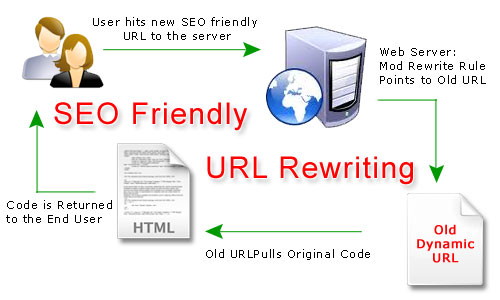 There isn’t a person who does not utilize search engine for some particular task or the other, which is due to the fact that they have improved the searching capabilities of a search. There are many aspects of SEO, which needs to be considered and carried out effectively to help a firm create a strong presence over the web. URL rewriting can be seen as one such important aspect of the SEO (search engine optimization), which is most of the times overlooked by many.

Visitor Rating: 5 Stars