Be friendly but use your brain while talking on Social networking sites

lets be frdHi friends, If you are using internet then you must be having accounts on Facebook or Orkut or Myspace etc. (may be in all :)) My question is: Why you joined social networking sites?

1. Just for fun,

2. To remain in touch with my friends and relatives,

3. To make new friends specially beautiful girls :D,

4. To remain updated about others

Let me guess in most cases it would case no. 2 or 3 (correct me if I am wrong). As far as you are safe at this site its ok even if you are addicted to it. But if you are sharing your social or personal information then be aware before talking even.
Bit Defender did survey on it and found more than 90% internet users share sensitive data within 2 hours of continuous talks over chat messenger or over Social sites.  According to Internet World Stats, people are spending increasingly more time online, with global Internet usage up by more than 390% between 2000 and 2009. Over this period of time, the popularity of social networks amplified as well.

They did survey by making a fake profile and sending friend request to more than 2000 users (male and female included age varying from 20-65 of 27 years mean age). After a week, the friendship request form proved very successful: out of the 2,000 requests sent by the test-profile, 1,872 were accepted.

A first analysis of the gathered datasets revealed that usually, on a social network, the first impression counts a lot: a very nice looking young woman will always attract a lot of friends. 94% of the 2,000-user experimental sample accepted to become friends with the test-profile.
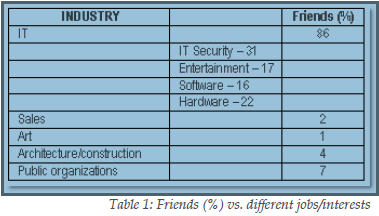
Surprisingly 86% of them were from IT field (isn’t it hilarious), and more interesting ,31 % of them were from IT Security field. An industry that has been stressing the risks of using social networking sites for many years. (This really surprised me) Most of them added because of display picture which was of a lovely girl.

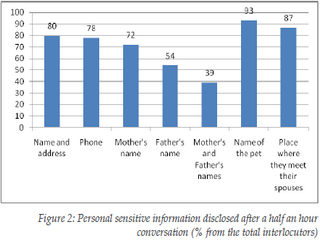
The worst thing with social networking site is, after having half an hour conversation with stranger they reveal many personal information like their parent’s names, address, spouse, children names (all these information can be use to crack passwords and in most of the cases it works).

They allow them to see their albums which may be copied for wrong purpose. In addition to that, after a 2 hour conversation, 73% revealed what appears to be confidential information from their work place, such as future strategies, plans, and unreleased technologies/software. The results of this study suggest not only that social network users accept unknown persons in their group just based on a nice profile photo, but also that they are willing to reveal personal, sensitive information after a short online conversation.

This means that social networks serve both as a meeting ground where people can present themselves and communicate, but also as a starting point for a virtual “friendship”, which brings people to divulge too much information because of the illusion of anonymity.
So, from the next time if someone sends you friend request or trying to talk to you over chat messenger, have patience do all investigations related to unknown profile (at least take help from Google) , if you feel O.K. then go on else reject it blindly. Never be too emotional over social sites and don’t reveal such things so easily. It may help them in social engineering and they may harm your system, your bank accounts, your reputation even you. See the images below for detailed analysis: frdship rateppl from diff jobpersonal info revealed Source: BitDefender

3 Easiest methods to make gmail your default Email Client

Love for GmailSometimes you don't need a bulky program just for sending an email like MS outlook, isn't it? And gmail lover would rather prefer sending any mail through their gmail account right? Sometimes you just need to send a website link, or just a screen-shot of  current web page  it really doesn't make much sense to start Outlook for these tiny things.

If you see any emailto: field, that will prompt you to open MS outlook by default which is annoying sometimes. (I really don't like). So if you click on that emailto: admin@aliencoders.org (say an example), it would rather shoot gmail instead of MS outlook. You can do this in three different easiest ways:

  1. Tweaking Firefox settings:

    • Click on  tools-> option
    • Click on Application tab
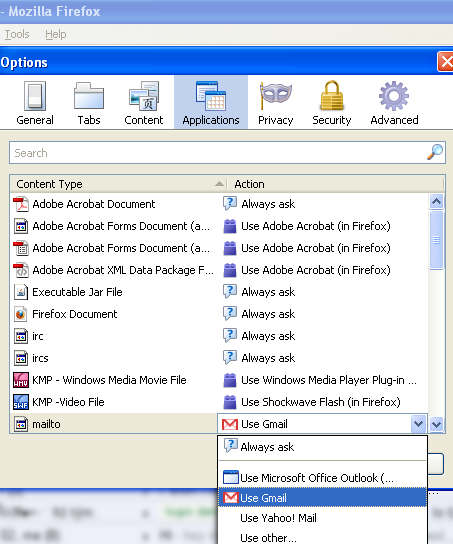
    • You will see content type and action column. Search for mailto content type and choose gmail from drop-down option against mailto column (you can choose yahoo mail or any other email client too)
    • I would prefer this method over any other methods, because there is no need to install any extra application.
    • It will work only if firefox is opened for sending mail
  2. Using Google-talk settings:

    • Double click on the Google Talk icon in the system tray(you need not to be logged in)
    • Click on the Settings link and go to general tab option
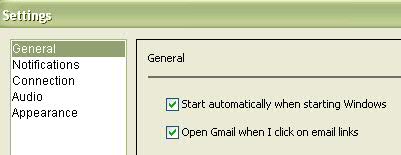
    • Now check the “Open Gmail when I click on email links” box in the Settings window.
    • Click “OK” and You are done hurray!
    • Many people use gtalk, so this is also fine and i would give it second preference
       
  3. Using Gmail notifier:

    • You need to have Gmail notifier installed in your system
    • Right click on its system tray icon
    • Select the Options menu and tick the box next to “Use Gmail for internet mailto: links”.
    • Select your favorite browser in the drop down menu and you are done now.
    • You may get error saying  “Cannot connect to your mailbox. and it always have an unnecessary pop-up to prompt whenever you try to connect gmail at startup.


    Personally i avoid installing unnecessary application, if that work will get accomplished by other easier way, isn't it. i would use Gmail notifier when i will not have any option (which will never happen unless and until Firefox or gtalk is there :P)

Firefox and Google Talk settings images:Gmail option in Firefox  Gtalk settings for gmail I hope you will surely like this. need your comments! Happy Alien browsing 🙂

Firefox tweak to bypass blocked sites

Firefox tweaks Hi folks!, Why to use any proxy server or any application when we can achieve the same thing just by tweaking firefox a little bit? Most of the people have account in facebook. People use to open it in an organization frequently. Second things that users wish to do is chat over yahoo or skype or gtalk or aol or jabber etc. Make Firefox to work for facebook:

  • Click on Tools->options
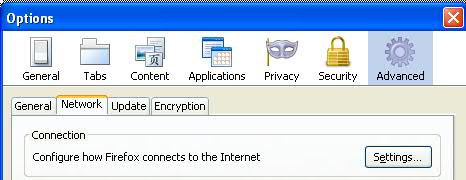
  • Click on advanced tab (you will see general, tabs, content….advanced at last)
  • Click on Network (second option after general)
  • Under connection click on setting button (a pop-up box will come out)
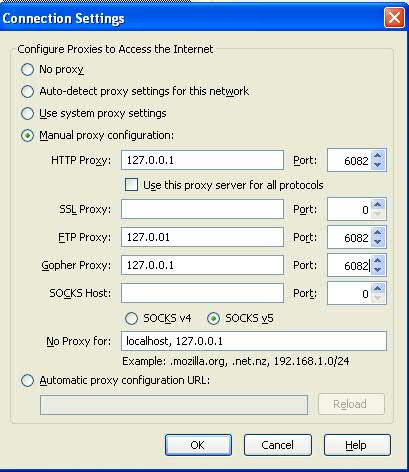
  • Check Manual proxy configuration radio button

    • Leave SSL and SOCKS host blank at  IP address and port no: 0
    • For the rest HTTP, FTP Gopher leave as it is being set by your organization

    You are done! Click on Ok and come out of all those options. Try to open facebook or meebo or chat based site (except orkut). If its saying access denied, try that link with https i.e. https://www.meebo.com or https://www.facebook.com Now it will open (working for me).

  • For chat option you can use https://www.meebo.com, https://www.imo.im(its having skype option too) or http://java2script.org (click on below shown chat icons)

Note:

  • You will not be able to open orkut anyhow.
  • If you gmail chat is disabled, then after setting your firefox option as above said, you will be able to chat through gmail.
  • You can't open youtube too

Check the images below: (click to view larger size) firefox proxy settingsProxy connection settings Let me how its works for you all? Happy Alien browsing !

Types of Network Hardware

computer network The label network hardware is generally given to any piece of equipment with the task of moving data. Common categories of network hardware include:
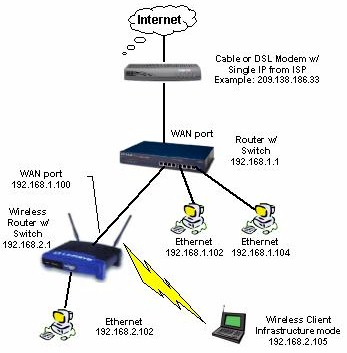

• Routers routers and switches

•Switches 

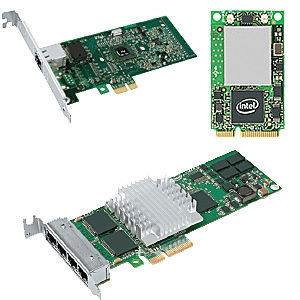
• Network Interface Cards

Routers A router is a network device with interfaces in multiple networks whose task is to copy packets from one network to another. Routers operate at Layer 3 of the OSI Model, the Network Layer. A router will utilize one or more routing protocols to create a routing table. The router will then use the information in its routing table to make intelligent decisions about what packets to copy to which interface. This process is known as routing.

Routers are available with many interface types, such as Ethernet and DSL. Wireless routers support wireless interfaces, such as 802.11 (Wi-Fi). Not all routers clearly fall into the category of network hardware. Routing software makes it possible to build a fully functional router out of a normal computer

Switches A switch is a network device with multiple ports in one network whose task is to copy frames from one port to another. Switches operate at Layer 2 of the OSI Model, the Data-Link Layer. A switch stores the MAC Address of every device which is connected to it. The switch will then evaluate every frame that passes through it. The switch will examine the destination MAC Address in each frame.

Based upon the destination MAC Address, the switch will then decide which port to copy the frame to. If the switch does not recognize the MAC Address, it will not know which port to copy the frame to. When that happens, the switch will broadcast the frame to all of its ports.

Before switches became available, devices called hubs were used. Hubs were less intelligent netword devices that always copied all frames to all ports. By only copying frames to the destination ports, switches utilize network bandwidth much more effectively than hubs did. Another piece of network hardware related to the switch is the Bridge. A Bridge is effectively a two-port switch. Because few users need a two-port switch, they are no longer manufactured. NIC

Network Interface Cards A network interface card is an expansion card which installs into a computer and enables that computer to physically connect to a local area network. The most common form of network interface card in current use is the Ethernet card. Other types of network interface cards include wireless network interface cards and Token Ring network interface cards. Other terms for network interface card include network adapter, network card and NIC. Network interface cards are becoming rare, as most motherboards now include built-in network interfaces.

Ultrasurf: to bypass blocked sites

Blocked site made frustrationIn most of the colleges or IT industries, you will observe that many sites will be blocked or even you will not be able to hat through online messenger. People use to open orkut, facebook, youtube but they will not be able to open it due to proxy enabled firewall in hat organization. I also got annoyed with such things and one day go to know, how to surpass all these barriers.

Why to use or test any proxy site to open such sites when there is a small application for it which does its job at its best. Yes! ultrasurf is there to solve your problem. (You can smile :)). More than 70% organizations usually ban  Social networking sites. Few companies allow with some term and conditions. Sometimes its good to not having access to such sites, else it may harm work culture and productivity. But it may be used for refreshment and kind of updates about friends, families, about other companies, sites etc.

For example: I wish to see updated news of few companies or sensex through twitter, then how i will be able to see it if they will block twitter at office?Why social sites are banned?

  • Its daily traffic is over 8000 GB and daily hits would be near around 800 million
  • Its free to use
  • Latest version is 9.97
  • Its so light, size is 500 Kb approx.
  • You just need to download it and double click on it whenever you wish to use automatic enabled proxy server to bypass your organization's proxies.
  • It requires IE only and works on almost any O.S. version of windows (like XP,Vista, win 7)

Add-on for Firefox

Firefox users need to download the firefox add-on besides the above software: Download Firefox add-on(.zip) (md5: 6ce151b1b0ef8430031a8e9a69f38806)

Installation:

Unzip it, drag the wjbutton_en.xpi file to firefox window. Click the "Install" button in the pop-up window to install it. The UltraSurf icon will show at the right-bottom of the firefox window. Close all firefox windows and re-open firefox. A grey-out UltraSurf icon means UltraSurf is disabled. A bright colorful icon means UltraSurf is enabled. Click it to enable/disable it. To change the settings or uninstall it, go to "tools/add-ons" of firefox. Start UltraSurf program and enable the firefox add-on, your internet activities thru Firefox will be under UltraSurf's protection.

Automatic upgrade

When UltraSurf software releases a new version, you will see a pop-up window telling you to download the latest version when you open the UltraSurf home page. I hope you will like it. Comment is needed! Happy Alien Blogging You tube access deniedUltrasurf v9.97

Ava Find: An alternate to windows search

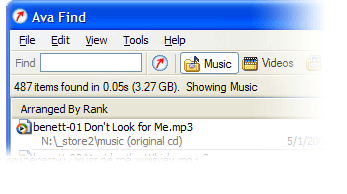
Ava FindHi friends, Have you ever noticed that searching any file on a clattered system is how tough through windows search mechanism? I feel irritated sometimes when windows search is on and on and after few minutes , saying that no match found. I have left even thinking that Windows is having such feature and i started using Ava Find 1.5. Its in my favorite application list now. Its fast searching features really amazed me. Some of its features are listed below:

  • Search without delay. (very very fast if its cached)
  • Searches accurately and will show you all the details you might want.
  • Scout Bot finds newly downloaded files automatically. You don’t even have to enter a search or have to refresh it again.
  • Browse Music/Videos/Programs etc folder at single click or you can select select all also.
  • Find documents you just saved: Suppose you forgot, where you have saved it. Not an issue at all if you have Ava Find. 🙂
  • Suppose you don’t the exact file name or folder name, no worries Ava Find does Advanced Name Search i.e. Match file names using * and ? wildcards.
  • Same right-click menu options are there for each file as it is in Windows Explorer.
  • Folders are shown with their sizes next to them. So, you need not to wait for windows properties to show their size.

Fair enough to use it freely or buy it. Ifs its Ava Find Pro then you can do network drive search also and if its free then you might not be able to do all right click stuffs too. You can use free version but after 30 days, it will disable few of the features that you may have in Pro. Its latest version is still 1.5 only Its of less than one MB in size. It costs 40 US Dollar approx. (can use trial version too.) You can download it from here Don’t forget to comment if you like this application.

Everything about cd command in UNIX

analysis of cd command.Hi Alien Coders….its not an alien thing to write about cd. Yeah cd(change directory) not CD(Compact Disc) 😛 . Either you are working on Windows or Unix flavors O.S, the most easiest and usual command is cd, correct?

cd means change directory (as everyone knows) and its more powerful in Unix rather than Windows i guess. Window is having only cd path_of_the_diretory or cd .. but in Unix or specifically in Linux cd command is having lots of options. Lets explore one by one:

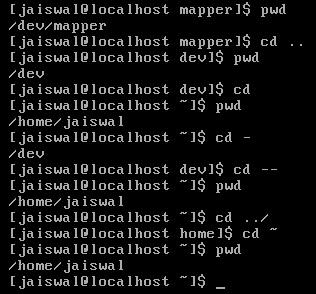
1. cd path_of_directory This command is used to enter into the directory whichever is specified either absolute or relative Ex: # cd /home/jaiswal/songs/audio/bollywood (absolute path) # cd  songs/audio/bollywood   (relative path when u r already at /home/jaiswal)

2. cd .. This command is used to move one step up form the current directory. If you are at /home/jaiswal/songs/audio/bollywood (keep it as a base of the examples) and want to move one directory up use cd .. Ex: # cd ..  (now current directory will be /home/jaiswal/songs/audio) # cd ../../../movies  (moved up three directories and entered into movies directory now i.e. /home/jaiswal/movies)

3. cd – This command comes very handy when you are working with files and one is at other directory and one is at another directory. For example: suppose one file is at /opt/bin/perl/codes and other is at /opt/bin/perl/modules/jaiswal/modules Now go to one directory using cd. Like cd /opt/bin/perl/codes then again type cd /opt/bin/perl/modules/jaiswal/modules and now use cd – You will be returned back to previous one which you used with cd. now use cd – as many time as you wish to switch over those two directories.

Ex:

# cd /opt/bin/perl/codes
# cd /opt/bin/perl/modules/jaiswal/modules
# cd - /opt/bin/perl/codes
# cd - /opt/bin/perl/modules/jaiswal/modules
Yes , you are right cd – is doing two work at a time.

1. Bringing back to previous used cd directory path and 2. also print the current directory path just like pwd

4. cd — or cd ~ or cd Yes all three commands will let you drive to user's home directory most probably /home/user_name like /home/jaiswal ex: #  cd — or cd ~ or cd (don't write all three commands all together just i wrote. use any one if at one time buddy.) Windows have no such option as far as i have tried (if it is there let me know ) # pwd /home/jaiswal # I hope you will like it although even you know all these commands, you will find rarely any article on this which will explain like this. What say?

Tool to get information about site: whois and whosip (for windows)

Hi friends, you might be using some whosip informationonline site to know the details about any ip address or website like ip-adress.com or whois.domaintools.com In Linux or Unix based O.S there is a utility call whois , if you are familiar with whois and wish to do the same operation in windows then you might find whois and whosip tools useful.

How to get work done on Windows:
Step 1: Download whois or whosip (or both ,depending upon your interest). These software will be in zip format.

Step 2:

  1. Make a folder anywhere in your PC, like C:/whois/
  2. go to that folder i.e. whois (here in example)
  3. extract any one of these or both (again on your interest)

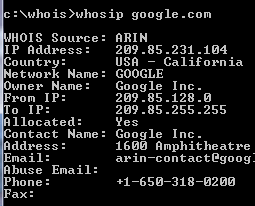
Step 3: open run command type cmd then go to c:/whois location and type whois domainname hostname(optional) or whosip domainname hostname (for summary) or whosip -r domainname (for detailed information)

Here domain name can be either website name or its IP address. Ex: whois google.com whosip google.com whosip -r google.com Note: the information that you will see through whois and whosip may differ What I observed from the output is whois <domain name> will give you the information about domain name whereas whosip <domain name> would give you the information about registrar where that domain name got registered etc. So, if you wish to know something about hostname use whois or if you wish to know where that domain name got registered and all then use whosip.


An alternative to winrar : 7-zip

compression softwareIn our day today life, we use at least one of the rar application  for sure. It may be used to compress your codes, files, movies, songs whatever it is.
Winrar seems bit popular in this area but it now freeware or open source application. And I get annoyed when I double click on any .rar files it open winrar application and says buy it or use trial version. Then I was trying to find better compression application than winrar and guess I got success in that.

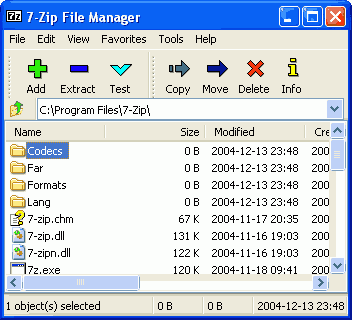
7-zip is the alternative to winrar or any compression application. It supports nearly all feasible format for your system. Its an open source software, so you can download it freely from  here (32 bit) and from here for 64 bit pc

  • It is of 1 MB size and supports near around 70 languages.
  • Its latest version is 9.13 in beta relaease and 4.65 under stable release
  • It supports under any windows platform like XP/Vista/ME/2000, hopefully it would work on 7 also
  • 7-Zip compresses to zip format 2-10% better than most of other zip compatible programs.
  • 7-Zip compresses to 7z format 30-70% better than to zip format

Compression ratio depends upon what you are  going to compress. Like if you are going to compress any .exe file then it will not compress much because its already compressed. Use it and revert back your feedback here.

Pidgin: Universal Chat software v2.6.6

Pidgin: Universal Chat SoftwareEvery time when you wish to chat with your friends and foes, you have to open separate chat software for that like msn, skype, yahoo, gtalk and so on. Why not to use only one software for all these stuffs.
Then I saw one site called meebo.com (its really a cool one, web based chat site). It allows you to login with your yahoo or gmail or skype etc ids. But if you are looking for a software that will provide you such facilities , then pidgin is there.

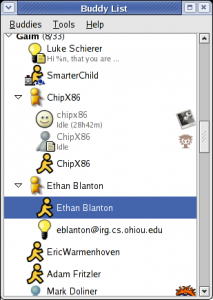
Pidgin (formerly named Gaim) is a multi-platform instant messaging client, based on a library named libpurple.

Libpurple has support for many commonly used instant messaging protocols, allowing the user to log into various different services from one application.  libpurple is intended to be the core of an IM program. When using libpurple, you'll basically be writing a UI for this core chunk of code. Pidgin is a GTK+ frontend to libpurple, and Adium (like pidgin but for Mac OS X) is a Cocoa frontend. Whatever be your chat program, whatever language you use, if you are going to connect with network, user dialogue box, user authentication in fancy manner; you have to use libpurple. It is being used by pidgin, meebo, EQO(for mobile users), Adium etc.


It’s an open source software and written in C and its plugins are written in C#, Python, Perl etc. Its file Size is 14.10 MB and latest Version is 2.6.6 Pidgin supports following chat networks:  AIM, ICQ, Google Talk, Jabber/XMPP, MSN Messenger, Yahoo!, Bonjour, Gadu-Gadu, IRC, Novell GroupWise Messenger, QQ, Lotus Sametime, SILC, SIMPLE, MXit, MySpaceIM, and Zephyr. It can support many more with plugins.

It  Supports many international and lots of regional languages too like Kannada, Gujarati  ,  Telugu, Punjabi, Marathi and Hindi (of course).  It supports almost all popular languages over the world. Whatever be your OS you can use it (Windows and Linux is common).

It became very popular  after 2007 and today millions of people use it worldwide. It supports all famous chat networks like

Shows all chat list

  • Bonjour
  • Gadu-Gadu
  • Google Talk
  • Groupwise
  • ICQ
  • IRC
  • MSN
  • MXit
  • MySpaceIM
  • QQ
  • SILC
  • SIMPLE
  • Sametime
  • XMPP
  • Yahoo!
  • AIM
  • Zephyr
  • Now Facebook chat also being supported through XMPP network.

But I found only one demerit in it, that is why I use it rarely. If you are logged in with your yahoo account , next time if you will login with your gmail account, it will show you your yahoo and gmail friend list together (imagine in case of yahoo, gmail, msn, aol: how long list you will be having). One more thing is that, if you are using it alone then its ok. If your friends also gets logged in through the same software then he/she will be able to see your whole friend list also (Isn’t it bad?). I hope in next version they will do something to this issue.