Making an application using n number of options of programming languages using various algorithms and concepts is not as tougher as to find out the […]
Tag: information security
NIST Cybersecurity Framework v1.0 – Key Takeaways
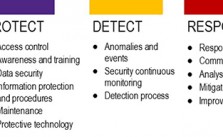
The NIST cyber security Framework is a risk-based approach to managing cyber security risk, and is composed of three parts: The Framework Core, the Framework […]
Beware of search engine ads: Social engineering in action
 Before proceeding further some common question to all readers.
- Which search engine do you use? Google, yahoo, Bing, Lycos etc?
- How many of you know about virus, worms, malware, spam, social engineering, session hi jacking etc.?
- How many times you clicked the link which led you to a known page but the web address is somewhat different?
- Have you ever been the victim of such things, like clicking on image or any link may lead spam installation by default into your system? Or one fake message will be spread to all you friends from your account? (I am sure more than 70% would lie in this category).
It shows that Social Engineering, an oldest but very sophisticated weapon is still active amongst us because of our callousness, lack of proper knowledge about internet activities and all. Recently there was news that Bing search ads are leading visitors to install malwares in their computers. Although Bing Search engine is not so popular and not having even 20% Google’s traffic but still it attracted cybercriminals to spread worms through it.
How it works?
- Whenever you search for anything say Fierfox, Flash, Torrent, Google chrome, any images, songs, mp3 free download (these are most common terms, :D).
- It will list millions of links and you will see few ads at the top of it, at the right side of the search result.
- If you click on them (not authenticated or say criminal’s provided link), it will lead you to look alike page and It will allow you to install that particular software also but it may attach its own infected programs with it which will silently get installed without your knowledge.
How we can avoid it?
- Don’t try to click on ads unless and until you think it is necessary and relevant for your specified work.
- Check the redirecting links before clicking. When you will hover on that good ad link, at the bottom of the browser, you will be able to see the link. If you find anything suspicious then don’t click on such links.
- If you have clicked by mistake then before installing or providing any crucial information, please check the web address. If that is the address which you were looking for then it’s ok else just close that website. Ex: You may see Facebook like page and it will allow you to login at Facebook also but its web address will not be https://www.facebook.com
- Instead of that it may http://www.facbook.com or http://www.fcebook.com or anything except the original one.
- Don’t trust your anti-virus blindly and be little cautious before doing any activities that may lead attcks to your system.
Ed Bott is an award-winning technology writer who reported this issue to Microsoft. And after 5 hours of reporting, Microsoft banned that particular hosting server and fixed the issue mostly.
A Microsoft spokesperson told him :
Microsoft has identified the malicious ad and took the appropriate action to remove it. The advertiser also can no longer post ads on Bing. In addition, the site’s URL is no longer available via adCenter. We remain vigilant in protecting consumers, advertisers and our network from fake online insertion orders and continue to directly work with our agency media partners to verify and confirm any suspicious orders.
P.S. :Most common way to spread spam is through most famous social networking sites. So Facebook, twitter, Google+ users, please be more conscious before clicking on any links and before installing any executable files.
Image source: http://www.reverbnation.com/
Uncategorized
A déjà vu with Information Security guru – Manu Zacharia
 This 21st century has its own saga. Internet users have grown exponentially and because of that online fraud, cyber crimes, hacking have become even more dangerous and vulnerable when compared to physical thefts. The thing is only firewall, anti-virus et can’t prevent all cyber incidents. We need awareness on Information Security.
He is the man who first started general awareness in India on Information security and we call it an “InfoSec day”. He is none other than that Manu Zacharia who is Information Security evangelist with more than sixteen years of professional experience.
I met him and got a chance to share few words face to face in 2008, when there was 3 days lecture cum workshop on Information Security and hacking by him. As I was the Event head so , I had to be always in touch with him. (It was an honor to meet him personally) and he is my security guru too.
His profile says lots of good things about him.
• Information Security evangelist with more than sixteen years of professional experience.
• Awarded the prestigious Microsoft Most Valuable Professional – MVP award for 2009 and 2010 in Enterprise Security stream and he is currently the only one in India (in Enterprise Security
stream) to hold this award as on Dec 2010.
• Also honored with the prestigious Asia Pacific Information Security Leadership Achievements
Award for 2010 from International Information Systems Security Certification Consortium –
(ISC)² under Senior Information Security Professional Category – the only Indian to receive the
award in 2010.
• Creator & Chief Architect of Matriux – Asia's first Security & Penetration Testing Operating
System – http://www.matriux.com
• Founder of Information Security Day Initiatives & c0c0n International Hacking and Information
Security Conference.
• Co-author of a book titled “Intrusion Alert – An Ethical Hackers Guide to Intrusion Detection
Systems".
• He is also associated with the Signal School, Centre for Defense Communication & Electronic
Warfare – premier professional training institution of the Indian Navy in Communications and
Information Warfare for their various cyber security courses.
• Speaker at various International and national security and technology conferences including
Microsoft Tech-Ed, ClubHack, Enterprise Information Security 2010 – Singapore, Security
Conference- Bangalore 2010, DevCon, etc.
• Associated with the Information Technology Specialization School, INS Valsura, Indian Navy for
their advance courses on Network Security and Ethical Hacking.
• Also an expert member of the Curriculum Review Committee of the Indira Gandhi National
Open University (IGNOU – The largest university in the world) M-Tech Program in Information Systems Security.
• Associated with the Centre for Development of Advanced Computing (C-DAC – the R&D
institution and scientific society of the Ministry of Communication & Information Technology,
Government of India), Advanced Computing Training School as a Guest Faculty for their various
Information Security, Ethical Hacking, Digital Forensics and Investigations modules.
• Extended his service to various state & central investigation agencies on various Cyber Forensics
Investigation issues, some of which attained national attention.
• President of Information Security Research Association (ISRA) and an active member of Data
Security Council of India, Bangalore Chapter.
• Closely associated with the academia on various projects and also an invited speaker to various
colleges like Indian Institute of Information Technology (IIIT), Allahabad and IMT Ghaziabad.
• Member of the Community Board of Advisors – EH-Net – Ethical Hacker Network Portal.
• Associated with Symbiosis Centre for Information Technology (SCIT) – the premier IT Business School – as a visiting faculty for various IT Security modules.
• MVP (Enterprise Security), ISLA-2010 (ISC)², C|EH, C|HFI, CCNA, MCP, AFCEH
Certified ISO 27001:2005 LA
• https://mvp.support.microsoft.com/profile/Manu
• http://www.flickr.com/photos/manuzacharia/show
He shared few words with us. (An exclusive interview with him )
1. You were Air Force personnel. What made you to jump into Information Security field?
[Manu Zacharia]: Security, whether it is digital security, or physical security, has always fascinated me. While serving in the Air Force, I got the opportunity to work with Networks and slowly started getting into the breaking and securing aspects of digital networks. To summarize, two reasons influenced me; first, it’s interesting and challenging, and secondly I saw it as a promising domain.
2. Currently you are developing Matriux? What is the idea behind it?
 [Manu Zacharia]: Matriux is more than an OS or Live Security Distribution. It is a combination of the following:
a. Live Security Distribution
b. Project k0d3 – Secure Programming and Coding
c. MSTF – Matriux Security Testing Framework
d. DVM – Damn Vulnerable Matriux
The idea was to promote information security to the professionals. We could realize that every body knows how to configure and server or write a program, but very few know how to configure or program securely. The second objective was to give a platform to the young generation who wants to get into information security.
3. You are always busy with conference, seminars and many more official works. How you manage personal and professional life?
[Manu Zacharia]: Time Management – (at least I try to manage)
4. In India, very few percentages of internet users are aware of cyber crime. What you wish to do to make them aware of it?
[Manu Zacharia]: We identified this as a major threat to the society and started an awareness campaign and dedicated one day for awareness. We named the day as Information Security Day – http://www.informationsecurityday.com where we try to promote information security awareness to various strata in the society, starting from Government offices to universities and schools to end users / home users.
5. Any role Model?
[Manu Zacharia]:My Dad,
My gf who taught me the first lessons of hacking and asked me to break into her boyfriends email ID, and
All the security Gurus ?
6. What one should do to excel in Information Security field?
[Manu Zacharia]:
Read, Read and Read
Commitment and Dedication, and
Think Logically (Common Sense)
7. Any suggestions to Indian youth?
[Manu Zacharia]:Security is always fascinating. But at the same time if not handled properly, can take you to the negative side. Always stick to the positive side, avoid getting into the negative side like defacing, flaming – try to spend those energy for positive things and you will see the success following you in every step you take.
Try to think and come out with innovative ideas – the world needs the young ideas.
8. Can you share your website or profile links where readers can follow you?
[Manu Zacharia]: I am going through a major rework on the web portals and blogs. However, the links are as follows:
Profile – https://mvp.support.microsoft.com/profile/Manu
Blog – http://manuzacharia.blogspot.com/
Forum and Portal – http://www.hackit.co
IRC – irc://irc.chat4all.org/#HackIT-Lobby
P.S. : There are three roads to spoil; women, gambling and hacking. The most pleasant is with women, the quickest is with gambling, but the surest is with hacking – c0c0n – get ready to get spoiled
Uncategorized
Cheque Fraud – Cheque Scams
 Cheque Fraud is one of the oldest types of financial crime. Even in our computer and internet technology era, many still prefer to pay by cheque or bankers draft. The cause of this is people do not trust computer technology and have misconceptions about online banking. This is understandable because of the fact most of these humans are computer illiterate and what is unknown to human mind causes fear or rejection. This fear, however, is totally obsolete for statistics show online banking is safer than cheques. To protect yourself from cheque fraud I will show you some guidelines of necessary precaution you should take before you receive or send a cheque. Than it is your responsibility to inspect and analyze the cheque.There are three main types of cheque fraud:
- Counterfeit Cheques These are not written or authorized by legitimate account holder. The existence of counterfeit cheques is supported by new technology. Thieves use printers, copiers and newest software to make clone cheques with high resemblance to the original. Many times these are hard to recognized as false even by experts.
- Stolen Cheques Cheque is not signed by account owner, rather stolen, usually out of the glove box of your car or your house. The signature is then forged and cheque used as pleased. Most of the time once you recognize your cheques are missing it is too late.
- Altered or Forged Cheques The Cheque is properly issued by the account holder but has been intercepted and the beneficiary or the amount of the item have been altered or new information added. To do so, sharp instruments and chemicals are used.
- Closed Account Bank accounts which are not used anymore or are closed, but cheques still exist for this particular account. If you don't destroy those cheques you can be a potential victim.
- New Account An identity is stolen or made up by false documents. If a fraudster has personal documents and some personal information, he can request a bank account in your name. Bankers, unknowingly accept these requests and open new accounts, giving scammers the opportunity to steal money from individuals or businesses in your name.
- Over payed Cheques A false cheque issued by your “business partner with a larger sum than required. The thief will then ask you if you can give him the change, making up different excuses why he transfered the over payed sum. The cheque is false and will be declined by the bank and you will end up losing the amount you gave him in exchange. Read Nigerian Fraud.
Some steps you can take to prevent your cheque being forged or information added after you wrote the cheque:
- Leave no gaps in your words
- Draw a Line after the name, amount and else where empty space was left
- Use full and correct names for all the information
- Prohibit transfer of cheque
- Never pre-sign cheques
- Don't leave your chequebook in the glove box of your vehicle, a large percentage of stolen cheque books are taken from cars
- If you close an account, destroy any remaining cheques relevant to that account
If receiving a cheque you can:
- Ask for an ID. Only take a drivers license, personal ID or passport, don't take other ID confirmations as they are relatively easier to fake. Even than be cautions, these documents can also be forged
- Compare the signature on the ID against the cheque signature
- Ask the person issuing the cheque to give you their home telephone number and maybe some sort of personal information, compare the number in your phone book and call the person at home
- Refuse cheques written with a pencil or cheque with signs of being altered
- Be wary of accepting cheques not signed in front of you or single cheques not being torn out of the cheque book. Thiefs often steal just one or two cheques to gain time before the owner of cheques suspects them missing
- Don't give change on cheques (if the cheque is false and you already gave change, you were scammed)
People who are cashing cheques end up losing funds when the banks realize the cheques are false. That's because people are held responsible for anything they deposit into their accounts. Source: http://www.bustathief.com
Uncategorized
IT Security Threats for 2011 by McAfee
2011 will be much like 2010 when it comes to IT security threats, only more so.
“We are seeing an escalating threat landscape in 2011,” says Dmitri Alperovitch, threat research vice president at McAfee Labs, which Tuesday issued its annual threat predictions for the coming year.
In an interview with Information Security Media Group, Alperovitch explains the challenges these threat present and how individuals and organizations can address them. The threats McAfee Labs identifies for 2011 are:
Internet Explorer is found vulnerable again
A vulnerability has been identified in Microsoft Internet Explorer, which could be exploited by remote attackers to take complete control of a vulnerable system. This issue is caused by a use-after-free error within the “mshtml.dll” library when processing a web page referencing a CSS (Cascading Style Sheets) file that includes various “@import” rules, which could allow remote attackers to execute arbitrary code via a specially crafted web page.
Secure your PC – Online Banking : Essential Security Measures
 Online banking is quite a handy way to keep track of your finances. You simply log on through your bank's website, and you can do things like set up standing orders, transfer money to people or other accounts, and order cheque books. Online banking also allows you to get financial deals that are just not on offer in the offline world. For convenience sake, you can't beat an online bank! However, this popularity of online banking has not gone unnoticed by the criminal fraternity. We'll show you some popular attacks on your money, and what you can do to prevent them.
Phishing
One of the most common ways that a criminal will attempt to part you with your money is through something known as Phishing. Phishing is pronounced FISH-ING. It's the Internet's equivalent of this popular sport. The fisherman is a criminal, the bait is usually an email that attempts to panic you into action, and the fish is you! The criminal will send out thousands of email using a list he got from a spammer. The email that is sent pretends to be from a bank. Let's call it the Wee Bank.
Most people the criminal sends the email to will not have an account with the Wee Bank. But some will. It's those few that he's after. In the email, you may be warned that your banking details need updating, and that it's essential that you act now to protect your account. They'll usually try to scare you into taking action. And there's always a link for you to click on. All you need to do is to click on the link and you'll be taken to a secure area where you can enter your details. If you click on any of these links, you'll be taken to a page that does indeed look like your bank's website. Except it's not.
One trick the criminal may use is to have an address that looks similar to your bank's.
Your real bank is this:  Take a closer look at the address bar, though, and you may see something like this:
  The address has been spoofed. The "w" is now "vv" – two V's and not one W. But some spoofed addresses are quite difficult to spot, and even fool the more experienced surfers. You need to look for other clues in your browser. One thing that all browsers will have are padlock icons. These are supposed to tell you that the site is using security measures. If you're using Internet Explorer 7, you'll see this to the right of the address bar:
Click on the padlock and you'll see information about the security certificate (the one in the image below is for 2checkout – a genuine source):  Click the link that says View Certificates, and you'll see something like this:
  Click the Details and
Certification Path tabs at the top. There should be plenty of details for you to view. Make sure the certificate has not expired. In the image above, the security certificate is from a good source, and it's still valid (at least, it was when this article was written). The Firefox browser has more visual clues than Internet Explorer. Notice the address bar from Firefox:  The address bar will turn yellow on a secure site, and the padlock is just to the left of the blue down arrow. Firefox also has another padlock. Look in the bottom left and you'll see this:
  Double click the padlocks and you'll see the security certificate. Notice the name of the website to the left of the padlock.
This one is from a legitimate source – 2checkout.com One more thing to note. The address for a secure site normally starts with https. If the "s" is missing, it's not a secure site! A last word of warning, however: these visual clues have been know to be spoofed by the criminals!
If in doubt, remember this: You bank will NEVER send you an email asking for your login details! If you receive such an email, forward it to your bank. And DON'T click on the link! The same is true for other secure websites that hold your money – PayPal never send you emails asking you to confirm your details!
For a more detailed look at Phishing, there's an excellent Wikipedia article here: Phishing Article The latest versions of Firefox and Internet Explorer have anti-Phishing measures built in. You should make sure these are turned on when accessing secure websites. (In Internet Explorer 7, click Tools > Phishing Filter > Check this Website.)
Password Protection
We've all got passwords. In fact we've all got LOTS of passwords! We've got so many that it's become increasingly difficult to keep track of them all. Banking passwords are no different. But the recommendation is to keep changing each one every few months or so! Because the whole password process is cumbersome, some people have one password for all of the sites on the internet that ask for them. This is something you should NEVER do! You need a different password for each site.
The reason is simple – if a criminal has your password for one website, he's got them for all your sites – he could clean you out! The problem is, how do you remember them all? One technique for password creation is to take letters and numbers from a favourite song, saying, or something that's special to you. For example, a favourite song of yours may be "happy birthday to you"!
To turn this into a password, take the initial letters of each word. You'd then have this: hbty Not very secure, but easy to remember. Let's complicate it a bit, by adding some capitals: HBty Slightly more secure. Let's add a number: HB2y Getting better. How about a non alpha-numeric character? HB_2y Adding non alpha-numeric character helps password security enormously. Let's make the password longer by singing Happy Birthday to Home and Learn: HB_2y_HBdhAL Now, not only is the password longer, but it has a mix of numbers, lowercase and uppercase letters, and non alpha-numeric character. This makes it more secure, and harder for criminals to guess. (The password is now "Happy Birthday to you. Happy Birthday dear Home and Learn".) A password like this is also easier for you to remember.
Passwords should never be just four characters long! The reason is that criminals may have password-cracking software. Using such software, short passwords can be cracked in no time at all. Use at least 8 characters. Duke University have a good page here that tells you how long it would take to crack a password of up to 8 characters. The amount of time needed to crack a password rises dramatically: Duke University Password Information
You and Your PC
You should never log in to your bank account using somebody else's computer. Simply because you have no idea what security measures they take, and whether or not the computer is infected. Internet cafes are also not somewhere you should be entering security information. In an internet cafe, all the data you enter is logged and saved by the owners (they may be forced to do this by law). You can never be sure that your data is safe from prying eyes. Also, what if you forget to log out properly?
The next person who uses the computer could see all of your details, and have access to your bank account! The only place you should be entering your bank details are from your own PC. Of course, you need to make sure that your own computer is safe from infection, and take sensible security measures when it comes to the emails you receive. Follow the suggesting on our site and your PC will be just that much more secure than it was yesterday! Source: http://www.homeandlearn.co.uk/BC/bcs5p7.html
Brief introduction on Computer Virus
 What is a Virus?
A virus is a self replicating code that produces its own code by attaching copies of itself into other executable codes and operates without the knowledge or desire of a computer user. Virus was discovered in early 1980s. Viruses require human activity such as booting a computer, executing an autorun on a CD, or opening an email attachment.
In day today life most of computers get attacked or infected with the viruses or worms. 4% attacks are due to viruses and worms are reported, rest are due to human error (53%) and so on. But that 53% also includes viruses and worms which get attached to our system due to human error. So, whatever be the matter , every computer user should at least know the basics of viruses and worms and how one can try to avoid such stuffs from the system.
There are three basic ways viruses propagate through the computer world: Master boot record: This is the original method of attack.. It works by attacking the master boot record of floppy disks or the hard drive. This was effective in the days when everyone passed around floppy disks.
- Document Virus: A slightly newer form of virus that relies on the user to execute the file.. Extensions, such as .com and .exe, are typically used. Some form of social engineering is normally used to get the user to execute the program. Techniques include renaming the program or trying to mask the .exe extension and make it appear as a graphic or .bmp.
- Macro Virus: The most modern type of virus began appearing in the 1990s. Macro viruses exploit scripting services installed on your computer. Most of you probably remember the I Love You virus, a prime example of a macro infector.
Viruses must place their payload somewhere so that they can overwrite a portion of the infected file. Most virus writers want to avoid detection for as long as possible One way the virus writer can accomplish this is to place the virus code either at the beginning or end of the infected file.
Prependers infect programs by placing their viral code at the beginning of the infected file. Appenders infect files by placing their code at the end of the infected file.. This leaves the file intact while the malicious code is added to the beginning or end of the file or append at both sides.
Component/Working of a Virus: 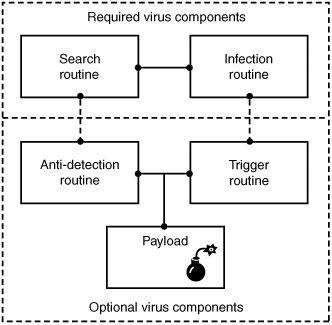 Viruses that can spread without human intervention are known as worms. ->The search routine is responsible for locating new files, disk space, or RAM to infect -> Infection Routine is responsible for copying the virus and attaching it to a suitable host. ->Trigger Routine: is to launch the pay-load at a given date and time. The trigger can be set to perform a given action at a given time.
Characteristics of Virus
- Virus resides in the memory and replicates itself.
- It does not reside in the memory after completing its task
- It may transform itself into other programs to hide its identity
Reason for the creation of Viruses:
- It may be created for research purpose
- May be to play pranks with friend and foes what we usually do J
- Someone may intentionally wish to harm others computer i.e. vandalism
- To gain over some companies content for financial or threat purpose i.e extortion
- To have an eye over the people say in a computer lab or on any product distribution i.e Spyware.
- For spreading threats and terrors at the people through internet by thefting others identity and misusing that and many more may be the reason.
Symptoms that computer get an attack
- System will work in unmannered way
- Process may take more time that its expected.
- floppy drive or disk drive suddenly get opened
- Hang up at the starting time.
- Computer name gets changed.
- Drive names get changed
- Firefox or other browsers not working properly
- Getting sudden restart or freezes fast on warning
- Other gets vulgar messages what you have not sent to them and so on.
Basic Difference between Virus and worm:
- A worm is a special kind of virus that can replicate itself and use memory, but don’t attach itself to other programs what a virus does.
- A worm spread through the infected network automatically but virus does not.
Types of Viruses:
What they infect
- Boot virus: infects disk boot sectors and records.
- File Virus: infects executables files in OS file system.
- Macro Virus: infects documents, data sheets etc like word, excel
- Network Virus: spread through email using command and protocols of computer network.
- Source Code Virus: override host codes by adding Trojan code in it
How they infect
- Parasitic Virus: attach itself to executable files and replicates itself
- Memory resident Virus: resides and do changes in main memory
- Stealth Virus: which can hide itself from anti-virus programs
- Polymorphic Virus: A virus that mutates and changes accordingly.
- Cavity Virus: overwrites a host file with constant null but with the same size and functionality
- Famous Viruses and Worms: I love you which is a win-32 email based worm
- Melissa Virus: it’s a Microsoft word macro virus
- JS.spth: It’s a JavaScript internet worm which spreads through e-mail, p2p networks etc.
- Klez virus: its an email attachment that automatically runs when viewed with MS word and uses its own SMTP engine to spread mail
- Slammer/Sapphire worm: it was the fastest worm in history which doubles itself within 9 seconds. others are top rated viruses in 2008 detnat, netsky, mytob , bagle, mywife, virut, Zafi, mydoom, Lovegate and bagz.
Always remember Prevention is better than cure so don’t accept strange files, don’t do double click on everything, try to check file’s extension and learn little bit batch file commands.
Install good antivirus(Nod32, AVG, McAfee, Bitdefender , Kaspersky etc.) and regulary scan your whole sytem, always try to check processes and all.
For more information check Wikipedia, howstuffsworks.com , Ec-council CEH guide and don’t forget to google to get latest news and stuffs related to this topic. This was just an introduction!