A vulnerability has been identified in Microsoft Internet Explorer, which could be exploited by remote attackers to take complete control of a vulnerable system. This issue is caused by a use-after-free error within the “mshtml.dll” library when processing a web page referencing a CSS (Cascading Style Sheets) file that includes various “@import” rules, which could allow remote attackers to execute arbitrary code via a specially crafted web page.
Tag: computer security
Secure your PC – Online Banking : Essential Security Measures
 Online banking is quite a handy way to keep track of your finances. You simply log on through your bank's website, and you can do things like set up standing orders, transfer money to people or other accounts, and order cheque books. Online banking also allows you to get financial deals that are just not on offer in the offline world. For convenience sake, you can't beat an online bank! However, this popularity of online banking has not gone unnoticed by the criminal fraternity. We'll show you some popular attacks on your money, and what you can do to prevent them.
Phishing
One of the most common ways that a criminal will attempt to part you with your money is through something known as Phishing. Phishing is pronounced FISH-ING. It's the Internet's equivalent of this popular sport. The fisherman is a criminal, the bait is usually an email that attempts to panic you into action, and the fish is you! The criminal will send out thousands of email using a list he got from a spammer. The email that is sent pretends to be from a bank. Let's call it the Wee Bank.
Most people the criminal sends the email to will not have an account with the Wee Bank. But some will. It's those few that he's after. In the email, you may be warned that your banking details need updating, and that it's essential that you act now to protect your account. They'll usually try to scare you into taking action. And there's always a link for you to click on. All you need to do is to click on the link and you'll be taken to a secure area where you can enter your details. If you click on any of these links, you'll be taken to a page that does indeed look like your bank's website. Except it's not.
One trick the criminal may use is to have an address that looks similar to your bank's.
Your real bank is this:  Take a closer look at the address bar, though, and you may see something like this:
  The address has been spoofed. The "w" is now "vv" – two V's and not one W. But some spoofed addresses are quite difficult to spot, and even fool the more experienced surfers. You need to look for other clues in your browser. One thing that all browsers will have are padlock icons. These are supposed to tell you that the site is using security measures. If you're using Internet Explorer 7, you'll see this to the right of the address bar:
Click on the padlock and you'll see information about the security certificate (the one in the image below is for 2checkout – a genuine source):  Click the link that says View Certificates, and you'll see something like this:
  Click the Details and
Certification Path tabs at the top. There should be plenty of details for you to view. Make sure the certificate has not expired. In the image above, the security certificate is from a good source, and it's still valid (at least, it was when this article was written). The Firefox browser has more visual clues than Internet Explorer. Notice the address bar from Firefox:  The address bar will turn yellow on a secure site, and the padlock is just to the left of the blue down arrow. Firefox also has another padlock. Look in the bottom left and you'll see this:
  Double click the padlocks and you'll see the security certificate. Notice the name of the website to the left of the padlock.
This one is from a legitimate source – 2checkout.com One more thing to note. The address for a secure site normally starts with https. If the "s" is missing, it's not a secure site! A last word of warning, however: these visual clues have been know to be spoofed by the criminals!
If in doubt, remember this: You bank will NEVER send you an email asking for your login details! If you receive such an email, forward it to your bank. And DON'T click on the link! The same is true for other secure websites that hold your money – PayPal never send you emails asking you to confirm your details!
For a more detailed look at Phishing, there's an excellent Wikipedia article here: Phishing Article The latest versions of Firefox and Internet Explorer have anti-Phishing measures built in. You should make sure these are turned on when accessing secure websites. (In Internet Explorer 7, click Tools > Phishing Filter > Check this Website.)
Password Protection
We've all got passwords. In fact we've all got LOTS of passwords! We've got so many that it's become increasingly difficult to keep track of them all. Banking passwords are no different. But the recommendation is to keep changing each one every few months or so! Because the whole password process is cumbersome, some people have one password for all of the sites on the internet that ask for them. This is something you should NEVER do! You need a different password for each site.
The reason is simple – if a criminal has your password for one website, he's got them for all your sites – he could clean you out! The problem is, how do you remember them all? One technique for password creation is to take letters and numbers from a favourite song, saying, or something that's special to you. For example, a favourite song of yours may be "happy birthday to you"!
To turn this into a password, take the initial letters of each word. You'd then have this: hbty Not very secure, but easy to remember. Let's complicate it a bit, by adding some capitals: HBty Slightly more secure. Let's add a number: HB2y Getting better. How about a non alpha-numeric character? HB_2y Adding non alpha-numeric character helps password security enormously. Let's make the password longer by singing Happy Birthday to Home and Learn: HB_2y_HBdhAL Now, not only is the password longer, but it has a mix of numbers, lowercase and uppercase letters, and non alpha-numeric character. This makes it more secure, and harder for criminals to guess. (The password is now "Happy Birthday to you. Happy Birthday dear Home and Learn".) A password like this is also easier for you to remember.
Passwords should never be just four characters long! The reason is that criminals may have password-cracking software. Using such software, short passwords can be cracked in no time at all. Use at least 8 characters. Duke University have a good page here that tells you how long it would take to crack a password of up to 8 characters. The amount of time needed to crack a password rises dramatically: Duke University Password Information
You and Your PC
You should never log in to your bank account using somebody else's computer. Simply because you have no idea what security measures they take, and whether or not the computer is infected. Internet cafes are also not somewhere you should be entering security information. In an internet cafe, all the data you enter is logged and saved by the owners (they may be forced to do this by law). You can never be sure that your data is safe from prying eyes. Also, what if you forget to log out properly?
The next person who uses the computer could see all of your details, and have access to your bank account! The only place you should be entering your bank details are from your own PC. Of course, you need to make sure that your own computer is safe from infection, and take sensible security measures when it comes to the emails you receive. Follow the suggesting on our site and your PC will be just that much more secure than it was yesterday! Source: http://www.homeandlearn.co.uk/BC/bcs5p7.html
Brief introduction on Computer Virus
 What is a Virus?
A virus is a self replicating code that produces its own code by attaching copies of itself into other executable codes and operates without the knowledge or desire of a computer user. Virus was discovered in early 1980s. Viruses require human activity such as booting a computer, executing an autorun on a CD, or opening an email attachment.
In day today life most of computers get attacked or infected with the viruses or worms. 4% attacks are due to viruses and worms are reported, rest are due to human error (53%) and so on. But that 53% also includes viruses and worms which get attached to our system due to human error. So, whatever be the matter , every computer user should at least know the basics of viruses and worms and how one can try to avoid such stuffs from the system.
There are three basic ways viruses propagate through the computer world: Master boot record: This is the original method of attack.. It works by attacking the master boot record of floppy disks or the hard drive. This was effective in the days when everyone passed around floppy disks.
- Document Virus: A slightly newer form of virus that relies on the user to execute the file.. Extensions, such as .com and .exe, are typically used. Some form of social engineering is normally used to get the user to execute the program. Techniques include renaming the program or trying to mask the .exe extension and make it appear as a graphic or .bmp.
- Macro Virus: The most modern type of virus began appearing in the 1990s. Macro viruses exploit scripting services installed on your computer. Most of you probably remember the I Love You virus, a prime example of a macro infector.
Viruses must place their payload somewhere so that they can overwrite a portion of the infected file. Most virus writers want to avoid detection for as long as possible One way the virus writer can accomplish this is to place the virus code either at the beginning or end of the infected file.
Prependers infect programs by placing their viral code at the beginning of the infected file. Appenders infect files by placing their code at the end of the infected file.. This leaves the file intact while the malicious code is added to the beginning or end of the file or append at both sides.
Component/Working of a Virus: 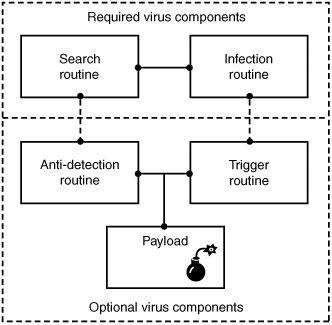 Viruses that can spread without human intervention are known as worms. ->The search routine is responsible for locating new files, disk space, or RAM to infect -> Infection Routine is responsible for copying the virus and attaching it to a suitable host. ->Trigger Routine: is to launch the pay-load at a given date and time. The trigger can be set to perform a given action at a given time.
Characteristics of Virus
- Virus resides in the memory and replicates itself.
- It does not reside in the memory after completing its task
- It may transform itself into other programs to hide its identity
Reason for the creation of Viruses:
- It may be created for research purpose
- May be to play pranks with friend and foes what we usually do J
- Someone may intentionally wish to harm others computer i.e. vandalism
- To gain over some companies content for financial or threat purpose i.e extortion
- To have an eye over the people say in a computer lab or on any product distribution i.e Spyware.
- For spreading threats and terrors at the people through internet by thefting others identity and misusing that and many more may be the reason.
Symptoms that computer get an attack
- System will work in unmannered way
- Process may take more time that its expected.
- floppy drive or disk drive suddenly get opened
- Hang up at the starting time.
- Computer name gets changed.
- Drive names get changed
- Firefox or other browsers not working properly
- Getting sudden restart or freezes fast on warning
- Other gets vulgar messages what you have not sent to them and so on.
Basic Difference between Virus and worm:
- A worm is a special kind of virus that can replicate itself and use memory, but don’t attach itself to other programs what a virus does.
- A worm spread through the infected network automatically but virus does not.
Types of Viruses:
What they infect
- Boot virus: infects disk boot sectors and records.
- File Virus: infects executables files in OS file system.
- Macro Virus: infects documents, data sheets etc like word, excel
- Network Virus: spread through email using command and protocols of computer network.
- Source Code Virus: override host codes by adding Trojan code in it
How they infect
- Parasitic Virus: attach itself to executable files and replicates itself
- Memory resident Virus: resides and do changes in main memory
- Stealth Virus: which can hide itself from anti-virus programs
- Polymorphic Virus: A virus that mutates and changes accordingly.
- Cavity Virus: overwrites a host file with constant null but with the same size and functionality
- Famous Viruses and Worms: I love you which is a win-32 email based worm
- Melissa Virus: it’s a Microsoft word macro virus
- JS.spth: It’s a JavaScript internet worm which spreads through e-mail, p2p networks etc.
- Klez virus: its an email attachment that automatically runs when viewed with MS word and uses its own SMTP engine to spread mail
- Slammer/Sapphire worm: it was the fastest worm in history which doubles itself within 9 seconds. others are top rated viruses in 2008 detnat, netsky, mytob , bagle, mywife, virut, Zafi, mydoom, Lovegate and bagz.
Always remember Prevention is better than cure so don’t accept strange files, don’t do double click on everything, try to check file’s extension and learn little bit batch file commands.
Install good antivirus(Nod32, AVG, McAfee, Bitdefender , Kaspersky etc.) and regulary scan your whole sytem, always try to check processes and all.
For more information check Wikipedia, howstuffsworks.com , Ec-council CEH guide and don’t forget to google to get latest news and stuffs related to this topic. This was just an introduction!