Alternative option for "reCpatcha from Google"

CAPTCHA stands for
Completely
Automated
Public
Turing test to tell
Computers and
Humans
Apart. (Yes, it really should be “CAPTTTCHA.” Don’t blame us; we’re not the ones who made up the term.) It’s a type of challenge test used on web sites to verify that the transaction taking place—the comment being posted, the account being registered, the vote being cast in a poll—is coming from a human and not a computer program. In addition to the examples mentioned above, CAPTCHA are used to block registration spam and contact form spam, to prevent scrapers from stealing email addresses and search bots from accessing private data, to deter dictionary password search attacks, and to preempt servers from getting bogged down by spam and malicious scripts.
Using Captcha may reduce spam but it would also reduce real comments/posts drastically 🙁
Something to notice:
CAPTCHA will reduce your spam but it won't eliminate it. People are paid to decipher those glyphs. Some sites use the glyph that was presented to them for their own site so some hapless visitor will decipher it
The biggest problem with spam on sites is if you use software that's in widespread use (eg phpBB). Your best bet for those is to make enough modifications to defeat out-of-the-box scripting. You may get targeted anyway but spamming is a high-volume low-success game. There's no real reason to target your site until it accounts for a significant amount of traffic.
The other thing worth mentioning is techniques that can be used to defeat scripted spam:
-
Use JavaScript to write critical content rather than including it as static HTML. That's a lot harder to deal with (but not impossible);
-
Rename and/or reorder key fields like username and password. For example, generate username and password form fields and store them as session variables so they only work for that user. That then requires the user to have visited the page with the login form (rather than scripting a form response that can be POSTed directly);
-
Obfuscate the form submission. Things like unobtrusive JavaScript that you can do in jQuery and similar frameworks make this pretty easy;
-
Include a CAPTCHA image and field box and then don't display them (display: none in CSS). You'll confuse parsers.
After doing some Google research (search :D) I found Mollom or Akismet a better solution than any others. But I will enlist them all according to my preference:
-
Mollom

-
Supports wordpress, drupal PHP,Python ,Perl
-
Twitter, The economist, Sony Music, Netlog uses Mollom
-
Next generation spam filtering technology … Ham or spam? – When new content is analyzed by Mollom's intelligent text-analysis filter, and Mollom is unsure whether it is ham or spam, it asks the user to answer a CAPTCHA challenge. This challenge-response procedure will never block human users, and it allows us to set very tight spam filters and prevent almost all spam from getting through
-
Eliminate spam moderation queues – By using a combination of advanced content analysis techniques and CAPTCHA challenges, Mollom is able to make sure more spam is captured without preventing legitimate users from posting on your site.
-
Accessible and secure CAPTCHAs – Mollom provides both image and audio CAPTCHA challenges, allowing the visually impaired to participate on your site. We serve our CAPTCHAs from a centralized server and constantly monitor CAPTCHA quality. If hackers solve them, they respond by immediately changing them.
-
Content quality assessment (BETA) – Mollom provides a quality score, based on automated content-analysis techniques, for each post sent to us for analysis. This makes it possible to ignore or reject low-quality or offensive comments, based on quality metrics that you control.
-
Multi-lingual – Mollom stops spam and unwanted content in all languages.
-
Extensive statistics – Mollom plays with an open hand. We show real-time statistics on our front page and maintain an individual statistics page for each site protected by Mollom.
-
Open API – Mollom is built on an open API, meaning that anyone may incorporate Mollom into their web applications. We provide open-source modules for several content-management systems, but you are free to adapt it for your own needs.
-
High-availability built in – The Mollom API uses client-side load balancing, making it reliable and practically infinitely scalable. Should one Mollom server fail or become overloaded, another Mollom server will automatically take over. The Mollom Plus subscription service is guaranteed to be available 99.9% of the time.
-
OpenID – Mollom fully supports OpenID, a decentralized, single sign-on system, which allows users to log in to different websites using only one set of credentials. Internally, Mollom builds a reputation for each of our users' OpenIDs, allowing the inheritance of user reputations across sites in the future.
-
Dedicated Mollom servers – We offer dedicated Mollom servers for enterprise users. These are virtual servers running dedicated, unlimited, full-featured instances of Mollom. You can rest assured that your server will never be hit by a DDoS attack, since it accepts connections only from your web server.
-
Secure authentication – Mollom uses a secure authentication scheme using a keyed-hash message authentication code instead of just a single access key. This protects your key. Hackers cannot hijack your account or impersonate you.
-
Retain spam instead of discarding it – Not all of our users are comfortable with the idea of Mollom discarding spam without the possibility of manual review (no matter how spammy the message appears to be). We've solved this in a simple way: by allowing spam comments to be retained in your site's moderation queue, which can then be reviewed periodically by moderators or administrators. Note that depending on the capabilities of your CMS, this option may not be available in every Mollom client package.
-
Better protection for user registration forms – To help combat user registration spam, some of our Mollom clients now support text analysis on custom, additional fields that may be required for registration, like a "Bio" or "About me" section.
-
Hidden honeypots – In our Drupal Mollom module, we've added a basic honeypot to all forms protected by Mollom, through the use of a hidden field, a common way to trick spam bots into revealing themselves. This significantly reduces the number of spam bots attempting to game your web forms.
-
Akismet

I was using Akismet for my wordpress blogs and found it very effective. It was free few years back but now it has some pricing schemes but it is worthy to use.
Check its planning scheme:
https://akismet.com/signup/
To check which plugins and libraries this app supports:
http://akismet.com/development/
It has almost all the features that mollom has except
-
Hidden honeypots
-
Content quality assessment
-
Eliminate spam automatically and allow legitimate users to type without facing captcha which I really support
We may go for Image captcha for following reasons:
-
Images are more intuitive than Words
-
Images are harder for machines to crack
-
Clicking/Touching is quicker than typing
-
Are you a Human (Playthru) -> complete free

As name suggests, it will check if you are a real human being or spam. Though it will not ensure 100% spam protection which no app does but It’s good, easy and fun to use & implement. Users will like too 😀
Please check the demo, you will smile for sure:
http://areyouahuman.com/demo/
It works with HTML5, iPhone, Android, Wordpress, Drupal plugins and PHP, Perl, Ruby, Python, .NET libraries. Here is the link:
http://portal.areyouahuman.com/installation
-
Picatcha (Image Captcha)

Picatcha is an image-based CAPTCHA with the goal of making it easy for humans to read but harder for bots to crack. We can try this too. Pricing scheme seems nominal too. Free, $5 and $10 per month schemes.
Check its comparison with text based captcha here:
http://picatcha.com/captcha/
Picatcha related documents:
http://picatcha.com/api/
-
Confident Captcha

This is also image based captcha solution implemented as an alternative to text captcha or reCaptcha mainly. There is nothing much to explain in it. Demo itself explains everything.
Confident CAPTCHA™ is a clickable
, picture CAPTCHA that stops spam and bots on websites by asking visitors to click on specific pictures.
Pricing schemes not mentioned here. But we can do a free trial experiment on it 😀
Why to use:
-
Stops spam and bots on blogs, web forms, account registrations, ticketing sites and more
-
Ends user frustration
-
Reduces website abandonment
-
Increases conversion rates
-
Branding and advertising opportunities
-
Ideal for mobile devices including Smartphone and tablets
Deployment Options
-
Plugins available for PHP, Java, ASP.NET, Python,Wordpress, Drupal and Joomla
-
Software as a Service (SaaS)
-
A virtual appliance
-
White labeled as a component within other enterprise solutions


 In most of the colleges or IT industries, you will observe that many sites will be blocked or even you will not be able to hat through online messenger. People use to open orkut, facebook, youtube but they will not be able to open it due to proxy enabled firewall in hat organization. I also got annoyed with such things and one day go to know, how to surpass all these barriers.


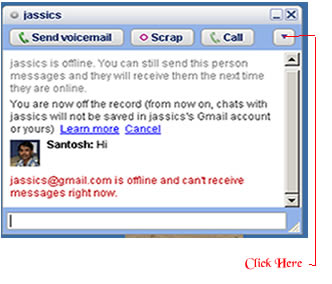 There is simple trick to find out Invisible user. The Gmail Chat application that is present on the left pane of the site allows users to appear 'Invisible' to their contact. For this , You will need the 'Google Talk' desktop application. One you have logged on to your account, follow these steps to determine which of your contacts is invisible :
Visitor Rating: 5 Stars
Visitor Rating: 1 Stars
Visitor Rating: 5 Stars