How to make effective media sharing in home through broadband connection

Media Sharing In Your Home through Your Broadband Internet Connection – How to Make It More Effective
 
One of the concerns of people who perform different activities online like games, video streaming, VoIP, etc. is the bandwidth. Having a continuous internet service whether through expensive plans or cheap broadband, can enable you to perform these internet related activities, but there are ways where an internet user can do these with utmost convenience, depending on priority. This is with a downloadable custom Firmware, DD-WRT. Modifying the settings may take some time but if this is the trade-off for a better performance of your internet activities, then it should be worth it.

Humor for Coding Geeks

Humor for Coding Geeks
Humor for GeeksIn the serious business of coding, sometimes it is difficult to break out of the technology mindset. Thankfully, there are a few coders out there with a sense of humor. Those coders have created industry specific comics that are sure to tickle your funny bone. Here are five great comic strips for the coding and technology geeks of the world.
 

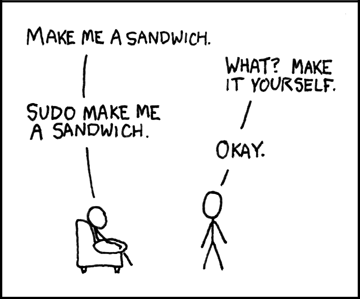
  1. Xkcd.com–Basic stick figures and simple black and white doesn’t detract from the humor in this great comic strip series. Updated every Monday, Wednesday and Friday, xkcd is an amalgamation of computer, physics, math, and simple nerd humor. 
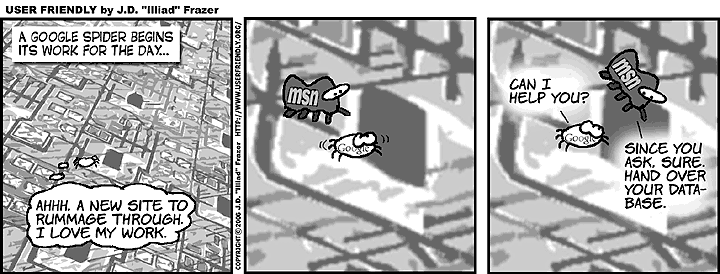
  1. UserFriendly.org – A compilation of coding, software, and general tech humor, UserFriendly is a great place to waste time, since 1997.
 Humor for Geeks
  1. PCWeenies.com–Another great comic strip for I.T, software and hardware engineers, and computer geeks. A new comic is posted every Monday, Wednesday and Friday. Color is great on this strip!
 
 
Humor for Geeks


  1. BugBash.net – A great color comic about managing technology, the business of technology, and all the odd characters forced to work together to build the software, networks, Web sites and cell phones that connect us to each other with increasing and sometimes terrifying speed. Updated every Monday.
Humor for Geeks
 
  1. JoyofTech.com – The Joy of Tech is a comic about technology and pop culture, created by Nitrozac and Snaggy, and updated three times a week. They like to feature the people and events that are making today's tech news. They've been making comics on the web since 1999.
    Humor for Geeks
 
 
Author Bio

Melanie Slaugh writes extensively for internet service providers and also topics related to that. She provides the information to consumer on the need to choose the right Internet package for them. She can be reached at slaugh.slaugh907@gmail.com

How to transfer the domain name easily

How to tranfer domain nameHow to transfer the domain from one hosting provider or registrar to other
It’s always important to host your website to a reliable web hosting service provider. But sometimes due to lack of knowledge or much experience on these things we register our domain and signup for the hosting plans. Although all renowned hosting providers are doing great job but I preferably choose either blueshost.com or godaddy.com

I had few issues with godaddy.com, that’s why I postponed the plan to host my domain there and finally chose bluehost.com as I was using it from last 2 years without any hassle and Customer Support Service is awesome. I liked online chatting also 😉

These simple steps to transfer your domain from one hosting service provider to another or from one registrar to another will work for any such situation for any service provider. (Few things may change though)

Let’s start step by step to transfer domain from one registrar or one hosting provider to another
Step 1
Make sure you have access to your present account and the domain name that you wish to transfer is unlocked. If not then either go to your admin panel (cpanel usually) and under domain section you will see domain manager icon/link. Click on that and then you will see unlock domain option.

If you are not able to figure out how to unlock the domain name and how to see/change EPP(Auth) code which you would be the basic step to transfer your domain name successfully. Contact the current registrar or the hosting provider to unlock the domain and to provide EPP or authorization code.

Step 2
I assume you are done with Step 1 and your domain is unlocked and you have EPP code with you. Now make sure your whois database information is upto date and turn off the privacy domain if it’s turn on else leave it.
This step is required because your new registrar will send the mail to the email id that appears in whois database for that domain name.

Step 3
Now either you will register the domain and host too with the same client or registrar may be different from the hosting provider. But I would suggest try to host your domain from whom you registered. For example: Blue Host Inc is a hosting provider and you can register the domain name from this company too. Its registrar is FastDomain Inc. So, choose hosting provider carefully and do the needful.

This step is required to make transferring easier. Once you register and have account with a new hosting provider and your account is verified there. If you are new to that hosting provider it may take 48 hours to get verified or it may take just few hours (for me it took 6 hours approx.)

Step 4
It is highly recommended that pointing the name servers to your new hosting provider before initiating a registration transfer because transfers can take 3-10 days to complete. During this time the name servers cannot be modified. If you point the name servers to it before starting a transfer, your domain will be pointed to it (bulehost DNS in my case) during the duration of the transfer and your site will show what is on Bluehost's servers.

Go to old account (I mean the existing account i.e. old one) and point the name server to point to your newly registered web hosting DNS. In my case it was bluehost, so
I updated Bluehost nameservers as:

  • ns1.bluehost.com (Primary Server Hostname)
  • ns2.bluehost.com (Secondary Server Hostname)
Once you have made this change, allow 24-48 hours for the changes to update across DNS resolvers worldwide, and your domain will be pointed to Bluehost’s name servers.

Step 5
Now you can login to your newly registered account’s dashboard. (For me it was bluehost cPanel) and click on the domain manager under the domain section.
Then Select the domain that you wish to transfer. (One can have as many domains linked with one account as possible). Then you will fugure out that there will be a link/icon to “Tranfer this domain to your account” (for me it showed aliencoders.org)

Read the information carefully and provide the EPP code that you got from your older account and click on continue.

Step 6
Now you will get email on the same email id that you have updated in your old account which will contain the verification code without which you will not be able to proceed.
So, if you don’t have access to the provided email address, contact the current registrar to update the WHOIS contact information. It will take hardly few minutes if everything is fine). I got within 10 minutes.
 
Step 7
I assume you got the confirmation code that I stated at step 6 and now use that code as the second verification code required by new registrar and click on continue button.
And update nameservers if required, and other option like renewal scheme, contact information, privacy option. Then agree to all terms and click on Add transfer/start transfer process.

Now your old registrar will contact you and will mail you to confirm the transfer. It would take 2-3 days to get mail from old registrar, so be patient. Then respond accordingly.
Note: These are a few points to keep in mind while transferring the domain name registration.

  • The transfer process takes 3-10 days once initiated. Ensure the domain name will not expire in this time frame to avoid potential problems with the transfer. If recently renewed, make sure it is at least 30 days after the renewal date to ensure you do not lose the additional time added with the current registrar.
  • When transferring a domain to bluehost, ICANN requires an additional year is added to the domain's current expiration date. The cost for this is $11.95 per domain. If your account has an available "Free Domain" credit, it will automatically be applied during the checkout process.
  • ICANN policy does not allow a domain name to be transferred from a registrar within 60 days of the date or registration or renewal.
  • If you would like to start hosting the domain with bluehost within 24-48 hours rather than waiting to complete registry transfer, contact the current registrar before starting the transfer and modify the DNS to ns1.bluehost.com and ns2.bluehost.com. Once the transfer is initiated, no change to the DNS can be made until the transfer is either canceled or has completed.  (I did so and it worked perfectly for me)
Source: Blue Host Inc (Last four points mainly) and this article is based on bluehost process because I transferred here only.
 
 Image source:
http://domainnames.nikenya.com

Chrome browser for the Android platform

Chrome browser for AdnroidChrome browser for the Android platform

The Google Chrome Browser for the Android has been on the calling cards for a long time now; and now, it has finally arrived. The launch included all tablets running the Ice cream Sandwich software. For the Smartphone, a separate beta version was showcased.

Therefore, as of now, there won’t be many people who can benefit from the browser app. The Google Chrome Browser lets you double-up with the desktop version and keep your mobile device synchronized, so that you don’t miss out on anything, while on the move.

All bookmarks and saved tabs would be transferred to your mobile device via a chrome account. The new features include better looks, superior functionality, better zooming-in options and a re-imagined user interface.

In my opinion, the Google Chrome Browser is not an ‘amazing’ app in its entirely. But then, I would agree on the point, that the way tabs open up on the screen and the way they are positioned, is pretty nifty. Google says, this new feature is to make the user’s experience more comfortable while the user flips through the tabs ‘like a pack of cards’. Well, I do appreciate this feature; but other than this, there isn’t anything new.

Maybe because a few months ago, the Google Chrome to Phone app had the same idea and had worked out in an amazing way. The Google Chrome Browser is just an extension of this idea. Moreover, the Google Chrome to Phone app had a Firefox extension too, which meant anyone using Chrome or Firefox would be able to use the software to keep the mobile device up to date.

Now, let’s not go into that debate and concentrate on the usability of the new Google Chrome Browser app for the Android.

The Pros:

  • Extremely useful and convenient (if you are an avid Google Chrome user)
  • Improved graphical user interface
  • Tabs are redesigned to make your usage more comfortable
  • Use gestures to flip through tabs
  • Apps like YouTube, Google Maps, and other features are integrated.
  • Send YouTube videos and Play it via the YouTube player
  • Send webpages automatically from an open web browser
  • Sync your phone with all the content
  • Copy text from clipboard and send it over to a message box or untitled document
  • Copy number and send it to the dialer

The Cons:

  • Only the beta version is available for Smartphone now
  • Only available for tablets running Android version 4.0-Ice cream Sandwich
  • You need a chrome account to access all its features
  • Stability issues for Smartphone (as it’s a beta version)
  • Less accessibility, as of now

The Google browser is useful in very many ways. The synchronizing features of the app are superb and you would truly feel like living a dream; with all that data getting transferred to your phone with a simple click!

Nevertheless, the new Google Chrome Browser has a lot of potential and can prove to be an effective tool in business communications, if more and more people can gain access to it. Otherwise, the software will have only a niche number of users and, will die eventually.

About the author: Margaret is a blogger by profession. She loves writing on environment and technology. Beside this she is fond of books. She recently bought an  audi a9. These days she is busy in writing an article on bonhams.

Social media and SEO go hand-in-hand

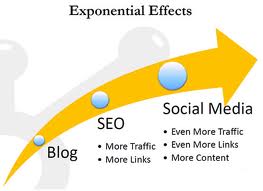
SEO and social mediaLast 2-3 years have marked a unanimous growth of both SEO and social media websites. This rise should have, and ultimately has, sparked the debate on the ‘better option’. When it comes to the question, for online businesses, on which to rely more; SEO marketing or social media websites, they are perplexed.

Where as some experts are of the view that SEO is dead and Facebook and Twitter will write new chapters in online marketing there are people, who can prove that just top rank in Google is still not the crown. After long discussions what was drafted was that both the giant technologies need to go hand in hand where getting biased towards one can harm you badly.

Facebook’s fan page or twitter or FourSquare’s ‘check in’, which are considered to be the new age marketing tools might let people know about the brand you are trying to promote but still 80% people simply Google the product before buying them. This is the moment when you require SEO support to top the Google list. We need to differentiate between the Facebook search and Google search. Even if you find a company’s page in Facebook you still check Google ranking or leave that, you will still goggle to find more about the company.

When people ‘like’ the product on Facebook what does it actually do? Or how does it help in terms on online marketing. It simple brings the product in Google’s watch list. Here we are back to square one; Google. And that is what can be achieved when the website is strict on SEO. Just winning the race of ‘likes’ will not help until you have strong back up support of the website content in terms of search engine optimization.

Undoubtedly just stuffing the website with keyword content is not a good plan either. What penultimate preference is optimization and ultimately is traffic diversion. Businesses just cannot rely on fan following because ‘liking’ is not buying. You like what your friends do but that does not happen when you buy, you have a choice.

SEO, as is normally considered, is a medium to top Google search list; has one more work. SEO enabled website has sensible content. Think of the situation where daily hundred people divert from Facebook to your website but the text in it is crap! When they look to fill forms they have 10 steps to go through. That is bound to cut the conversions.

SEO is not dead and at this age should work compositely with social media websites. If you are business holder, you must take good hold of media websites but simultaneously your website should come up with SEO content not just keywords and links. Take care when traffic comes to you, you can handle it.

That means when people look into your websites or fill forms the process should be SEO filtered. The reflection that whey saw in social media website should be maintained when it comes to actual realization of the website; SEO and social media websites should go hand in hand.

About the author: Margaret is a blogger by profession. She loves writing on health and style. Beside this she is fond of books. She recently bought  Home remedies. These days she is busy in writing an article on Black Pearl Earrings.

Image source: techbucket.org

Lets talk about the Cloud ..

This writeup is an attempt to throw some light on the concept of cloud computing , which is turning out to be quite a buzzword these days ..

You all remember the matrix movie .. don't you ?? lets run our imagination wild and travel with Mr Reeves for a while …

Remember that scene where Mr Reeves walks into a place swarming with security guards wearing  a trench coat and those stylish glasses .. He is in a situation where he needs to get through that maze of security systems and people armed with weapons .. unfortunately his charms , intelligence or super-natural powers don't work and his only respite is to use brute force to break through .. so what next ?

No Flash for Chrome on Android: Adobe


No flash for chrome in AndroidAdobe flash player, the popular plug-in used for online gaming, video streaming and sharing and photo editing will not work for the chrome browser on your android phone. Google chrome the web-browser available for desktops and laptops is now available on a tablet or a smartphone, but there is a catch to it. Chrome will not support adobe flash player.


What is Chrome on Android

Google has finally launched the speedy and easy-to-use browser chrome for smartphones and tablets. However, it is still in the beta stage, which means it is still on a test run. You can download chrome from the android market free.
However, it will only work for android version 4.0, or the ‘Ice Cream Sandwich’ phone. You will be able to access all your chrome settings, browse at high speeds and synchronize your phone and desktop.


What was the last version of Flash Player for Android phones

The last version for flash player in android phones was released in December 2011. After version 11.1, adobe has decided to stop developing newer versions as the software has reportedly not been working on platforms other than android.


Why has adobe abandoned developing flash for mobile devices

That flash will no longer be available on android was confirmed by adobe early in February 2012. Adobe now wants to concentrate on developing HTML5, which it thinks will gradually replace the flash experience.

However, flash will continue to be available for default browser in android. They are working on programs that will help a smooth transition from flash to HTML5. Apple has already refused to allow adobe on iOS, that is, on devices like ipad, iphone and ipod.

They felt that flash was redundant and was not performing well on their operating system. The company also complained that it was insecure and slow, draining the device battery quickly. They are keener on using native applications for apple products.


What is HTML5?
HTML5 is a language for structuring and presenting content on the internet. It comes with many syntactical features. These are crafted which to handle graphic and media content, without the use of an application programming interfaces (APIs).

However, this language is still being continually upgraded and modified. Yet, it has already gained much success in a wide range of tablets and smart phones.


How is chrome on android different from its default browse

Chrome on android is still in its beta version. It is also available to a limited range of smartphones, specifically, those which run on the latest version of android. The latest version of android is popularly known as the Ice Cream Sandwich, it is the 4.0 version.

Google claims to provide the same speed and simplicity of the chrome browser on your smartphone as you have experienced on your desktop. The default browser had not been supporting HTML5. Although both default browser and chrome are webkit derived, the former lacks in browsing speed and hardware acceleration.


What do experts think of this move by Google

In 2010, apple rejected adobe from its operating system. Google has followed suit in 2012. Microsoft has also already declared that, by next year, it will not allow the flash plug-in to install in version 10 of its internet explorer in windows 8.

Experts see this move as an action to fall into the trend of giving up flash for faster browsers. They have also predicted that the use of flash will eventually stop even on desktops. Soon, the experts feel, HTML5 and similar applications will take over the web experience, eliminating the flash player.

About the author: Margaret is a blogger by profession. She loves writing on environment and technology. Beside this she is fond of books. She recently bought  eboard. These days she is busy in writing an article on steam support.
The importance of URL rewriting

Introductory facts on URL rewriting

url rewriting fundamentalsThere isn’t a person who does not utilize search engine for some particular task or the other, which is due to the fact that they have improved the searching capabilities of a search. There are many aspects of SEO, which needs to be considered and carried out effectively to help a firm create a strong presence over the web. URL rewriting can be seen as one such important aspect of the SEO (search engine optimization), which is most of the times overlooked by many.

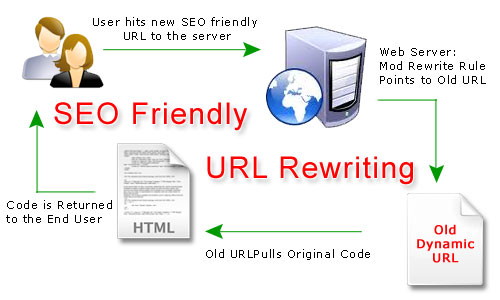
The term URL rewriting is a very broad term, where it includes something known as a rewrite engine, which aids in the modification of the way a URL is displayed. The technique of URL rewriting generally aims to create more SEO friendly and static URLs from the dynamic ones, so that they are more searchable and readable.

The benefits and the aspects for using URL rewriting

It is extremely important that URLs make sense and give an idea about the page it refers to (the page being displayed), as well as being easy for the search engines to comprehend.  URL rewriting does not show the inner workings and statistics behind a website’s address to the user, preventing them from seeing any query strings, which does not prove to be beneficial to the site.

This process is not only useful for those viewing or reading it, but also helps in the security aspect of the site by preventing hacking  or access to malicious users to a great extent.  It aims for the creation of a keyword rich URL, which means including the keyword into the URL text, that would help effectively in the SEO process.  This helps ensure that the site being developed is already optimized to an extent before even its launch adding to its success.

The URLS created also tend to hide the inline linking, which most of the time appears to waste a lot of bandwidth.   Moreover, the same URL can be continued to be used, even if there is a change in the primitive technology, which has been used, that appears to be very useful.

The process of URL rewriting can be carried out on any type of site or web content management systems, be it an asp.net developed site or the ones created with the use of PHP technology. The process of URL rewriting is carried out differs based on the languages, suiting their requirement. It seems to be possible with the ASP.NET technology efficiently, because of the fact that it is similar to IIS (Microsoft’s Internet Information System). URL rewriting is also made possible with PHP with the mod_rewrite module (for Apache server), besides others.

Moreover, they also appear to be user-friendly via the interface.  Also it is useful if a user wants to take off a section of the URL in order to get (navigate) to the higher level, which proves to be very beneficial to them.


The concluding aspects on the URL rewriting

There are many ways in which URL rewriting could be employed based on what is trying to be achieved with the process. The above mentioned aspects clearly state the significance of URL rewriting and the benefits it exhibits, which is often not paid much attention to. However, a dot net development Company from India and a PHP development company from India ensure that the factor of URL rewriting is taken into proper consideration for a variety of development requirements. The method is an effective SEO method which if utilized properly can aid successfully in the advancement of your firm.

Author Bio:

This post discusses about the concept of URL rewriting and the importance it exhibits along with how a PHP development India  Company can assist you regarding the matter. Smartkathy also likes to write about various other SEO based trends and tools which currently exist for effectively aiding in taking one’s site high up in the rankings.

Image source: http://www.joydeepdeb.com/

How to change Blog items count in Drupal

If you are using Drupal CMS for your website and you are displaying recent blog post items in a block anywhere in your website. You will see that it shows 10 recent blog posts always. I was trying to make it to list only 5 recent items but I didn’t get any clue how to do that.

After googling for few hours I got some solutions which I am sharing below.