 Website url domain[/caption]
There is more than 50 millions website over the internet. And more are getting daily mostly by bloggers, wordpress or other such blog networking providers. How Google is ranking amongst all these and how you can make your website popular. I jotted down few basic ground rules which will surely help you to make your site much popular.
6 Minimum steps are there that one can implement to make their site popular:
- Quality matters not quantity
- You might have observed that there are many sites which are having hundreds of posts but not even listed in top 10 pages of Google Search. And there are few website which are having very few articles but are very popular over the internet. What mattersis “Quality not the Quantity”.
- Try to write/post such contents which is worthy for users. Your contents should be unique. It should not be just copy-paste from other websites. It may degrade your website ranking.
- Before writing any content, try to do some Google work to see if such articles are already there in market. How you can make your article unique and how you can compete with existing article over the internet.
- Choose title for the content which will be unique and much popular over internet. Like top 5 , minimal 5 steps, 5 basic steps, top 10 best or something like that. Ex: Top 10 programming language in 2010
-
[caption id="" align="alignleft" width="121"]
 SEO Importance[/caption]
Search Engine Optimization(SEO)
- All search engines have one thing in common. That is they will search keywords through metadata at first. If the title of your article matches with the contents inside it. You may get good reputation over the internet
- There should not be any broken links. Every web page should have forward and backward link.
- Whenever you are posting any articles try to excerpts (not more than 160 words), keywords, description, author description etc.
- Website should not be too slow to get loaded; else users may lose their interest over the content. Don’t use much graphics, and image icons (At least you can avoid them at your home page)
- Publicity
- Done with above 2 steps! You and your website will not be much popular if there are not much loyal users to visit your website regularly. You can drive the mass users only by publicity.
- Spread the words through all popular social networking websites like Twitter, FaceBook, Orkut, MySpace, Google Buzz etc.
- You can share your articles at reddit.com, dzone.com, stumbleupon.com,dig.com
- You should use some popular forums or blog to post your quality comments and contents, where you can use your website address in your signature. You will get huge traffic through this way too.
- Use feedburner or any rss for feeds
- Try to put follow us and share button to your website
- Choice of Domain Name, Hosting Server
- Choose domain name according to your website’s objectives. If it’s for programming purpose then domain name should be contain something like code, codes, coding or programmer, programming etc. Ex: http://www.aliencoders.org (for code sharing, discussions, blogging etc)
- Domain name length should not be too lengthy. Users find tough to type long domain names (Although there is no harm in it.)
- Choosing Popular and good web hosting server always matters. They have already good reputation over internet, search engines etc. So choose good web hosting servers like godaddy.com (most popular in its area)
- Choice of Themes, plugins and CMS
- There are hardly 5-10% internet users who are good with all coding stuffs and can make website at their own. Mostly people use customized layouts or better say CMS (Content Management Systems) which can be used by any newbies too. Little internet knowledge would do your work.
- If you here only for blogging purpose, you should think about wordpress.com, bloggers.com these are two most famous platform available for bloggers.
- If you are here to discuss or to provide solutions or something like community based stuffs, you should use phpbb3, SMF, vBuletin, myBB etc. They all are fully customized and you don’t have to think much about second step (SEO).
- If you are thinking to have everything at your box try to use Drupal, Joomla etc.
- Use email subscription template , so that interested users can subscribe to your website through email.
- Regular Updates to draw attention of users
- Once you get loyal users and people are coming to your website regularly, you should not disappoint them by not submitting contents on regular basis.
- Try to post 2-3 articles on daily basis instead of putting 10 articles on 1 day and no articles on another day.
- If possible post your contents and publish it everywhere at 8 a.m. and 6 p.m. Because by that time internet traffic remain more in comparison to other time.
- There should not be any broken links in your website
- Try to include sitemap for your website.
I hope, it will be useful for internet users. Comments are always cherished
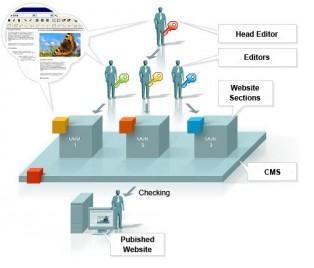 hen one should go for Drupal. If the site is for blog purpose then one can use wordpress. I have used wordpress for blog and SMF for forum in our website i.e non-other than aliencoders.org