I know u guys are well familliar wi th various Windows Client like uTorrent, BitComet, Vuze etc etc, Transmission for Mac …And well yaa kTorrent for Linux Distros.
But Do u guys know about one great text based torrent client. rTorrent. This is the most popular torrent client used by hardcore uploaders with Seed Boxes. (More on Seed Boxes later) Just imagine running 100 torrents on a P4 machine with 0% CPU usage. Isnt that awsome?
So lets start the tutorial For running rTorrent you will need a front end else you will need to perform different operations on torrent file using the konsole. There are many front ends available for rTorrent on internet e.g wTorrent, rtGUI, nTorrent etc etc. So How to set up rTorrent with xmlrpc and with wTorrent as front end ? Many other tutorials are ofcourse easily available for other distros like ubuntu and Debian. Here we go
-: Dependencies and pre-requisite:-
First of all we need to install various dependencies
gcc(GNU C Compiler) g++(GNU C++ Compiler) automake libsigc++20-devel libopenssl libopenssl-devel libtool ncurses-devel subversion libcurl libcurl-devel texinfo
for installing all these dependencies you can use
sudo zypper install <packae name>
If u want to search for a specific package and choose then use
sudo zypper se <package name>
This will display a list of names of packages matching your search name. If on any step you find that you are missing something you can always use
cnf <missingfunction>
It will tell whaether it is available on your system or not and what packages are required for that specifically missing e.g Suppose make is missing then use
cnf make
It will tell you either the exact path(if it is installed) or what packages are required for this and will suggest u like try
zypper install thispackage
Get the xmlrpc package from its svn repository, compile, configure and install it. on bash
cd.. svn co xmlrpc-c – Revision 1851: /advanced xmlrpc-c cd xmlrpc-c ./autogen.sh
(If executing ./autogen.sh gives error please check for what reason the error is coming. If its lacking some packages like aclocal not found, make not found, makeinfo not found etc etc, Use cnf functionality and see if you have required packages if you are missing any please install it using zypper.)
./configure –enable-tools –prefix=/usr/local make make install
or u can also run all at once by using
./configure –enable-tools –prefix=/usr/local && make && make install
-: rTorrent compilation :- Download the latest rTorrent packages from Index of /downloads type on bash
cd .. mkdir rtorrent cd rtorrent svn co svn://rakshasa.no/libtorrent/trunk svn up cd trunk cd libtorrent ./autogen.sh ./configure –prefix=/usr/local && make && make install cd ../rtorrent (Change it to rtorrent directory) PKG_CONFIG_PATH=/usr/local/lib/pkgconfig/ ./configure –with-xmlrpc-c && make && make install
After these steps your rtorrent will e ready to run but wait you still need .rtorrent.rc file in your home directory. Contents of my .rtorrent.rc is below.
scgi_port = localhost:5000 # Move completed torrents to /home/rt/torrents/done/ on_finished = move_complete,"execute=mv,-u,$d.get_base_path=,/Maxtor/rtorrent/done/ ;d.set_directory=/Maxtor/rtorrent/done/" # Maximum and minimum number of peers to connect to per torrent. #min_peers = 40 #max_peers = 100 # Same as above but for seeding completed torrents (-1 = same as downloading) #min_peers_seed = 10 #max_peers_seed = 50 # Maximum number of simultanious uploads per torrent. #max_uploads = 15 # Global upload and download rate in KiB. "0" for unlimited. #download_rate = 0 #upload_rate = 0 # Default directory to save the downloaded torrents. directory = /Maxtor/rtorrent/doing # Default session directory. Make sure you don't run multiple instance # of rtorrent using the same session directory. Perhaps using a # relative path? session = /home/deshbandhu/.rtsession # Watch a directory for new torrents, and stop those that have been # deleted. schedule = watch_directory,5,5,load_start=/Maxtor/rtorrent/watch/*.torrent schedule = untied_directory,5,5,stop_untied= # Close torrents when diskspace is low. #schedule = low_diskspace,5,60,close_low_diskspace=100M # Stop torrents when reaching upload ratio in percent, # when also reaching total upload in bytes, or when # reaching final upload ratio in percent. # example: stop at ratio 2.0 with at least 200 MB uploaded, or else ratio 20.0 #schedule = ratio,60,60,"stop_on_ratio=200,200M,2000" # The ip address reported to the tracker. #ip = 127.0.0.1 #ip = rakshasa.no # The ip address the listening socket and outgoing connections is # bound to. #bind = 127.0.0.1 #bind = rakshasa.no # Port range to use for listening. port_range = 45000-50000 # Start opening ports at a random position within the port range. #port_random = no # Check hash for finished torrents. Might be usefull until the bug is # fixed that causes lack of diskspace not to be properly reported. #check_hash = no # Set whetever the client should try to connect to UDP trackers. #use_udp_trackers = yes # Alternative calls to bind and ip that should handle dynamic ip's. #schedule = ip_tick,0,1800,ip=rakshasa #schedule = bind_tick,0,1800,bind=rakshasa # Encryption options, set to none (default) or any combination of the following: # allow_incoming, try_outgoing, require, require_RC4, enable_retry, prefer_plaintext # # The example value allows incoming encrypted connections, starts unencrypted # outgoing connections but retries with encryption if they fail, preferring # plaintext to RC4 encryption after the encrypted handshake # # encryption = allow_incoming,enable_retry,prefer_plaintext # Enable DHT support for trackerless torrents or when all trackers are down. # May be set to "disable" (completely disable DHT), "off" (do not start DHT), # "auto" (start and stop DHT as needed), or "on" (start DHT immediately). # The default is "off". For DHT to work, a session directory must be defined. # # dht = auto # UDP port to use for DHT. # # dht_port = 6881 # Enable peer exchange (for torrents not marked private) # # peer_exchange = yes # # Do not modify the following parameters unless you know what you're doing. # # Hash read-ahead controls how many MB to request the kernel to read # ahead. If the value is too low the disk may not be fully utilized, # while if too high the kernel might not be able to keep the read # pages in memory thus end up trashing. #hash_read_ahead = 10 # Interval between attempts to check the hash, in milliseconds. #hash_interval = 100 # Number of attempts to check the hash while using the mincore status, # before forcing. Overworked systems might need lower values to get a # decent hash checking rate. #hash_max_tries = 10
Change the name of directories as per your choice. Please check that your .rtorrnt.rc file contains
scgi_port = localhost:5000
You can use what ever port you want to use
-:Setting up Webserver for wTorrent with scgi support :-
I will use lampp Get lampp servers and untar them to /opt
wget Download XAMPP from SourceForge.net tar xvfz xampp-linux-1.6.5a.tar.gz -C /opt wget Download XAMPP from SourceForge.net tar xvfz xampp-linux-devel-1.6.5a.tar.gz -C /opt
Now Get SCGI 1.12 Modules from here
After this do the following cd to the directory where you downloaded this tarball an execute the following.
tar zxfv scgi-1.12.tar.gz cd scgi-1.12 cd apache2 /opt/lampp/bin/apxs -i -c mod_scgi.c
Now we need to edit Apche config file a little so let us go to its directories
cd /opt/lampp/etc vi httpd.conf
Now find the sequence of lines where modules are being loaded Append another load module directive
LoadModule scgi_module modules/mod_scgi.so
After adding this navigate to the end of the file and adding
SCGIMount /RPC2 127.0.0.1:5000
Note that here you have to use the same port as specified in .rtorrent.rc If U have used 5000 as me then use 5000 here else you should use your own specific port.
-: Seting up wTorrent :-
Download latest wTorrent from its svn repository. On bash write
cd /opt/lampp/htdocs svn co svn://wtorrent-project.org/repos/trunk/wtorrent/
Now change the ownership of wtorrent directory by using
chown -R serverusername.servergroupname /opt/lampp/htdocs/
If you are confused with the server user and group then plz do the following On Bash
vi /opt/lampp/etc/httpd.conf
find the server user and group and change the user to your user name (not root) and change the group name to users and then change the permission of wtorrent directory. e.g. Suppose for me
server user = deshbandhu server group= users
then I will use the command
chown -R deshbandhu.users /opt/lampp/htdocs/
Now start lampp
/opt/lampp/lampp start
It ill start Apche with ssl, MySQL, Phpmyadmin by default but if you want to start simply apache
/opt/lampp/lampp startapache
Start rtorrent in its screen
su <username> -c 'screen -d -m rtorrent'
e.g. I use
su deshbandhu -c 'screen -d -m rtorrent'
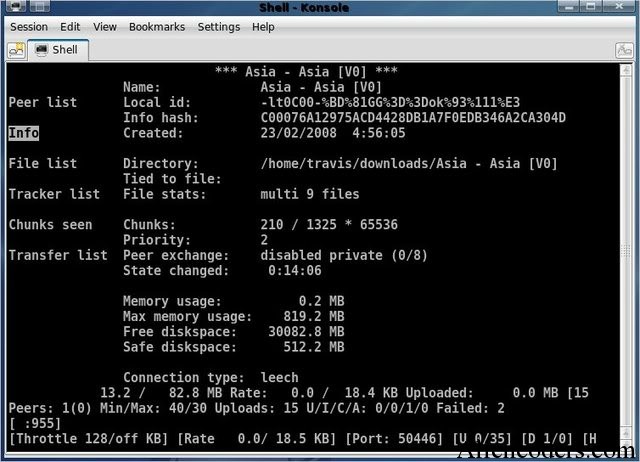 It will ask for yuor password , enter it . If u suspect that rtorrent is not running check
netstat -lnp |grep 5000
It should return some result else if it does not then open a terminal and simply write
rtorrent
Whoa !!!!! rTorrent and wTorrent is set up now. But U need to create accounts for wtorrent. For this Open mozilla go to 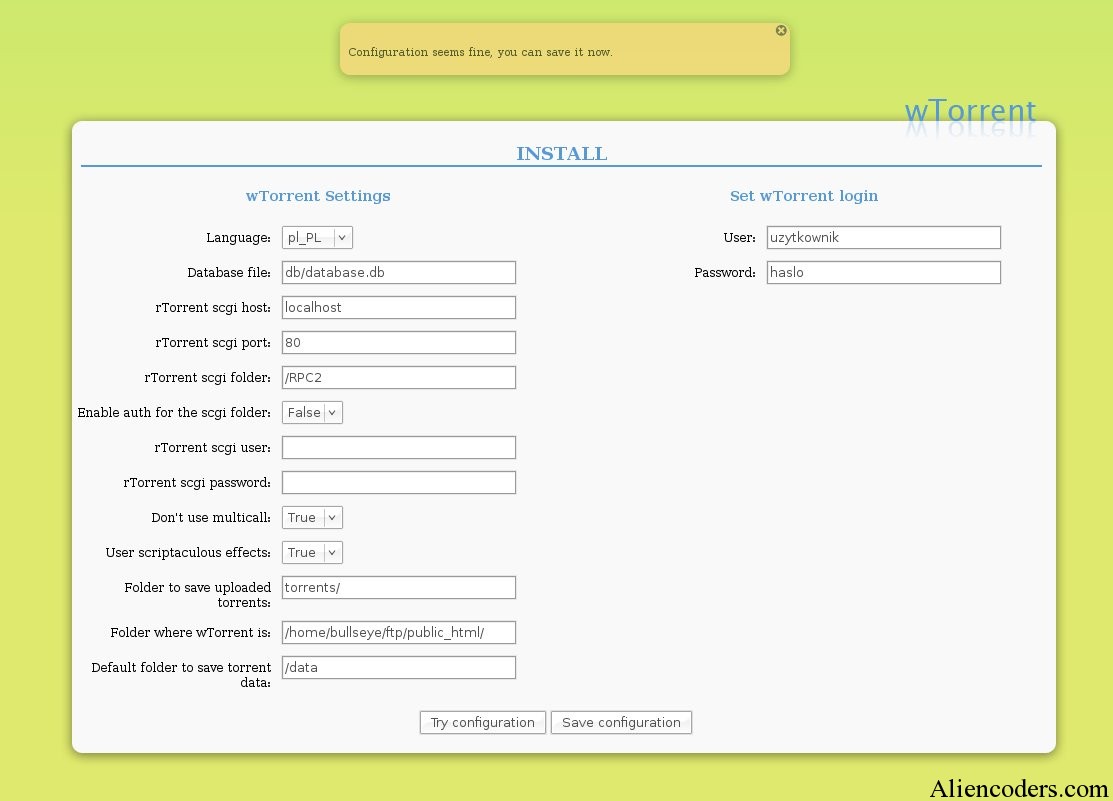
Configure accounts and users for once. After this step u can delete intall.php from htdocs directory. Now on mozilla
Enter the user name and password and start using rtorrent and wtorrent. Feedbacks are welcome!!!!
 is the name of a peer-to-peer (P2P) file distribution protocol, and is the name of a free software implementation of that protocol.
 Java lan
 guage client; was the best until uTorrent software came along)