Uncategorized

Null Hyderabad, May Presentation on various InfoSec Topics

As it was said that Null Hyderabad, May chapter would be fire talks session and yes it was. There were six presentation on various Information Security topics with proper explanation, images, demo etc.  Null Hyderabad is really doing great job in Information Security Awareness domain and I personally convey my special thanks to all speakers for delivering mind blowing presentation along with Imran and Raghu for leading Null Hyderabad chapter successfully all the time 😀

You can follow their events and activities very well at Facebook and Twitter


All those 6 presentations are really well versed and doesn't need any introductory lines before reading the slides. So, I am sharing all those slides here one by one.

1. Heartbleed by Danish Amber


Heartbleed by-danish amber from nullhyd

2. Netcat-101 "The networking swiss army knife" by Mahesh Bheema

3. The art of FireWalking by Sujay Gankidi

4. Social Engineering Techniques by Rakesh Nagekar

5. Spear Phising Attack by Hari V

6. XSS by Sai Shanthan

Please feel free to share your feedback as comment regarding these presentation and Null Hyderabad Chapter.

Beware of search engine ads: Social engineering in action

Cyber crime in actionBefore proceeding further some common question to all readers.

  • Which search engine do you use? Google, yahoo, Bing, Lycos etc?
  •  How many of you know about virus, worms, malware, spam, social engineering, session hi jacking etc.?
  • How many times you clicked the link which led you to a known page but the web address is somewhat different?
  • Have you ever been the victim of such things, like clicking on image or any link may lead spam installation by default into your system? Or one fake message will be spread to all you friends from your account? (I am sure more than 70% would lie in this category).

It shows that Social Engineering, an oldest but very sophisticated weapon is still active amongst us because of our callousness, lack of proper knowledge about internet activities and all. Recently there was news that Bing search ads are leading visitors to install malwares in their computers. Although Bing  Search engine is not so popular and not having even 20% Google’s traffic but still it attracted cybercriminals to spread worms through it.


How it works?

  • Whenever you search for anything say Fierfox, Flash, Torrent, Google chrome,  any images, songs, mp3 free download (these are most common terms, :D).
  • It will list millions of links and you will see few ads at the top of it, at the right side of the search result.
  • If you click on them (not authenticated or say criminal’s provided link), it will lead you to look alike page and It will allow you to install that particular software also but it may attach its own infected programs with it which will silently get installed without your knowledge.

How we can avoid it?

  • Don’t try to click on ads unless and until you think it is necessary and relevant for your specified work.
  • Check the redirecting links before clicking. When you will hover on that good ad link, at the bottom of the browser, you will be able to see the link. If you find anything suspicious then don’t click on such links.
  • If you have clicked by mistake then before installing or providing any crucial information, please check the web address. If that is the address which you were looking for then it’s ok else just close that website. Ex: You may see Facebook like page and it will allow you to login at Facebook also but its web address will not be https://www.facebook.com
  • Instead of that it may http://www.facbook.com or http://www.fcebook.com or anything except the original one.
  • Don’t trust your anti-virus blindly and be little cautious before doing any activities that may lead attcks to your system.

Ed Bott is an award-winning technology writer who reported this issue to Microsoft. And after 5 hours of reporting, Microsoft banned that particular hosting server and fixed the issue mostly.
A Microsoft spokesperson told him :
Microsoft has identified the malicious ad and took the appropriate action to remove it. The advertiser also can no longer post ads on Bing. In addition, the site’s URL is no longer available via adCenter. We remain vigilant in protecting consumers, advertisers and our network from fake online insertion orders and continue to directly work with our agency media partners to verify and confirm any suspicious orders.

P.S. :Most common way to spread spam is through most famous social networking sites. So Facebook, twitter, Google+ users,  please be more conscious before clicking on any links and before installing any executable files.

Image source: http://www.reverbnation.com/

Safety tips for mobile users

be safe while talking on mobile Hi friends, according to present scenario every people who are above 14 are having mobile (except those who can't afford it). Its good thing to have to be in touch with friends and families but it may turn into devil if you misuse it either knowingly or unknowingly. So, its the right time to know that what we should do and what we should not do with mobile.

  • Only give your mobile number out to people you know and trust. (Specially for girls)
  • Don't do any transaction through smart phone if password or any personal information is getting to be stored in your mobile.
  • Don't talk rubbish or don't harass anyone on phone, it comes under Cyber Crime. (while break up couples usually do so. So beware guys!)
  • Avoid, unless absolutely needed, connecting to an unsecured wireless network through your mobile (whici is having wi-fi facility)
  • Do not use your mobile phone to communicate with strangers. Only text and call people or businesses you know in real life.
  • Never reply to text messages from people you don’t know. (One or two messages you can do to know his/her identity, if possible)
  • Make sure you know how to block others from calling your phone. Using caller id ,you can block all incoming calls or block individual names and numbers.
  • Make a record of your Electronic Serial Number (ESN) and/or your International Mobile Equipment Identity (IMEI) number. You can find out your IMEI number by pressing *#06# on your mobile phone's keypad, it will display a 15 digit number – that is your IMEI number.
  • If your phone is lost or stolen, report it to your local police station and your network operator immediately.
  • Think about how a text message might be read before you send it. (Married couples may face many issues because of such messages. No need to explain i guess)
  • You should never give anyone else's number out without their permission.
  • You should never take pictures or videos of anyone with your phone if you do not have their permission.
  • Do not allow others to take pictures or videos of you without your permission. Remember – these pictures and videos can be posted to the Internet.
  • Be careful if you meet someone in real life who you only "know" through text messaging. Even though text messaging is often the "next step" after online chatting, that does not mean that it is safer.

We follow most of the steps but knowingly or unknowingly we do such mistakes which leads towards Cyber crime. So, play safe, be safe and make the nation Cyber crime free nation. Source: http://www.staysafeonline.org

Be friendly but use your brain while talking on Social networking sites

lets be frdHi friends, If you are using internet then you must be having accounts on Facebook or Orkut or Myspace etc. (may be in all :)) My question is: Why you joined social networking sites?

1. Just for fun,

2. To remain in touch with my friends and relatives,

3. To make new friends specially beautiful girls :D,

4. To remain updated about others

Let me guess in most cases it would case no. 2 or 3 (correct me if I am wrong). As far as you are safe at this site its ok even if you are addicted to it. But if you are sharing your social or personal information then be aware before talking even.
Bit Defender did survey on it and found more than 90% internet users share sensitive data within 2 hours of continuous talks over chat messenger or over Social sites.  According to Internet World Stats, people are spending increasingly more time online, with global Internet usage up by more than 390% between 2000 and 2009. Over this period of time, the popularity of social networks amplified as well.

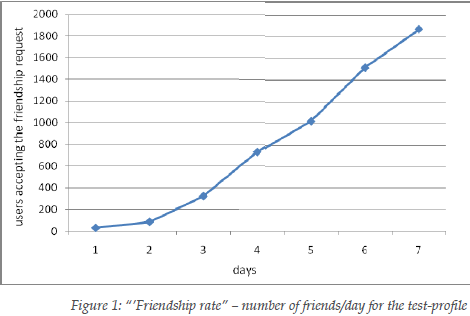
They did survey by making a fake profile and sending friend request to more than 2000 users (male and female included age varying from 20-65 of 27 years mean age). After a week, the friendship request form proved very successful: out of the 2,000 requests sent by the test-profile, 1,872 were accepted.

A first analysis of the gathered datasets revealed that usually, on a social network, the first impression counts a lot: a very nice looking young woman will always attract a lot of friends. 94% of the 2,000-user experimental sample accepted to become friends with the test-profile.
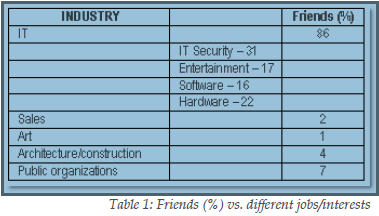
Surprisingly 86% of them were from IT field (isn’t it hilarious), and more interesting ,31 % of them were from IT Security field. An industry that has been stressing the risks of using social networking sites for many years. (This really surprised me) Most of them added because of display picture which was of a lovely girl.

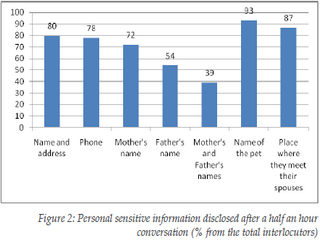
The worst thing with social networking site is, after having half an hour conversation with stranger they reveal many personal information like their parent’s names, address, spouse, children names (all these information can be use to crack passwords and in most of the cases it works).

They allow them to see their albums which may be copied for wrong purpose. In addition to that, after a 2 hour conversation, 73% revealed what appears to be confidential information from their work place, such as future strategies, plans, and unreleased technologies/software. The results of this study suggest not only that social network users accept unknown persons in their group just based on a nice profile photo, but also that they are willing to reveal personal, sensitive information after a short online conversation.

This means that social networks serve both as a meeting ground where people can present themselves and communicate, but also as a starting point for a virtual “friendship”, which brings people to divulge too much information because of the illusion of anonymity.
So, from the next time if someone sends you friend request or trying to talk to you over chat messenger, have patience do all investigations related to unknown profile (at least take help from Google) , if you feel O.K. then go on else reject it blindly. Never be too emotional over social sites and don’t reveal such things so easily. It may help them in social engineering and they may harm your system, your bank accounts, your reputation even you. See the images below for detailed analysis: frdship rateppl from diff jobpersonal info revealed Source: BitDefender