
Search engine optimisation has changed, have you?

Search engine optimisation has changed, have you?
Black hat White HatThe search engines have gone through a lot of changes in the last 6 months which has completely shaken up the SEO industry. Even reputable companies that have always applied ‘white hat’ SEO practises are no longer safe and some big named sites were hit by Google penalties. So what’s changed?
 
For many years there has been a debate about what is black hat SEO – the frowned upon way to optimise a website, and what is white hat SEO – the best practises approach.

Although Google always said that you were not allowed to create links in order to manipulate the search results and any links built purely for the purpose of improving rankings were considered as web spam and black hat, most people believed that black hat was manually created links and provided they created links manually, they were safe from a penalty. Google Penguin proved just how wrong that was.
 
How it used to be
Up until 6 months ago, Google would ignore poor links going to a site and would only take into account good links. If you had some poor links going to your site, Google’s advice would be not to worry about it.
 
When building links, the best practises approach was always to put your keywords in the anchor text. This was because it made your links highly relevant to your keywords and therefore carried a significant amount of link juice. You are only able to manipulate anchor text though if you have built the links yourself. If people have naturally linked to your site, the chances are they would have used different anchors giving you huge anchor text diversity. 
 
Poor links now count against you
In an attempt to cut down on web spam, Google started to penalise sites with poor anchor text diversity by introducing Google Penguin. This was a huge moment in the SEO world as now low quality links have a negative effect on sites.
 
What is a low quality link?

Low quality links are any links that do not appear to be naturally built. Google believes that links should be naturally created by people writing good quality content and others sharing that content. Any links built purely for the purpose of link building are considered as web spam.
 
Google Penguin

Google PenguinGoogle Penguin is an algorithmic penalty that works like a filter and only runs once a month and penalises sites that have unnatural link profiles. An unnatural link profile is one that has low anchor text diversity for the reasons mentioned earlier.
 
Google Penguin caused a huge shack up in the SEO world and marked the change of how links are built. Post Google Penguin, poor quality links have a negative effect on a site and can significantly alter sites rankings.
 
The difficulty with Google Penguin though is that it opened the door to negative SEO. Some savvy competitors will deliberately launch a negative SEO attack on sites in an attempt to lower their link diversity and trigger a penalty. On the plus side though, savvy SEOs can remove unwanted content which is great for online reputation campaigns!
 
Google Panda
Google Panda was first introduced in early 2011 with regular updates being released. In the last 6 months Google has really been clamping down on over optimisation and have been penalising over optimised sites through Google Panda.
 
Panda targets sites with duplicate content and pages that have been stuffed with keywords. Duplication issues are more prevalent in ecommerce sites as often products are filed under several categories causing duplicate pages. Also people get lazy and copy manufacturer descriptions rather than writing their own.
 
Effects on SEO
As a result of Google penguin, anchor texts are now much longer and a lot more varied. Google Panda has caused web masters to be very careful about the content on their sites. In years gone by web master would stuff keywords into their sites in a deliberate attempt to manipulate the search engines. Now though web masters are doing the opposite and are actually de-optimising their site making sure they have very low anchor text diversity.
 
Google Disavow tool
To protect against negative SEO, Google launched a disavow link tool in early October 2012 where users can submit links from their link profile that they wish to be ignored. It is essentially a crowd sourcing tool whereby webmasters do a lot of the spam filtering on behalf of Google. The difficulty with this though is that a lot of SEOs don’t know what they are doing and will simply disavow all of their links and start again. This is making Google believe that certain links are spam links when they are not.
 
Example
Imagine if you put together a really good link building campaign and saw some good movement in the search engine results pages but someone else built links to the same sites and didn’t diversify their links and then got hit with Google Penguin and so reports these links to Google causing these links then get taken down. There is nothing wrong with the sites that link to these sites, only the 2nd person didn’t know what they were doing. 
 
Is this a useful tool or a recipe for disaster? I will let you make your own mind up…
 
How to protect against Google Penguin penalties

Google Penguin UpdateProtecting against Google penalties is simply a case of knowing your link profile. You should be running regular live link reports that detail your exact match e.g. keyword, and broad match anchors e.g. keyword with extra text, of all of your indexed links.

There are no exact figures that you should be looking for as every niche is different but if any of your keywords have anchor text diversities of 30% or higher, you should be looking to reduce them by building links with generic anchors. A natural link profile will have a high percentage of branded anchor text (your company’s name) and a high level of naked URLs (www.yourdomain.com).
 
How to protect against Google Panda penalties
Protecting against Panda penalties should happen automatically if you have set up your website correctly. The important things to note are that your content is original and not copied and that you haven’t stuffed it with keywords. If you have written it yourself, you will know whether it is original or not. If you buy content, make sure you check it is original by running it through Copyscape before buying it. Really your content should have keyword densities of lower than 2.5%.
 
Identifying penalties
If you get hit with a penalty, it is very important to understand which penalty you have been hit by so that they can formulate a plan on how to recover. Often people assume they have been hit by a certain penalty simply because their rankings have dropped and there is a lot of discussion about that particular penalty in the forums. Before taking any action, you need to understand what penalty you were hit by so that you are able to take action otherwise you are likely to make the situation worse rather than better.
 
Google algorithm change history
SEOmoz have a page on their site that details all of the algorithm changes and the date at which they happened. This is a good place to start if your site suddenly tanks in the search engine result pages (SERPs) to see if there has been any algorithm changes recently. If there hasn’t, look at your website files to see if your site has been hacked and if you are hosting files that you shouldn’t be. Make sure you change the settings so that you can see hidden files!
If there have been algorithm changes at a similar time to when your website dropped in the SERPs then the next step is to understand what penalty you have been hit by.
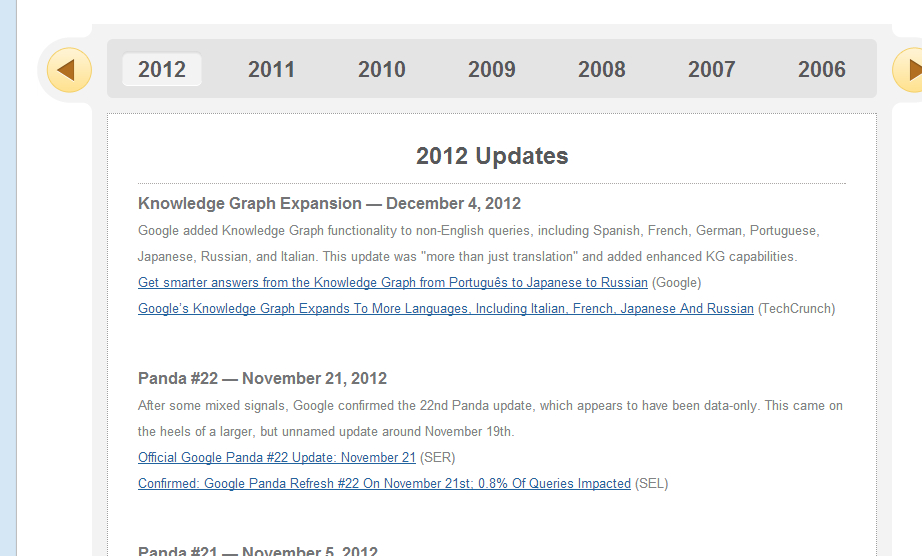
 SEO-moz chart

I analyse the different penalties using a tool called Chartelligence which allows you to overlay algorithm changes over your Google Analytics data or Quantcast data and identify which penalty you were affected by and when. It is a free Google Chrome plugin and really simple to use.
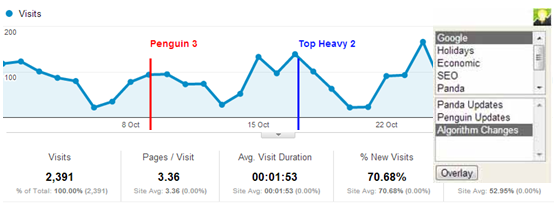
chartelligence chrome plugin

Once you know what penalty it was, you can set about fixing the problem.

Summary
The SEO world is ever changing and this was never truer than in the last 6 months. With the right approach, search engine optimisation delivers a huge amount of value to any business. You can easily protect against any penalties.
 
Let’s see what the next 6 months has installed!
 
Author Bio
Jack Willis is the Managing Director of Marketing Grin, an online marketing agency that provides search engine optimisation to a number of businesses of varying size and in a variety of different industries. Jack has over 5 years’ experience in online marketing and particularly enjoys getting stuck into online marketing campaigns where he can use all of his online knowledge. Jack also has a good level of experience in running Google AdWords campaigns, being an AdWords qualified professional, and of running social media optimisation campaigns.

Well written and interesting blogs get more hits

Well written and interesting blogs get more hits. So, Don’t Be Dense, Write Well
Well Written BlogBlogging works best when it’s well written. Blogs are most enjoyable when they’re easy to navigate and when the content they offer is interesting to read and has some depth to it. Search engines are looking for these types of blogs because they’re exactly what people are looking for when they search for information on a given topic.

Informative, well organized and authoritative are among the qualities that search engines are interested in when they index new resources. If you forget this and only pay attention to the keyword aspects of writing blogs, you may end up hurting yourself rankings wise.

 
Keyword Density and Blogging
You’ll find a lot of conflicting information on the Internet about what optimum keyword density really is. Most of the time, including a keyword or keyword phrase around one percent of the time in your text is enough to catch the attention of the search engines and to get you associated with those keywords in their indexes.
That density can actually come about quite naturally if you’re simply writing about a subject and being detailed in what you’re saying about it. In fact, higher keyword density sometimes results legitimately simply because somebody is writing an article about something and is including a great deal of information.
 
What search engines don’t want to see our articles that are obvious attempts to stuff keywords into the text just to hit a certain density. Search engines want to avoid articles that don’t give the reader something useful for the reader having taken their time and read it. Stuffed articles tend to be very low quality and to be dull to read.
They tend not to be terribly informative. What search engine companies are aware of is the fact that most of the time people led to a webpage with very stuffed writing on it will be disappointed with what they find. That will reflect on the search engine and the search engine doesn’t want to send people to useless pages.
 
Information Density
If you want to bring up the density of the keyword, one way to do it is to simply add more detailed information to your blog. For example, if you happened to be selling flat screen TVs and wanted to get your website associated with keywords related to those products, putting up quality information about flat screen TVs would give a perfect excuse to use that keyword phrase over and over while still providing something very useful for the people who come to read your site.
 
Some search engine optimization techniques do make use of heavily key worded content but, overall, most of the good ones do not. The ones that are most appropriate for blogs certainly do not. Blogs need to be informational, interesting and frequently updated.
 
If you write your blog well, you’ll end up with an archive of information that will be useful to people for a very long time. Once you have all of this content developed, it stays on your site and the benefits it gives you continue as long as you have it available. If you need a blogging platform to provide a good archive, WordPress is an excellent choice.
 
Wordpress templates  oftentimes have features that go beyond what the default WordPress setup offers you in terms of managing your archive and other information. There are powerful tagging features that you can use your organizer content in WordPress. If you organize your information using tools such as site maps, tags and other resources that WordPress makes available, you’ll make a much more useful resource for readers. Premium themes usually have features that make such tasks easier to do.
 
About author
Olga Ionel is an original writer at ThemeFuse.com – a leader in the wordpress themes industry. She is fond of sharing SEO and blogging ideas.

Image Source: http://www.internetsafetyproject.org

5 Alternatives of Adsense for Your Blog

5 Alternatives of Adsense for Your Blog
 
Many webmasters started to use AdSense, but some of them consider it as unsafe or to annoying. It is true that Google can sometimes drive you mad, especially because of their lack of response when it comes to customer services. However, as there are alternative programs to AdSense, and some of them might be more rewarding.

What is alexa and how it ranks the website

sanjeevWhat is Alexa?
Alexa Internet, Inc. is a California-based subsidiary company of Amazon.com that is known for its toolbar and Web site. Once installed, the toolbar collects data on browsing behavior which is transmitted to the Web site where it is stored and analyzed and is the basis for the company's Web traffic reporting. (From Wikipedia)

Alexa has built an unparalleled database of information about sites, including statistics, Related Links, and more. All of this information can be found on Alexa's Site Info pages. Just type the URL of any site into the Alexa search box and click the "Search" button.

Why Alexa and for whom Alexa rank is?

Being a site owner or internet surfer or blogger you may need to know that

  •  How much your website is popular over the internet
  • From where most of the traffic are coming?
  • At what time most of the users hit your website?
  • What are the keywords that are most popular over your website?
  • What is the average page loading time?

So Alexa is for everybody who wishes to track his/her website for above mentioned reasons at least. Although Google Analytics and other tools will give detailed information but It’s unique in its own way.

Is it safe to use its toolbar?
Many users complaint that using alexa toolbar is harmful and categorized it as adware or spyware. But McAfee show green signal to Alexa toolbar. So it’s safe. Rest is still on you 😛

How alexa rank works and its features?

  • Alexa’s traffic rankings are based on the usage patterns of Alexa Toolbar users mainly over a rolling 3 month period.
    It means it may vary on daily basis also but it will show you the rank over 3 month’s period. 1 month rank will also be there. And if you website comes under 1 Lakh then it will show you other details graph wise too!
  • A site’s ranking is ranked on combined parameters of reach, pageviews, hits and bounce. It means if Site A got 100 Visitors and each of them viewed only one page and Site B got only 30 Visitor but they viewed 5 different pages of your website. Then Site B will get 150 Alexa Credits while Site A gets only 100.
    So quality of your contents and your site navigation matters too. Write quality contents and make users to read more and more pages for longer time.
  • Requests for the same URL on the same day by the same user will be treated only one page view. So stop refreshing the same page and stop clicking on the same link time and again. It will not increase your alexa rank.
    Now being an owner your IP Address may be noted down and your visit will not be counted for alexa ranking. (That’s what Google does!)
  • Alexa’s traffic rankings are meant for the top level domains only.
    This means if your site has separate sections (sub domains or sub directories) like www.aliencoders.org  and www.blog.aliencoders.org, www.forums.aliencoders.org  you are not going to get 3 different Alexa Ranks for them. Instead Alexa calculates overall traffic to www.ailencoder.com  using all the sub domains in your website.
    So sometimes xyz.wordpress.com or abc.blogspot.com may get 18 or 47 respectively which is actually its main domain name’s rank not that individual website’s rank.

    If it identifies that sub-domain is someone’s personal website then it may calculate its individual ranking.

Whats the Accuracy of this Alexa rank?

Earlier there were lots of controversies related to accuracy of alexa ranking algorithms. But now Alexa Internet Inc. officials confirmed that they are using unique algorithm and database which will avoid any kind of gimmick, and will considers users apart from tool-bar users.
So in my opinion I rely upon its ranking and almost all advertising companies or rank comparison tools/website considers alexa rank.


Simple Formatting changes to improve your Blog’s readability statistics

Blog Readability Stats It is a well known fact that only good quality content is what it takes your readers to visit your blog, get information and revisit it whenever they need or feel like. But that’s just one part of the story. Are you paying enough attention to your blog’s readability quotient as a blogger?

If not, then you probably must start now since it is crucial for holding back your readers tightly right there without getting distracted from reading your blog. Readability is essential as it makes you get enough traffic and even increases your readership. Ensuring your blog’s readability is essentially an important step you should take as a blogger, even if you are an established blogger or a newbie.

There are many plug-ins available today which may lend you some help to improve your blog’s contents and its readability. But you can make sure and improve your blog’s readability with these simple formatting tips.

Your audience needs to find your content appealing and most importantly, easily readable. If you have never given a thought to the readability part, you must start working on it as early as possible. Let’s have a look at these simple formatting tips one by one.

Keep your Blogpost structured

This is the first step you need to take while writing your post. You need to clearly present the contents in a structured way. If the post is long enough, your readers may take time to finish reading it. But you can format the contents in to small blocks or paragraphs with appealing headings, sub-headings etc.

Justify the content to the left as it is the best option always. Follow a simple hierarchy of a brief introduction, then headings and its content and sub-headings with its text in it.

Images inside the post

Your audience will get more attracted to your content if you include a relevant, creative image to the post. Always use the image at the top of the post. This tends to attract your audience more easily. Your purpose of using an image in the post is solved only then.

Keep the post short and simple

Nothing is more annoying for your readers than reading a really long post with unnecessary information. It drives them crazy and they may easily turn their heads away from your site/blog. Always try writing short and simple posts for your blog. Give proper spacing between lines and paragraphs also.

Though you should not try losing out on the main content, avoid using too many words in place of few words which can pass the same message across.

The blog posts at our discount coupon blog that features weight watchers and nutrisystem diets discount coupons are very short and to the point. We don’t write long paragraphs but short ones that convey the message.

Long blog posts are good, but they’re not always needed.

Font and its Size

This is a very simple formatting tip yet most of them neglect using proper font or tend to ignore using the right font for the blog. Go for the font that mostly everyone prefers to use. Using a medium size of 14 or 16 is fair enough. Keep in mind that using too small a font can spoil the readability and a large font does not go well with anyone.

Underline the Links in your post

It is best to underline all the links you have used in the post. It helps your readers to easily find the related content through your blog post. Hence using links that are underlined is a great readability tip as it is also allows color blind people to distinguish links from normal text.

Use Headings and bullets

Headings are a great way to show your readers what exactly is there for them to read when they scroll down for a quick scan. Format them accordingly with h1, h2, h3 etc. If you have a number of things to be listed, you can always go for bullets to show it in an organized way.

Differentiate your text from the background

Always use a lighter background on a darker text. This improves readability and encourages your readers to completely read the post. Color contrast is thus a necessary tip.

Though these are just few tips on improving your blog’s readability statistics, you can implement them easily with practice. Just keep them in your head so that you don’t have to take out this bookmarked post to remember these tips again.

Jane enjoys sharing what she learns from her own blog in the diet niche. In Weight Loss Triumph she reviews leading diet programs like Weight Watchers. You can find the latest savings coupons for Nutrisystem following this link. Weight Watchers has been ranked #1 diet program by US News. Nutrisystem meal delivery weight loss program backed by the Glycemic Index.

The basic optimizations that everyone forgets -SEO

The basic optimizations that everyone forgets
SEO tipsThe design looks good and promising and you are about to make it live. But wait, the job does not end here.
Do you like to own a website that people cannot even find easily while surfing in Google?
You definitely not like the idea of owning a website that comes with barrage of problems. You can not even think of it right. But, it happens.

Even after taking so many precautions, you eventually find that you have missed out on some vital points that create big issue with your website’s online visibility. Here, we are going to share some basic seo techniques that you should not give a miss no matter what.

Meta tag: Just keeping the name of your website in the title is not going to help you make your website appear in some related search queries. You need to add some keywords in the title and Meta description sections of your website if you are to see your website getting a descent amount of traffic to targeted keywords. Do not stuff keywords in title and Meta description section as it will be treated as spam and your website might get penalized for that. Just try to keep it simple and natural.

Set Canonical: Google still treats www and non www version of a website as different URLs and that means, if URLs of your website are not getting redirected from non www to www version, it is creating internal duplicate content. This will certainly not augur well for the visibility of your website. To fix this issue, all non www URLs of the website need to be redirected to with www version via 301 permanent redirection.

Cross Browser Compatibility: This is another vital issue. You do not like to see your website opening like hell in IE because of poor cross browser compatibility issue. Now, before your make your website live, you need to check that the website is rendering perfectly in all major browsers. A poor browsing experience can ruin all your chances of making it big in the virtual world, so give it your best shot if you do not want to face an embarrassing situation at the end.

Validation: You need to make sure that your website conforms to the rules set by W3. Besides that your website does not have any error within it. Some common errors are missing alt tags, forget to close tags etc. Before making your website live, you should check them all otherwise, it will be a huge downer for both the users and search engines.

Analytics: Do not forget to add analytic codes in your website. Without them you will not be able to get indepth analysis of your website. Just create a Google Analytics account and there you go.

Prefetch and Prerender: You do not like to wait, no one does. So, it is your moral duty to preload some pages of your website so that visitors would not have to wait. Just specify the URL that you want to preload with both these two tags and there you go.

Alt tag: Do not forget to add alt tag against all the images of your website. Since Google or other search engines cannot read images, you should always use alt tags against all the images of your website. This will increase the chances of your website appearing in google image search.

Page Load: Make sure that your website is not taking long time to get loaded. If your website takes more than 5 seconds to get loaded, it will cost you dearly. You might lose your visitors and a steady decline is what you are likely to see in the Google analytics report. To fix this thing, you need to follow certain rules religiously. You should not use large images no matter what. Do not use inline CSS or JS files as they contribute significantly to your website’s loading time. Create separate files and put all the codes therein. It will help you reduce page loading time to a great extent.

Read and Reread: Make sure that you have read all the content precisely. Typos are quite common these days and therefore, you should go through all the content of your website to minimize the chances of typos.

Sitemap: You need to have two versions of sitemap – HTML and XML. XML sitemap is for search engine submission purpose whereas HTML sitemap is for users who could otherwise unable to reach to some URLs of your website.

Robots.txt: Robots.txt is a simple txt file that needs to be placed at the root folder. It gives search engines the direction which pages you want them to crawl and which you want them exclude from their index. Just use the Disallow and Allow tags judiciously and there you are done.

If you have checked all of the above mentioned points, I can dare say that your website is in good shape and it is the time to make it live.

Author Bio
James Arnold is a passionate blogger. He has been writing articles on different promotional codes at coupon blogs where you can find discount for laithwaites wineand zagat wine promo code. He is a regular writer for a coupon website that has amazing offer on zagat wine coupon, laithwaites wine promo code and other promotional code.

Image source: yourseotips.com