WD Live TV Hub: A must have Electronic Device

Review on an awesome electronic gadget: WD Live TV Hub
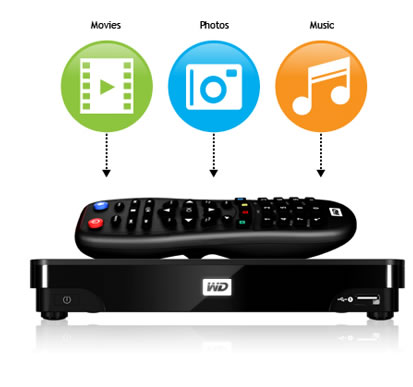
WD TV Live Hub Overview
“Bring your digital life to high definition big screen or any old screen at your home”. This sounds interesting. Isn’t it? Being from 21st century, where a 5 years old kid plays with mobile and computers, we need something unique apart from saving our bigger files for future use by using external hard disk.

I still remember when my friend bough computer, I simply asked what you will do with so much space (80 GB). Now 1 Terabyte (1 TB is equivalent to 1024 GB or simply say approx… 1000 GB) does not sufficient for future use. Whosoever is buying laptop, desktop etc.  looking for 500 GB internal hard disk at least (purely my assumption).


Hard disk either internal or external is meant for data storage from a doc file (merely in a KB) to Blu-ray quality movie of 8 GB size approx… But If I need to watch movies, video songs, serials on bigger screen like 40 inch television or 5 feet white screen using projector. By that time using laptop or computer system will not be a better idea! (Of course we can do all these but there must some awesome way to do it.)
Even simple external hard disk can’t suffice our needs, although it can store thousands of high quality movies in its 1 TB space but to access any of its file we need to connect it through our system anyway. How about an electronic gadget that:
  • Can be used to watch stored data directly at bigger screen like TV without using computer?
  • Can be used to surf internet on TV
  • Can be shared across other computer using LAN/WAN
  • Can be treated as multimedia player which can play any format even mkv,m2ts without any hassle
Yes, I know you can’t read any more boring lines. Let come to the point. I bought an electronic device solve my problem of storing extra files into an external hard disk and the same device can be used to watch/access those files using a remote on TV or any bigger screen. Here comes, Western Digit’s Live TV Hub which has lots of features that will compel to you have one in your home.

Features that I liked:

  • Easy to operate
  • 1 TB or 2 TB storage capacity
  • Can access internet using LAN wire
  • One can access its data using a switch or by directly connecting through LAN wire
  • One can operate this device using smartphone app (available in android and iphone )
  • One can access it using LAN wire, through HDMI port, through old 3 pin socket (used in older TV)
  • Transfers/uploads  files easily across the network
  • One can use usb keyboard to surf net on TV instead of laptop screen 😀
  • It support full HD video playback(1080p)
  • You can directly see video camera’s content through this device
  • The player automatically synchronizes with watched folders so new content from any PC, Mac, or USB storage will be added to the WD TV Live Hub.
  • It supports usb v2.0, HDMI v1.4
  • It has 2 usb ports, one HDMI port, one optical audio output port, composite and component socket for TV and TFT monitors. (But I faced problem while accessign files using USB. I need to experiment more on it. )
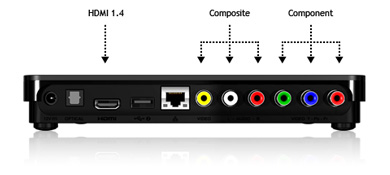
WD TV Live Hub
File Format supported:
  • Video AVI (Xvid, AVC, MPEG1/2/4), MPG/MPEG, VOB, MKV (h.264, x.264, AVC, MPEG1/2/4, VC-1), TS/TP/M2T (MPEG1/2/4, AVC, VC-1), MP4/MOV (MPEG4, h.264), M2TS, WMV9, FLV (h.264) 
  • Photo – JPEG, GIF, TIF/TIFF, BMP, PNG
  • Audio – MP3, WAV/PCM/LPCM, WMA, AAC, FLAC, MKA, AIF/AIFF, OGG, Dolby Digital, DTS
  • Playlist – PLS, M3U, WPL
  • Subtitle – SRT, ASS, SSA, SUB, SMI 
Note: It doesn’t support amazon store, iTunes store
  • It supports many languages like English, French, Dutch, Korean, Russian etc.
  • It costs around $180 (9000 INR approx. ) It may vary at present.
  • My Rating 4.5 out of 5

Here is much more detail about it. http://wdc.com/en/products/products.aspx?id=570
 
Uncategorized

Innobuzz: An emerging Information security institue in India

Innobuzz logoI know about Innobuzz from last 3 years when it was just emerging in India as a brand for Information security based training through different medium of communication. Innobuzz was established in 2007 and it’s an Indian company having presence now at different places at abroad too.

I liked the course content of its two courses for which it is famous. One is Information Security training and other is on PHP & MySQL. They have launched many other courses now through various channels of communication like Distance learning program, CBTs, online training, class training.


Programs run by Innobuzz are:
  • Ethical Hacking (Classroom and Distance Learning )
  • PHP/MySQL (Classroom and Distance Learning )
  • Online Marketing/SEO (Classroom and Distance Learning )
  • Network Security
  • Web Application Security (Class-room only for now )
  • Android Application Development (Distance Learning for now )
They have started SEO based classroom training and Android Application development through Distance Learning Programs. PHP programming language is being dealt nicely. Chapter contents look ok to me. They will be adding more chapters on MySQL in its level 1 version 3.0.  One chapter is on CMS basics, which will be beneficial from web designing based employees and employers

Course fee seems reasonable to me. And courses are mainly useful for students and fresher (only my assumption). Its CISE certification course is very attractive and covers almost all basic necessary concepts to get higher certifications from other famous organizations like Ec-council, (ISC)2 , GIAC etc.

Innobuzz provides corporate level training and arrange workshops also on various topics like Ruby on Rails, SEO, PHP hands-on, and Information Security etc.  It has it’s own forum which is meant for any kind of academic based discussions or anything related Innobuzz’s courses.

Disclaimer: paid review by http://www.innobuzz.in

Chrome browser for the Android platform

Chrome browser for AdnroidChrome browser for the Android platform

The Google Chrome Browser for the Android has been on the calling cards for a long time now; and now, it has finally arrived. The launch included all tablets running the Ice cream Sandwich software. For the Smartphone, a separate beta version was showcased.

Therefore, as of now, there won’t be many people who can benefit from the browser app. The Google Chrome Browser lets you double-up with the desktop version and keep your mobile device synchronized, so that you don’t miss out on anything, while on the move.

All bookmarks and saved tabs would be transferred to your mobile device via a chrome account. The new features include better looks, superior functionality, better zooming-in options and a re-imagined user interface.

In my opinion, the Google Chrome Browser is not an ‘amazing’ app in its entirely. But then, I would agree on the point, that the way tabs open up on the screen and the way they are positioned, is pretty nifty. Google says, this new feature is to make the user’s experience more comfortable while the user flips through the tabs ‘like a pack of cards’. Well, I do appreciate this feature; but other than this, there isn’t anything new.

Maybe because a few months ago, the Google Chrome to Phone app had the same idea and had worked out in an amazing way. The Google Chrome Browser is just an extension of this idea. Moreover, the Google Chrome to Phone app had a Firefox extension too, which meant anyone using Chrome or Firefox would be able to use the software to keep the mobile device up to date.

Now, let’s not go into that debate and concentrate on the usability of the new Google Chrome Browser app for the Android.

The Pros:

  • Extremely useful and convenient (if you are an avid Google Chrome user)
  • Improved graphical user interface
  • Tabs are redesigned to make your usage more comfortable
  • Use gestures to flip through tabs
  • Apps like YouTube, Google Maps, and other features are integrated.
  • Send YouTube videos and Play it via the YouTube player
  • Send webpages automatically from an open web browser
  • Sync your phone with all the content
  • Copy text from clipboard and send it over to a message box or untitled document
  • Copy number and send it to the dialer

The Cons:

  • Only the beta version is available for Smartphone now
  • Only available for tablets running Android version 4.0-Ice cream Sandwich
  • You need a chrome account to access all its features
  • Stability issues for Smartphone (as it’s a beta version)
  • Less accessibility, as of now

The Google browser is useful in very many ways. The synchronizing features of the app are superb and you would truly feel like living a dream; with all that data getting transferred to your phone with a simple click!

Nevertheless, the new Google Chrome Browser has a lot of potential and can prove to be an effective tool in business communications, if more and more people can gain access to it. Otherwise, the software will have only a niche number of users and, will die eventually.

About the author: Margaret is a blogger by profession. She loves writing on environment and technology. Beside this she is fond of books. She recently bought an  audi a9. These days she is busy in writing an article on bonhams.