Uncategorized

Beautify the obfuscated/minified JavaScript code

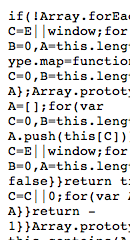
obfuscated JavaScriptBy seeing this image, you can observe that this code is surely obfuscated/minified which is damn hard to read.  Obfuscated is having slightly different meaning over minified version of the code. Anyways, in simple term both will be unreadable(of no use ) for the users those who want to modify or debug such codes.

Almost every website use this technique to reduce the upload time of the webpage. I usually find two important reason behind obfuscating the code, specially JavaScript code.

  • It will occupy less space on web, so easy to download, which will ultimately fastens the website loading time.
  • Very tough to figure out the programming logic so your logic is safe even it is being seen by users/developers

It would be very nice, if we could have some tools or online tools which will beautify such puzzled javaScript for us. Use this  website which would beautify our minified JavaScript code.

Or If you want to minify or compress the JavaScript code then use this website  This website will minify your JavaScript code and will show you the message also that by how much percentage it has been compressed.

Note: If you working on any website for experiment or test purpose, you may need or can upload uncompressed version of JavaScript code.
If you are going to upload your JavaScript code for active website , then better use it's minified version.

Uncategorized

Basics on area and map tag in HTML

HTML logoThere is nothing much to write about map and area tag in HTML but when I was writing a working code using marquee, map and area tag for my friend , then I realized that having a blog which will explain step by step about all these tag would be really nice for all programmers (specially for the beginners and intermediate HTML programmer).

Problem:I need to use world map and have to show brief information about different continents when mouse is hovered on that continent. Description should be displayed below the image and when again mouse is released from that clickable area, it should show the initial content. And initial content will be within a marquee tag.

Solution:
 What is required
Basic knowledge of HTML, CSS, JavaScript.

First I will explain all basic terms and syntax then will post fully working codes.
1
. To show how map tag and area tag works
2.  How to add hovering style to map

Tags that we are going to use mainly are: map tag, area tag, marquee tag.
JavaScript is needed to do some action when mouse will be hovered on and hovered out at clickable area of the image.
 

What is map tag in HTML
An image-map is an image with many clickable areas in a single image.  The map element contains a number of area elements, which defines the clickable areas in the image map.

Syntax:
<map name="name-of-the-map-tag"> </map>

Inside which there will be many area tag elements. Remember whatever name you are using here under map tag , same name with hash as prefix, you need to use under Image tag <img> too. For ex: <img src=”path of an image”  usemap=”# name-of-the-map-tag”   />

What is area tag in HTML
The <area> tag defines an area inside an image-map. The area element is always nested inside a <map> tag.

Syntax:

<map name="name-of-the-map-tag">
<area shape="rect" coords="0,0,82,126" href="sun.htm" alt="Sun" />
</map>

Taken from w3schools.org

Area tag has few attributes.

·         Shape
It can be rectangle, circle or polygon. Ex: shape=”rect” for rectangle, shape=”poly” for polygon, shape=”circle” for circle.

·         Coords attribute is for co-ordinates.

-Image

First of all, you need a suitable graphic. You need to be a bit careful when choosing the right image. An image that cannot be divided in different sections is not your best choice, but an image that has clear cut-offs or lines would be better. Of course, this down not apply to navigational menus or similar, just to everyday pictures like animals, objects or people.

Co-ordinates

When you've chosen or created your desired image, you then insert it into an image editor (I use Ms Paint) so that you can find its co-ordinates. Try to either write down different co-ordinates of take them one by one and then insert them into your document. I used MeasureIt add-on in firefox to get the co-ordinates.
 You'll need different co-ordinates depending on what sort of "hot spot" you'd like to use. Hot spots are covered in the next paragraph.

Hot Spot

Now that you've got your image and co-ordinates, HTML comes to finalise your job. There are three different shapes (commonly termed "hot spots") that can be used in image maps. They are as follows:

-RECT
-CIRCLE
-POLYGON

Rect

Rect is obviously short for rectangle. For this one, you'll need two different co-ordinates. Top right and bottom left.

Circle

Many people get confused with this one and many don't even know that it exists. I personally think it's the easiest of all. All you need is the centre co-ordinate (the point in the centre of your shape) and it's radius size (remember your maths: radius is HALF the diameter. Don't get diameter and radius mixed up!).

– Polygon

The most common hot spot used. This is used for when you can't use neither of the above hot spots. This one uses the co-ordinates of the points in order. So if you're going to have a pentagon (shape with five sides), then you list all five co-ordinates but make sure they're listed in ORDER. One after the other, otherwise you'll confuse some browsers.

Map Name

Just like any person, document, image and country, image maps also require names. This is simply because if you are going to include more than one map on your page, then to identify which image goes with which map, you'll need to name the map. Confused? Look here:

<IMG SRC="img1.gif" USEMAP="#countryname1"> <IMG SRC="img2.gif" USEMAP="#countryname2"> <map name="worldmap">

[…. codes for map which I'll show you later on ….]

</map>

<map name="worldmap">

[……]

</map>

Now, if you didn't name each map, how would the browser know which image goes with which map?

You'll also notice this tag at the end of each map: </map>. You may have suspected by now that </map> just closes the map. Simple!

Area & Anchor Tags

There are two more tags you should know before completing your image map. <area shape="rect"> is a tag that identifies which hot spot is being used. The other is the anchor tag which I'm sure you already know what it means. It's just <href="http://www.aliencoders.org&gt;. So in a completed code, they should both look like this:

<area shape="circle" coords="245,30" href="http://www.aliencoders.org"&gt;

Final Code

Now you just need to put all these codes together and you've got magic! Here's what your final code should look like:

<body>
<img src="world-map.gif" width="614" height="340" alt="World Map" usemap="#world-map" border="0 px"  />
<map name="world-map">        
           <area shape = "poly" coords = "420, 220, 454,185, 461, 166, 426, 145, 400, 171, 420, 220" onMouseOver="showText('India');"  onMouseOut =  "showText('');" alt= "India" href="#" />                       <area shape = "poly" coords = "486,272, 490, 300, 555, 320, 560, 285, 545, 245, 510, 245, 480,265, 486, 272" onMouseOver="showText('Australia');"  onMouseOut = "showText('');" alt= "Australia" href="#" />
</map>
</body>

– Other Tips

Of course, you don't just have to use external links. You can also use anchors for bookmarks on the page [href="#SectionTwo"], mailto [href="mailto:george@trees.com] and other anchor tags. You can specify the target as well (put it right after the anchor tag) [target="_new"]. Insert alternative text tags- alt (insert it after anchor as well) [alt="Click here to learn about trees"].

– Summary

So that's all you need to do. Very easy to create and very professional looking when used with a good graphic.

Fully Working code on this topic has been posted in forum: http://www.aliencoders.org/content/area-and-map-tag-demonstration-html
(It's having code with and without marquee behavior too)
Uncategorized

5 Important rules to start with JavaScript

At first sight, JavaScript looks very simple language. But if you don't follow unobtrusive and OO pattern then you will treat it as one of the weird browser languages. But in today's world you can't make good websites without the help of JavaScript. Either you use Dojo, JQuery, ext js , moo tools or any JavaScript based plug-ins , you would require fair knowledge of JavaScript. Apart from keeping in mind while using  namespace, global and local variables. We should follow  these 5 simple rules (in no order and there can be many rules as per the programmer), we can improve JavaScript coding:

1. Do not make any assumptions about JavaScript features

Probably the most important feature of unobtrusive JavaScript is that you stop making assumptions:

  • You don't expect JavaScript to be available but make it a nice-to-have rather than a dependency
  • You don't expect browsers to support certain methods and have the correct properties but  test  them before you access them
  • You don't expect the correct HTML to be at your disposal, but check for it and do nothing when it is not available
  • You expect other scripts to try to interfere with your functionality and keep the scope of your scripts as secure as possible. use local variable and namespace properly

The first thing to consider before you even start planning your script is to look at the HTML code that you are going to enhance with scripting and see what you can use for your own purposes.

 2. Find your hooks and relationships (HTML, the base to build on)

Before you start your script look at the base that you build upon. If the HTML is unstructured , there is hardly any way to create a clever scripting solution

There are several things to consider in your HTML – hooks and relationships

 HTML Hooks

HTML hooks are first and foremost IDs, as these can be accessed with the fastest DOM method – getElementById. These are safe as IDs are unique in a valid HTML document (IE has a bug with name and ID, but good libraries work around that) and easy to test for.

Other hooks are HTML elements which can be read out with getElementsByTagName and CSS classes, which can not be read out with a native DOM method in most browsers (Mozilla will soon have one and Opera 9.5 already does though). However, there are a lot of helper methods that allow for a getElementsByClassName.

 HTML relationships

The other interesting thing about HTML is the relationships of your markup. Questions to ask yourself are:

  • How can I reach this element the easiest and with the least steps traversing the DOM?
  • What element do I need to alter to reach as many child elements that I need to change?
  • What attributes or information does a certain element have that I can use to link to another?

Traversing the DOM is expensive and can be slow, that is why it is a good idea to leave it to a technology that is already in use in browsers.

 3. Leave traversing to the experts (CSS, the faster DOM traveller)

It is pretty interesting that DOM scripting and traversing the DOM with its methods and properties (getElementsByTagName, nextSibling, previousSibling, parentNode and so on) appears as a confusing matter to a lot of people. It is interesting as we already do it with a different technology: CSS.

CSS is a technology that takes a CSS selector and traverses the DOM to access the desired elements and change their visual attributes. A rather complex JavaScript using DOM can be replaced with a single CSS selector:

var n = document.getElementById('nav');
if(n){
var as = n.getElementsByTagName('a');
if(as.length &amp;gt; 0){
for(var i=0;as[i];i++){
as[i].style.color = '#369'; as[i].style.textDecoration = 'none'; }
}
}

/* is the same as */

#nav a{ color:#369; text-decoration:none; }

 4. Understand Events (Event handling to initiate change)

Event handling is the next step to truly unobtrusive JavaScript. The point is not to make everything draggable and clickable or add inline handling. The point is to understand that Event Handling is true separation. We separate HTML, CSS and JavaScript but with Event Handling we go much further.

Elements in the document are there to wait for handlers to listen to a change happening to them. If that happens, the handlers retrieve a magical object (normally as a parameter called e) that tells them what happened to what and what can be done with it.

The really cool thing about most event handling is though that it does not only happen to the element you want to reach but also to all the elements above it in the DOM hierarchy (this does not apply to all events though – focus and blur don't do that). This allows you to assign one single event handler to for example a navigation list and use event handling's methods to reach what element was really involved. This technique is called event delegation and it has several benefits:

  • You only need to test if a single element exists, not each of them
  • You can dynamically add or remove new child elements without having to remove or add new handlers
  • You can react to the same event on different elements

The other thing to remember is that you can stop events from being reported to parent elements and you can override the default action HTML elements like links have. However, sometimes this is not a good idea, as browsers apply them for a reason. An example would be links pointing to in-page targets. Allowing for them to be followed makes sure that users can bookmark the state of your script.

 5. Work for the next developer (Making maintenance easier)

The last step to make your script truly unobtrusive is to give it another go-over when you finished and think about the next developer who has to take over from you once this went into production. Consider the following:

  • Are all the variable and function names logical and easy to understand?
  • Is the code logically structured? Can you "read" it from top to bottom?
  • Are the dependencies obvious?
  • Have you commented areas that might be confusing?

The most important bit is to understand that the HTML and CSS of a document is much more likely to change than the JavaScript (as these make up visual output). Therefore it is a great idea not to have any class and ID names or strings that will be shown to the end user buried somewhere in the code but separate it out into a configuration object instead.

myscript = function(){
   var config = {navigationID:'nav', visibleClass:'show'};
   var nav = document.getElementById(config.navigationID);
   function init(){
      show();
      if(nav.className === config.visibleClass){ reset(); } // do stuff
   }
   function show(){
     var c = nav.className; // do stuff
   }
   function reset(){
   // do stuff
   };
}();

That way maintainers know exactly where to change these without having to alter the rest of your code.

Source: http://icant.co.uk

Uncategorized

Tips for writing faultless code in JavaScript

JavaScript is a programming language that is more prevalent these days due to its easy-to –use characteristic. This can be entrenched onto the header of the web pages thus improving the look of the page and providing many interactive features that is not found in the obsolete programming languages.

Some of the interactive features include special effects, games, graphics, etc. Most of them who are new to programming often misconstrue Java and JavaScript. It is a myth that Java and JavaScript are interlinked with each other.

The fact is that there is a huge difference between the two. Though Java is an equally significant programming language, JavaScript is the easier of the two. There are no requirements of applets and compiling in JavaScript as in Java. Writing codes in JavaScript is as easy as writing codes for UNIX and like there are UNIX tips for better code writing, there are ways for effectively writing Java Script codes too.

Code writing in JavaScript Before beginning with a proficient code in JavaScript, one needs to learn the practical measures that work. One such approach is writing a simple program which provides solution to a practical real life problem. After writing a simple one, fidget with it to get some different ideology.

The following step is to get the basics of JavaScript to get a legible code. Legibility is most important if one wants to effortlessly find the flaws in the coding. Usage of proper variable names is extremely important as far as JavaScript codes are concerned.

If you have an age old experience in writing PHP codes, try and avoid influencing the JavaScript code with a PHP one. Maintain a constant principle for naming of variables so that the code is easier to read and make changes when needed. A good Java Script convention consists of Class Names, the function names, the necessary local variables and names of the exception.

A hint for increasing the readability is to use more white spaces between letters in the variables. For more productivity, use a JavaScript library. These libraries are helpful in solving the issues in the browser compatibility and also act as a source of code. Some of the recommended libraries are the Yahoo UI library, Google Closure, AJS, Moo Tools and JQuery. Always keep the structures of the codes in directories and files.

When your Java Script code sprawls for more than 30 lines, splitting the codes and saving them in different directories and files it look more uncomplicated. The flaws in the codes can also be easily identified. The above are some of the basic tips for effectively writing codes for JavaScript. The author of the above article has also written many on streaming video problems and webcasting that you may find interesting.

For further details, kindly contact the author: Sweta Menon