 Many of us use gmail account for mailing purposes. If you will open any mail to read, you will notice that in the right side bar of mail; Google ads showing which is of no use for us (almost).
1. Will not it be nice, if we could get something useful instead of those advertisements?
2. How about getting social updates from different linked sites from the mail sender?
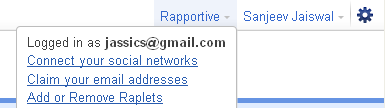
 Rapportive is a CRM (Customer Relationship Management but i would say Content resource Management though), a Firefox plug-in for Gmail which will do the same as I said above. It will update sender’s social updates from Facebook, Linkedin, Gmail contacts, blogger profile, twitter, picasa etc. It’s one of the best CRM in the market which can be used as google mail plug-in.
You can install it from here (Detailed instruction will be there with screenshots).
It get s the information based on sender’s mail ID and also allows user notes at the bottom of the page for personal use.
It’s not only that, even you can comment on his/her updates. Like you can comment on sender’s facebook status, recent pics added, can like or even can retweet or reply to his/her tweets. I liked it very much and its really worthy to use.
Something about Rapportive:
It’s a small company founded in January 2010 by Rahul Vohra, Martin Kleppmann and Sam Stokes. Check this out: http://rapportive.com/about .
Rapportive’s fund now have crossed $1 million and this plug-in was suggested by lifehacker.com, techcrunch etc.
What they say: You can immediately see what people look like, where they're based, and what they do. You can establish rapport by mentioning shared interests. You can grow your network by connecting on LinkedIn, Twitter, Facebook and more. And you can record thoughts for later by leaving notes. Imagine relationship management built into your email. For free.
Security Concerns:
People may think that it can read our contents form various accounts, can get our all personal mails etc. But just ask this question again to yourself. Whenever you are linking one account with other, are not they sharing your details?
What matters is trust and second thing is, it requires Google’s authorization to show you the details. Its works in the same way as other third party authorization tool works. So no harm in using it!
Any Alternatives? Yes